

The best modem for gaming delivers stable wired speed, low delay, broad compatibility, and reliable service during every match.
Lag often starts at the modem, not the game. A weak or outdated unit can cause drops, slow downloads, and high ping when others stream at home. I reviewed six strong options for cable internet users, from modem-router combos to modem-only models and one dedicated gaming router. These picks suit different setups, budgets, and internet plans. Check your provider first, then choose the model that matches your speed tier, Ethernet needs, and home network.
See the differences between my top picks at a glance.
separate; border-spacing:0; font-size:14px; background:#fff;”>
| Model | Type | Key speed detail | Wi-Fi | Best for | Buy |
|---|---|---|---|---|---|
| NETGEAR CAX30 | Modem/router combo | Up to 2.7 Gbps | Wi-Fi 6 | Simple all-in-one setup | View on Amazon |
| ARRIS SB8200 | Modem only | Up to 1 Gbps plans | Router required | Reliable basic cable setup | View on Amazon |
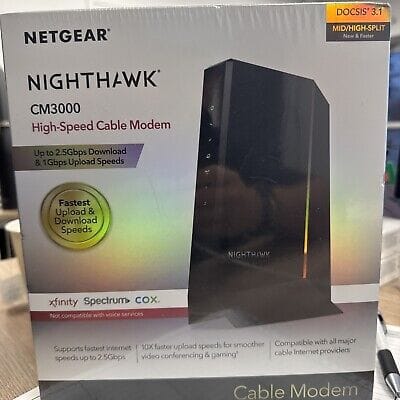
| NETGEAR CM3000 | Modem only | 2.5 Gbps port | Router required | Multi-gig cable plans | View on Amazon |
| ARRIS S34 | Modem only | 2.5 Gbps + 1 Gbps | Router required | Future-ready cable users | View on Amazon |
| GL.iNet Flint 2 | Gaming router | Up to 6 Gbps Wi-Fi | Wi-Fi 6 | Advanced home networks | View on Amazon |
| Hitron CODA56 | Modem only | Up to 2.5 Gbps | Router required | Low-cost multi-gig setup | View on Amazon |
NETGEAR CAX30 Wi-Fi 6 Modem Router

The NETGEAR CAX30 is a modem and router in one box. It uses DOCSIS 3.1 and supports a rated total speed of up to 2.7 Gbps. Its built-in Wi-Fi 6 helps newer phones, laptops, consoles, and smart TVs share the network with less strain. Four Gigabit Ethernet ports also make it easy to connect a gaming PC or console by cable.
I like this model for players who want a clean setup without buying separate networking gear. A wired console can use one of the LAN ports, while other family members use dual-band Wi-Fi. The guided setup and listed compatibility with Xfinity, Spectrum, and Cox can save time. Still, you should confirm your exact plan and provider approval before ordering.
Pros:
- Combines a cable modem and Wi-Fi 6 router
- Supports up to 2.7 Gbps total rated speed
- Four Gigabit Ethernet ports suit wired gaming
- DOCSIS 3.1 supports modern cable plans
- Guided setup helps reduce installation stress
- One device takes less space than a separate modem and router
Cons:
- It does not suit fiber or DSL service
- Four LAN ports are Gigabit, not 2.5 Gigabit
- Combo units offer less router upgrade freedom
What Amazon Buyers Are Saying
Buyer comments for this type of CAX30 listing commonly focus on easy setup, strong coverage for average homes, and the value of combining two devices. Users who connect consoles by Ethernet often appreciate the simple layout. Some buyers report setup or activation steps that depend on the internet provider. Others note that Wi-Fi range changes with walls, floor plans, and placement, so results are not the same in every home.
My Recommendation
I recommend the CAX30 for cable users who want the best modem for gaming in a simple all-in-one design. It is a practical choice for homes with one main gaming area and several wireless devices. Buy it only after checking provider compatibility and your speed plan.
ARRIS SURFboard SB8200 Cable Modem

The ARRIS SURFboard SB8200 is a modem-only option for cable internet. It supports DOCSIS 3.1 and is marketed for plans up to 1 Gbps. Its two 1 GbE ports can provide up to 2 Gbps of wired aggregate capacity when the service and network setup support it. You still need a separate router for Wi-Fi and home network control.
This model makes sense for a player who already owns a good router. It keeps the modem job separate from wireless duties, which can make future upgrades easier. The wired connection from the modem to the router can remain steady during play, while your router manages traffic and Wi-Fi. Do not expect the SB8200 to create Wi-Fi on its own.
Pros:
- DOCSIS 3.1 design for modern cable service
- Supports cable plans up to 1 Gbps
- Two 1 GbE ports add useful wired capacity
- Works with listed Xfinity, Cox, and Spectrum service
- Modem-only design makes router upgrades simple
- Compact setup for users who already own networking gear
Cons:
- No built-in Wi-Fi or routing features
- Requires a separate router and Ethernet cable
- It may not be the best match for newer multi-gig plans
What Amazon Buyers Are Saying
Common buyer feedback tends to praise the SB8200 for stable service, easy activation, and a straightforward design. Many users like avoiding a monthly modem rental when their provider allows customer equipment. Complaints often involve provider activation, firmware updates, or confusion about the need for a separate router. Some buyers also expect the second Ethernet port to work as a simple extra LAN port, but that depends on the service and network configuration.
My Recommendation
I recommend the SB8200 for a careful buyer with a cable plan around 1 Gbps and a separate router. It is not a complete home network by itself, but it can form a dependable base for gaming. It offers good value when your current router already provides strong Wi-Fi and traffic control.
NETGEAR CM3000 Multi-Gig Cable Modem

The NETGEAR CM3000 targets cable users with faster multi-gig service. It has a 2.5 Gigabit port and two additional 1 Gigabit ports, according to the supplied product details. This is a modem-only model, so you must connect it to a router for Wi-Fi, security, and device management. Its DOCSIS 3.1 platform makes it a strong match for current high-speed cable plans.
The CM3000 is useful when your plan is faster than a basic Gigabit connection. A compatible 2.5GbE router can take better advantage of its main port than an older Gigabit router. I also like the option of using the extra ports for flexible wired networking, though the real benefit depends on your provider and setup. For gaming, the modem will not lower server distance or fix poor routing, but it can remove an old hardware limit.
Pros:
- 2.5 Gigabit Ethernet port supports multi-gig networking
- DOCSIS 3.1 suits newer cable plans
- Two extra 1 Gigabit ports add connection choices
- Modem-only format works well with a separate premium router
- Good upgrade path for fast cable service
- Useful for wired gaming and large game downloads
Cons:
- No Wi-Fi is built into the unit
- Needs a 2.5GbE-capable router to use its main advantage
- Provider support can vary by plan and location
What Amazon Buyers Are Saying
Buyer discussions around multi-gig cable modems often praise faster port options, clean installation, and the ability to replace rented equipment. Users with compatible plans tend to value the extra headroom. The main concerns usually involve activation, provider approval, and whether the rest of the network supports 2.5GbE. Some buyers also learn that a fast modem cannot increase a plan that has a lower service limit.
My Recommendation
I recommend the CM3000 for gamers who already have, or plan to buy, a strong multi-gig router. It is a better long-term choice than a basic modem when your cable plan exceeds 1 Gbps. For a 500 Mbps or 1 Gbps plan, its extra capacity may not justify the added cost.
ARRIS SURFboard S34 Multi-Gig Modem

The ARRIS SURFboard S34 is a DOCSIS 3.1 cable modem made for multi-gig service. It includes a 2.5GbE port and a 1GbE port, as listed in the product details. Since it is modem only, you need a separate router for Wi-Fi and device control. The listing names compatibility with Xfinity, Cox, and Spectrum, but provider approval remains important.
This modem fits a gamer who wants a modern wired connection without an all-in-one unit. The 2.5GbE port can connect to a matching router and help avoid a Gigabit bottleneck. The second port gives you another option, but its exact use depends on your internet service and network design. I see it as a neat middle ground between a basic modem and a larger multi-gig setup.
Pros:
- 2.5GbE port supports fast wired networking
- Includes a second 1GbE port
- DOCSIS 3.1 supports modern cable service
- Modem-only design allows router choice
- Good fit for future cable speed upgrades
- Small, simple network footprint
Cons:
- Requires a separate Wi-Fi router
- Actual speed depends on the ISP plan and network hardware
- Not suitable for fiber or DSL connections
What Amazon Buyers Are Saying
Buyers commonly look to the S34 for its 2.5GbE connection, compact form, and ability to support a separate router. Positive experiences often depend on quick provider activation and compatible network gear. Reported frustrations tend to center on activation steps, firmware timing, and confusion about modem-only products. Buyers also stress that a multi-gig modem needs a matching router, cable, and Ethernet hardware to show its full value.
My Recommendation
The S34 is a strong pick for a gamer who wants the best modem for gaming with a 2.5GbE router. It offers a clean upgrade path and avoids paying for built-in Wi-Fi you may not use. I would choose it over a basic modem when your plan and router both support multi-gig speeds.
GL.iNet Flint 2 Wi-Fi 6 Gaming Router

The GL.iNet Flint 2 is a gaming router, not a cable modem. You connect it to a separate modem or an Ethernet handoff from your internet service. It offers Wi-Fi 6, dual 2.5G ports, and an eight-stream design with rated wireless speeds up to 6 Gbps. The router also comes with OpenWrt and supports OpenVPN and WireGuard.
This is the most advanced networking choice in this guide. It can help a gamer manage a busy home network, use secure VPN tools, and connect fast wired devices. Its broad controls may appeal to users who enjoy tuning their network rather than using a basic app. New users should expect a learning curve, and this router cannot replace a cable modem.
Pros:
- Dual 2.5G ports support fast wired links
- Wi-Fi 6 handles many modern devices
- OpenWrt offers deep network control
- Supports OpenVPN and WireGuard
- Strong fit for gaming PCs, consoles, and NAS devices
- Can provide more control than basic ISP routers
Cons:
- It is not a modem
- Advanced settings may confuse first-time users
- Wireless speed depends on client devices and home conditions
What Amazon Buyers Are Saying
Buyer feedback commonly highlights strong hardware, fast wired ports, useful VPN support, and the freedom of OpenWrt. Experienced users often enjoy the large set of network options. The most common concerns involve firmware settings, setup choices, and the time needed to learn advanced features. Some buyers also expect gaming tools to solve every lag issue, but router features cannot fix weak ISP service or distant game servers.
My Recommendation
I recommend Flint 2 for an experienced gamer who already has a modem and wants more control. It can be the router half of the best modem for gaming setup, but it is not a standalone internet gateway. Choose it when you value 2.5G ports, VPN support, and advanced settings over simple plug-and-play use.
Hitron CODA56 DOCSIS 3.1 Modem

The Hitron CODA56 is a modem-only device with DOCSIS 3.1 and a listed speed of up to 2.5 Gbps. It does not include Wi-Fi, so you must pair it with a separate router. The product information lists compatibility with Xfinity, Spectrum, and Cox. It is designed for cable service and is not intended for fiber or DSL.
This modem suits shoppers who want multi-gig capacity without a built-in wireless system. A separate router lets you choose the Wi-Fi range, security tools, and gaming controls that fit your home. The simple modem role can also make troubleshooting easier because each device has a clear job. Before buying, confirm that your provider supports the exact model and speed tier.
Pros:
- DOCSIS 3.1 supports modern cable networks
- Listed speed reaches up to 2.5 Gbps
- Works with a separate gaming router
- No unused built-in Wi-Fi adds to the hardware cost
- Good option for a clean modem-router setup
- Suitable for users moving toward multi-gig service
Cons:
- No Wi-Fi or routing functions
- Requires a separate router
- Not compatible with fiber or DSL service
What Amazon Buyers Are Saying
Buyer comments for the CODA56 commonly focus on its multi-gig support, compact modem-only design, and value when paired with an existing router. Users often like having control over their own wireless hardware. The main complaints in this product class involve activation delays, provider compatibility, and the need for a separate router. Some buyers also discover that their Ethernet cables or router ports limit speed more than the modem does.
My Recommendation
I recommend the CODA56 for a budget-minded cable user who wants a 2.5 Gbps modem and already owns a suitable router. It is a sensible foundation for a wired gaming setup. If you need Wi-Fi in one box, the CAX30 is more convenient.
How to Choose the Best Modem for Gaming
Choosing the best modem for gaming takes more than looking at the largest speed number. Your internet provider, plan, router, Ethernet ports, and home layout all affect play. I use the points below to match the modem to the real network, not just the box label.
1. Confirm Cable Compatibility and Your Speed Plan
Start with your provider. The modems in this guide target cable service, not fiber or DSL. Check the provider’s approved equipment list before you buy. Then compare the modem’s supported speed with your plan. A modem rated for 2.5 Gbps cannot make a 500 Mbps plan faster, but a weak modem can hold back a faster plan.
DOCSIS 3.1 is the key standard in these picks. It supports current cable networks and gives you a better path for future plans. Still, provider approval matters more than a large product claim. If you rent equipment, ask about activation rules, firmware support, and return terms.
2. Choose the Right Modem and Router Setup
A modem connects your home to the cable line. A router shares that connection with your devices. Modem-only models such as the SB8200, CM3000, S34, and CODA56 need a router. The CAX30 combines both jobs, so it offers a faster and simpler setup.
For a console near the router, use Ethernet when possible. A cable connection avoids many wireless problems. If you need advanced traffic control, VPN tools, or 2.5G ports, a separate router such as the Flint 2 offers more choice. If you prefer fewer boxes and fewer settings, a combo unit may suit you better.
3. Match Ethernet Ports, Value, and Future Needs
Look at the port speed on every part of the network. A 2.5GbE modem connected to a 1GbE router will not deliver a 2.5GbE link. The same limit can come from an older switch, cable, or computer port. For many gamers, one stable Gigabit wired connection is enough. Multi-gig hardware makes more sense for fast plans, several wired users, or large downloads.
Also consider long-term value. A modem-only unit lets you replace the router later. A combo saves space but ties the wireless system to the modem. You should also check warranty terms, activation help, heat, placement, and the cost of any ISP rental. The best modem for gaming is the model that fits your full setup without paying for features you cannot use.
Final Verdict: Which Should You Buy?
For most cable homes, I choose the NETGEAR CAX30 because it combines DOCSIS 3.1, Wi-Fi 6, wired ports, and simple setup. For multi-gig plans, the NETGEAR CM3000 or ARRIS S34 pairs well with a capable router.
The best modem for gaming cannot fix poor ISP service, but the right model can remove hardware limits. Confirm compatibility, use Ethernet when possible, and choose a router that matches your speed plan.
FAQs Of Best Modem for Gaming
What is the best modem for gaming on cable internet?
The NETGEAR CAX30 is the easiest all-in-one pick. The CM3000 and ARRIS S34 are better for multi-gig plans with a separate router.
Does a gaming modem lower ping?
A modem can provide a stable link, but it cannot control game server distance or ISP routing. Ethernet and a good router often help more with local lag.
Do modem-only products include Wi-Fi?
No. The SB8200, CM3000, S34, and CODA56 need a separate router for Wi-Fi and device sharing.
Can I use these products with fiber internet?
No. These modem models target cable service. The Flint 2 is a router and can work behind a suitable fiber gateway or Ethernet connection.
Is DOCSIS 3.1 important for gaming?
DOCSIS 3.1 supports modern cable plans and offers useful future capacity. Your provider and plan still set the actual internet speed.





[…] strong connections and enhancing productivity. With various options available, choosing the right router can make all the difference in your remote work experience. Whether you need a device that supports […]
[…] today’s digital age, internet security is crucial. VPN routers provide an extra layer of protection, encrypting data and safeguarding privacy. Various options […]
[…] the best router for cloud gaming involves understanding your specific needs and preferences. With technology […]
[…] you’re streaming movies, video chatting, or working remotely, a good RV router is essential. With options like TP-Link’s Ultra-Portable Wi-Fi 6 AX1500 and GL. iNet […]
[…] the world of online gaming, a powerful router is crucial. It ensures smooth gameplay and stable connections. With so many options available, […]
[…] the best router for multiple devices can greatly enhance your internet experience. Each router offers unique features tailored to […]