

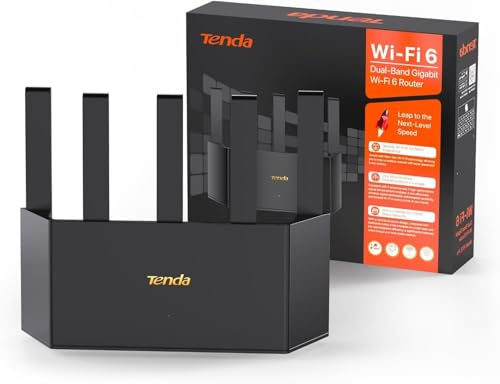
The best router for cloud gaming delivers low latency, stable Wi-Fi, strong coverage, and smart traffic control.
You sit down for one quick cloud gaming session, then the screen freezes during a boss fight. A family member starts streaming, another device downloads a large file, and your ping jumps. The right router can reduce these problems by managing game traffic, using faster wireless bands, and keeping more devices connected at once. I reviewed seven gaming routers for different budgets, homes, and skill levels. My picks include affordable Wi-Fi 6 models, fast Wi-Fi 6E options, and premium Wi-Fi 7 routers with multi-gigabit ports.
See the differences between my top picks at a glance.
| Router | Wi-Fi | Best For | Key Benefit | Price Check |
|---|---|---|---|---|
| GL.iNet Flint 2 | Wi-Fi 6 | Advanced users | OpenWrt and dual 2.5G ports | View on Amazon |
| ASUS RT-AX1800S | Wi-Fi 6 | Small homes | Simple setup and AiMesh | View on Amazon |
| ASUS ROG Strix GS-BE12000 | Wi-Fi 7 | Serious gamers | High speed and eight 2.5G ports | View on Amazon |
| MSI Radix AXE6600 | Wi-Fi 6E | Busy homes | Tri-band Wi-Fi and AI QoS | View on Amazon |
| ASUS GT-BE19000AI | Wi-Fi 7 | Large homes | 10G ports and broad coverage | View on Amazon |
| HYPEREV AX3000 | Wi-Fi 6 | Console players | Game accelerator features | View on Amazon |
| ASUS TUF Gaming BE6500 | Wi-Fi 7 | Value-focused gamers | Four 2.5GbE ports and MLO | View on Amazon |
GL.iNet Flint 2: Best for Advanced Users

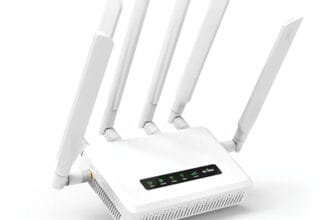
The GL.iNet GL-MT6000 Flint 2 is a strong choice for gamers who want control over their home network. It uses Wi-Fi 6 and supports up to 6 Gbps of combined wireless speed. Its dual 2.5G ports give fast wired connections for a gaming PC, console, NAS, or multi-gig internet service. The pre-installed OpenWrt system also gives experienced users many setup options.
Flint 2 stands out for its VPN support, including OpenVPN and WireGuard. A wired connection will still offer the best response time, but the router can also give a clean wireless link for phones, laptops, and handheld consoles. The interface may feel more technical than a basic home router. Still, users who enjoy network control will find strong value here.
Pros:
- Two 2.5G multi-gigabit ports
- Fast Wi-Fi 6 performance for many devices
- OpenWrt gives advanced network control
- Built-in OpenVPN and WireGuard support
- Useful choice for gaming, streaming, and home servers
- Strong upgrade path for fast internet plans
Cons:
- Advanced settings may confuse new users
- Wi-Fi 7 models offer newer wireless features
- Some VPN setups may need manual tuning
What Amazon Buyers Are Saying
Amazon buyer feedback commonly focuses on the router’s speed, control, and flexible firmware. Many owners like the multi-gigabit ports and VPN tools. Some buyers report that setup takes longer than expected when they use advanced OpenWrt features. Experiences can vary based on firmware version, internet service, and home layout, so I would review current listings and recent comments before purchase.
My Recommendation
I recommend Flint 2 for a PC gamer, power user, or home network fan who wants more than a basic app. It is not the simplest pick, but its ports and software make it a serious cloud gaming router. I rate it 4.6 out of 5.
| Category | Rating |
|---|---|
| Cloud gaming stability | 4.6/5 |
| Wired connectivity | 4.8/5 |
| Network controls | 4.8/5 |
| Ease of use | 4.0/5 |
| Overall Rating | 4.6/5 |
ASUS RT-AX1800S: Best Budget Wi-Fi 6 Router

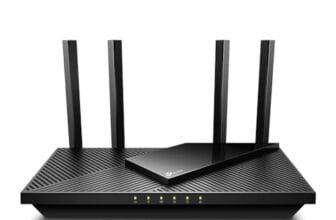
The ASUS RT-AX1800S is made for buyers who want dependable Wi-Fi 6 without paying for a large gaming router. It supports dual-band wireless and works with ASUS AiMesh for future coverage expansion. It also includes parental controls, network security features, and built-in VPN support. For a small home, apartment, or single gaming room, its simple design makes sense.
This router can handle cloud gaming, video calls, streaming, and smart home devices when placed in a good location. Its game and streaming features help prioritize common home uses, though it does not provide the multi-gigabit port selection found on premium models. I like it most for users with internet plans up to typical gigabit-class service. It is a practical starting point for console and laptop gaming.
Pros:
- Affordable Wi-Fi 6 performance
- AiMesh support for wider coverage
- Parental controls and network security tools
- Built-in VPN support
- Simple fit for apartments and small homes
- Useful for gaming and everyday streaming
Cons:
- Limited compared with tri-band gaming routers
- Not aimed at multi-gig wired networks
- Large homes may need an AiMesh node
What Amazon Buyers Are Saying
Common Amazon feedback highlights easy installation, stable connections, and good value. Buyers often choose it for a small home or as an upgrade from an older Wi-Fi 5 router. Some comments mention coverage limits in larger homes and mixed results with advanced settings. Walls, router placement, and nearby networks affect real performance, so buyers should not expect the same range in every home.
My Recommendation
The RT-AX1800S is worth buying when you need a low-cost, trusted Wi-Fi 6 router for one or two gamers. It is not the fastest router here, but it covers the basics well. I rate it 4.3 out of 5.
| Category | Rating |
|---|---|
| Cloud gaming stability | 4.2/5 |
| Setup ease | 4.6/5 |
| Coverage flexibility | 4.2/5 |
| Value | 4.6/5 |
| Overall Rating | 4.3/5 |
ASUS ROG Strix GS-BE12000: Best Wi-Fi 7 Gaming Router

The ASUS ROG Strix GS-BE12000 targets gamers who want a high-speed Wi-Fi 7 system with serious wired capacity. It is a tri-band router with a listed combined speed of up to 12 Gbps. The product also lists mesh support, coverage up to 3,300 square feet, and eight 2.5G ports. Those features make it suitable for a home with several gaming systems, workstations, and high-speed devices.
Wi-Fi 7 can improve efficiency with compatible devices, but older phones and consoles will not gain every new feature. The router still offers value through its strong port selection and gaming tools. I would connect a main gaming PC or console by Ethernet when possible. For wireless play, placement remains important because no router can remove distance, walls, or an unstable internet plan.
Pros:
- Wi-Fi 7 technology for newer devices
- Tri-band design helps separate busy traffic
- Eight 2.5G ports offer unusual wired flexibility
- Mesh support can expand coverage
- Gaming-focused controls and traffic tools
- Strong fit for multi-device homes
Cons:
- Premium price may exceed a casual gamer’s needs
- Older devices cannot use every Wi-Fi 7 feature
- Large design may need careful placement
What Amazon Buyers Are Saying
Amazon buyers commonly discuss speed, wired ports, and the ROG feature set. Positive experiences tend to come from users with fast internet and many connected devices. Some buyers may find the software or feature list more complex than a basic router. As with any new wireless standard, current firmware and client device support can affect the experience.
My Recommendation
I recommend the GS-BE12000 for serious gamers who need many fast wired ports and a strong wireless upgrade. It is overkill for a small apartment, but it is one of the most complete options here. I rate it 4.7 out of 5.
| Category | Rating |
|---|---|
| Wireless speed | 4.8/5 |
| Port selection | 5.0/5 |
| Gaming features | 4.7/5 |
| Value for advanced users | 4.3/5 |
| Overall Rating | 4.7/5 |
MSI Radix AXE6600: Best Wi-Fi 6E Value

The MSI Radix AXE6600 uses Wi-Fi 6E and a tri-band design to give compatible devices access to the 6 GHz band. That band can offer less congestion than crowded 2.4 GHz and 5 GHz networks, especially in busy areas. MSI also lists AI QoS, MU-MIMO, an 1.8 GHz quad-core processor, and eight-stream wireless support. These features suit a family that games, streams, works, and uses smart devices at the same time.
The router has a clear gaming identity, including RGB lighting and traffic tools. The main benefit for cloud gaming comes from stable traffic handling, not from lights or labels. A compatible laptop or newer device can make better use of 6 GHz, while older devices can still connect through the other bands. I would choose it for a busy home that wants tri-band performance without moving straight to Wi-Fi 7.
Pros:
- Tri-band Wi-Fi 6E includes the 6 GHz band
- AI QoS helps manage busy network traffic
- MU-MIMO supports many connected clients
- Strong processor for gaming and streaming tasks
- Good option for congested wireless environments
- Distinct gaming design with RGB lighting
Cons:
- 6 GHz benefits need compatible devices
- RGB design may not suit every room
- Wi-Fi 7 offers newer wireless features
What Amazon Buyers Are Saying
Amazon reviews often mention the router’s speed, design, and tri-band performance. Buyers with newer Wi-Fi 6E devices tend to see the clearest benefit. Some users report that software features take time to learn, while others focus on coverage or firmware behavior. Results depend on device support, placement, and local wireless interference.
My Recommendation
The MSI Radix AXE6600 is a smart middle choice for a busy home with Wi-Fi 6E devices. It gives more wireless room than many dual-band routers without requiring a Wi-Fi 7 budget. I rate it 4.5 out of 5.
| Category | Rating |
|---|---|
| Wireless traffic control | 4.5/5 |
| Band flexibility | 4.6/5 |
| Cloud gaming support | 4.5/5 |
| Ease of use | 4.2/5 |
| Overall Rating | 4.5/5 |
ASUS GT-BE19000AI: Best Premium Wi-Fi 7 Router

The ASUS GT-BE19000AI is built for buyers who want a top-tier Wi-Fi 7 gaming router. Its listed features include tri-band wireless, a combined speed of up to 19 Gbps, two 10G ports, and four 2.5G ports. ASUS lists coverage up to 3,500 square feet, plus gaming tools and VPN support. This is a strong fit for a large home with fast internet and several high-end devices.
The two 10G ports give this router long-term value for multi-gig internet, storage, and wired workstations. Its price and size make less sense for a small home or a modest broadband plan. Wi-Fi 7 features also work best when your client devices support them. I see this as a premium platform for enthusiasts who want high capacity today and room for future upgrades.
Pros:
- Very high listed Wi-Fi 7 capacity
- Two 10G ports for advanced wired networks
- Four 2.5G ports for gaming and home devices
- Large listed coverage area
- Gaming, VPN, and mesh support
- Strong choice for multi-gig internet plans
Cons:
- High price for casual gaming
- May be more router than most homes need
- Wi-Fi 7 client support remains important
What Amazon Buyers Are Saying
Amazon buyer comments for premium routers often focus on speed, coverage, port capacity, and setup. Buyers who own fast internet service and newer devices are the most likely to use its full feature set. Common concerns with this class of router include price, size, and the time needed to tune advanced options. I suggest checking current buyer feedback for firmware updates and long-term stability.
My Recommendation
Buy the GT-BE19000AI if you need premium capacity, 10G networking, and broad home coverage. It is not a value pick, but it is a powerful investment for a demanding network. I rate it 4.8 out of 5.
| Category | Rating |
|---|---|
| Multi-gigabit networking | 5.0/5 |
| Wireless capacity | 4.9/5 |
| Coverage potential | 4.7/5 |
| Value for casual users | 3.8/5 |
| Overall Rating | 4.8/5 |
HYPEREV AX3000: Best for Console Gamers

The HYPEREV AX3000 is aimed at players who want a gaming-focused Wi-Fi booster for a PS5, PC, or console. It uses dual-band Wi-Fi 6 and lists wireless speeds up to 2,402 Mbps. The product also includes a 90-day GearUP VIP Core plan, which may appeal to players who want a game acceleration service. It offers a more focused approach than a large premium home router.
This model makes the most sense when the gaming device sits far from the main router or when a player wants a dedicated gaming network product. A booster cannot fix poor broadband service, server distance, or every form of packet loss. I would test the placement and use Ethernet where possible. Buyers should also check what happens after the included service period ends.
Pros:
- Wi-Fi 6 wireless technology
- Designed for PS5, PC, and console gaming
- Game accelerator features target lower lag
- Listed wireless speed up to 2,402 Mbps
- Includes a 90-day GearUP VIP Core plan
- Useful for a remote gaming area
Cons:
- Included accelerator plan is time limited
- Dual-band design has less capacity than tri-band models
- Results depend heavily on placement and internet quality
What Amazon Buyers Are Saying
Buyer feedback commonly centers on setup, signal reach, and whether the gaming tools improve a specific home network. Some users may like the focused console design, while others may compare it with a standard Wi-Fi 6 router. Because wireless results vary by room and wall layout, I would read current reviews that match your console and home size. Also check the terms for any optional service after the trial.
My Recommendation
I recommend HYPEREV for a console player who needs a focused Wi-Fi 6 upgrade and understands the limits of game acceleration software. It is less flexible than a full premium router, but it can suit a targeted setup. I rate it 4.1 out of 5.
| Category | Rating |
|---|---|
| Console focus | 4.5/5 |
| Wireless performance | 4.1/5 |
| Game tools | 4.2/5 |
| Long-term value | 3.8/5 |
| Overall Rating | 4.1/5 |
ASUS TUF Gaming BE6500: Best Wi-Fi 7 Value

The ASUS TUF Gaming BE6500 offers a balanced path into Wi-Fi 7. It is a dual-band router with listed wireless speeds up to 6.5 Gbps. ASUS also lists Multi-Link Operation, four 2.5GbE ports, mesh compatibility, VPN support, and subscription-free network security. These features make it attractive to gamers who want modern hardware without stepping up to the largest premium models.
Four 2.5GbE ports give users room to connect a gaming PC, console, desktop, and storage device at high speed. MLO can help compatible Wi-Fi 7 devices use more than one link, though support varies by client. The dual-band layout may not separate traffic as well as a tri-band router in a very busy home. Still, this is a well-rounded choice for many gamers who want a practical Wi-Fi 7 upgrade.
Pros:
- Wi-Fi 7 features at a more approachable tier
- Four 2.5GbE ports support fast wired gaming
- Multi-Link Operation for compatible devices
- Mesh and VPN compatibility
- Subscription-free network security
- Good fit for gaming and home workstations
Cons:
- Dual-band design may limit separation in busy homes
- Older clients cannot use every Wi-Fi 7 feature
- Some advanced tools may need setup time
What Amazon Buyers Are Saying
Amazon buyers typically look at the TUF model for its port count, Wi-Fi 7 support, and security features. Positive comments often come from users who want a newer router without paying for a flagship model. Some buyers may need time to understand Wi-Fi settings, mesh options, or gaming controls. I recommend checking recent reviews and confirming that your internet plan and devices match the router’s capacity.
My Recommendation
The ASUS TUF Gaming BE6500 is my favorite value pick among the newer Wi-Fi 7 models. It gives gamers fast ports and useful features without the extreme capacity of a flagship router. I rate it 4.6 out of 5.
| Category | Rating |
|---|---|
| Gaming connection quality | 4.6/5 |
| 2.5GbE connectivity | 4.8/5 |
| Future readiness | 4.7/5 |
| Overall value | 4.5/5 |
| Overall Rating | 4.6/5 |
How to Choose the Best Router for Cloud Gaming
Choosing the best router for cloud gaming means looking beyond the biggest speed number. Cloud gaming sends game video from a remote server to your screen, so stable latency matters more than a huge local transfer rate. Your internet plan, home layout, gaming device, and network traffic all affect the result. Use these three checks before you buy.
1. Prioritize Stable Latency and Traffic Control
Ping is the time data needs to travel to a server and back. Lower and steadier ping usually feels better during play. Look for QoS, game prioritization, adaptive traffic control, or similar tools. These features can help a game keep access to bandwidth when another device streams video or downloads a file.
Do not assume a gaming label guarantees low ping. A router cannot control the distance to a game server or repair a poor internet line. A wired Ethernet link usually gives the most stable path. If you use Wi-Fi, place the router in an open area near the gaming room and avoid hiding it inside a cabinet.
2. Match Wi-Fi Bands and Ports to Your Devices
Wi-Fi 6 remains a strong choice for many homes. Wi-Fi 6E adds the 6 GHz band, which can reduce local congestion when your device supports it. Wi-Fi 7 adds newer tools such as Multi-Link Operation, but both the router and client device need compatible hardware for the full benefit.
Check the Ethernet ports as well. A 1G port can suit many plans, while 2.5G or 10G ports make more sense with multi-gig internet, a fast PC, or a home server. Four 2.5G ports can be more useful than a very high wireless rating if you play on several wired devices.
3. Consider Coverage, Firmware, and Total Value
A router must reach the room where you play. Large homes may need mesh support or a wired access point. A tri-band router can help separate traffic, while a dual-band model may offer better value in a small home. Do not buy a flagship unit if your broadband plan and devices cannot use its capacity.
Also check the software. Strong security updates, parental controls, VPN support, and clear setup tools can matter for years. Some products include a limited service trial, so check future costs before buying. I prefer a router that solves your real network problem instead of one that only offers impressive numbers.
Final Verdict: Which Should You Buy?
The ASUS ROG Strix GS-BE12000 is my top overall choice for serious gamers, while the ASUS TUF Gaming BE6500 offers better value. Choose Flint 2 for OpenWrt control, MSI for Wi-Fi 6E, or ASUS RT-AX1800S for a small budget.
The best router for cloud gaming will not replace good broadband, but it can reduce home network congestion. Match the router to your devices, room size, ports, and internet plan for the best result.
FAQs Of Best Router for Cloud Gaming
What is the best router for cloud gaming?
The ASUS ROG Strix GS-BE12000 is my top overall pick for serious gamers. The ASUS TUF Gaming BE6500 is a better value choice for many homes.
Is Wi-Fi 6 good enough for cloud gaming?
Yes. Wi-Fi 6 can work very well for cloud gaming when the router is placed close to the device and the internet connection remains stable.
Should I use Ethernet for cloud gaming?
Yes, when possible. Ethernet usually provides a steadier connection and less wireless interference than Wi-Fi.
Does a gaming router reduce ping?
A gaming router can reduce local congestion and traffic delays. It cannot reduce server distance or fix an unstable internet service.
Do I need Wi-Fi 7 for cloud gaming?
No. Wi-Fi 7 is useful for newer devices and busy networks, but Wi-Fi 6 or Wi-Fi 6E can meet the needs of many gamers.




[…] this guide, we explore the best routers for HD streaming. These routers provide strong, stable connections, essential for high-quality video. The Roku Ultra […]