


ASUS RT-BE88U is the best router for parental controls, speed, security, and long-term home use.
Kids now use phones, tablets, game consoles, smart TVs, and laptops at the same time. Without good controls, it is hard to set bedtimes, block unsafe sites, or pause the internet during homework. The best router for parental controls lets you manage these tasks from one app or web page. I reviewed seven strong options for different homes, budgets, and internet plans. My picks include fast Wi-Fi 7 routers, simple Wi-Fi 6 models, and a mesh system for larger homes. I focused on control tools, coverage, security, ease of use, and overall value.
See the differences between my top picks at a glance.
| Router | Wi-Fi | Parental Control Strength | Best For | Check Price |
|---|---|---|---|---|
| ASUS RT-BE88U | Wi-Fi 7 | Excellent, subscription-free tools | Large, fast homes | View on Amazon |
| TP-Link BE6500 | Wi-Fi 7 | Very good with HomeShield | Busy family networks | View on Amazon |
| ASUS RT-AX3000S | Wi-Fi 6 | Strong schedules and profiles | Performance on a budget | View on Amazon |
| TP-Link Deco S4 | Wi-Fi 5 mesh | Good family controls | Large homes | View on Amazon |
| ASUS RT-AX1800S | Wi-Fi 6 | Very good, no security fee | Small and medium homes | View on Amazon |
| ASUS RT-BE58U | Wi-Fi 7 | Strong security and controls | Growing smart homes | View on Amazon |
| TP-Link Archer AX10 | Wi-Fi 6 | Basic to good controls | Low-cost homes | View on Amazon |
ASUS RT-BE88U Wi-Fi 7 Router

The ASUS RT-BE88U is the most complete choice in this group. It uses Wi-Fi 7 and supports a very fast wired network. ASUS lists two 10G ports, one 10G SFP+ port, four 2.5G ports, and four 1G ports. That layout gives a family plenty of room for gaming PCs, workstations, NAS storage, and smart home hubs. It also makes this router a strong match for fast fiber service.
Its parental controls are part of the ASUS control system. I like that ASUS includes security and family features without forcing a monthly subscription for the core tools. Parents can create profiles, set time rules, review connected devices, and manage access from the router app or web interface. The router also supports AiMesh, so you can add compatible ASUS units when one box cannot cover the whole home.
Pros:
- Wi-Fi 7 offers strong speed for newer devices
- Excellent selection of high-speed wired ports
- Parental controls are included without a required monthly plan
- Strong security features for a busy family network
- AiMesh support allows future coverage expansion
- Good choice for multi-gigabit internet service
Cons:
- Costs more than basic Wi-Fi 6 routers
- Many advanced settings may feel complex to new users
- Older devices cannot use every Wi-Fi 7 feature
What Amazon Buyers Are Saying
Buyer feedback for this model commonly focuses on speed, port variety, and the strong hardware platform. Users who own fast internet plans tend to value the multi-gigabit ports and the ability to connect many wired devices. Family users also look for the included security and control tools. As with many advanced routers, some buyers report that setup and deeper settings take time to learn, so I recommend updating the firmware and starting with the basic app setup.
My Recommendation
I recommend the RT-BE88U for families that want one premium router to manage fast internet, many devices, and daily access rules. It is overkill for a small apartment with a basic plan, but it is an excellent long-term buy for a large connected home. For parental controls, speed, ports, and upgrade value, it earns my top rating.
TP-Link BE6500 Wi-Fi 7 Router

The TP-Link BE6500, also called the Archer BE400, is a practical Wi-Fi 7 option for a busy family. It has dual 2.5Gbps ports, a USB 3.0 port, and a quad-core processor. TP-Link lists coverage of up to 2,400 square feet and support for up to 90 devices. Real coverage will change with walls, floor plans, interference, and client devices, but the hardware fits a medium or large home well.
HomeShield gives this router its family appeal. Parents can create user profiles, set schedules, pause access, and apply content controls. The exact feature set can depend on the software plan and region, so I suggest checking the current TP-Link terms before buying. I also like the private IoT option, which helps place smart home devices on a separate network from family computers and phones.
Pros:
- Fast Wi-Fi 7 platform for newer phones and laptops
- Two 2.5Gbps ports support faster wired connections
- HomeShield offers useful family management tools
- Private IoT support helps organize smart home devices
- USB 3.0 adds a simple file-sharing option
- Good balance of speed and price for a family router
Cons:
- Some HomeShield features may require a paid plan
- Coverage claims depend heavily on home layout
- Wi-Fi 7 benefits require compatible client devices
What Amazon Buyers Are Saying
Common buyer feedback highlights easy setup, strong wireless speed, and stable service across many connected devices. Buyers who replace older routers often notice better capacity and faster newer-device connections. Some users pay close attention to the difference between included HomeShield controls and premium features. That point matters for parents who want advanced reports or extra filters, so I recommend reviewing the current app options before purchase.
My Recommendation
The BE6500 is a strong choice for families that want modern Wi-Fi without moving to an extremely expensive router. It offers useful parental controls, good device capacity, and a helpful private IoT feature. I would choose it for a medium-size home with many phones, TVs, cameras, and game systems.
ASUS RT-AX3000S Wi-Fi 6 Router

The ASUS RT-AX3000S is a smart middle-ground router. It uses Wi-Fi 6 and gives families more speed than a basic entry-level model. It works with ASUS AiMesh, so you can add another compatible ASUS router later. That makes it useful for homes that need better coverage but do not want to replace the main router right away.
Its parental control scheduling is the main reason I included it. Parents can assign devices to profiles and set internet rules around school, sleep, or family time. ASUS also includes Instant Guard and VPN support for users who need safer remote access. The interface has many options, but the basic family controls remain easy to understand once devices have clear names.
Pros:
- Strong Wi-Fi 6 performance for everyday family use
- Useful parental control scheduling
- AiMesh support allows future expansion
- Instant Guard adds a simple remote access option
- Good match for streaming, gaming, and school work
- Usually costs less than premium Wi-Fi 7 models
Cons:
- It does not offer the newer Wi-Fi 7 features
- Advanced ASUS settings may take time to learn
- One router may not cover a large multi-floor home
What Amazon Buyers Are Saying
Buyer comments commonly praise the router for its speed, stable connection, and broad feature set for the price. Families often like the ability to schedule access instead of turning devices off one by one. Some buyers mention that the app and web interface expose many settings, which can feel busy at first. Clear device names and a firmware update usually make daily management easier.
My Recommendation
I recommend the RT-AX3000S for parents who want strong control features and good Wi-Fi 6 speed at a sensible price. It is not the newest router here, but it offers useful tools without forcing a premium Wi-Fi 7 purchase. It is one of the best router for parental controls choices for a medium home.
TP-Link Deco S4 Mesh Wi-Fi System

The TP-Link Deco S4 is the coverage specialist in this review. The two-pack is designed to cover up to 3,800 square feet under the maker’s stated conditions. Mesh systems help solve weak signal areas by placing a second unit closer to bedrooms, offices, or upper floors. The S4 uses older Wi-Fi 5 technology, but it can still handle normal browsing, school work, streaming, and many smart home devices.
Deco’s family controls let parents build profiles and set daily schedules. You can pause a profile when dinner starts or stop internet access at bedtime. The system also supports basic content categories and device management. It is less suitable for a home with a very fast multi-gigabit plan, but it makes sense when coverage matters more than top wireless speed.
Pros:
- Two units help reduce dead zones in larger homes
- Simple app-based setup and management
- Useful profiles, schedules, and pause controls
- Good fit for homes with thick walls or more than one floor
- Compact units are easy to place around the home
- Often offers strong value for whole-home coverage
Cons:
- Wi-Fi 5 is slower than newer Wi-Fi 6 and Wi-Fi 7 systems
- Limited wired speed compared with premium routers
- Advanced security features may depend on subscription options
What Amazon Buyers Are Saying
Common buyer feedback centers on better coverage and a simple setup process. Users with dead spots often like placing one Deco unit near the modem and the other in a problem area. Many family users also find the profile and pause tools easy to use. Some buyers note that placement affects mesh performance, while others want more advanced settings than this budget system provides.
My Recommendation
I recommend the Deco S4 for a large home where weak coverage causes more trouble than raw speed. It is a good family mesh system for ordinary internet plans and basic parental controls. Choose a newer Wi-Fi 6 or Wi-Fi 7 model if you have very fast internet or many high-demand wireless devices.
ASUS RT-AX1800S Wi-Fi 6 Router

The ASUS RT-AX1800S is a compact Wi-Fi 6 router for small and medium homes. It supports everyday tasks such as video calls, online classes, streaming, and casual gaming. Its dual-band design keeps the setup simple, while Wi-Fi 6 improves efficiency when several devices share the network. It also works with ASUS AiMesh for users who later need more coverage.
This router stands out because ASUS promotes subscription-free network security and parental controls. Parents can manage connected devices, make schedules, and use family profiles without adding another paid service for core control tasks. The built-in VPN feature gives the router extra flexibility. It does not have the high-end wired ports of the RT-BE88U, but most homes do not need those ports.
Pros:
- Useful parental controls without a required subscription
- Wi-Fi 6 works well for common family devices
- Simple size and design fit small spaces
- AiMesh support gives it upgrade flexibility
- Built-in VPN adds extra utility
- Good value for small and medium homes
Cons:
- Less powerful than premium ASUS routers
- Coverage may not suit a large or multi-floor house
- Limited port selection for demanding wired networks
What Amazon Buyers Are Saying
Buyer feedback often praises the easy setup, stable connection, and useful feature list at this price. Parents who want basic schedules and device controls tend to appreciate the lack of a required security subscription. Some buyers report that placement matters in larger homes, and a few expect more advanced controls than this entry-level model provides. It is best viewed as a practical home router, not a full enterprise filter.
My Recommendation
The RT-AX1800S is a strong budget pick for parents who want clear controls and reliable Wi-Fi 6 service. I would choose it for an apartment, townhouse, or modest single-floor home. It delivers more family value than many basic routers, especially when subscription costs matter.
ASUS RT-BE58U Wi-Fi 7 Router

The ASUS RT-BE58U brings Wi-Fi 7 to a more approachable class of router. It supports up to 3.6Gbps combined wireless speed according to its product listing and includes one 2.5G port plus four 1G ports. It also supports dual WAN, VPN functions, and ASUS mesh expansion. This makes it a useful step up for a home that wants newer wireless technology without buying the most expensive model.
ASUS lists triple-level network security and included parental controls for this router. Parents can use device profiles and schedules to set simple rules for children. The 2.5G port can help with faster internet or local network devices, while the four gigabit ports cover common wired needs. For a family that expects more smart devices over time, this router offers a sensible mix of speed and control.
Pros:
- Wi-Fi 7 supports newer client devices
- Included parental controls and security tools
- Dual-WAN support adds network flexibility
- One 2.5G port supports faster connections
- VPN and mesh features improve long-term usefulness
- More affordable than many premium Wi-Fi 7 routers
Cons:
- Only one 2.5G port may limit high-speed wired setups
- Older devices will not gain every Wi-Fi 7 benefit
- ASUS settings can feel detailed for first-time users
What Amazon Buyers Are Saying
Common buyer themes include fast wireless service, a clean hardware design, and a strong set of controls for the cost. Buyers who already use ASUS products often like the familiar app and mesh options. Some users point out that the router’s advanced features require reading the setup screens carefully. Parents should also confirm which security tools are included and which may vary by region or service plan.
My Recommendation
I recommend the RT-BE58U for families that want Wi-Fi 7, VPN support, and included controls at a lower cost than a flagship model. It is a better fit for a growing home than a basic Wi-Fi 6 router. Choose it when you want modern wireless performance but do not need the RT-BE88U’s large selection of 10G ports.
TP-Link Archer AX10 Wi-Fi 6 Router
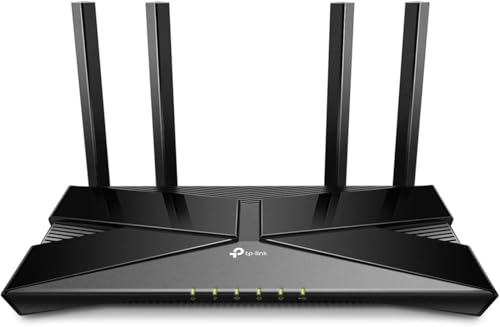
The TP-Link Archer AX10 is the lowest-cost router in this group, and this listing is marked renewed. It uses Wi-Fi 6 with features such as OFDMA, beamforming, and MU-MIMO. These tools help the router share wireless capacity across several devices. It is a sensible option for basic browsing, streaming, online classes, and smaller homes.
Its parental controls cover the core needs of many families. Parents can create profiles, set limits, and manage access for selected devices. The router also works with Alexa for compatible voice controls. Because this is a renewed product, I would pay close attention to the seller, return policy, warranty terms, and physical condition before ordering.
Pros:
- Low purchase price compared with newer routers
- Wi-Fi 6 helps manage several everyday devices
- Parental controls cover basic family needs
- Beamforming can help improve connection focus
- MU-MIMO and OFDMA support efficient device sharing
- Alexa compatibility adds convenient voice control
Cons:
- This listing is renewed, not new
- Basic hardware may not suit a very busy home
- Coverage and performance are limited compared with premium picks
- Advanced security features may be less extensive
What Amazon Buyers Are Saying
Buyer feedback for Archer AX10 listings often focuses on affordable Wi-Fi 6 service and easy everyday use. Users with modest plans may find it handles normal streaming and browsing well. Renewed products can produce different experiences based on inspection and seller quality, so buyers should read the current listing details. Some users also want stronger coverage or more advanced family reports than this basic router provides.
My Recommendation
I recommend the renewed Archer AX10 only for budget-focused shoppers with a small home and simple control needs. It can be a good way to spend less, but the renewed condition adds a level of buying risk. If the price gap is small, I would move up to a newer ASUS or TP-Link model.
How to Choose the Best Router for Parental Controls
Choosing the best router for parental controls takes more than checking the Wi-Fi speed number. The right model should match your home size, internet plan, device count, and parenting style. It should also make daily tasks quick. I look for tools that let parents pause access, set schedules, group devices, and update rules without a long setup each time.
1. Check the Actual Family Control Tools
Look for profiles, bedtime schedules, pause buttons, and content filters. A profile lets you manage a child’s phone, tablet, console, and laptop as one group. A schedule can stop access during school or sleep hours. A pause button helps during dinner or homework.
Also check whether the router includes these tools at no extra cost. Some brands provide basic controls for free but place reports, advanced filters, or security scans behind a subscription. That does not make a router bad, but you should know the long-term cost before you buy.
Remember that router controls are not perfect. A child may use cellular data, a guest network, a VPN, or a device that the router cannot identify well. Use the router with device settings, open talks, and age-appropriate safety tools. A router works best as one part of a family safety plan.
2. Match Coverage and Speed to Your Home
One router may work well in a small apartment but struggle in a large house. Thick walls, floors, metal objects, and distance all reduce Wi-Fi strength. A mesh system, such as the Deco S4, can help spread service to distant rooms. Place the main unit in an open area, then place the second unit between the main router and the weak zone.
Speed also matters. Wi-Fi 6 remains a good choice for many homes. Wi-Fi 7 makes more sense when you own newer devices, have a fast fiber plan, or want a longer upgrade cycle. Do not pay for Wi-Fi 7 only because of the label. A good Wi-Fi 6 router may offer better value if your phones and laptops use older standards.
3. Review Security, Ports, and Long-Term Value
Parental controls protect time and access, but router security protects the network itself. Look for regular firmware updates, guest network support, safe administration, and clear security tools. A private IoT network can also help separate cameras, lights, plugs, and other smart devices from computers that hold personal data.
Check the wired ports if you use gaming systems, a desktop computer, a NAS, or a multi-gigabit modem. The ASUS RT-BE88U is the clear leader for port variety. A lower-cost router may have enough ports for a normal home, but it may force you to add a switch later.
Finally, consider the total cost. Include the router price, any security subscription, mesh add-ons, and possible replacement costs. The best router for parental controls should give you useful family tools today and enough capacity for your home over the next few years.
Final Verdict: Which Should You Buy?
The ASUS RT-BE88U is my top choice for speed, security, parental controls, and future value. Choose the TP-Link Deco S4 for large-home coverage, or the ASUS RT-AX1800S for a lower-cost family setup.
The best router for parental controls should fit your home, devices, and budget. Set clear schedules, update the firmware, and pair router controls with healthy family rules.
FAQs Of Best Router for Parental Controls
What is the best router for parental controls in 2026?
The ASUS RT-BE88U is the best overall pick in this review. It combines strong parental controls, subscription-free core security tools, Wi-Fi 7, and many fast wired ports.
Do router parental controls require a monthly fee?
Not always. ASUS includes core parental controls on the listed models, while some TP-Link HomeShield features may vary by plan. Check the current terms before buying.
Can a router pause the internet on a child’s device?
Yes. Compatible routers can pause internet access for a device or profile through an app or web control panel.
Is a mesh router better for parental controls?
A mesh router is better when your home has weak signal areas. Its parental controls can manage devices across the full mesh network, not just near the main unit.
Will parental controls block every unsafe website?
No router can block every risk. Use router filters with device controls, updated software, safe search tools, and age-appropriate family guidance.









