The best security system with Synology NAS combines reliable camera storage, easy access, strong backups, and room to grow.
A camera system can feel simple at first. Then clips fill your phone, cloud fees rise, and one weak Wi-Fi link leaves a blind spot. A Synology NAS gives you a central place for video, alerts, files, and backups. It can work with compatible IP cameras through Synology Surveillance Station, but the NAS is not a camera by itself. You still need cameras, network power, and careful setup. I reviewed six Synology NAS options to help you choose the right base for a safer home or small office.
See the differences between my top picks at a glance.
Synology DS225+ 2-Bay NAS

The Synology DS225+ is my leading pick for most homes that need local security video storage. It uses two drive bays, so it fits well in a small office, apartment, or family home. Its Intel processor also makes it more useful for mixed tasks than a basic file box. You can use it for camera recordings, photo backup, documents, and media in one quiet unit.
This is a diskless NAS, so you must buy compatible hard drives separately. That adds a step, but it also lets you choose the capacity and drive type that match your camera plan. With compatible IP cameras and Surveillance Station, the DS225+ can centralize live views, recordings, and alerts. I like this model because it offers a useful middle ground without forcing a small user to buy a large four-bay system.
Pros:
- Good two-bay size for most homes
- Intel processor supports a wider range of NAS tasks
- Useful for camera video and regular file backup
- Lets you choose your own storage drives
- Compact design suits shelves and small offices
- Supports future storage planning with a second drive
Cons:
- Drives are not included
- Two bays offer less expansion than four-bay models
- Extra camera licenses may cost more after the included allowance
What Amazon Buyers Are Saying
Buyer feedback for this type of Synology Plus model often focuses on the simple DSM software, compact build, and broad home-server use. Buyers who understand that the unit is diskless tend to value the freedom to select their own drives. A common concern with any diskless NAS is the added setup cost, since the final price depends on the drives you install.
Reviews can change as sellers update bundles and product listings. I recommend checking the current listing for the exact included items, drive support, warranty details, and delivery condition. Also confirm camera compatibility before you buy. A NAS can be powerful, but it cannot fix a camera that uses a closed or unsupported system.
My Recommendation
I recommend the DS225+ for homeowners who want a dependable base for a Synology security system and still need normal NAS features. It is worth buying when two bays meet your storage needs and you are comfortable adding drives. It is less suitable for a large property with many high-resolution cameras.
Synology DS925+ 4-Bay NAS

The Synology DS925+ is the strongest choice here for a growing camera system. Four bays give you more room for drive capacity, separate storage pools, or a plan that grows over time. This matters when a property has several outdoor cameras and longer retention needs. It also works well for people who want one NAS for security footage, office files, backups, and shared media.
The unit is sold without drives, which keeps the base purchase flexible but raises the setup budget. A four-bay NAS also needs more planning than a two-bay model. Before buying, estimate the number of cameras, video quality, frame rate, motion activity, and days of retention. I would choose the DS925+ when expansion matters more than the smallest footprint.
Pros:
- Four bays provide a clear upgrade path
- Better fit for many cameras and longer retention
- Useful for home offices and small businesses
- Can separate important data from surveillance storage
- Strong choice for users who plan ahead
- Supports a broad range of Synology applications
Cons:
- Higher purchase cost than two-bay options
- Diskless design requires a separate drive budget
- May be more NAS than a small apartment needs
What Amazon Buyers Are Saying
Customer discussions around four-bay Synology systems commonly praise the flexible storage layout, clean management tools, and ability to replace or add drives as needs change. Buyers who run several services often like having more capacity than a small two-bay box can provide. The main concerns tend to involve total cost, drive selection, and the time needed to plan a proper setup.
Do not read a high-capacity NAS as a promise of unlimited camera support. Camera count depends on the model, video settings, network design, and Surveillance Station limits. Check current Synology compatibility information and the Amazon listing before placing an order.
My Recommendation
The DS925+ is worth buying for a serious home security setup, a small business, or anyone who wants room to grow. It is my best expansion pick. I would not choose it only to save money, because the drives and network equipment can make the full system expensive.
Synology DS425+ 4-Bay NAS

The Synology DS425+ targets users who want four drive bays in a practical private-cloud unit. It gives a home or small office more space for video history than a compact two-bay NAS. That extra room can help when cameras record at higher quality or when you want to keep footage for more days. It also leaves space for photos, work files, and backup copies.
Like the other diskless models here, the DS425+ needs separate drives. I see that as a benefit for careful buyers, since you can match the storage plan to your workload. Still, first-time NAS owners should calculate the complete cost before ordering. This model makes the most sense when you want four bays but do not need the highest tier of expansion or processing power.
Pros:
- Four-bay layout supports larger storage plans
- Good match for home offices and small teams
- Can hold security footage and personal files together
- Offers more retention flexibility than a two-bay NAS
- Diskless format allows custom drive selection
- Useful long-term platform for a growing network
Cons:
- Drives and cameras cost extra
- Four bays take more space than compact models
- May offer more capacity than basic users need
What Amazon Buyers Are Saying
Buyers of four-bay Synology systems often mention the value of centralized file control, easy access, and flexible storage. People who move from a small external drive tend to appreciate the wider backup options. Common concerns include the learning curve, drive compatibility, and the need to understand RAID or storage-pool choices before setup.
Those concerns are fair. A NAS protects against some drive failures, but RAID is not the same as a backup. I suggest keeping a second copy of important clips and files on another device or location. For security footage, also test playback and export before you depend on the system.
My Recommendation
I recommend the DS425+ for a user who wants a balanced four-bay Synology security storage system. It is a sensible alternative to a larger Plus model when your needs are clear and moderate. It earns strong marks for capacity and flexibility, but it needs a thoughtful drive and backup plan.
Synology DS225+ 16TB Bundle

This bundle pairs a Synology DS225+ two-bay NAS with two 8TB Seagate IronWolf drives. For a buyer who wants a clearer path to a working system, that is a major advantage. You do not need to compare separate drive listings or guess whether the advertised capacity matches your plan. The bundle can suit a home that wants camera storage, family backups, and a private file hub.
The included 16TB figure is raw drive capacity, not always the usable space after a storage layout and protection scheme. Two matching drives can support a mirrored plan, but the exact usable amount depends on how you configure the NAS. I would still check the current Amazon listing for drive details, warranty terms, and whether the seller has changed the bundle contents.
Pros:
- Includes two 8TB IronWolf hard drives
- Simplifies the first NAS purchase
- Good starting capacity for home camera footage
- Two-bay DS225+ supports more than surveillance alone
- Reduces the need to shop for separate drives
- Useful option for buyers who prefer one package
Cons:
- Less flexible than a diskless unit if you already own drives
- Two bays limit future expansion
- Usable capacity may be lower than the raw 16TB total
What Amazon Buyers Are Saying
Bundle buyers often value convenience because the NAS and drives arrive as one planned purchase. That can remove much of the guesswork for a first-time owner. The usual point to check is the exact bundle contents. Marketplace bundles can vary, so buyers should read the current listing and confirm the seller before checkout.
Storage buyers also need to separate capacity from performance. A large drive does not by itself guarantee smooth camera recording. Network speed, camera stream settings, drive health, and NAS configuration all matter. I would run a test recording from every camera before relying on the system.
My Recommendation
This is my favorite convenience package for buyers who want the DS225+ and need drives now. It is worth considering when the current bundle price compares well with buying the parts alone. Choose a diskless model instead if you want complete control over brands, capacity, or an existing drive collection.
Synology DS223j 2-Bay NAS
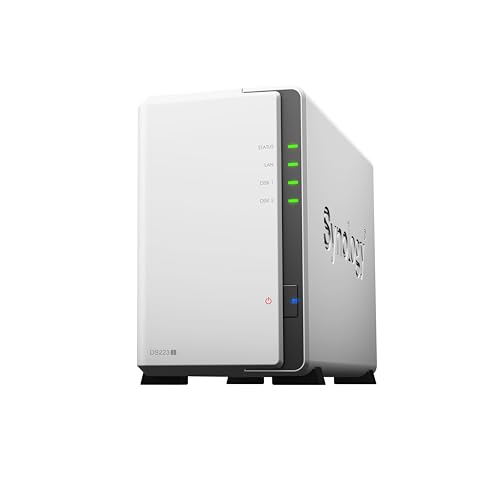
The Synology DS223j is the entry-level choice in this group. Its two-bay design can work for a small home, a simple backup plan, or a modest camera setup. It gives users access to the Synology environment without the size and cost of a four-bay unit. For basic recording and file storage, that compact approach may be enough.
This model is diskless, so the final cost depends on the drives you select. I would keep the camera plan modest and avoid treating it like a high-demand business server. Before buying, check the current hardware details and camera support list. The DS223j makes the most sense when low cost and simple storage matter more than advanced processing or large expansion.
Pros:
- Compact two-bay design
- Lower entry point than larger NAS models
- Good for basic home storage tasks
- Supports a simple local camera archive plan
- Allows the buyer to choose storage drives
- Uses the familiar Synology software environment
Cons:
- Less suited to demanding multi-camera workloads
- Drives are not included
- Limited expansion compared with four-bay models
What Amazon Buyers Are Saying
Entry-level Synology buyers often like the small footprint, low power needs, and clear file management tools. Many choose this type of unit for backups rather than advanced surveillance. A repeated concern for new NAS owners is that the advertised base price does not include hard drives, so the full budget must include storage.
Some buyers may expect a NAS to work like a plug-and-play camera recorder. It usually does not. You must install drives, configure storage, connect cameras, and set access rules. That work is manageable, but users with many cameras may benefit from a stronger model with more headroom.
My Recommendation
I recommend the DS223j for a small, simple setup with a few compatible cameras and moderate storage needs. It is worth buying when your goal is affordable local storage. I would spend more on a Plus-series model for heavy video workloads, frequent remote access, or several high-resolution streams.
Synology DS223 Home Backup Hub

The Synology DS223 is a practical two-bay home and office backup hub. It fits buyers who want one place for documents, photos, shared folders, and a modest property monitoring plan. Its two bays provide a simple path to local storage without taking up much room. The product description also presents it as a way to monitor property, which makes it relevant to a small Synology camera system.
This is a diskless NAS, so you need to add drives before recording footage. I would choose it for light to moderate use, not for a large installation with complex video demands. Its greatest strength is balance: it can support everyday backup needs while giving you a path toward local camera storage. Check current software and camera compatibility before you commit.
Pros:
- Useful home and office backup focus
- Two bays fit small storage plans
- Can combine files, photos, and compatible camera video
- Compact form suits a desk or shelf
- Diskless design allows a custom storage choice
- Good fit for users who value backup first
Cons:
- Drives are not included
- Two bays limit long-term expansion
- Not the first choice for a large camera network
What Amazon Buyers Are Saying
Buyers who use a Synology two-bay NAS for home backup often value central access and the ability to move files away from scattered computers. The compact size also appeals to people who do not want a large server enclosure. As with other diskless NAS products, the most important buying check is the total cost after adding suitable drives.
People who want surveillance should also look beyond the product name. A NAS can store and manage supported camera streams, but the cameras, switch, router, and network cables still matter. I suggest planning the whole system before buying the box alone. That approach prevents poor Wi-Fi placement and storage surprises.
My Recommendation
The DS223 is a solid value for a home user who wants backup first and security video second. It is worth buying for a few compatible cameras and normal family or office storage. Choose the DS225+ or a four-bay model if you need more processing room, capacity, or growth.
How to Choose the Best Security System With Synology NAS
Choosing the Best Security System With Synology NAS means choosing the full system, not only the NAS. You need compatible cameras, enough storage, a stable network, safe remote access, and a clear retention plan. Use these checks before you order.
1. Match the NAS to Your Camera Count
Start with the number of cameras you plan to run now. Then add a few more for future needs. Camera resolution, frame rate, codec, motion level, and recording mode all affect storage and system load. Continuous recording uses more space than motion-only recording.
A two-bay NAS can suit a small home. A four-bay NAS makes more sense for a larger property or longer video history. Do not rely on bay count alone. Check the model’s current specifications and Synology compatibility information for your exact camera setup.
2. Plan Storage, Retention, and Drive Protection
Estimate how many days of footage you want to keep. A front door camera may need less history than a driveway camera. High-resolution video also takes more space. If you use two drives, decide whether you want more usable capacity or protection against one drive failure.
Drive protection does not replace a backup. A deleted clip, theft, fire, malware event, or damaged NAS can still remove your only copy. Keep important exported clips somewhere else. Use strong passwords, software updates, and limited user access as part of the plan.
3. Check Camera Support and Network Quality
Synology Surveillance Station works with supported IP cameras, but compatibility can vary. Check whether your camera offers a standard stream or ONVIF support. Some low-cost cameras lock key functions inside their own cloud service. Those cameras may not work well with a local NAS system.
Use wired Ethernet for fixed outdoor cameras when possible. Power over Ethernet can reduce cable clutter and improve stability when the network supports it. Place the NAS on a wired connection to the router or switch. For remote viewing, secure the connection and avoid exposing the NAS directly to the public internet.
Also review camera license needs. Synology systems may include a limited number of camera licenses, while additional cameras can require paid licenses. Confirm the current allowance for your model and software version. This small detail can change the real cost of the Best Security System With Synology NAS.
Final Verdict: Which Should You Buy?
For most homes, I would buy the Synology DS225+. It offers the best mix of size, power, and camera storage value. Choose the DS925+ when you need four bays and clear growth room. The 16TB DS225+ bundle is best for a simpler, ready-to-start purchase.
The Best Security System With Synology NAS still needs compatible cameras, good drives, and a strong network. Plan those parts first, then choose the NAS that fits your footage and backup needs.
FAQs Of Best Security System With Synology NAS
Can a Synology NAS record security cameras?
Yes. A compatible Synology NAS can record supported IP cameras through Synology Surveillance Station. You still need cameras, storage drives, network equipment, and any required camera licenses.
Which Synology NAS is best for a home security system?
The DS225+ is a strong choice for most homes. It offers two bays and useful performance for camera storage, backups, and other home NAS tasks. A four-bay model is better for larger systems.
Do Synology NAS products include hard drives?
Most models listed here are diskless and require separate drives. The DS225+ 16TB bundle includes two 8TB Seagate IronWolf drives. Always check the current Amazon listing for the exact contents.
How many cameras can Synology Surveillance Station support?
The number varies by NAS model, camera settings, resolution, and software limits. Check the current Synology specifications and camera compatibility list before buying. Also confirm the included and paid license requirements.
Is a Synology NAS safer than cloud camera storage?
Local storage gives you more control and can reduce monthly cloud fees. It does not remove all risk. Use strong passwords, updates, restricted access, drive protection, and a separate backup for important recordings.