Ubiquiti Networks does not currently offer a standard consumer cable modem, so buyers need to choose carefully.
If you searched for a Ubiquiti Networks Cable Internet Modem because your internet feels slow or unreliable, you are not alone. Many shoppers find Ubiquiti networking products mixed with cable modems, access points, and network cables. These products do very different jobs. In this guide, I review the listed options, explain which ones are true DOCSIS cable modems, and show where the Ubiquiti items fit. I also cover modem speed, ISP support, Ethernet ports, Wi-Fi needs, and overall value for 2026 buyers.
See the differences between my top picks at a glance.
Hitron CODA56 Cable Modem

The Hitron CODA56 is a real cable modem, unlike the Ubiquiti access point and network cable in this comparison. It uses DOCSIS 3.1, the current cable standard used for high-speed internet plans. The listing presents it as a modem-only unit with no built-in Wi-Fi. It also lists compatibility with Xfinity, Spectrum, and Cox, but I still recommend checking the provider’s approved modem list before purchase.
This model suits a home that already has a separate router or mesh system. Its advertised 2.5 Gbps Ethernet support gives it room for a fast cable plan and a multi-gig wired network. It will not work as a fiber or DSL modem. Setup also depends on activating the modem with your cable provider, so keep your account details and coax connection ready.
Pros:
- DOCSIS 3.1 supports modern cable internet plans
- Advertised 2.5 Gbps Ethernet capacity
- Compact modem-only design
- Works with a separate router or mesh system
- No extra Wi-Fi features to pay for if you already own a router
- Suitable for users who want a simple wired gateway
Cons:
- No built-in Wi-Fi or routing
- Requires cable provider activation
- Not suitable for fiber, DSL, or fixed wireless service
- ISP approval can vary by plan and location
What Amazon Buyers Are Saying
Buyer feedback for this type of CODA56 listing commonly focuses on easy installation, strong wired speed, and the value of using a personally owned modem. Users who understand that it is modem-only tend to appreciate its simple design. The main complaints usually come from activation problems, provider restrictions, or buyers who expected built-in Wi-Fi. Those concerns show why compatibility and router requirements matter more than the modem label alone.
My Recommendation
I recommend the Hitron CODA56 for cable customers with a separate router and a plan that can use its multi-gig Ethernet feature. It is a stronger fit than an incorrectly labeled Ubiquiti Networks Cable Internet Modem because it is actually designed for cable service. Confirm the exact hardware revision and ISP approval before ordering.
ARRIS SURFboard SB8200 Cable Modem
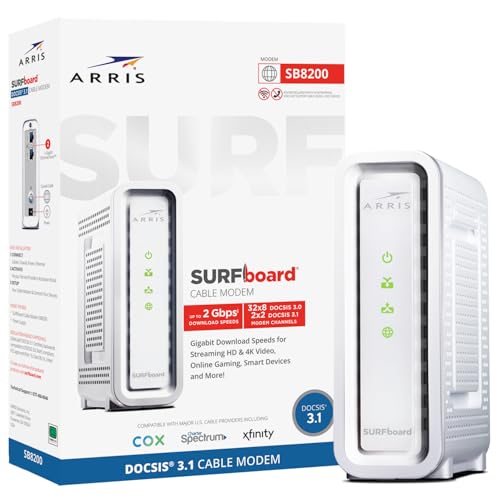
The ARRIS SURFboard SB8200 remains a well-known DOCSIS 3.1 cable modem for homes with Xfinity, Cox, or Spectrum service. The listing describes two 1 GbE ports, which can deliver up to 2 Gbps of wired aggregate capacity in supported setups. It does not include Wi-Fi, a router, or phone service. That clear modem-only design works well for buyers who already have a trusted network system.
I like the SB8200 for standard gigabit cable plans and simple home networks. Its two Ethernet ports may offer useful flexibility, but the exact benefit depends on ISP support, link setup, and router features. Buyers should not assume that two ports automatically create one faster connection. This modem also needs coax service and provider activation.
Pros:
- DOCSIS 3.1 platform for current cable networks
- Two 1 GbE ports listed for wired aggregate capacity
- Broad compatibility with major cable providers
- Simple modem-only setup
- Works with personal routers and mesh systems
- Good match for many plans up to gigabit class speeds
Cons:
- No Wi-Fi included
- No built-in router or telephone adapter
- Two-port features may depend on ISP support
- Not a choice for fiber or DSL service
What Amazon Buyers Are Saying
Amazon buyers often value the SB8200 for stable wired service and its long history in the cable modem market. Positive comments tend to mention smooth activation and reliable performance after setup. Less positive experiences often involve older firmware, activation delays, or confusion about the lack of Wi-Fi. These reports are a reminder that a modem can be working correctly even when the separate router or provider account needs attention.
My Recommendation
The SB8200 is a sensible buy for a cable customer who wants a proven DOCSIS 3.1 modem and does not need built-in wireless. I would choose it for a normal gigabit plan when its price is lower than newer multi-gig models. It is not a Ubiquiti Networks Cable Internet Modem, but it can connect to a Ubiquiti router or access point through Ethernet.
Hitron CODA56 Single-Port Listing

This second Hitron listing describes a CODA56 cable modem with DOCSIS 3.1 and a single Ethernet port. It states support for Xfinity, Spectrum, and Cox, while also making clear that it does not include Wi-Fi, voice service, or a router. The single-port design keeps the network path easy to understand. Your separate router will handle wireless access, local devices, and network controls.
The main point to check is the exact listing and hardware configuration. Amazon sometimes shows similar names with different seller details or revisions. I would compare the port description, return policy, and provider approval before ordering. If you need only one Ethernet connection to a router, this version can be practical.
Pros:
- DOCSIS 3.1 support
- Clear modem-only design
- Single Ethernet port keeps setup simple
- Advertised support for major cable providers
- Works with a separate Wi-Fi router
- Can suit a basic wired home network
Cons:
- No Wi-Fi, router, or voice function
- One Ethernet port offers less flexibility
- Listing details should be checked with care
- Cannot replace a fiber or DSL terminal
What Amazon Buyers Are Saying
Customer feedback for this type of listing tends to center on activation, speed, and the need for a separate router. Buyers who want a clean modem-to-router connection often like the simple hardware. Complaints usually arise when a customer expects wireless service from the modem or finds that a provider does not support the exact model. I would read recent reviews beside the current product details because marketplace listings can change.
My Recommendation
I recommend this listing only after confirming that the hardware, port count, and ISP approval match your needs. It can be a good value for a simple cable setup, but it offers less flexibility than a multi-port modem. If you are trying to build a Ubiquiti home network, use this as the cable modem and connect it to the Ubiquiti gateway or router separately.
Ubiquiti UniFi Access Point Listing

The Ubiquiti listing in this comparison is described as a wireless modem and router product, but the title is too vague to identify the exact UniFi model with confidence. The image and listing suggest a UniFi access point rather than a cable modem. An access point creates or extends Wi-Fi from an existing wired network. It does not normally connect directly to a coax cable or replace the cable modem supplied by an ISP.
This distinction matters if you searched for a Ubiquiti Networks Cable Internet Modem. Ubiquiti is known for network equipment such as UniFi gateways, switches, and access points, not for a typical DOCSIS cable modem line. Before buying, confirm the model number, power method, controller needs, and seller description. A separate approved cable modem and router may be required.
Pros:
- Useful for expanding Wi-Fi coverage
- Fits into a wider UniFi network design when the model supports it
- Can provide central network management on compatible UniFi systems
- Better suited to wired backhaul than a basic range extender
- Helpful for homes, offices, and small network upgrades
- Ubiquiti design can support a clean, organized network
Cons:
- Not a DOCSIS cable modem
- Exact model and features are unclear from the short listing
- May need separate power equipment or a UniFi controller
- Does not solve coax modem activation by itself
What Amazon Buyers Are Saying
Feedback on UniFi access points often praises strong coverage, a clean management system, and reliable performance after proper setup. Common complaints involve confusing model names, required controllers, power adapters, or setup steps that feel less simple than consumer Wi-Fi gear. Because this listing does not clearly identify the exact model, I would not rely on general UniFi reviews alone. The specific model number should match the buyer’s intended use.
My Recommendation
Buy this item only if you need a UniFi wireless access point and can verify the exact model. Do not buy it as a cable modem. It may become an important part of a Ubiquiti network, but it must sit behind an approved cable modem and suitable router or gateway. I rate it lower for this article because it does not perform the core modem job.
Ubiquiti U-CABLE-PATCH-RJ45 Cat6 Cable

The Ubiquiti U-CABLE-PATCH-RJ45 is a short Cat6 network cable, not an internet modem. The listing gives a length of 0.2 meters, or about eight inches. That short length can help connect a modem to a router, a switch to a patch panel, or a network device to a nearby port. It carries Ethernet data, but it cannot connect directly to a coax wall outlet.
I see this cable as a useful accessory for a neat network cabinet or compact desk setup. Its short size reduces loose cable around nearby devices. It also limits where you can place equipment, so measure the gap first. For a Ubiquiti network, it can link a cable modem to a gateway or connect a UniFi device to a switch.
Pros:
- Compact 0.2-meter length
- Cat6 format for standard Ethernet connections
- Useful for short modem-to-router links
- Helps reduce cable clutter
- Fits compact racks and network shelves
- Simple accessory for wired Ubiquiti systems
Cons:
- Not a cable modem
- Too short for many room-to-room links
- Provides no Wi-Fi or routing
- Does not replace a coax cable
What Amazon Buyers Are Saying
Buyers of short patch cables usually focus on fit, build quality, and whether the cable reaches the intended ports. A short cable can make a compact setup look cleaner, but several inches of extra length may be useful in real installations. The most likely source of disappointment is not product performance. It is buying a 0.2-meter cable when a longer cable was needed.
My Recommendation
This is worth considering as a small add-on for a modem, router, switch, or UniFi access point. It is not a substitute for the Ubiquiti Networks Cable Internet Modem that some shoppers expect to find. Buy it only after measuring the connection. For most living-room setups, a longer Cat6 cable may offer more flexibility.
NETGEAR Nighthawk CM3000 Cable Modem

The NETGEAR Nighthawk CM3000 is another true cable modem in this comparison. Its listing describes DOCSIS 3.1 support, a 2.5G Ethernet port, and two 1G ports. It is modem-only, so it does not create Wi-Fi by itself. The extra port choices make it a strong match for buyers planning a multi-gig network or a wired setup with more than one connection.
NETGEAR also highlights guided setup and expert help, which may appeal to first-time modem buyers. Still, no setup service removes the need for ISP approval and activation. I would check the supported speed tier and exact provider list before ordering. If you plan to connect a Ubiquiti gateway, the 2.5G port may provide a useful link between the modem and gateway when both devices support that speed.
Pros:
- DOCSIS 3.1 technology
- 2.5G Ethernet port for a multi-gig connection
- Two additional 1G ports listed
- Modem-only design works with a preferred router
- Guided setup support is listed
- Good long-term fit for a faster cable plan
Cons:
- No built-in Wi-Fi
- Higher features may be unnecessary for slower plans
- Port use can depend on ISP and network configuration
- Requires a separate router or gateway
What Amazon Buyers Are Saying
Buyers commonly look to the CM3000 for fast wired links, several Ethernet options, and a clean modem-only setup. Positive experiences often involve easy activation and good performance with a compatible provider. Complaints can involve setup questions, provider support, or paying for multi-gig hardware while using a lower-speed plan. I recommend matching the modem to your current plan and expected upgrade path.
My Recommendation
The CM3000 is my strongest overall modem pick in this group for a buyer who wants multi-gig flexibility. It costs more than a basic gigabit modem, but its port layout gives a home network more room to grow. It is also a good partner for a Ubiquiti gateway, access point, or switch. Confirm your ISP’s approved list before purchase.
How to Choose a Ubiquiti Networks Cable Internet Modem
The first step is to separate the modem from the rest of the network. A cable modem changes the signal from your coax line into Ethernet. A router manages your home network. An access point provides Wi-Fi. A switch adds wired ports. One product may combine some of these jobs, but the products in this comparison do not all serve the same role. This simple check can prevent an expensive mistake.
1. Confirm the Cable Standard and ISP Approval
Look for DOCSIS 3.1 when you want a current cable modem for fast plans. DOCSIS is the standard that lets the modem communicate with the cable provider. The provider must also approve the exact modem model. Compatibility can vary by country, plan, firmware, and service area.
Check your provider’s official modem list before you order. Do not rely only on an Amazon title that says “compatible.” Also confirm whether your plan supports the modem’s listed speed. A 2.5G modem will not make a 500 Mbps plan faster, although it may support a future upgrade.
2. Match the Ethernet Ports to Your Network
Most modem-only products need one Ethernet cable to connect to a router or gateway. A single-port modem works well for a basic setup. Multiple ports may help in a more advanced network, but the ISP must support the related feature. Your router, switch, and Ethernet cables must also support the speed you want.
If you plan to use Ubiquiti equipment, think of the modem as the first device in the chain. The order may look like this: coax outlet, cable modem, Ubiquiti gateway or router, switch, and UniFi access point. The modem does not replace every device in that chain. A short Ubiquiti Cat6 patch cable can connect nearby devices, but it remains only a cable.
3. Decide Whether You Need Wi-Fi, Voice, or a Separate Gateway
None of the true modem-only choices here includes normal built-in Wi-Fi. You need a router or mesh system for wireless devices. You may also need a separate voice gateway if your cable plan includes landline phone service. Check this before canceling rented equipment.
A separate modem and router can offer better control and easier upgrades. It can also create more setup work. Ubiquiti buyers often prefer separate equipment because UniFi gateways and access points provide detailed network control. New users may prefer a simpler all-in-one gateway. Choose the layout that matches your comfort level.
Final Verdict: Which Should You Buy?
For a true cable modem, I would choose the NETGEAR CM3000 for multi-gig flexibility, or the ARRIS SB8200 for a proven gigabit-class setup. The Hitron CODA56 is also a strong option when your ISP approves it.
There is no clear Ubiquiti Networks Cable Internet Modem in these listings. Use an approved DOCSIS modem first, then connect your Ubiquiti router, gateway, or access point.
FAQs Of Ubiquiti Networks Cable Internet Modem
Does Ubiquiti make a cable internet modem?
Ubiquiti does not currently offer a standard consumer DOCSIS cable modem in this comparison. Its products mainly include gateways, routers, switches, and wireless access points.
Can a UniFi access point replace a cable modem?
No. A UniFi access point provides Wi-Fi from an existing wired network. You still need an ISP-approved cable modem and a suitable router or gateway.
Which modem works best with a Ubiquiti router?
A compatible DOCSIS 3.1 modem, such as the Hitron CODA56, ARRIS SB8200, or NETGEAR CM3000, can connect to a Ubiquiti router through Ethernet. Confirm ISP approval first.
Do these cable modems include Wi-Fi?
No. The Hitron, ARRIS, and NETGEAR products reviewed here are modem-only devices. You need a separate Wi-Fi router, mesh system, or access point.
Can I use the Ubiquiti Cat6 patch cable with a cable modem?
Yes. The Ubiquiti U-CABLE-PATCH-RJ45 can connect a modem to a router when its short length is sufficient. It does not connect to the coax wall outlet or act as a modem.