The best outdoor Wi-Fi routers with big range deliver steady coverage across yards, farms, garages, and outdoor work areas.
A weak signal can ruin outdoor cameras, drop a video call, or leave a smart device offline. Indoor routers often lose power through walls, windows, and long distances. Outdoor access points solve this problem with weather protection, stronger antennas, and flexible mounting. I reviewed six popular options for different needs, from simple Wi-Fi 5 coverage to newer Wi-Fi 7 systems. I focused on range, weather resistance, network speed, setup, power options, and real-world value.
See the differences between my top picks at a glance.
| Product | Wi-Fi Type | Weather Rating | Power / Ports | Best For | Buy |
|---|---|---|---|---|---|
| WAVLINK AX1800 | Wi-Fi 6 | IP67 | PoE | Large yards and farms | View on Amazon |
| TP-Link EAP225-Outdoor | Wi-Fi 5 | IP65 | PoE injector | Stable mesh networks | View on Amazon |
| WAVLINK AX3000 | Wi-Fi 6 | IP67 | Active PoE | Busy outdoor networks | View on Amazon |
| Deco BE25-Outdoor | Wi-Fi 7 | IP65 | Dual 2.5G PoE+ | Modern Deco mesh users | View on Amazon |
| WAVLINK BE5100 | Wi-Fi 7 | IP67 | PoE, 2.5Gbps Ethernet | High-speed outdoor links | View on Amazon |
| BrosTrend AC1200 | Wi-Fi 5 | Outdoor design | PoE powered | Simple budget coverage | View on Amazon |
WAVLINK AX1800 Outdoor Wi-Fi 6 Extender

The WAVLINK AX1800 is a strong choice for people who need outdoor coverage over a wide open space. It uses Wi-Fi 6 and four 8 dBi antennas to send a focused signal farther than many basic indoor extenders. The IP67 housing helps protect the unit from dust and water. Its design also suits farms, yards, RV areas, garages, and Starlink setups.
This model supports up to 256 devices according to its listed product details. That does not mean every device will receive the same speed, but it gives the unit useful capacity for cameras, phones, sensors, and smart equipment. PoE power can simplify installation because one Ethernet cable can carry both power and data. I like this balance of range, weather protection, and modern wireless support.
Pros:
- Wi-Fi 6 offers better efficiency with many connected devices
- IP67 protection suits demanding outdoor locations
- Four 8 dBi antennas help focus the signal
- PoE power can reduce cable clutter
- Works with listed Starlink, router, and camera setups
- Useful capacity for larger outdoor networks
Cons:
- PoE installation may require extra planning
- Large claims depend on clear line of sight and local conditions
- Advanced settings may take time for new users to learn
What Amazon Buyers Are Saying
Buyer feedback for this type of WAVLINK outdoor extender often centers on stronger coverage across yards and large properties. Users also tend to value the solid outdoor housing and the ability to mount the unit away from the main router. Some buyers report that setup takes patience, especially when choosing repeater, access point, or bridge modes. Results vary with cable length, router settings, trees, walls, and nearby radio signals, so I recommend checking current reviews for the newest firmware and setup notes.
My Recommendation
I recommend the AX1800 for a large yard, farm, workshop, or RV area that needs dependable Wi-Fi 6 coverage. It offers more protection and range potential than a basic indoor extender. Buy it when you can run Ethernet to the outdoor mounting point and want a flexible network device.
TP-Link Omada EAP225-Outdoor Access Point

The Omada EAP225-Outdoor remains a practical pick for users who want a managed outdoor access point. It uses dual-band Wi-Fi 5 and supports mesh and roaming features within the Omada system. The IP65 enclosure helps defend against dust and water from outdoor use. The included PoE injector can make the first installation easier for many homes and small businesses.
This access point makes the most sense when network control matters more than the newest Wi-Fi standard. Omada tools can help users manage several compatible access points from one system. The unit can serve patios, courtyards, small businesses, and garden areas with a wired network connection. I would not choose it for a buyer who wants the highest possible speed or a simple plug-and-play repeater.
Pros:
- Well-known Omada management platform
- Dual-band wireless support
- IP65 outdoor protection
- PoE injector included in the listed package
- Supports mesh and roaming features
- Good fit for homes and small business networks
Cons:
- Uses Wi-Fi 5 instead of Wi-Fi 6 or Wi-Fi 7
- Advanced Omada features may feel complex to casual users
- Performance depends on the wired network and placement
What Amazon Buyers Are Saying
Amazon buyers commonly look at this model for its stable connection, outdoor build, and Omada features. Users who already own TP-Link networking products often appreciate the shared management system. Some feedback points to a setup process that feels less simple than a home mesh kit. Buyers also need to understand that mesh does not remove the need for good placement and a strong connection to the main network.
My Recommendation
I recommend the EAP225-Outdoor for a user who already has, or plans to build, an Omada network. It is a sensible value choice for steady outdoor coverage and central management. It is less appealing for a new Wi-Fi 7 installation or a buyer who wants maximum raw speed.
WAVLINK AX3000 Outdoor Wi-Fi 6 Extender
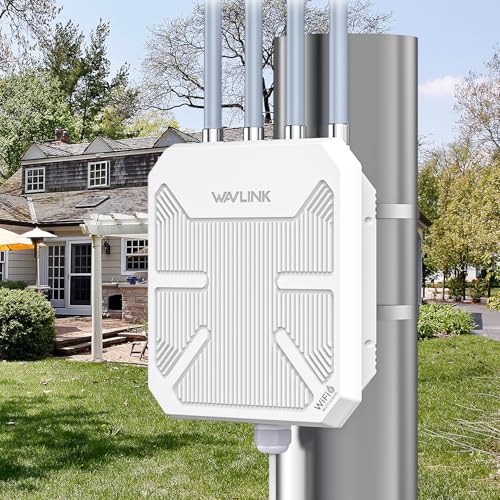
The WAVLINK AX3000 steps up from the AX1800 with a higher listed class and dual-band Wi-Fi 6 support. It has four 8 dBi antennas and an IP67 design for outdoor use. The product is aimed at broad spaces such as farms, yards, RV sites, and camera networks. It also lists active PoE, which can make a permanent installation neat and practical.
This model is a better match for users who expect more traffic from many devices. Outdoor cameras, phones, tablets, sensors, and work laptops can all compete for airtime, so Wi-Fi 6 efficiency has real value. Still, the AX3000 label does not guarantee that every device will reach that combined rate. I would place it where the antennas have a clear view of the target area and where the Ethernet run can stay protected.
Pros:
- Wi-Fi 6 suits busy outdoor networks
- IP67 housing adds strong dust and water protection
- Four high-gain antennas support wide coverage planning
- Active PoE supports cleaner installations
- Designed for up to 256 devices in listed specifications
- Useful for cameras, farms, yards, and RV areas
Cons:
- Needs careful placement for the best long-range result
- Wi-Fi 6 benefits require compatible client devices
- PoE wiring may be difficult in a finished property
What Amazon Buyers Are Saying
Customer discussions around this class of WAVLINK unit often focus on coverage distance, outdoor durability, and the value of PoE. Buyers who need a signal beyond a home wall tend to see the most benefit from a wired access point setup. Some users may need to work through mode selection and network security settings. Because outdoor range changes with terrain and interference, I would treat customer range reports as useful examples rather than a promise for every property.
My Recommendation
The AX3000 is one of my stronger picks for a busy outdoor area. It makes sense for farms, large yards, and multiple security cameras. Choose it over the AX1800 when you expect more traffic and want extra wireless capacity, not simply a larger number on the box.
Deco BE25-Outdoor Wi-Fi 7 Mesh Extender

The Deco BE25-Outdoor is built for buyers who want outdoor coverage inside a newer Deco mesh system. It uses Wi-Fi 7 and lists a BE5000 class, with two 2.5G PoE+ ports. The product listing also includes MLO, which can help compatible devices use multiple wireless links more effectively. Its IP65 weather-resistant design and flexible mounting make it a modern choice for patios, gardens, and outdoor work areas.
This is not the best pick for every router owner. Its main value appears when the home already uses compatible Deco equipment or when the buyer plans a full mesh upgrade. The two faster Ethernet ports can help protect wired backhaul performance, but the rest of the network must also support the desired speed. Wi-Fi 7 features need compatible client devices, so older phones and laptops will not gain every benefit.
Pros:
- Wi-Fi 7 supports newer client devices
- Two 2.5G PoE+ ports offer fast wired options
- Works as a Deco mesh add-on
- MLO can improve links with compatible devices
- IP65 weather resistance supports outdoor placement
- Flexible mounting suits several installation styles
Cons:
- Best value requires a compatible Deco mesh network
- Wi-Fi 7 benefits are limited with older devices
- May cost more than Wi-Fi 5 or Wi-Fi 6 outdoor units
What Amazon Buyers Are Saying
Buyers considering this model tend to focus on easy mesh expansion, newer wireless features, and fast wired ports. Users with existing Deco systems often value a single app and one shared network name. The main concern for some buyers is compatibility, since a mesh add-on should match the main Deco platform. I recommend checking the current product listing and your exact Deco model before ordering.
My Recommendation
I recommend the BE25-Outdoor to Deco owners who want a future-ready outdoor node. It is a strong choice for a new Wi-Fi 7 setup with fast Ethernet backhaul. It is not the best value if your current router uses an unrelated mesh system or if most client devices are older.
WAVLINK BE5100 Outdoor Wi-Fi 7 Extender

The WAVLINK BE5100 brings Wi-Fi 7 to an outdoor extender with a listed 2.5 Gbps Ethernet port. It also includes four 8 dBi antennas, PoE power, and IP67 waterproof protection. The product can operate as an extender, access point, or mesh router according to its listed design. That range of modes gives it appeal for homes, workshops, farms, and larger outdoor networks.
I see this as a high-speed option for buyers who want to avoid replacing the outdoor unit again soon. The 2.5Gbps port is especially useful when the main network and Ethernet cabling can support it. Wi-Fi 7 cannot create extra internet speed from a slow service plan, but it can help local traffic and newer devices. Setup may still require a clear plan for mode, channel, security, and cable routing.
Pros:
- Wi-Fi 7 supports modern wireless clients
- 2.5 Gbps Ethernet supports faster wired backhaul
- IP67 protection suits harsh outdoor placement
- Four 8 dBi antennas support directional coverage
- PoE can simplify power delivery
- Multiple operating modes add flexibility
Cons:
- Older devices cannot use all Wi-Fi 7 features
- Higher-speed Ethernet needs compatible network hardware
- Setup may feel advanced for first-time users
What Amazon Buyers Are Saying
Interest in this model centers on its Wi-Fi 7 support, outdoor protection, and faster Ethernet connection. Buyers who need a strong wired link to a detached building may find the port more important than the wireless label. Common concerns for this type of product include learning the operating modes and setting up PoE correctly. I suggest reading the newest buyer comments for firmware behavior and compatibility before purchase.
My Recommendation
This is my top performance pick for buyers who want Wi-Fi 7 and 2.5Gbps Ethernet in an outdoor unit. It offers a useful mix of range hardware and network flexibility. I would buy it for a new high-speed installation, but not for a small patio with only a few older devices.
BrosTrend AC1200 Outdoor Wi-Fi Extender

The BrosTrend AC1200 is aimed at buyers who want basic outdoor coverage without moving to Wi-Fi 6 or Wi-Fi 7. It uses dual-band Wi-Fi and PoE power, which can help place the unit near the edge of a yard or building. The simple design fits tasks such as outdoor browsing, music, smart plugs, and selected camera links. It can be a sensible entry point when the existing router also uses Wi-Fi 5.
This model may offer better value than a premium outdoor access point for a small property. Still, buyers should keep expectations realistic. AC1200 is a combined class, not a single-device speed, and walls or trees can reduce the final signal. I would use a wired access point mode when possible because it usually gives a more stable link than repeating a weak wireless signal.
Pros:
- Dual-band Wi-Fi supports common home devices
- PoE power helps with remote placement
- Simple option for basic outdoor coverage
- Can suit patios, garages, and small yards
- May cost less than newer Wi-Fi 6 and Wi-Fi 7 models
- Good match for older Wi-Fi 5 networks
Cons:
- Wi-Fi 5 has less efficiency than newer standards
- May not suit many high-demand outdoor devices
- Coverage depends strongly on cable and mounting position
What Amazon Buyers Are Saying
Buyer interest in the BrosTrend unit usually comes from its lower-cost design, dual-band support, and PoE setup. Users with modest coverage goals may find it easier to justify than a high-end Wi-Fi 7 product. As with other outdoor extenders, some buyers may need help with placement and network mode selection. Check current reviews for the latest installation experience, since firmware and package details can change.
My Recommendation
I recommend the BrosTrend AC1200 for light outdoor use and smaller budgets. It is a practical choice for email, browsing, smart devices, and moderate streaming near the home. Choose a newer WAVLINK or Deco model when you need heavy camera traffic, many users, or a longer upgrade life.
How to Choose Outdoor Wi-Fi Routers With Big Range
Choosing Outdoor Wi-Fi Routers With Big Range takes more than comparing the largest speed number. The right unit must match your property, devices, wiring, weather, and main router. I use the factors below before recommending any outdoor network product.
1. Match the Wi-Fi Standard to Your Devices
Wi-Fi 5 can still work well for simple outdoor tasks. It suits browsing, music, smart plugs, and a few low-demand cameras. Wi-Fi 6 handles busy networks more efficiently and makes better sense for homes with many connected devices. Wi-Fi 7 offers newer features, but compatible phones, laptops, and network hardware are needed to use them.
Do not pay for Wi-Fi 7 only because the label looks impressive. First, count your devices and check your internet plan. A Wi-Fi 6 outdoor access point may give better value for a farm, garage, or yard with mixed devices. A Wi-Fi 7 model makes more sense when you want fast local links and a longer upgrade cycle.
2. Check Weather Protection and Installation Power
Outdoor networking equipment faces rain, dust, heat, cold, and sunlight. IP65 and IP67 ratings both offer protection, but the exact level differs. IP67 products generally provide stronger water protection than IP65 products when installed as directed. No rating makes a unit safe from poor cable seals, standing water, or extreme heat without proper mounting.
PoE can make installation much easier. It lets one Ethernet cable carry power and network data to the outdoor unit. You still need a compatible injector or switch, outdoor-rated cable, and a safe cable path. Keep connectors dry and place the unit where water will not collect. When possible, use a wired access point mode instead of repeating a weak signal.
3. Plan Range, Backhaul, and Total Value
Big range depends on more than antenna gain. Trees, hills, metal walls, brick, glass, and radio noise all reduce coverage. A clear line of sight usually helps. Mount the access point high enough to reach the target area, but keep it within a safe and serviceable location.
Also check the backhaul. A wireless repeater must receive a good signal before it can repeat one. Ethernet backhaul usually gives a stronger base for an outdoor network. For a busy camera system, check the Ethernet port speed and the upload needs of each camera. Finally, compare the product cost with cable, PoE hardware, mounts, and future upgrades. The cheapest unit may not be the best value if it cannot meet your real range goal.
Final Verdict: Which Should You Buy?
For most large outdoor areas, I would choose the WAVLINK AX3000 for its Wi-Fi 6 capacity, IP67 protection, antennas, and PoE support. The WAVLINK BE5100 is the better premium pick for Wi-Fi 7 and 2.5Gbps Ethernet.
The best Outdoor Wi-Fi Routers With Big Range depend on your devices and property. Choose wired backhaul, mount carefully, and check current Amazon details before ordering.
FAQs Of Outdoor Wi-Fi Routers With Big Range
Do outdoor Wi-Fi routers provide more range than indoor routers?
They can provide better outdoor coverage because they use outdoor antennas, weather protection, and flexible mounting. Actual range still depends on walls, trees, terrain, interference, and cable placement.
Is Wi-Fi 6 better than Wi-Fi 5 for outdoor use?
Wi-Fi 6 usually handles many connected devices more efficiently. Wi-Fi 5 can still work well for light use and may offer better value with older devices.
Do I need Ethernet for an outdoor Wi-Fi access point?
Ethernet is often the best option because it provides a stable backhaul. Many outdoor units also support repeater modes, but repeating a weak signal can reduce performance.
What does IP67 mean on an outdoor Wi-Fi router?
IP67 indicates strong protection against dust and temporary water immersion under test conditions. Install the unit and cable connectors as directed for reliable outdoor use.
Can an outdoor Wi-Fi extender work with Starlink?
Several reviewed products list Starlink compatibility. You still need the correct Ethernet connection, power setup, network mode, and Starlink router settings.