


The ASUS ROG Rapture GT-BE98 Pro is my top router for low latency, speed, ports, and gaming control.
Lag can ruin an online match, break a video call, or make cloud apps feel slow. The right router cannot fix a weak internet line, but it can reduce local delay, manage busy traffic, and keep more devices stable. I reviewed these router and satellite internet kits for wireless standards, wired ports, gaming features, travel use, setup needs, and overall value. This guide will help you find the best router for low latency based on how you use your connection.
See the differences between my top picks at a glance.
STARLINK AX 4X Tri-Band Standard Kit
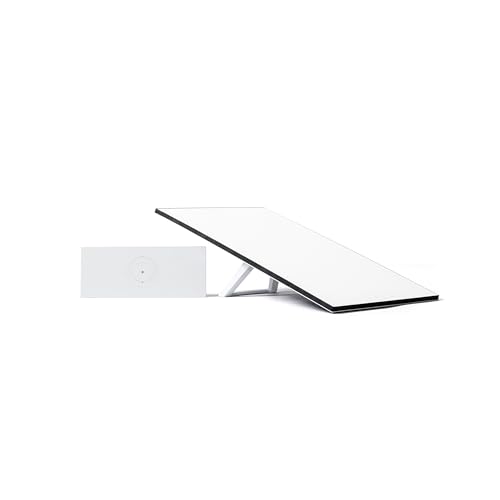
This STARLINK Standard Kit targets users who want satellite internet with a newer tri-band wireless system. Its main appeal is the complete format, since the listing combines the router and satellite dish in one package. That makes it more useful for a new Starlink installation than a basic replacement router. The advertised focus on low latency also suits video calls, streaming, and online play where satellite service is available.
Performance will still depend on the Starlink service plan, sky view, weather, network load, and dish position. A tri-band router can give local devices more wireless room, but it cannot remove delay caused by the internet link itself. I would check the exact kit contents, service terms, and current buyer feedback before ordering. This is a practical choice for people who need a portable satellite setup rather than a stand-alone Wi-Fi router.
Pros:
- Combines a satellite dish and router in one package
- Tri-band design can help separate busy wireless traffic
- Designed for high-speed satellite internet use
- Useful for portable or changing internet locations
- Supports common needs such as streaming and video calls
Cons:
- Satellite latency can vary with weather and network conditions
- It may require a clear view of the sky and careful dish placement
- Service costs are separate from the hardware purchase
What Amazon Buyers Are Saying
Buyer feedback for Starlink kits commonly centers on easy self-install steps, improved access in rural areas, and useful speeds where cable or fiber is not available. Buyers also tend to focus on dish placement, delivery, setup support, and service availability. Complaints can relate to weather interruptions, account activation, or expectations about latency. Because this listing may change over time, I recommend checking the newest reviews and confirming that the kit matches your Starlink region and plan.
My Recommendation
I recommend this kit for rural users, travelers, and homes that need a full Starlink installation. It is not my first choice for a fiber customer who only needs a gaming router. Confirm compatibility and included parts before checkout.
GL.iNet Flint 3 Wi-Fi 7 Router

The GL.iNet Flint 3 is one of the strongest choices here for a normal home internet connection. It uses tri-band Wi-Fi 7 and includes a 6GHz band, which can reduce congestion for compatible devices. The listing also highlights five 2.5G ports and a claimed wireless speed of up to 9 Gbps. Those features give this router room for fast local transfers, gaming, and several active users.
I also like its VPN focus because remote work and privacy users often need more than simple wireless coverage. Wi-Fi 7 features work best with newer phones, laptops, and adapters, so older devices will not gain every benefit. A wired Ethernet connection remains the best way to reduce wireless variation for a gaming PC or console. For many buyers, this is the best router for low latency when they want modern Wi-Fi without buying a large gaming-only unit.
Pros:
- Modern tri-band Wi-Fi 7 platform
- Includes a 6GHz band for compatible devices
- Five 2.5G ports support fast wired links
- Strong fit for gaming, work, and home media
- VPN features add useful control for advanced users
- More flexible than a router made only for gaming
Cons:
- Wi-Fi 7 benefits require compatible client devices
- Advanced settings may feel complex for beginners
- It does not provide satellite internet hardware
What Amazon Buyers Are Saying
Reviews for GL.iNet routers often praise the feature set, wired ports, VPN tools, and control over network settings. Buyers who enjoy custom network setups usually value the flexibility. Some users may need more time to understand VPN modes, firmware options, or advanced wireless settings. As with any Wi-Fi 7 router, buyer results can vary based on device support, wall materials, channel conditions, and the speed of the internet plan.
My Recommendation
I recommend the Flint 3 for users who want low delay, multi-gig networking, and VPN control in one device. It offers a better balance than a very large gaming router. I would choose it for a fast home connection, especially when several newer devices share the network.
SpaceX Starlink Gen 3 Standard Kit

The Starlink Gen 3 Standard Kit is aimed at homes, cabins, and RV users who need internet beyond the reach of cable or fiber. Its Wi-Fi 6 router is a sensible match for many current phones, TVs, laptops, and smart home devices. The kit format simplifies the buying process because the dish and network hardware come together. It also supports the main Starlink use case: broadband access in locations with limited wired options.
Wi-Fi 6 can improve efficiency when many devices connect at once, but it does not guarantee a fixed ping. Satellite conditions still matter more than the router alone. I would place the dish where it has a clear sky view and connect a gaming device by Ethernet when possible. This is a solid pick for users who need a full satellite system and want a newer platform than older Starlink hardware.
Pros:
- Complete kit for a new satellite internet setup
- Wi-Fi 6 suits many modern home devices
- Useful for residential and RV applications
- Can bring internet to areas without wired service
- Supports a simple self-install approach
Cons:
- Requires a suitable Starlink service plan
- Open-sky placement can limit installation choices
- Satellite delay may change during poor conditions
What Amazon Buyers Are Saying
Customers who choose Starlink hardware often highlight access in rural places, quick setup, and the value of receiving internet where local providers cannot reach. Buyers also discuss cable routing, dish placement, activation, and the need to check regional service availability. Negative comments may involve outages, weather, shipping, or confusion about ongoing service charges. Read current reviews closely because the exact bundle and seller can affect the experience.
My Recommendation
This kit is worth considering if you need Starlink rather than a traditional Wi-Fi router. It is a better fit for rural homes and RV users than for city buyers with fiber. I rate it highly as a complete satellite package, but not as the fastest local router in this guide.
SL-4X Starlink Wi-Fi 6 Travel Kit

The SL-4X is marketed as a Starlink Standard kit for travel, RV use, and mobile setups. It pairs a high-performance antenna with a Wi-Fi 6 router, which may suit buyers who want a dedicated internet system away from home. The main benefit is the travel-focused design rather than advanced gaming controls. It can make sense for remote work, browsing, streaming, and other daily tasks in places with limited local broadband.
Before buying, I would confirm that the antenna, router, power parts, and service plan match your exact Starlink setup. Third-party or travel-focused bundles can differ from official packages. Wi-Fi 6 helps local wireless efficiency, but the satellite connection remains the key limit for ping. This kit is most useful when portability and access matter more than the lowest possible local network delay.
Pros:
- Designed around travel and RV use
- Includes a Wi-Fi 6 router platform
- Combines antenna and network hardware
- Useful for remote work and mobile internet needs
- May help users reach service in underserved locations
Cons:
- Buyers must verify compatibility with their Starlink plan
- Travel setup may require extra mounting or power parts
- Not a specialist gaming router
What Amazon Buyers Are Saying
Feedback on travel satellite kits usually focuses on portability, setup time, antenna performance, and whether the package includes the expected parts. Buyers often value internet access at campsites and remote locations. Common concerns include unclear compatibility, cable length, power needs, and service activation. I suggest reading recent reviews for the exact seller and checking every included item before purchase.
My Recommendation
I recommend the SL-4X for an RV owner or traveler who needs a Starlink-based connection. I would not select it for a fixed home with fiber or cable. Its value depends heavily on package contents and compatibility, so verify those details first.
ASUS ROG GT-BE98 Pro Wi-Fi 7 Router

The ASUS ROG Rapture GT-BE98 Pro is the most ambitious router in this group. It uses quad-band Wi-Fi 7 and lists a total wireless speed of up to 30 Gbps. The hardware also includes two 10G ports and four 2.5G ports, giving power users strong options for wired gaming, storage, and fast broadband. ASUS adds Game Boost tools, mesh support, and VPN features for a broad feature set.
This router makes the most sense in a large home with a fast internet plan and several new Wi-Fi devices. It may be excessive for a small apartment or a modest connection. For the lowest practical ping, I would still connect a gaming PC or console by Ethernet and use traffic controls with care. Among these products, this is my top pick for buyers who want the best router for low latency and do not mind paying for high-end hardware.
Pros:
- Quad-band Wi-Fi 7 design
- Two 10G ports support demanding wired networks
- Four 2.5G ports add strong multi-gig flexibility
- Gaming tools can help prioritize network traffic
- Mesh support can expand coverage
- VPN support adds privacy and remote access options
Cons:
- Premium price may exceed the needs of most homes
- Large hardware can take up noticeable shelf space
- Full Wi-Fi 7 value requires newer client devices
- Advanced controls may take time to learn
What Amazon Buyers Are Saying
Buyers of premium ROG routers often praise the strong port selection, coverage, gaming controls, and fast performance with newer devices. Enthusiasts tend to enjoy the detailed settings and network management tools. Common concerns for this class of product include price, size, firmware learning curves, and the need for compatible Wi-Fi 7 clients. I would compare current reviews with your internet speed and home layout before spending at this level.
My Recommendation
I recommend the GT-BE98 Pro for serious gamers, streamers, creators, and homes with multi-gig internet. It is my overall winner for local latency control. It is not the best value for a small home, but it earns its premium when you can use its ports and newer wireless bands.
Starlink Gen 3 Kit With 150-Foot Cable

This bundle targets a common Starlink installation problem: the best dish location may be far from the router or indoor power point. The listing combines a Gen 3 Standard setup with a 150-foot extension cable. That added reach can help place the antenna in a clearer area while keeping the router inside the living space. It is especially interesting for homes, cabins, workshops, and larger lots.
A long cable can make installation easier, but I would inspect its rating, connectors, weather protection, and compatibility before use. Cable routing also needs care to avoid sharp bends, water entry, and trip hazards. This bundle is not designed to compete with the ASUS or GL.iNet for advanced local network controls. Its strength is installation flexibility, which can indirectly improve service stability when dish placement is the main issue.
Pros:
- Includes a 150-foot extension cable
- Helps separate the dish location from the router location
- Useful for larger homes and remote structures
- Based on a Gen 3 Starlink setup
- Can support a clearer antenna placement plan
Cons:
- Long cable runs need careful protection and routing
- Buyers should confirm cable and kit compatibility
- Does not offer advanced gaming traffic controls
What Amazon Buyers Are Saying
Reviews of cable bundles tend to focus on whether the cable reaches the intended location, whether connectors fit, and whether the connection remains stable after installation. Buyers often value the freedom to place the dish away from trees or buildings. Complaints may involve cable quality, packaging, or confusion about which components are official. Check recent feedback and the seller’s item description before relying on the listed cable length.
My Recommendation
I recommend this bundle when cable distance is the main barrier to a clean Starlink installation. It can be a smart buy for a larger property. I would choose a separate premium router only if you also need advanced gaming or home network features.
Starlink Gen 2 Self-Install Kit

This listing is presented as a Starlink Standard Kit with a Gen 2 router and a self-install setup. It may appeal to buyers who want a basic satellite system without a bundle of extra accessories. The product description highlights low-latency internet and broad satellite coverage. Still, the unusual wording in the listing makes careful verification very important before purchase.
I would confirm the seller, generation, warranty, included dish, router, cables, and activation process. Older hardware can remain useful, but a newer generation may offer better wireless features and longer product support. The router itself will not create low ping if the satellite link or service plan limits performance. Treat this as a budget or availability-driven option, not the automatic best router for low latency.
Pros:
- Self-install format may reduce setup complexity
- Offers a complete satellite internet concept
- Can suit locations without cable or fiber
- May cost less than newer premium hardware
- Useful for basic browsing and connected devices
Cons:
- Listing language requires careful product verification
- Older Gen 2 hardware may have fewer modern features
- Exact condition and included parts should be confirmed
- Service and satellite limits still affect latency
What Amazon Buyers Are Saying
For older or unusual marketplace listings, review quality matters even more than the headline. Buyers usually focus on whether the delivered hardware matches the description, whether activation works, and whether cables and power parts arrive. Complaints can involve used condition, missing items, account transfer, or unclear warranty terms. I would read the newest verified reviews and use Amazon’s return terms as part of the buying decision.
My Recommendation
I recommend this only after confirming every listing detail with the seller. It may work for a budget satellite setup, but newer kits provide a clearer buying path. I rate it below the other Starlink options because product uncertainty can outweigh the lower price.
How to Choose the Best Router for Low Latency
Choosing the best router for low latency takes more than looking at the highest speed number. Ping depends on your internet provider, modem or dish, network load, Wi-Fi signal, device distance, and traffic control. A good router gives your devices a clean path and helps prevent large downloads from causing delay. Use these checks before you buy.
1. Match the Router to Your Internet Type
First, identify your connection. Fiber, cable, 5G home internet, and satellite service have different limits. A Wi-Fi 7 router can improve your home network, but it cannot turn satellite service into fiber. If you use Starlink, focus on dish placement, clear sky access, service compatibility, and the correct router mode.
For cable or fiber, check the WAN port speed. A router with only a basic gigabit port may limit a multi-gig plan. For satellite kits, confirm whether the product includes the dish, power supply, cable, and router. Never assume that a product title tells the full story.
2. Look for Real Latency Controls
Low-latency gaming needs stable delay, not just high download speed. Look for quality-of-service tools, traffic priority, device profiles, and controls that prevent uploads or downloads from filling the connection. These tools work best when you set realistic bandwidth limits based on your actual test results.
Ethernet remains the most stable choice for a gaming console or desktop. If you use Wi-Fi, the 5GHz or 6GHz bands can help when your device sits close to the router. Wi-Fi 7 may improve capacity and efficiency, but your phone, laptop, or gaming adapter must support the newer standard to gain the full benefit.
3. Compare Ports, Coverage, and Total Value
Count the ports you will use. Multi-gig Ethernet helps with fast internet plans, network storage, and wired access points. A 10G port can be useful for advanced homes, while several 2.5G ports may offer better everyday value. Do not pay for ports you will never use.
Coverage also matters. A router placed behind a TV or inside a cabinet can create more delay and packet loss than a router placed in an open, central spot. Large homes may need mesh nodes, but each wireless hop can affect performance. Finally, include subscriptions, service fees, mounts, cables, and replacement costs when comparing the total price.
Final Verdict: Which Should You Buy?
For gaming and fast home networks, the ASUS ROG GT-BE98 Pro is the best router for low latency. The GL.iNet Flint 3 offers better value, while Starlink kits suit rural and mobile users.
Choose the product that matches your internet type, device support, and home layout. A wired connection, good placement, and sensible traffic control often matter as much as router speed.
FAQs Of Best Router for Low Latency
What is the best router for low latency gaming?
The ASUS ROG GT-BE98 Pro is my top pick for advanced gaming networks. The GL.iNet Flint 3 is a better value choice for many homes.
Does Wi-Fi 7 reduce gaming ping?
Wi-Fi 7 can improve wireless capacity and reduce local congestion with compatible devices. It cannot fix delay caused by your internet provider or satellite link.
Is Ethernet better than Wi-Fi for low latency?
Yes. Ethernet usually gives a more stable connection with less interference. Connect your gaming PC or console by cable when possible.
Can a router improve Starlink latency?
A better router can improve local network stability, but Starlink latency still depends on the dish, service, weather, network load, and sky visibility.
What router features help prevent lag?
Useful features include quality of service, traffic priority, device profiles, multi-gig Ethernet, current Wi-Fi standards, and clear firmware controls.









