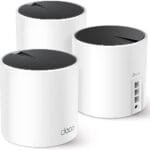
The T-Mobile 5G Gateway Wi-Fi 7 kit is my top pick for busy homes with many connected devices.
A home office, smart TV, game console, phones, cameras, and tablets can all fight for the same connection. That problem gets worse when a router has weak Wi-Fi, poor coverage, or limited cellular support. I reviewed five useful options for T-Mobile users, including 5G and 4G LTE gateways, a traditional ASUS router, and a cellular antenna. The best choice depends on your T-Mobile plan, signal strength, home size, and the number of devices you need to connect each day.
See the differences between my top picks at a glance.
| Product | Best For | Network Type | Main Strength | Key Note | Action |
|---|---|---|---|---|---|
| T-Mobile 5G Gateway Wi-Fi 7 | Busy homes | 5G cellular | Modern Wi-Fi and multi-device use | Check plan and SIM support | View on Amazon |
| Dionlink Dual-Band LTE Router | Flexible 4G users | 4G LTE | SIM slot and external antennas | Not a 5G router | View on Amazon |
| TM-RTL0102 LTE Gateway | Basic T-Mobile LTE use | 4G LTE | Simple gateway design | Renewed product | View on Amazon |
| ASUS AC1900 Router | Existing modem users | Wi-Fi 5 | Security and wired LAN | Needs a separate internet source | View on Amazon |
| Boobrie 4×4 MIMO Antenna | Weak cellular signal | 4G LTE and 5G antenna | Signal improvement option | Accessory, not a router | View on Amazon |
T-Mobile 5G Gateway Wi-Fi 7 Kit

This gateway kit is the strongest all-around option in this group for users who want a current cellular home network. Its product listing describes dual-band Wi-Fi 7 and a no-contract design. That combination makes it appealing for homes that stream, work online, play games, and run smart devices at the same time. It also follows the simple idea of placing a cellular gateway where T-Mobile signal works best.
I like this option for multitasking because newer Wi-Fi standards can manage busy networks more efficiently than older designs. Still, Wi-Fi 7 does not create a faster cellular tower signal by itself. Your real speed will depend on T-Mobile coverage, the plan, network load, and device support. Before buying, I would confirm that the gateway works with your exact T-Mobile service and SIM setup.
Pros:
- Designed for 5G cellular home internet use
- Wi-Fi 7 support for newer phones and laptops
- Useful for homes with many connected devices
- No-contract positioning offers more service flexibility
- Suitable for streaming, work, study, and smart-home tasks
- Modern platform with better long-term appeal than older Wi-Fi routers
Cons:
- Actual speed still depends on T-Mobile coverage and plan limits
- Some devices may not support Wi-Fi 7 features
- Compatibility should be checked before purchase
- May cost more than a basic 4G LTE router
What Amazon Buyers Are Saying
Buyer feedback for cellular gateways often focuses on setup, signal strength, and daily stability. Positive comments tend to value easy installation, useful Wi-Fi coverage, and the freedom to use a cellular connection instead of cable or DSL. Buyers also care about whether the gateway accepts their SIM and connects to the expected carrier network.
The main concerns to watch for are carrier compatibility, uneven speeds, and unclear setup steps. Those issues can come from the router, the SIM, local tower traffic, or the service plan. I recommend reading the newest Amazon reviews for your area and checking the return policy before placing an order.
My Recommendation
I recommend this kit first for a T-Mobile customer who wants a modern 5G gateway and a strong base for many devices. It is not a guaranteed speed upgrade in every location, but it has the most future-ready design in this review. It is worth considering when your service and SIM are compatible.
| Category | Rating |
|---|---|
| Cellular flexibility | 4.5/5 |
| Multitasking potential | 4.5/5 |
| Ease of use | 4/5 |
| Compatibility confidence | 3.5/5 |
| Overall Rating | 4.3/5 |
Dionlink Dual-Band 4G LTE Router

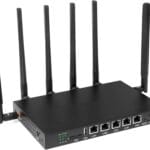
The Dionlink router is a practical pick for people who need an unlocked 4G LTE device with a SIM card slot. Its listing highlights dual-band Wi-Fi, a stated wireless speed class of up to 1200 Mbps, and support for AT&T and T-Mobile. The six-antenna design may also help the unit maintain a stable wireless link inside the home.
This is not the same as a 5G gateway, so buyers should set fair expectations. It can make sense in a rural home, workshop, RV, or backup setup where 4G LTE is the available service. The plug-and-play design may reduce setup stress, but carrier bands, APN settings, and SIM requirements still matter.
Pros:
- Built-in SIM card slot for cellular internet access
- Unlocked design offers carrier flexibility
- Supports T-Mobile and AT&T according to the listing
- Dual-band Wi-Fi supports common 2.4 GHz and 5 GHz devices
- External antenna design may help with wireless coverage
- Useful for home, office, travel, or backup connectivity
Cons:
- Uses 4G LTE rather than 5G cellular service
- Maximum wireless rating is not the same as real internet speed
- Compatibility can vary by SIM, band, and local carrier settings
- May need manual APN setup in some cases
What Amazon Buyers Are Saying
Reviews for unlocked LTE routers commonly praise the SIM slot, flexible carrier use, and easy setup. Buyers often like having a single device that can create Wi-Fi without a fixed broadband line. The antenna layout also attracts users who want a more serious alternative to a phone hotspot.
Common complaints in this product category involve confusing carrier settings, weaker results in low-signal locations, and speed that does not match the printed wireless number. Those concerns are important because the router cannot overcome a poor tower connection. I would check recent reviews for stability, heat, setup, and T-Mobile band support before buying.
My Recommendation
I recommend the Dionlink for buyers who need a flexible 4G LTE router and do not require 5G. It offers a useful mix of SIM support, dual-band Wi-Fi, and a router form that suits several use cases. It is a good value when 4G is reliable in your area, but I would not choose it as my first option for a high-demand 5G home.
| Category | Rating |
|---|---|
| SIM flexibility | 4.5/5 |
| 4G performance potential | 4/5 |
| Setup convenience | 4/5 |
| Future-proofing | 3/5 |
| Overall Rating | 4/5 |
TM-RTL0102 LTE Gateway for T-Mobile
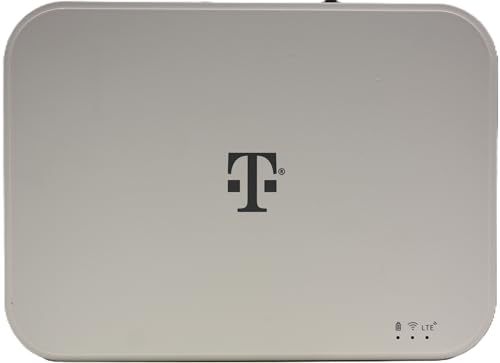
The TM-RTL0102 is a renewed LTE Wi-Fi gateway made for T-Mobile service. It targets buyers who want a simple cellular home network without paying for the newest 5G hardware. A gateway can be helpful when you need one Wi-Fi connection for several devices instead of using a phone hotspot all day.
Because this unit is renewed, condition and included accessories deserve extra attention. I would inspect the listing for warranty terms, return rules, power supply details, and SIM requirements. This can be a sensible low-cost option for light browsing, email, streaming on a few devices, or a backup connection.
Pros:
- Designed for T-Mobile LTE use according to the listing
- Gateway format creates a shared home Wi-Fi network
- May cost less than a new 5G device
- Useful for basic browsing and light home tasks
- White, compact design may fit neatly in a room
- Renewed hardware can offer value for careful buyers
Cons:
- Renewed condition may vary from unit to unit
- LTE limits its speed potential compared with 5G
- Less suitable for heavy multi-device use
- Buyers must confirm included accessories and return coverage
What Amazon Buyers Are Saying
When shoppers choose renewed gateways, they often look for low price, working hardware, and a quick setup. Positive experiences usually center on getting a usable T-Mobile LTE connection without buying a costly new system. Some buyers also appreciate the simple design and small footprint.
The main risks involve cosmetic wear, missing parts, activation trouble, and performance that depends on local LTE coverage. A renewed unit may work well, but the buying process needs more care than a new product. I suggest saving the packaging and testing the gateway soon after delivery.
My Recommendation
I recommend this LTE gateway only when price matters more than peak speed and your T-Mobile LTE signal is dependable. It may work well as a basic or backup connection. For a busy family home, I would spend more on a current 5G gateway if the budget allows.
| Category | Rating |
|---|---|
| Basic LTE use | 4/5 |
| Value potential | 4/5 |
| Multitasking capacity | 3/5 |
| Condition confidence | 3.5/5 |
| Overall Rating | 3.6/5 |
ASUS AC1900 Dual-Band Router

The ASUS AC1900 is a traditional wireless router, not a T-Mobile cellular modem. Its strengths include dual-band Wi-Fi, Gigabit wired networking, and AiProtection with Trend Micro. It can be a strong choice for users who already have a compatible T-Mobile gateway or modem and want better local Wi-Fi control.
This distinction matters. The ASUS router cannot replace a cellular gateway by itself because it needs an internet source through its Ethernet connection. Once connected, it can serve computers, game consoles, smart TVs, and other devices. Its Wi-Fi 5 platform remains useful, but newer Wi-Fi 6 and Wi-Fi 7 routers offer better long-term value for some homes.
Pros:
- Gigabit Ethernet supports wired computers and consoles
- Dual-band Wi-Fi works with many existing devices
- AiProtection adds useful network security tools
- Good fit for users who already own a modem or gateway
- Can improve local network management over basic gateway Wi-Fi
- Useful for streaming, gaming, and home office devices
Cons:
- Does not provide T-Mobile cellular service by itself
- Older Wi-Fi 5 standard than newer router platforms
- Requires another modem or gateway for internet access
- Security features may require attention to updates and settings
What Amazon Buyers Are Saying
Buyers often like ASUS routers for their strong feature set, wired ports, and security controls. Many users choose this type of router to gain better control over a home network than their internet provider gateway offers. Stable coverage and a mature settings interface also appear in the reasons people consider it.
Common concerns include setup complexity, older hardware, and confusion about modem versus router functions. Some users expect the router to connect directly to cellular service, which it cannot do without compatible upstream equipment. I would buy it only if you understand where it fits in your network.
My Recommendation
I recommend the ASUS AC1900 as a second-stage router for a T-Mobile gateway, not as a standalone T-Mobile internet solution. It remains useful for wired connections and network security. If you need one box with cellular access, choose a 4G or 5G gateway instead.
| Category | Rating |
|---|---|
| Wired networking | 4.5/5 |
| Security features | 4/5 |
| Wireless generation | 3.5/5 |
| Cellular usefulness | 2/5 |
| Overall Rating | 3.8/5 |
Boobrie 4×4 MIMO Cellular Antenna

The Boobrie 4×4 MIMO antenna is different from the other products here. It is an accessory for a compatible modem, gateway, hotspot, or router. The listing describes a wide 600–6000 MHz range, an omnidirectional design, SMA and TS9 connector options, and a 9.84-foot RG58 cable. Those features may help users place an antenna where cellular reception is better.
An antenna can help when the router has removable antenna ports and the outdoor or window location receives a stronger signal. It cannot improve service if the device lacks the right connectors or if the tower signal is poor everywhere nearby. Cable length, connector type, placement, and local interference all affect results. I would confirm the exact ports on your T-Mobile equipment before ordering.
Pros:
- Supports a broad listed frequency range
- 4×4 MIMO design targets compatible cellular equipment
- Omnidirectional form does not require tower aiming
- Long cable allows more placement options
- Includes SMA and TS9 connector support according to the listing
- May help a gateway hold a stronger cellular connection
Cons:
- It is not a router or modem
- Results depend on compatible ports and local signal conditions
- Long cable runs can reduce signal quality
- Placement may take trial and error
What Amazon Buyers Are Saying
Buyers of cellular antennas usually focus on connector fit, cable quality, mounting options, and signal changes after installation. Positive experiences often come from homes where moving the antenna near a window or outside improves reception. Users also value a cable that gives them more freedom than a built-in router antenna.
Feedback can vary widely because every location has different towers, walls, trees, and interference. Some buyers see little change when their router does not support the antenna correctly or when the original signal is already strong. I would treat this as a problem-solving accessory, not a guaranteed speed upgrade.
My Recommendation
I recommend the Boobrie antenna for T-Mobile users who already have a compatible cellular router and a clear signal problem. It can be a useful add-on for a distant tower or thick-walled room. I would not buy it first unless I had checked the gateway ports and tested the antenna placement plan.
| Category | Rating |
|---|---|
| Connector flexibility | 4/5 |
| Placement options | 4/5 |
| Potential signal help | 4/5 |
| Ease of choosing correctly | 3/5 |
| Overall Rating | 3.8/5 |
How to Choose the Best Multitasking Router for T Mobile
Choosing the Best Multitasking Router for T Mobile takes more than looking at a large speed number. You need to match the router to your cellular plan, signal, home size, device count, and daily tasks. A good router should keep work calls, video streams, smart devices, and normal browsing usable at the same time.
1. Match the Router to 5G or 4G LTE Service
Start with the cellular network you can use at your address. A 5G gateway makes the most sense when T-Mobile 5G coverage reaches your home and your plan allows the service. A 4G LTE router may offer better value in an area where LTE is more stable or where 5G is weak.
Do not confuse Wi-Fi speed with cellular speed. Wi-Fi connects your devices to the router. Cellular service connects the router to the T-Mobile network. A router may advertise a high wireless rate while your internet speed stays limited by the tower, signal quality, plan, or local network load.
Check SIM type, supported bands, APN needs, and carrier approval. These details can decide whether an unlocked router works well. If the listing uses broad words such as “supports T-Mobile,” read the technical details and recent buyer comments before purchase.
2. Choose Features for Your Real Device Load
Count the devices that connect at the same time. Include phones, laptops, televisions, cameras, speakers, printers, game systems, and smart-home devices. A small home with light browsing may work well with a basic LTE gateway. A family home with remote work, streaming, gaming, and cameras needs a stronger platform.
Dual-band Wi-Fi remains useful because many devices support both 2.4 GHz and 5 GHz connections. The 2.4 GHz band often reaches farther through walls. The 5 GHz band can offer more speed at a shorter range. Newer Wi-Fi 6 or Wi-Fi 7 hardware may handle busy networks more smoothly, but only compatible devices can use every new feature.
Look for Ethernet ports if you use a desktop computer, game console, security system, or smart TV. Wired connections can reduce wireless congestion and improve consistency. Security tools, guest networks, parental controls, and automatic updates also add value for a busy household.
3. Consider Signal Placement, Value, and Support
Placement matters with every cellular gateway. Test the router near a window, on an upper floor, or in another open spot. Keep it away from thick concrete, metal objects, large appliances, and crowded cabinets. The best location may not be the same place where you want the strongest indoor Wi-Fi.
If the cellular signal is weak, check whether the gateway supports external antennas. An antenna such as the Boobrie may help in the right setup, but it needs compatible connectors and careful placement. Do not assume an antenna will fix every signal problem.
Compare the full cost, not only the device price. Include the T-Mobile plan, possible SIM fees, cables, antennas, and return shipping. A low-cost renewed LTE gateway can be a smart backup. It may be poor value for a large family that needs heavy 5G use every day.
Finally, review the return policy and warranty. Test download speed, upload speed, latency, Wi-Fi range, and connection stability during the return window. Run tests at different times because cellular congestion can change from morning to evening. This simple check gives you a better view than one speed test made right after setup.
Final Verdict: Which Should You Buy?
For most busy T-Mobile homes, the T-Mobile 5G Gateway Wi-Fi 7 kit is my top choice. It offers the best mix of modern Wi-Fi, cellular access, and multi-device potential, provided your plan and SIM are compatible.
The Dionlink is a strong 4G alternative, while the ASUS works best behind an existing gateway. Choose the Best Multitasking Router for T Mobile by matching network type, signal, ports, and return support to your real needs.
FAQs Of Best Multitasking Router for T Mobile
Can I use any unlocked router with T-Mobile?
No. The router must support the right cellular bands, SIM type, network settings, and T-Mobile service rules. Always check compatibility before buying.
Is a 5G gateway better than a 4G LTE router?
It can be, but only when 5G coverage and your plan support it. A stable 4G LTE router may work better than weak 5G in some locations.
Can the ASUS AC1900 connect directly to T-Mobile cellular service?
No. The ASUS AC1900 is a standard Wi-Fi router. It needs a modem or cellular gateway with an Ethernet connection.
Will an external antenna increase T-Mobile internet speed?
It may help when the gateway supports the antenna and the antenna reaches a stronger signal. Results vary by location, cable, connectors, and tower conditions.
What is the best router for many devices on T-Mobile?
The T-Mobile 5G Gateway Wi-Fi 7 kit is the strongest option in this review for many devices, subject to plan, SIM, and coverage compatibility.