


The best router for VPN combines strong VPN support, fast Wi-Fi, secure controls, and simple setup for your home.
Slow streaming, dropped video calls, and device limits can make a VPN feel like a problem instead of a privacy tool. A good VPN router solves much of that work by protecting many devices from one central point. I tested the key features, ports, wireless standards, VPN support, size, and value of these leading models. My list includes home routers, wired VPN gateways, and compact travel routers, so you can choose the right fit for your network.
See the differences between my top picks at a glance.
| Router | Wi-Fi / Network Type | VPN Highlights | Best For | Buy |
|---|---|---|---|---|
| TP-Link Archer AX55 | AX3000 Wi-Fi 6 | VPN client and server | Most homes | View on Amazon |
| GL.iNet Opal | AC1200 travel router | OpenVPN and WireGuard | Budget travel use | View on Amazon |
| GL.iNet Beryl AX | Wi-Fi 6 travel router | OpenVPN and WireGuard | Fast travel VPN | View on Amazon |
| GL.iNet Slate 7 | Wi-Fi 7 travel router | VPN and AdGuard toggle | Modern travel setups | View on Amazon |
| TP-Link ER605 | Wired Gigabit | Multi-WAN VPN gateway | Small offices | View on Amazon |
| GL.iNet Flint 3 | Tri-band Wi-Fi 7 | VPN-focused 2.5G router | Power users | View on Amazon |
| TP-Link Archer AXE75 | AXE5400 Wi-Fi 6E | VPN and WPA3 support | Gaming and streaming | View on Amazon |
TP-Link Archer AX55 Wi-Fi 6 VPN Router

The TP-Link Archer AX55 is the strongest all-around pick for most homes. It uses Wi-Fi 6 and offers an AX3000 class wireless connection. The router also supports VPN client and VPN server functions, which gives buyers more flexibility than a basic home router. Its dual-band design suits homes with phones, laptops, smart TVs, consoles, and smart home devices.
I like the practical feature mix here. EasyMesh can help build wider coverage with compatible TP-Link equipment, while OFDMA and MU-MIMO help the router manage many connected devices. The USB 3.0 port adds useful file-sharing options, and HomeShield adds extra security tools. VPN speed still depends on the VPN provider, encryption settings, and your internet plan, but this router offers a balanced base for everyday privacy.
Pros:
- Wi-Fi 6 helps manage busy home networks.
- Supports both VPN client and VPN server functions.
- EasyMesh can expand coverage with compatible devices.
- USB 3.0 supports useful storage and sharing features.
- OFDMA and MU-MIMO suit homes with many devices.
- WPA3 support adds a modern wireless security option.
Cons:
- Advanced VPN setup may still require technical steps.
- Dual-band Wi-Fi has less capacity than newer tri-band models.
- HomeShield features may vary by plan or region.
What Amazon Buyers Are Saying
Amazon buyer feedback commonly praises the Archer AX55 for easy setup, steady Wi-Fi, and good coverage in typical homes. Buyers also often like the clean management app and the strong value for a Wi-Fi 6 router. Some users report that VPN settings take more time to understand than the basic wireless setup. Others note that real coverage depends on wall materials, placement, and home size, so results differ from one house to another.
My Recommendation
I recommend the Archer AX55 to families and home users who want VPN features without moving to a complex business gateway. It offers the best mix of price, speed, security, and daily ease among these standard home models.
GL.iNet Opal AC1200 Travel VPN Router
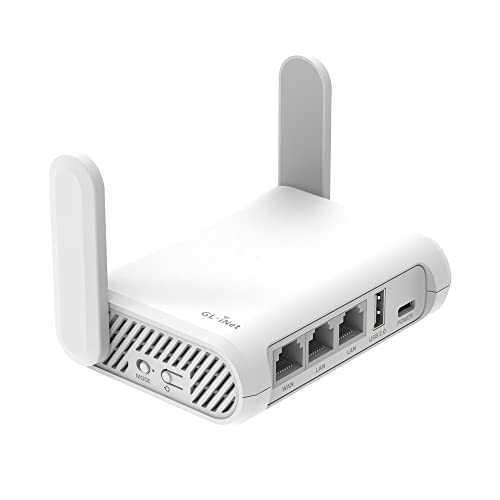
The GL.iNet Opal is a compact AC1200 travel router built for people who need VPN access away from home. It runs OpenWrt and supports OpenVPN and WireGuard. The unit includes three Gigabit ports, which is useful in hotel rooms, rental homes, and small temporary workspaces. At about 145 grams, it is easy to pack in a laptop bag.
This router works well as a personal travel network. Instead of connecting every device to a hotel network, I can connect the Opal once and then use my own Wi-Fi name and security settings. Its smaller design makes it less suitable for a large home or heavy multi-device use. Still, for basic browsing, work, streaming, and VPN use on the road, it offers a useful set of tools at a low entry cost.
Pros:
- Small and light for travel.
- Supports both OpenVPN and WireGuard.
- Three Gigabit Ethernet ports add connection choices.
- OpenWrt gives users broad control.
- AC1200 dual-band Wi-Fi suits basic travel use.
- Can create a private network from a hotel connection.
Cons:
- It lacks the newer Wi-Fi 6 standard.
- VPN encryption can reduce speed on demanding connections.
- Its compact range may not suit a large home.
What Amazon Buyers Are Saying
Amazon customers often praise the Opal for its small size, flexible software, and ability to simplify hotel Wi-Fi. Many buyers like having OpenVPN and WireGuard support in an affordable travel device. Common concerns focus on the learning curve, especially for users who have never used OpenWrt. Some buyers also explain that hotel login pages and unusual network rules may require extra setup.
My Recommendation
The Opal is worth buying if you want a low-cost VPN travel router for one or a few users. I would not choose it as the main router for a busy modern home, but it remains a smart compact option for work trips and vacations.
GL.iNet Beryl AX Wi-Fi 6 Travel Router

The GL.iNet Beryl AX is a stronger travel choice for users who want Wi-Fi 6 in a small body. Its dual-band wireless design reaches up to 574 Mbps on 2.4 GHz and 2402 Mbps on 5 GHz under ideal link conditions. It also has a 2.5G WAN port, a Gigabit LAN port, and USB 3.0. OpenWrt, OpenVPN, and WireGuard give it the software flexibility that VPN users expect.
The Beryl AX stands out when travel speed matters. The 2.5G WAN port gives it room for fast wired internet, although the final speed still depends on the source network. I find it better suited than the Opal for several devices, high-speed file work, and modern laptops. Its controls are powerful, but first-time users should expect to spend time learning VPN profiles, DNS settings, and travel network modes.
Pros:
- Wi-Fi 6 improves capacity for newer devices.
- Fast 5 GHz wireless link under suitable conditions.
- Includes a 2.5G WAN port.
- Supports OpenVPN and WireGuard.
- USB 3.0 adds storage and tethering options.
- Compact design works well for hotels and mobile offices.
Cons:
- Advanced settings may feel complex for beginners.
- Small travel routers cannot match large-home coverage.
- Maximum wireless rates require compatible devices and ideal conditions.
What Amazon Buyers Are Saying
Buyer feedback often highlights the Beryl AX’s speed, size, and VPN flexibility. Customers commonly use it for hotels, remote work, RV trips, and shared travel connections. Reviews also show that many users appreciate the 2.5G port and WireGuard support. The main complaints tend to involve setup details, firmware behavior, or confusion around hotel captive portals, which are common issues for travel routers in general.
My Recommendation
I recommend the Beryl AX as the best travel-focused VPN router in this group. It costs more than the Opal, but the Wi-Fi 6 hardware and 2.5G WAN port make the extra cost easier to justify for frequent travelers.
GL.iNet Slate 7 Wi-Fi 7 Travel Router

The GL.iNet Slate 7 is a tiny Wi-Fi 7 travel router with a touchscreen and a 2.5G connection. Its screen can provide quick access to VPN or AdGuard controls. The small one-inch class design targets hotel rooms, cruise cabins, RVs, business trips, and plane connectivity. This is a specialized router for travelers who want modern features in a very small package.
The touchscreen is the main reason to consider this model. It can make common actions faster than opening a phone or laptop dashboard. Wi-Fi 7 may help with newer client devices, but older devices will not gain every benefit from the standard. As with any travel router, the source network remains the limit, and some public networks may still require extra steps before the VPN tunnel works.
Pros:
- Very small design saves bag space.
- Wi-Fi 7 supports newer client hardware.
- 2.5G networking suits fast wired connections.
- Touchscreen offers quick VPN and AdGuard control.
- Useful for hotels, cruises, RVs, and business travel.
- Modern design gives the router a simple travel interface.
Cons:
- New Wi-Fi 7 benefits require compatible devices.
- Small hardware may have less range than a home router.
- Touchscreen controls do not remove the need for deeper setup in some networks.
What Amazon Buyers Are Saying
Amazon shoppers are drawn to the Slate 7 because of its size, touchscreen, and modern wireless standard. Early buyer experiences commonly focus on convenience during travel and quick access to network controls. Some users may find the product more advanced than needed for simple browsing. Buyers should also check current firmware and device support, since newer hardware can receive improvements over time.
My Recommendation
The Slate 7 is a good premium travel pick for users who value a touchscreen and newer Wi-Fi technology. I recommend it for frequent travelers, but casual users may get better value from the Opal or Beryl AX.
TP-Link ER605 Wired VPN Gateway

The TP-Link ER605 is different from the other routers here because it is a wired VPN gateway. It does not provide built-in Wi-Fi, so you pair it with a separate access point or wireless router. It offers up to three WAN Ethernet ports plus one USB WAN connection. Its design targets small offices, home labs, and networks that need multi-WAN control.
Load balancing is the key feature. It can help a small office use more than one internet connection, while the SPI firewall adds a layer of network protection. Omada SDN integration can make centralized management easier when you already use compatible TP-Link equipment. I would not buy this as a simple plug-and-play home Wi-Fi router, but it is a strong choice for users who understand wired network design.
Pros:
- Supports multiple WAN connections.
- Load balancing can improve connection flexibility.
- SPI firewall supports basic network protection.
- Omada SDN integration suits managed networks.
- Wired Gigabit design avoids wireless interference.
- Compact form fits office shelves and network cabinets.
Cons:
- It does not provide Wi-Fi by itself.
- Advanced multi-WAN and VPN features require networking knowledge.
- Users may need extra hardware for wireless coverage.
What Amazon Buyers Are Saying
Amazon buyers often like the ER605 for its low cost, small size, and multi-WAN features. It attracts home lab users, small businesses, and people who want to explore Omada networking. Reviews commonly show that setup feels easy for experienced network users but less clear for beginners. Some buyers also point out that the device works best when paired with suitable access points and a clear network plan.
My Recommendation
The ER605 is worth buying for a wired VPN gateway or small office network. It is not the best router for VPN if you expect one box to provide Wi-Fi, but it is excellent value for a controlled wired setup.
GL.iNet Flint 3 Tri-Band Wi-Fi 7 Router

The GL.iNet Flint 3 is the most advanced VPN-focused home router in this comparison. It uses tri-band Wi-Fi 7, includes the 6 GHz band, and offers five 2.5G ports. The product listing states a total wireless rate of up to 9 Gbps, which refers to combined theoretical wireless capacity rather than a single device’s real download speed. It is built for demanding homes with fast internet, newer clients, and many active connections.
The Flint 3 makes the most sense for power users. Its extra band can reduce crowding, while multiple 2.5G ports support fast wired devices and network equipment. The OpenWrt-based platform also gives VPN users more control than many basic consumer routers. However, the price, advanced controls, and need for compatible Wi-Fi 7 devices mean that many ordinary homes will not use its full potential.
Pros:
- Tri-band Wi-Fi 7 supports high-capacity home networks.
- Includes the 6 GHz band for compatible devices.
- Five 2.5G ports support fast wired connections.
- Strong fit for VPN power users.
- Designed for gaming, streaming, calls, and busy networks.
- OpenWrt-based controls offer deep customization.
Cons:
- Higher cost than basic Wi-Fi 6 VPN routers.
- Older devices cannot use every Wi-Fi 7 feature.
- Advanced controls may overwhelm casual users.
What Amazon Buyers Are Saying
Amazon buyers who choose the Flint 3 usually focus on speed, ports, VPN tools, and the advanced software platform. Enthusiastic reviews often mention strong performance with modern devices and demanding home use. The likely weak point for some customers is complexity, since a powerful router offers more choices to manage. Buyers should also confirm that their internet service, client devices, and wired hardware can benefit from multi-gigabit networking.
My Recommendation
I recommend Flint 3 to enthusiasts, creators, gamers, and large households with fast internet. It is my premium pick, but it only offers strong value when you can use its Wi-Fi 7 and 2.5G features.
TP-Link Archer AXE75 Wi-Fi 6E Router

The TP-Link Archer AXE75 is a tri-band Wi-Fi 6E router for gaming, streaming, and busy homes. It adds the 6 GHz band and includes a 2.5 Gbps WAN port. The router also supports 160 MHz channels, OneMesh, a dual-core CPU, VPN functions, and WPA3 security. It offers a middle path between a standard Wi-Fi 6 router and a premium Wi-Fi 7 model.
The 6 GHz band can be useful when compatible devices sit near the router and need a clean, fast connection. It does not improve every older device, so buyers should check their laptops, phones, and adapters first. The 2.5 Gbps WAN port also helps prepare the network for faster internet service. I see the AXE75 as a practical choice for users who want extra wireless capacity without paying for the highest-end hardware.
Pros:
- Tri-band design adds the 6 GHz band.
- 2.5 Gbps WAN port supports faster internet plans.
- 160 MHz channels suit compatible high-speed clients.
- OneMesh can help extend coverage with compatible equipment.
- WPA3 provides a current wireless security option.
- Good match for gaming and high-quality streaming.
Cons:
- 6 GHz range can be shorter through walls.
- Older devices cannot use the 6 GHz band.
- VPN speed may not match normal wired or wireless throughput.
What Amazon Buyers Are Saying
Amazon feedback often praises the AXE75 for fast wireless speeds, stable connections, and good value for a tri-band 6E router. Buyers with newer phones and laptops tend to get the most from the 6 GHz band. Some customers report that placement and device compatibility affect results. A few buyers also mention that advanced settings and firmware updates require care, which is normal for a feature-rich router.
My Recommendation
The Archer AXE75 is a strong choice for a home that has Wi-Fi 6E devices and wants better wireless capacity. I recommend it over the AX55 when you need tri-band Wi-Fi, but the AX55 offers better value for simpler homes.
How to Choose the Best Router for VPN
Choosing the best router for VPN use requires more than checking the largest Wi-Fi speed number. A router must support the VPN type you plan to use, handle your internet speed, and cover your space. It should also offer firmware updates, safe wireless encryption, and controls you can understand. Use the points below before you buy.
1. Confirm VPN Client Support
A VPN client lets the router connect to a VPN service. Devices on your network can then use that connection without separate VPN apps. Look for support for the protocol your provider uses, such as WireGuard or OpenVPN. WireGuard often offers a simple setup and good speed, while OpenVPN remains widely supported.
Do not confuse VPN client support with VPN server support. A client connects outward to a VPN service. A server lets you connect back to your home network from another place. Some routers support both, such as the Archer AX55, while other models focus on one use. Always check the current firmware guide before purchase.
2. Match Wi-Fi and Wired Speed to Your Devices
Wi-Fi 6 is enough for many homes. Wi-Fi 6E adds a 6 GHz band, and Wi-Fi 7 adds newer tools for compatible devices. These standards can improve capacity, but they do not remove the limits of your internet plan, walls, or older client hardware. A high speed label does not mean one device will reach that number.
Check the wired ports too. A 2.5G WAN port helps when your internet service exceeds 1 Gbps. A multi-gig LAN port helps connect a fast desktop, NAS, or switch. Travel routers may use one fast WAN port and one Gigabit LAN port, while wired gateways such as the ER605 focus on flexible Ethernet connections.
3. Consider Setup, Coverage, and Long-Term Value
Choose a simple home router if you want quick setup. Choose an OpenWrt-based model if you want deeper control and do not mind learning. For travel, focus on weight, power needs, captive portal support, and easy network cloning. For an office, look for multi-WAN support, firewall tools, central management, and stable wired performance.
Placement also affects VPN performance. Put a home router in an open, central location. Keep it away from thick walls and large metal objects. For a travel router, place it close to the hotel connection and your main devices. Finally, compare the full cost, including a VPN subscription, extra access points, Ethernet cables, and possible support needs.
Final Verdict: Which Should You Buy?
For most homes, I recommend the TP-Link Archer AX55 as the best router for VPN because it balances Wi-Fi 6 speed, VPN client and server support, security, and price. Power users should choose the GL.iNet Flint 3, while travelers should choose the Beryl AX.
Match the router to your network, not just its speed label. The right VPN router can simplify privacy, improve control, and keep more devices connected with less effort.
FAQs Of Best Router for VPN
Can a router run a VPN for every device?
Yes. A router with VPN client support can connect to a VPN service and share that connection with devices on its network. Check protocol and device limits before setup.
Is Wi-Fi 6 important for a VPN router?
Wi-Fi 6 is useful for busy homes with many newer devices. It does not guarantee faster VPN speeds, because the VPN service, router processor, and internet plan also matter.
Is WireGuard better than OpenVPN on a router?
WireGuard often provides simple setup and good speed. OpenVPN has broad support. The better choice depends on your VPN provider and the protocols supported by your router.
What is the best travel router for VPN use?
The GL.iNet Beryl AX is my top travel pick for its Wi-Fi 6 support, 2.5G WAN port, OpenVPN, WireGuard, and compact design. The Opal costs less, while the Slate 7 adds newer features.
Can I use the TP-Link ER605 as a Wi-Fi router?
No. The ER605 is a wired VPN gateway and does not provide built-in Wi-Fi. You need a separate wireless access point or Wi-Fi router.









