


The best router for high bandwidth is the Omada ER8411 for fast, stable, multi-device network control.
A busy home can expose a weak router fast. One person streams 4K video, another joins a video call, and someone else downloads a large game. Then the network slows, buffers, or drops devices. I reviewed six routers for speed, wired capacity, coverage, security, and daily ease of use. These models fit different needs, from simple Wi-Fi 6 home networks to advanced wired setups with multiple WAN links. My top pick favors strong network capacity, while the other options offer useful value for homes, gamers, and small offices.
See the differences between my top picks at a glance.
Omada ER8411 Enterprise VPN Router

The Omada ER8411 is the strongest choice here for a high-capacity wired network. It targets homes, studios, and small offices that need more than basic wireless routing. Its 10G network design gives fast wired devices room to move large files and handle demanding internet plans. It also supports VPN functions, firewall controls, and Omada SDN management.
This router does not act like a normal all-in-one Wi-Fi box. You will need separate access points for wireless coverage. That may sound like extra work, but it gives you more control over placement and future upgrades. The listed support for multiple WAN ports and load balancing also makes it useful when uptime matters. I would pair it with Wi-Fi 6 or Wi-Fi 7 access points for a complete high-bandwidth setup.
Pros:
- Strong wired capacity for demanding networks
- 10G connectivity for fast local transfers
- Supports VPN and SPI firewall features
- Useful load-balancing options for more than one WAN link
- Works with Omada SDN management
- Good fit for small offices and advanced home labs
Cons:
- Does not provide built-in consumer Wi-Fi
- May feel complex for a basic home setup
- Needs compatible access points for wireless coverage
What Amazon Buyers Are Saying
Buyer feedback for business-class routers often focuses on stability, management tools, and setup depth. Users who understand VLANs, VPNs, and managed networks tend to value the control. The common concern is the learning curve. Before buying, I recommend checking the current listing and support details because firmware features and hardware bundles can change.
My Recommendation
I recommend the ER8411 when your priority is capacity, control, and wired speed. It is not the easiest pick for a small apartment, but it is the most capable foundation in this group. Add suitable access points and it becomes a powerful network core. It is worth buying for advanced users who will use its business features.
WiFi 6 AX3000 Smart Router

This AX3000 router offers a practical balance for a busy family home. Wi-Fi 6 helps it manage many connected devices with less waste than older wireless standards. The dual-band design can serve phones, laptops, smart TVs, and game systems at the same time. Its listed high-gain antennas and gigabit ports also support broad home coverage and fast wired links.
The router includes useful home tools such as parental controls, VPN support, and mesh support. Those features matter when your home has several rooms or when you want to add coverage later. AX3000 is a wireless class, not a promise that every device will reach that speed. Your results will depend on the client device, walls, channel use, and internet plan.
Pros:
- Wi-Fi 6 support for modern devices
- AX3000 class suits streaming and work from home
- Gigabit ports support fast wired connections
- Mesh support allows future coverage expansion
- Parental control tools help manage family access
- High-gain antennas may help with room-to-room coverage
Cons:
- Dual-band Wi-Fi can still face congestion in crowded areas
- Wireless speed falls with distance and thick walls
- Advanced users may want deeper network controls
What Amazon Buyers Are Saying
Customers shopping in this class usually look for easy setup, stable streaming, and better coverage than an internet provider gateway. Positive feedback commonly centers on the value of Wi-Fi 6 and the simple home features. As with many budget and midrange routers, buyer experiences can vary by home layout and firmware version. I suggest reading the latest reviews for reports that match your internet plan and home size.
My Recommendation
This is my best all-around wireless pick for many homes. It has enough capacity for several users without the cost or complexity of a business router. I would choose it for a family with 4K streaming, remote work, smart devices, and a fast internet plan. It is a strong value if you need broad features in one box.
PLERY AX3000 Wi-Fi 6 Router

The PLERY AX3000 is built for homes that mix wireless devices with wired gaming and streaming gear. It uses Wi-Fi 6 features such as OFDMA and MU-MIMO to share airtime more efficiently between compatible devices. The router also lists six high-gain antennas and five gigabit ports. That port count gives you more room for a desktop, console, smart TV, and network storage.
EasyMesh support is a useful feature for homes with dead zones. You can plan a compatible mesh setup instead of replacing the main router when one room needs better service. The AX3000 class fits high-definition streaming and online play, but wired Ethernet remains the better choice for fixed gaming devices. I like this model most when a buyer wants several LAN ports without moving into enterprise equipment.
Pros:
- Wi-Fi 6 improves handling of many devices
- Five gigabit ports suit wired gaming setups
- OFDMA and MU-MIMO support efficient traffic sharing
- EasyMesh offers a path to wider coverage
- High-gain antenna design supports whole-home use
- Good match for 4K streaming and busy households
Cons:
- Mesh performance depends on compatible units and placement
- Not a 10G router for very fast local networks
- Newer brands may offer less long-term user documentation
What Amazon Buyers Are Saying
Shoppers in this price range often praise routers that offer many ports and a clear setup process. The main buying questions tend to involve coverage, app quality, and stability over time. Reviews can differ because wireless results change with building materials and device support. I would check the current Amazon feedback for recent comments on firmware, setup, and EasyMesh pairing before ordering.
My Recommendation
I recommend the PLERY AX3000 for gamers and families that want multiple wired connections. Its feature list is well matched to a high-bandwidth home network. Choose it over a basic AX1500 model when you need extra ports and stronger device handling. It is worth considering, but I would verify current support details before buying.
Tenda RX2 Pro AX1500 Router

The Tenda RX2 Pro is a sensible low-cost route into Wi-Fi 6. Its AX1500 class is lower than the AX3000 models, yet it still adds modern wireless features for phones, laptops, and smart home devices. The router lists five 6 dBi high-gain antennas and four gigabit ports. It also supports WPA3, IPv6, and parental controls.
This model suits a small or medium home with a moderate internet plan. It can handle everyday streaming, work calls, browsing, and many smart devices when placed in a good central spot. It is not the first choice for the most demanding multi-user network, but it offers a useful mix of range features and security. The four gigabit ports also help users avoid relying on Wi-Fi for every device.
Pros:
- Affordable entry into Wi-Fi 6
- Four gigabit Ethernet ports
- WPA3 support adds modern wireless security
- IPv6 support helps with newer network services
- Parental controls support family use
- High-gain antenna design may improve reach
Cons:
- AX1500 offers less capacity than AX3000 options
- May not suit very fast internet plans with heavy use
- Advanced traffic controls may be limited
What Amazon Buyers Are Saying
Buyers who choose the RX2 Pro usually want a simple upgrade from an older router or provider device. The features that attract them are Wi-Fi 6, gigabit ports, and a low entry price. Coverage reports will always vary with walls, floor plans, and placement. I recommend checking current buyer comments for setup ease and real-world range in homes similar to yours.
My Recommendation
The Tenda RX2 Pro is a good value choice for a smaller home or a moderate broadband plan. It is not the best router for high bandwidth when many people push large downloads at once. Still, it gives basic users modern security and Wi-Fi 6 at a sensible level. Buy it when price and simple home coverage matter most.
Synology RT2600ac Wireless Router

The Synology RT2600ac remains interesting because it puts strong software tools at the center of the home network. It uses dual-band 4×4 Wi-Fi and gigabit Ethernet. The router also supports MU-MIMO, VPN functions, traffic control, parental tools, and expandable mesh coverage. Its Threat Prevention feature can help users who want more visibility into network activity.
This is an older Wi-Fi 5 design, so it does not offer the same wireless efficiency as a newer Wi-Fi 6 router. Yet the software can make it a better fit for a user who values control over raw wireless class. Bandwidth management helps you set priorities for work, video, or other traffic. I would consider it for a home that needs detailed management and already works well with Synology’s ecosystem.
Pros:
- Strong router software and management options
- 4×4 dual-band design
- Useful bandwidth management tools
- Parental controls offer detailed access rules
- VPN support for remote access and privacy needs
- Mesh expansion can extend coverage
Cons:
- Wi-Fi 5 is older than the Wi-Fi 6 options here
- Gigabit ports limit very fast wired plans
- Advanced software may take time to learn
What Amazon Buyers Are Saying
Feedback on this type of router often highlights the rich operating system and the ability to monitor or shape traffic. Users who want simple plug-and-play service may find the controls more than they need. Some buyers also compare its older wireless standard with newer models. Check recent reviews and current firmware information if you plan to use Threat Prevention or mesh features.
My Recommendation
I recommend the RT2600ac for buyers who value network management more than the newest wireless speed. It remains a capable gigabit router, but I would not pick it for a new multi-gig broadband plan. Its software makes it useful for families, home workers, and careful network managers. Buy it only when its control features match your needs and the price is attractive.
OLAX Scorpio X60 AC1200 Router
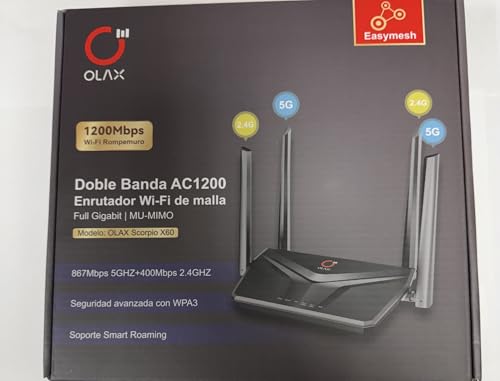
The OLAX Scorpio X60 is a basic dual-band router for users who want gigabit ports, mesh support, and simple home controls. Its AC1200 class uses Wi-Fi 5, which can still work well for browsing, HD video, smart devices, and ordinary work calls. The router lists MU-MIMO, WPA3 security, parental control, smart roaming, and four high-gain antennas.
Full gigabit ports make this model more useful than a very low-cost 100 Mbps router. You can connect a desktop, television, or console by cable and keep wireless space open for mobile devices. Its limits become clearer on a very busy network or with a fast broadband plan. I see it as a starter router for a small home, guest network, or light-duty mesh setup.
Pros:
- Full gigabit wired connectivity
- MU-MIMO support for compatible devices
- WPA3 security is listed
- Parental controls support basic family management
- Smart roaming helps in a compatible mesh setup
- Four high-gain antennas support home coverage
Cons:
- AC1200 Wi-Fi 5 has less capacity than Wi-Fi 6
- May not suit large homes with heavy traffic
- Advanced network tools may be limited
What Amazon Buyers Are Saying
Buyers looking at AC1200 routers often care about low cost, simple setup, and enough speed for daily use. The usual concern is whether coverage reaches every room. Wireless results depend on placement and construction, so I would not judge range from the antenna count alone. Read the current listing and recent customer comments before using it with a high-speed plan.
My Recommendation
The Scorpio X60 is a reasonable basic router, but it is not my first choice for a high-bandwidth household. It works better for light use, a small space, or a low-cost replacement. Choose a Wi-Fi 6 model if you have many modern devices or several active users. Its gigabit ports and mesh features add useful value at the entry level.
How to Choose Best Router for High Bandwidth
Choosing the best router for high bandwidth starts with your internet plan and your home network. A router can only use the speed its ports, wireless standard, and processor can handle. You also need to consider device count, room layout, wired connections, security, and future upgrades. Do not choose by the largest number on the box alone.
1. Match the Router to Your Internet Speed
First, check the speed from your internet provider. A gigabit plan needs at least gigabit WAN and LAN support. If you use a multi-gig plan, look for 2.5G, 5G, or 10G ports. The Omada ER8411 is the clear choice here for advanced wired capacity. Most AX1500 and AX3000 home routers use gigabit ports, so they suit gigabit-class service but may not fully use a faster multi-gig connection.
Remember that advertised Wi-Fi rates are shared link rates. A phone may not support the same class as the router. Distance, walls, interference, and network traffic also reduce real speed. For a desktop, gaming console, or network storage device, Ethernet is often more stable than wireless.
2. Consider Device Load and Wireless Coverage
Count the devices that connect at the same time. Phones, cameras, speakers, TVs, tablets, laptops, and smart plugs all add traffic. Wi-Fi 6 routers use tools such as OFDMA and MU-MIMO to serve many compatible devices more efficiently. An AX3000 router is a better fit than an entry-level AC1200 model for a busy home.
Placement matters as much as antenna design. Put the router in an open, central place, away from metal objects and thick walls. A mesh system can help when one router cannot reach the whole home. Check that the main router and added nodes use the same mesh standard. A wired backhaul can improve mesh performance because it leaves more wireless airtime for client devices.
3. Check Ports, Security, and Network Control
Look at the number and speed of Ethernet ports. Four or five gigabit ports help when you have several fixed devices. WPA3 is a useful current security feature, while automatic updates and a clear support policy matter for long-term use. Parental controls can help manage access, but read the details to see if they require an app or subscription.
Advanced users should review VPN support, VLAN options, firewall tools, traffic rules, and multi-WAN features. The Synology RT2600ac stands out for software control. The Omada ER8411 suits users who want a more advanced network platform. For most families, simple controls and steady firmware support are more useful than a long list of complex settings.
Final Verdict: Which Should You Buy?
The Omada ER8411 is the best router for high bandwidth when you need 10G wired capacity, VPN tools, and advanced control. For a normal wireless home, I prefer the AX3000 Smart Router or PLERY AX3000.
Choose Wi-Fi 6 for a busy modern home, and use Ethernet for fixed high-speed devices. Compare ports, coverage, security, and support before you buy the best router for high bandwidth.
FAQs Of Best Router for High Bandwidth
What is the best router for high bandwidth internet?
The Omada ER8411 is the strongest option for advanced wired networks and multi-gig use. For ordinary homes, an AX3000 Wi-Fi 6 router offers a simpler setup.
Is Wi-Fi 6 better for high-bandwidth homes?
Yes. Wi-Fi 6 can manage many compatible devices more efficiently than older Wi-Fi standards. Real speed still depends on distance, walls, device support, and your internet plan.
Do I need a 10G router for a gigabit plan?
No. A gigabit plan can work with gigabit Ethernet ports. A 10G router makes more sense for multi-gig service, fast local file transfers, or an advanced wired network.
Are more antennas always better for router range?
No. Antenna design helps, but placement, wall materials, power limits, channel use, and client devices also affect range. A well-placed mesh node may help more than a larger antenna count.
Should I use Ethernet for gaming and streaming?
Yes, when possible. Ethernet usually gives a steadier link and lower delay for consoles, desktops, TVs, and network storage. Wi-Fi remains useful for mobile devices and flexible placement.







[…] the right router is crucial for advanced users seeking optimal internet performance. As the demand for high-speed […]
[…] blog post explores some of the best routers suitable for DSL connections. NETGEAR Nighthawk 6-Stream Dual-Band WiFi 6 Router offers impressive […]