

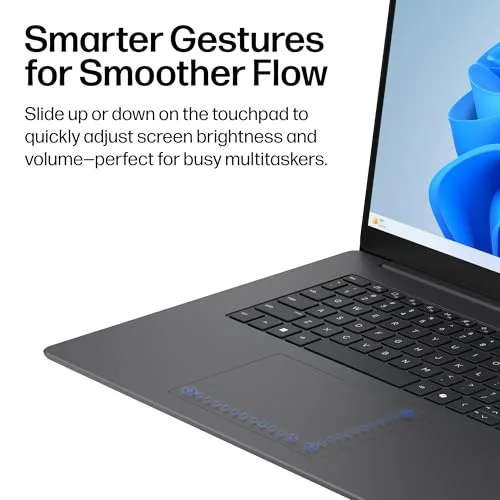
The best laptop for working from home balances speed, comfort, battery life, video calls, and long-term value.
A home office can change fast. One minute, you answer email; the next, you join a video call while keeping a spreadsheet, browser tabs, and chat open. A weak laptop can turn that simple routine into a slow, noisy chore. I reviewed these HP and Apple models with daily remote work in mind, focusing on screen comfort, storage, memory, portability, camera quality, and value.
HP OmniBook 3 17.3-Inch Laptop
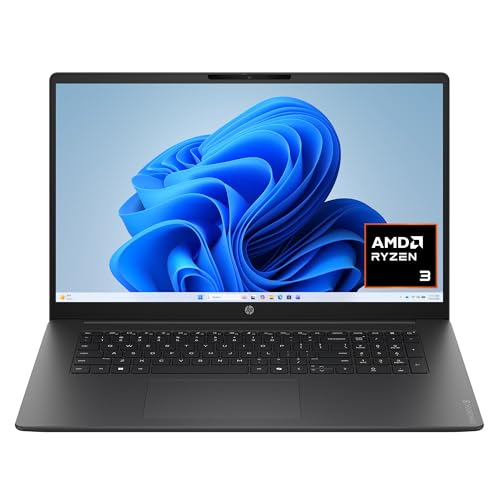
The HP OmniBook 3 gives home workers something many thin laptops do not: a large 17.3-inch Full HD screen. That extra space helps when I place a document beside a browser window or keep a meeting panel open during a call. Its AMD Ryzen 3 processor, 8 GB of RAM, and 512 GB SSD create a sensible base for email, office apps, web research, and light multitasking. Windows 11 Home also gives it a familiar setup for most remote workers.
The large display is the main reason to consider this model. It feels more like a small desk monitor than a cramped travel screen, which can reduce the need to squint or zoom. The 512 GB solid-state drive offers useful room for work files, photos, apps, and offline documents. The trade-off is size, so I see this as a laptop for a fixed home office rather than a daily commuter bag.
Pros:
- Large 17.3-inch Full HD screen for clear multitasking
- 8 GB RAM supports common office work and web use
- 512 GB SSD provides generous file storage
- Windows 11 Home works well with common business software
- AMD Radeon 610M graphics handle everyday display tasks
- Good fit for users who prefer a wide workspace
Cons:
- Large chassis is less convenient for frequent travel
- Ryzen 3 performance is aimed at basic and moderate work
- Not the best choice for advanced video editing or 3D work
My Recommendation
I recommend the HP OmniBook 3 to remote workers who spend most of the day at one desk. It is especially useful for teachers, office staff, writers, customer service agents, and anyone who compares files while attending online meetings. The 17.3-inch screen is its strongest feature because it gives work apps more room without requiring an external monitor.
This can be the best laptop for working from home for people who value screen size over light weight. I would pair it with a comfortable mouse and an external webcam only if your calls require a more polished setup. For the price, the mix of 8 GB memory and a 512 GB SSD makes this Amazon notebook computer a strong everyday value when available.
HP Everyday Slim Laptop with 128GB SSD

The HP Everyday Slim is built for people who want a simple Windows laptop that does not feel bulky. Its latest AMD processor, 128 GB SSD, thin design, and fast-charge feature suit email, online documents, video meetings, and basic school or business tasks. The included Microsoft 365 offer adds appeal for users who need familiar productivity tools. Its slim shape also makes it easier to move from a home desk to a kitchen table or spare room.
Storage is the main point to watch. A 128 GB SSD can hold normal office files, but large media libraries and many installed programs may fill it quickly. I like this model for cloud-first work, where files live in OneDrive, Google Drive, Dropbox, or a company server. Long battery life and fast charging can make a real difference when your workday moves around the house.
Pros:
- Thin design is easy to carry around the home
- Fast-charge support helps during short breaks
- 128 GB SSD starts faster than a traditional hard drive
- Microsoft 365 offer supports common office tasks
- Windows 11 provides broad software compatibility
- Good match for email, writing, classes, and web work
Cons:
- 128 GB storage may feel limited for large files
- Performance depends on the exact AMD processor configuration
- Cloud storage may be needed for heavier work collections
My Recommendation
I would choose this HP for a student, freelancer, home administrator, or remote employee who mainly uses browser apps and Microsoft 365. It is also a practical choice for families that need one laptop for homework, email, forms, and video calls. The slim body makes it more flexible than the 17.3-inch HP, especially in homes without a permanent office.
For many light users, this is a strong budget candidate for the best laptop for working from home. I suggest checking the included memory and processor details on the current Amazon listing before ordering. If your work depends on large design files, local video storage, or many demanding apps, consider a model with more RAM and storage.
Apple MacBook Neo 13-Inch with A18 Pro

The Apple MacBook Neo brings a compact design and an A18 Pro chip to the home office. Its 13-inch Liquid Retina display keeps the laptop easy to place on a small desk, while 8 GB of unified memory supports everyday Apple and web-based tasks. The 1080p FaceTime HD camera is a useful feature for remote calls, particularly when lighting and camera placement matter. Its 256 GB SSD offers twice the listed storage of the smaller HP Slim model.
Apple’s biggest advantage is the smooth link between hardware and software. If you already use an iPhone, iPad, AirPods, or iCloud, setup and file sharing can feel almost effortless. The compact screen is sharp and easy to carry, but it gives less room for side-by-side work than a 17.3-inch display. Buyers should also check app compatibility before switching from Windows, since some business tools work best on a specific operating system.
Pros:
- A18 Pro chip offers a modern performance platform
- Sharp Liquid Retina display in a compact 13-inch design
- 1080p camera is well suited to video meetings
- 256 GB SSD gives useful room for documents and apps
- 8 GB unified memory supports everyday productivity
- Strong choice for users already in the Apple ecosystem
Cons:
- 13-inch screen may feel small for heavy multitasking
- macOS may not support every Windows-only work tool
- Storage and memory are not as flexible as on many PCs
My Recommendation
I recommend the MacBook Neo to Apple users, mobile professionals, writers, consultants, and remote workers who value a small, polished laptop. It is a good fit for video calls, writing, research, online tools, and general productivity. The 1080p camera and compact build make it attractive for anyone who works in more than one room.
For Apple households, this may be the best laptop for working from home because it combines a modern chip, a clear display, and simple device integration. I would choose it over a budget Windows laptop when camera quality, portability, and ecosystem features matter most. Before purchase, confirm that your employer’s VPN, accounting software, or other key apps support macOS.
HP Everyday Slim Laptop with Intel N150
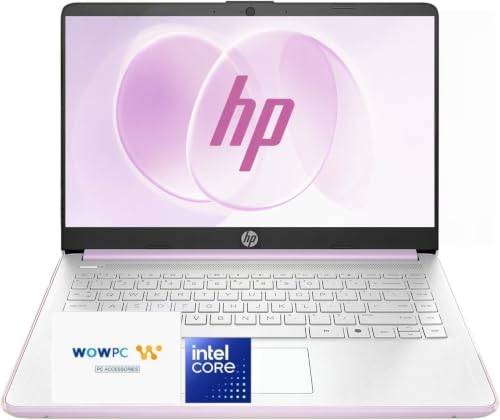
This HP Everyday Slim uses an Intel N150 processor, 4 GB of DDR5 RAM, and a 128 GB SSD. Those parts place it firmly in the basic-use category, but that does not make it useless. For email, online forms, light browsing, word processing, and simple video calls, it can offer an affordable path into Windows 11. Its slim design and long-battery-life focus also suit casual home use.
The 4 GB memory limit deserves careful attention. It can manage simple tasks, but many browser tabs or several open apps may slow the system. I would not buy this configuration for demanding business software, large spreadsheets, or constant multitasking. It makes more sense as a starter laptop, a backup computer, or a device for a user with modest needs.
Pros:
- Affordable entry point for basic home-office work
- Intel N150 processor suits simple daily tasks
- DDR5 memory offers a current memory standard
- 128 GB SSD provides faster startup than a hard drive
- Slim design is easy to store and move
- Windows 11 supports familiar office and browser apps
Cons:
- 4 GB RAM limits multitasking and future headroom
- 128 GB storage can fill up quickly
- Not intended for heavy editing, gaming, or advanced work
My Recommendation
I suggest this HP for light users who need a low-cost computer for email, browsing, printing, online banking, and basic documents. It may also work well as a shared family laptop or a backup device. Someone who keeps only a few tabs open and stores files online may find its limits manageable.
This is not my first pick for the best laptop for working from home if your job requires all-day multitasking. Still, it can provide good basic value when the budget is tight and the workload is light. Check the return policy and current listing details, and consider a higher-memory model if your work needs are likely to grow.
How to Choose the Best Laptop for Working From Home
Buying the best computers for home and office use is not just about picking the newest processor. Your work style matters more than a long list of technical terms. A bookkeeper may need a larger screen and strong multitasking, while a writer may care more about the keyboard and battery. I start with the tasks I perform every day, then match the hardware to those tasks.
Choose the Right Screen Size
A 13-inch screen is easy to carry and fits small spaces. It works well for writing, travel, and simple web tasks, but side-by-side windows can feel tight. A 15-inch screen offers a useful middle ground for most home offices. A 17.3-inch display, such as the HP OmniBook 3, gives the most room for spreadsheets, research, and video calls, though it takes up more desk space.
Resolution matters too. Full HD, often listed as 1920 by 1080, gives text and images a clean look for general office use. A clear display can reduce eye strain, but your room lighting also matters. I recommend placing the screen away from direct glare and keeping the top edge near eye level.
Look Beyond the Processor Name
The processor affects how quickly a laptop responds, but the model name alone does not tell the whole story. Basic chips can handle email and documents, while stronger chips feel better with large spreadsheets, many browser tabs, and video editing. The AMD Ryzen 3 and Intel N150 models here target everyday work, not demanding creative tasks. The Apple A18 Pro chip offers a different hardware and software design inside macOS.
For normal home work or the best laptop for programming, I prefer a balanced system over a flashy processor paired with too little memory A fast chip cannot fully rescue a laptop that runs out of RAM. Think of the processor as the engine and memory as the desk space around it. Both need to fit your workload.
How Much RAM Do You Need?
For light email and web use, 4 GB may work, but it leaves little room for growth. I prefer 8 GB for a home-office laptop because it gives browser tabs, office apps, and a video call more breathing room. Users who edit photos, work with large files, or keep many apps open should consider more than 8 GB when the model allows it.
Memory can be difficult or impossible to upgrade in thin laptops. That makes the original configuration important. A low price may look attractive today, but extra RAM often protects your purchase from feeling old too soon. This is one reason the 8 GB models in this guide are easier to recommend for regular remote work.
SSD Storage Makes Daily Work Feel Faster
All four laptops list solid-state storage. An SSD generally gives faster startup and app loading than an older mechanical hard drive. It also runs quietly and has no spinning disk. These are small comforts, but they add up when you open the laptop several times each day.
Storage size still matters. A 128 GB drive can hold office files and common apps, but it may fill fast after system files and updates use part of the space. A 256 GB drive offers more breathing room, while 512 GB is better for people who keep photos, downloads, videos, and work files locally. Cloud storage can help, but it should not replace a backup plan.
Battery Life and Charging
Battery claims vary with screen brightness, apps, wireless use, and power settings. A laptop may last much longer while reading a document than during a video call. I treat long battery life as helpful, not magical. Fast charging can be just as useful because a short break may provide enough power to finish a meeting or send a report.
Even if you work at one desk, a battery protects you from a brief power outage or a crowded outlet. Keep the charger nearby, and use the included power adapter unless the manufacturer confirms that another charger is suitable. Poor-quality chargers can create heat and reliability concerns.
Webcam and Microphone Quality
Remote work depends on more than processor speed. A clear webcam, stable wireless connection, and usable microphone shape how others experience your calls. The MacBook Neo lists a 1080p FaceTime HD camera, which gives it a clear advantage on paper for meetings. For the HP models, I recommend checking the current specifications and testing the camera as soon as the laptop arrives.
Good lighting can improve almost any built-in camera. Place a lamp in front of you rather than behind your head. A simple headset can also improve sound and reduce echo. These low-cost changes often help more than buying a faster computer.
Windows or macOS?
Windows 11 is familiar to many businesses and supports a broad range of printers, accessories, and work software. The HP models use Windows 11 Home, so users should check whether their employer requires Windows Pro features. Some work systems need special security tools or a company-managed edition.
macOS offers a clean interface and strong integration with Apple devices. It can be a smooth choice for writing, calls, web apps, and creative work. However, some older business tools only support Windows. Ask your employer or IT team before switching platforms, especially if you use remote desktop software, industry-specific apps, or custom security tools.
Keyboard, Touchpad, and Comfort
You may touch the screen hundreds of times during a workday, but the keyboard and touchpad often matter more. Look for comfortable key travel, a steady deck, and a touchpad that tracks accurately. A large laptop can provide more room for typing, while a smaller model may offer better portability.
Comfort also includes posture. Raise the screen with a stand if possible, and use an external keyboard when the display sits at eye level. A laptop should be the heart of your setup, not the whole setup. A mouse, monitor, lamp, and chair can improve your workday without replacing the computer.
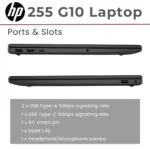
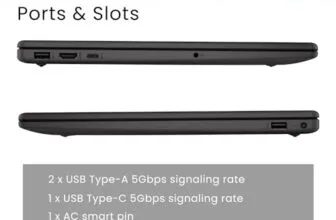
Ports and Wireless Connections
Count the devices you use. You may need a mouse, headset, monitor, flash drive, printer, or wired network adapter. Thin laptops sometimes reduce port variety to save space. A USB hub can solve the problem, but it adds another item to carry and manage.
Wireless reliability is vital for video meetings. Place your router in an open location, update its firmware, and use a wired connection when calls are critical. No laptop can fix a weak internet signal by itself. The computer and network must work as a team.
Best For Comparison
| Best for | Why |
|---|---|
| Large-screen home office work | The HP OmniBook 3 has a 17.3-inch Full HD display and 512 GB SSD. |
| Portable Windows productivity | The HP Everyday Slim with AMD focuses on a thin body, fast charge, and everyday apps. |
| Apple users and video calls | The MacBook Neo combines an A18 Pro chip, Liquid Retina display, and 1080p camera. |
Home Office Setup Tips
The best laptop for working from home performs better when your workspace supports it. Start with a stable desk and a chair that lets your feet rest on the floor. Keep the display at a comfortable height, and avoid strong light behind you during calls. Small changes can make a long day feel less like a long climb.
Use a separate backup for important files. Cloud sync protects against some hardware problems, but sync is not always the same as a full backup. Keep copies of key documents on a trusted external drive or approved company service. Also install operating system and browser updates, since security patches help protect your work and personal data.
For calls, test your camera and microphone before the first important meeting. Close unused tabs, plug in the charger when needed, and place the laptop where the camera points near eye level. If the computer becomes hot, clear the vents and place it on a hard surface. A bed or soft couch can block airflow.
Security deserves equal attention. Use a strong password or passcode, enable two-factor authentication where available, and lock the screen when you step away. Do not install unknown browser extensions or software from random websites. If your employer provides security rules, follow those rules before personal preferences.
FAQs Of best laptop for working from home
What is the best laptop for working from home?
The best choice depends on your tasks. The HP OmniBook 3 is strongest for a large home-office screen, while the MacBook Neo suits Apple users who want portability and a 1080p camera. For light Windows work, either HP Everyday Slim model may be enough.
Is 8 GB of RAM enough for remote work?
Yes, 8 GB is enough for email, documents, browser tabs, and normal video calls. It gives more room than 4 GB for multitasking. Heavy editing, advanced spreadsheets, and large software projects need more memory.
Is a 17-inch laptop too large for home use?
Not if you keep it at one desk. A 17.3-inch screen can make spreadsheets and side-by-side windows easier to read. It is less suitable for frequent travel or very small work surfaces.
Do I need a laptop with a 1080p webcam?
You do not need one for every job, but a 1080p camera can provide a clearer meeting image. Lighting, internet speed, and microphone quality also affect call quality. The MacBook Neo lists a 1080p FaceTime HD camera.
Can a 128 GB SSD handle working from home?
It can handle light office work, especially when you use cloud storage. Still, 128 GB may fill quickly with videos, photos, and many apps. Choose 256 GB or 512 GB if you store large files locally.
Final Verdict: Which Should You Buy?
The HP OmniBook 3 is my top pick for most fixed home offices because its 17.3-inch Full HD screen, 8 GB RAM, and 512 GB SSD support comfortable daily work. Choose the MacBook Neo if you prefer Apple devices and need a portable laptop with a 1080p camera.
The best laptop for working from home should match your apps, space, and work habits. Check the latest Amazon specifications, price, and availability before you buy.



[…] battery before class, a crowded desk, or late-night deadlines — qualities that also define the best laptop for working from home. I look at the full balance of hardware, software, comfort, and cost. A fast chip cannot rescue a […]
[…] most people, the best laptop for working from home should handle web browsing, email, streaming, video calls, documents, online shopping, and light […]