
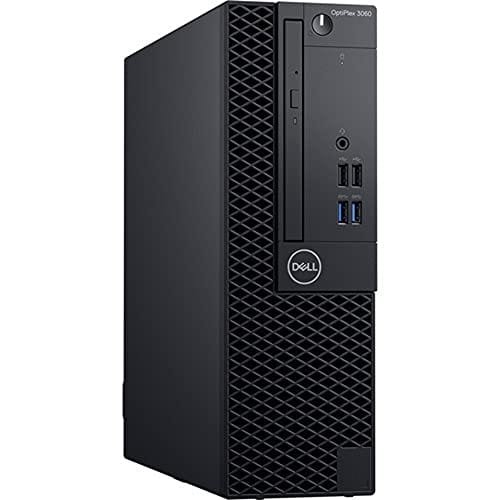
The Dell OptiPlex 3060 is the best home desktop computer for fast daily work, ample storage, and low-cost reliability.
A home computer should make life easier, not add more waiting, noise, or setup stress. If your old laptop freezes during video calls, struggles with many browser tabs, or has too little storage for family photos, a desktop can feel like a fresh start. I reviewed these renewed Dell systems and newer all-in-one PCs with real home use in mind. I focused on speed, memory, storage, ports, wireless features, upgrade potential, and value. The right choice depends on whether you want strong performance, a compact tower, or a clean desk with fewer cables.
Dell OptiPlex 3060: Best Overall Home PC

The Dell OptiPlex 3060 gives a home user a strong mix of speed and value. Its Intel Core i5-8500 processor has six cores, which helps when I keep many browser tabs, office apps, and streaming tools open at once. The listed 32GB of DDR4 RAM is generous for web work, school tasks, photo sorting, and video calls. Its 1TB solid-state drive also gives the system room for documents, apps, and a growing photo library.
This renewed business desktop includes built-in Wi-Fi and Bluetooth, so setup can stay fairly simple. The small business-PC design fits well under or beside a desk, although it still needs a separate monitor, keyboard, and mouse. The i5-8500 platform is older than current desktop hardware, but it remains a sensible choice for normal home work when the price is right. I would check the seller’s warranty, cosmetic grade, included power cable, and exact wireless adapter before ordering.
Pros:
- Six-core Intel Core i5 processor handles daily multitasking well
- 32GB RAM gives plenty of room for demanding browser use
- 1TB SSD offers fast startup and useful local storage
- Built-in Wi-Fi and Bluetooth reduce cable clutter
- Compact business chassis fits many home workspaces
- Windows 11 Pro is listed for the system
- Refurbished pricing can beat the cost of a new office PC
Cons:
- Renewed condition may include cosmetic wear
- Separate display and input devices are required
- Integrated graphics are not designed for modern AAA gaming
- Exact ports and included accessories should be confirmed before purchase
Dell OptiPlex 7050: Best for Multitasking

The Dell OptiPlex 7050 uses an Intel Core i7-7700 processor with four cores and a listed clock speed of 3.60GHz. It is an older chip, yet it still feels capable for documents, spreadsheets, email, research, and everyday media. The 32GB of DDR4 RAM is its strongest feature for users who like to work with many apps open. The 1TB SSD should also make Windows boot and programs load much faster than a traditional hard drive.
This small form factor desktop supports Wi-Fi, Bluetooth, HDMI, and dual-monitor use according to the listing. Two screens can make a big difference for budgeting, home business work, online learning, and long research sessions. The compact case is easy to place, but its small size can limit some future hardware upgrades compared with a full tower. I would also pay close attention to operating-system support because the seventh-generation processor is older than Microsoft’s usual official Windows 11 CPU support list.
Pros:
- Core i7 processor offers solid response for office multitasking
- 32GB RAM supports many open tabs and large work files
- 1TB SSD provides fast storage with useful capacity
- Dual-monitor support can improve home office productivity
- Wi-Fi and Bluetooth help create a cleaner setup
- Small form factor saves valuable desk or floor space
- Good fit for spreadsheets, remote work, and school projects
Cons:
- Older processor may have limited long-term support
- Compact case can restrict graphics and upgrade choices
- Renewed units may show marks from prior business use
- It is not a strong choice for current high-end games
Lenovo 24-Inch All-in-One: Best Cable-Free Setup
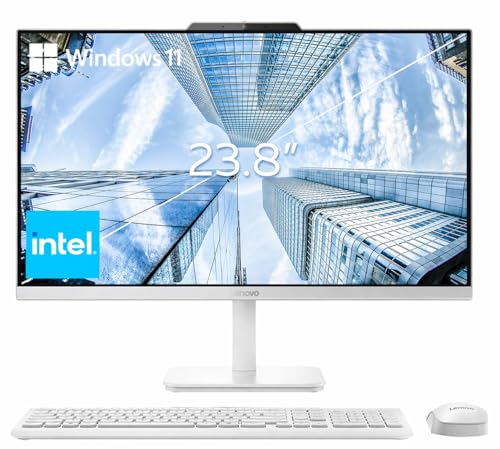
The Lenovo 24-inch all-in-one takes a different path from the renewed Dell towers. It places the computer behind a Full HD display, which keeps the desk neat and reduces the number of separate parts to buy. The listed 16GB of memory should cover common home tasks such as email, web browsing, video meetings, streaming, and schoolwork. Its 256GB PCIe SSD should feel quick, but it offers less storage than the Dell models in this guide.
Wi-Fi 6, Bluetooth 5.2, HDMI, and the included wireless keyboard and mouse make this model appealing for a ready-to-use home office. A 24-inch screen gives enough space for two windows side by side without taking over a small room. An all-in-one is harder to repair or upgrade than a standard desktop, so I would keep that trade-off in mind. It is a polished choice for buyers who value a simple look more than maximum hardware flexibility.
Pros:
- 24-inch Full HD display is included in the main unit
- 16GB RAM suits most home and office tasks
- PCIe SSD should provide quick startup and app loading
- Wi-Fi 6 offers modern wireless networking capability
- Bluetooth 5.2 works well with wireless accessories
- Wireless keyboard and mouse help reduce setup costs
- All-in-one design keeps the desk clean and simple
Cons:
- 256GB storage may fill quickly with videos and large photos
- All-in-one parts are usually harder to replace or upgrade
- Screen size and resolution may not suit serious creative work
- Exact Intel processor model should be checked before purchase
Dell OptiPlex 3050: Best Budget Office Desktop

The Dell OptiPlex 3050 is aimed at buyers who want a basic desktop without spending much. Its Intel Core i5-6500 has four cores and can manage email, documents, web research, bookkeeping, and video playback. The listed 16GB of DDR4 RAM is enough for ordinary home use and light office work. A 256GB SSD should make the computer feel much faster than an older hard-drive PC.
This small form factor model lists Wi-Fi, DisplayPort, HDMI, and 4K support. Those connections provide useful flexibility for a home office or a simple media station, though actual display limits depend on the graphics hardware and connection used. The case takes little room, but the sixth-generation processor is now quite old. Before buying, I would verify Windows 11 support, the seller’s renewal process, and whether the wireless feature is installed inside the exact unit shipped.
Pros:
- Affordable way to add a capable home office computer
- 16GB RAM handles common daily tasks with ease
- 256GB SSD improves boot and program load times
- Small form factor works in tight spaces
- Wi-Fi is listed for convenient home network access
- HDMI and DisplayPort support flexible monitor setups
- 4K output is listed for compatible displays and content
Cons:
- 256GB storage leaves less room for large media libraries
- Sixth-generation CPU is old by 2026 standards
- Limited graphics power makes it unsuitable for demanding games
- Renewed condition and included accessories can vary
HP 24-Inch OmniStudio: Best Simple Family Computer

The HP 24-inch OmniStudio is built for buyers who want an attractive all-in-one computer with a simple footprint. Its 24-inch display places the main parts behind the screen, so there is no separate desktop box on the floor. The listed 8GB of DDR5 RAM can handle basic browsing, email, streaming, and light school tasks. It is a practical fit for a guest room, kitchen desk, or family study area.
The main concern is storage. The listed 128GB UFS capacity is far smaller than the SSD capacity in the other systems here, so I would use cloud storage or an external drive for photos and videos. The product listing provides limited processor detail, which makes it important to review the current Amazon specification page before ordering. This HP can be appealing for simple use, but it is not my first pick for heavy multitasking or long-term local file storage.
Pros:
- 24-inch screen gives a comfortable view for daily tasks
- All-in-one form saves desk and floor space
- DDR5 memory uses a newer memory standard
- Clean design suits shared family rooms and home offices
- Good match for browsing, email, streaming, and light schoolwork
- Fewer separate components make setup easier
Cons:
- 128GB storage is very limited for modern media files
- 8GB RAM leaves less room for heavy multitasking
- Processor information is not clear in the supplied title
- All-in-one hardware is less flexible to repair or upgrade
- External storage may be needed for family photos and videos
My Recommendation
For most households, I would choose the Dell OptiPlex 3060. It has the best balance of processing power, RAM, storage, wireless features, and price among these options. The six-core i5-8500 is a better foundation than the older processors in the OptiPlex 7050 and 3050, while 32GB of RAM gives it room to breathe. The 1TB SSD is also useful because many home buyers underestimate how fast photos, downloads, games, and backups can consume space.
The Dell 3060 is best for remote workers, parents, students, and home users who already own a monitor. It ranks among the best computers for home and office use, handling office software, browser tabs, video calls, accounting tools, and streaming services without feeling cramped. It is not a gaming powerhouse, but it is a steady workhorse. I see it as the computer equivalent of a reliable family sedan: not flashy, yet ready for many daily trips.
The OptiPlex 7050 makes sense when dual monitors matter. Its 32GB RAM and 1TB SSD give it strong practical value for spreadsheets, research, and work-from-home use. However, its older seventh-generation platform deserves careful review before purchase. Microsoft’s official Windows 11 requirements and supported processor information can change the buying equation, so I would confirm the exact installation and support status rather than relying only on the product title.
The Lenovo 24-inch all-in-one is the better choice for a clean, finished workspace. It includes a display and wireless accessories, which can reduce the extra cost of building a full setup. I would recommend it to a student, home office user, or family member who prefers a simple desk. The 256GB SSD is its main limit, but an external drive or cloud plan can solve that for ordinary files.
The OptiPlex 3050 is a budget pick for basic work. It is suitable for email, online forms, word processing, light bookkeeping, and web use. I would not buy it for demanding creative software, modern gaming, or years of heavy growth without checking the price very carefully. The HP OmniStudio is best for light family use when screen size and a neat design matter more than storage and speed. Its 128GB capacity means I would plan for external or cloud storage from day one.
| Best for | Why |
|---|---|
| Overall home and remote work | Dell OptiPlex 3060 combines a six-core CPU, 32GB RAM, and 1TB SSD. |
| Clean desk with an included screen | Lenovo 24-inch all-in-one includes the display, Wi-Fi 6, and wireless accessories. |
| Lowest-cost basic home setup | Dell OptiPlex 3050 offers useful RAM, SSD speed, and compact size at a budget price. |
How I Choose the Best Home Desktop Computer
Choosing a desktop is easier when I start with the work, not the brand name. A family computer for school and email has different needs from a computer for photo editing or business accounting. I look at the processor, memory, storage, display plan, ports, wireless tools, operating system, and upgrade path.I also compare the full setup cost, because a low desktop price can look less attractive after adding a monitor, keyboard, mouse, and other items often bundled with an Amazon notebook computer.
Processor and Everyday Speed
The processor is the engine of a desktop. For simple work, a modern entry-level chip can feel smooth. For heavier multitasking, I prefer more cores and a healthy clock speed. More cores help when several tasks run at once, while single-core speed affects the feel of many simple apps.
These products use older Intel chips except for the less clearly specified newer all-in-one models. That does not make every older desktop bad. It does mean I would judge the price, warranty, software support, and expected use with care. A renewed business PC can still be excellent for basic work, much like a well-kept used car can still serve a family well.
How Much RAM Do You Need?
RAM holds the work that your computer is doing right now. When RAM runs low, the system may use slower storage, and the computer can feel less responsive. I consider 8GB enough for light browsing and email, 16GB a better everyday target, and 32GB ideal for heavy browser use, office multitasking, virtual meetings, and larger files.
The 32GB models in this guide offer the most breathing room. The Lenovo’s 16GB is also a strong middle ground. The HP’s 8GB may work for light tasks, but it gives you less cushion as software becomes more demanding. If you often keep dozens of tabs open, I would favor 16GB or more.
SSD Storage Versus UFS Storage
Storage affects both capacity and perceived speed. An SSD usually makes a desktop start faster and open apps more quickly than a hard drive. A 1TB SSD gives far more room than a 128GB or 256GB drive, which matters if you keep photos, videos, downloads, and local backups.
The HP lists 128GB UFS storage. That may work for a light user, but the usable space will be lower after Windows and recovery files take their share. The Lenovo’s 256GB PCIe SSD is faster and more useful, yet it can still fill quickly. I prefer 1TB for a family computer because storage pressure can turn a smooth setup into a constant cleanup chore.
All-in-One or Separate Desktop Tower?
An all-in-one combines the screen and computer in one body. It looks clean and takes less room. It also reduces setup steps, which helps buyers who do not want to select a monitor or manage many cables.
A separate desktop gives more freedom. I can replace the monitor, move the computer to another screen, add storage, or repair parts with less trouble. The trade-off is extra space and more parts. If I already own a good monitor, the Dell towers offer better value. If I need everything for the desk, the Lenovo or HP may be more convenient.
Ports and Monitor Support
Ports are easy to ignore until you need one. HDMI works with many modern displays and televisions. DisplayPort is common on business monitors and can support high resolutions. USB ports matter for printers, flash drives, webcams, external drives, keyboards, and mice.
The OptiPlex 7050 lists dual-monitor support, which can improve work speed. I find two screens helpful when I compare documents, watch training, or track a budget. Still, buyers should confirm the exact port layout because renewed desktops can vary by configuration. A product title is useful, but the current listing photos and specifications deserve the final check.
Wireless Features for a Modern Home
Built-in Wi-Fi lets a desktop connect to the home router without an Ethernet cable. Bluetooth helps connect headphones, speakers, keyboards, mice, and other accessories. Wi-Fi 6, listed on the Lenovo, can offer better performance on a compatible network, especially in busy homes with many connected devices.
Wireless performance depends on the router, walls, distance, and adapter. I still prefer Ethernet for a fixed work desk when possible because a wired connection can be steadier. Even so, built-in Wi-Fi adds convenience and can save the cost of a separate adapter.
Windows 11 and Older Refurbished PCs
Windows 11 support deserves special attention in 2026. Microsoft lists hardware requirements such as a compatible 64-bit processor, TPM 2.0, Secure Boot capability, adequate memory, and storage. The eighth-generation Intel Core i5-8500 in the OptiPlex 3060 is a more comfortable match than the sixth- and seventh-generation chips in the older Dell models.
Some renewed listings advertise Windows 11 Pro on hardware that may not appear on Microsoft’s official supported CPU list. I do not treat the title alone as proof of long-term support. Before ordering, I would confirm Windows activation, updates, TPM status, the seller’s warranty, and the return policy. This small check can prevent a large headache later.
What Renewed Condition Really Means
A renewed desktop is a used business computer that has been tested, cleaned, repaired, or reset for resale. It can offer excellent value because office PCs often have sturdy cases and serviceable parts. It may also show scratches, dents, or signs of prior use.
I recommend checking the renewal grade, seller feedback, warranty length, and return window. Ask whether the system includes Wi-Fi, a power cord, and the advertised version of Windows. Also check whether the computer arrives with a keyboard and mouse. A renewed product can be a smart buy, but clear expectations matter.
Home Desktop Computer Buying Tips for 2026
Start by listing your real tasks. If you only browse, email, print, and stream, you do not need a high-end workstation. If you edit photos, run a small business, or use many tabs, spend more on RAM and storage. If you want the best mini gaming PC experience, look for a dedicated graphics card rather than relying on the integrated graphics found in most business desktops.
Measure your space before buying. Small form factor desktops fit neatly on shelves, but they may have fewer upgrade choices. All-in-one computers save room, but the display and computer are tied together. A full tower gives the most room for upgrades, yet none of the five products here uses that larger style.
Think about sound and heat as well as speed. Business desktops often run quietly during light work, but fan noise can rise under load. Keep vents clear and avoid placing a tower inside a tight cabinet. Good airflow helps protect the parts and can extend the useful life of the computer.
Do not forget the display. A desktop is only as useful as the screen connected to it. For office work, I like a Full HD display with a comfortable size and adjustable height. For photos, a better panel and accurate color may matter more than raw CPU speed. The Lenovo and HP simplify this choice because they include a 24-inch display.
Security also matters in a home office. Use a strong account password, automatic updates, and a trusted security tool. Turn on two-factor authentication for email, banking, and cloud storage. Back up important files to an external drive or a reliable cloud service. Even the best home desktop computer cannot recover files that were never backed up.
Finally, compare the total price rather than the headline price. A Dell tower may need a monitor and accessories. An all-in-one may cost more at first but include more of what you need. I also consider warranty coverage, return rules, and support because a small difference in price is not worth losing peace of mind.
FAQs Of best home desktop computer
What is the best home desktop computer for most people?
The Dell OptiPlex 3060 is the strongest overall choice in this group. Its six-core Intel i5 processor, 32GB RAM, and 1TB SSD suit work, school, browsing, and home office tasks. It is especially attractive if you already have a monitor.
Is a renewed Dell desktop worth buying?
It can be worth buying when the seller offers clear testing, a warranty, and a fair return policy. Renewed business desktops often provide strong parts at a lower price. Check the exact condition, accessories, Windows license, and wireless features before ordering.
Is 16GB RAM enough for a home computer?
Yes, 16GB is enough for most browsing, office work, streaming, and school tasks. Choose 32GB if you use many tabs, large spreadsheets, photo tools, or several apps at the same time. Eight gigabytes works for light use but offers less room for growth.
Should I buy an all-in-one or a desktop tower?
Choose an all-in-one for a clean desk and simple setup. Choose a tower if you want easier repairs, more upgrade options, or the freedom to pick your own monitor. Your current accessories and available space should guide the choice.
Can these desktop computers run modern games?
They can handle simple games and older titles, but their listed configurations are not built for demanding new games. Modern gaming usually needs a dedicated graphics card, a stronger power supply, and better cooling. Check the full graphics specification before buying for gaming.
Final Verdict: Which Should You Buy?
The Dell OptiPlex 3060 is my top pick and the best home desktop computer here for balanced speed, storage, RAM, and value. Choose the Lenovo all-in-one for a clean setup, or the OptiPlex 3050 for basic low-cost work.
Compare the full specifications, Windows support, warranty, and accessories before ordering. With the right match, a best home desktop computer can make work, learning, and family tasks feel simple again.