
The best laptop for home use balances a clear screen, smooth speed, comfort, battery life, and fair value.
Picture this: you sit down to pay a bill, join a video call, stream a show, or print a school form. Then your old laptop starts freezing, the fan gets loud, and every task feels slow. I understand that frustration. A good home laptop should feel simple and dependable, like a helpful tool that stays out of your way. I reviewed the key features, daily limits, and practical value of these HP and Lenovo models to help you find the best laptop for home use without paying for power you may never need.
HP OmniBook 3 17.3-Inch Laptop
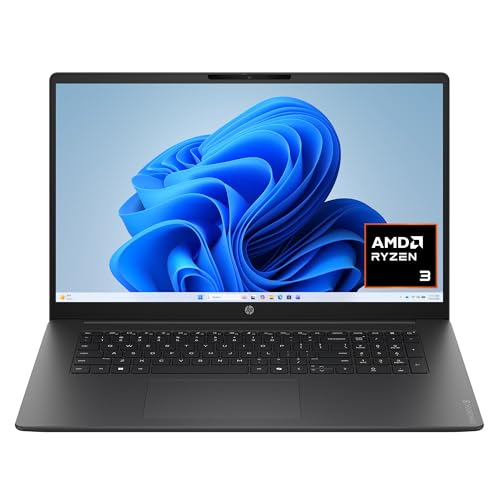
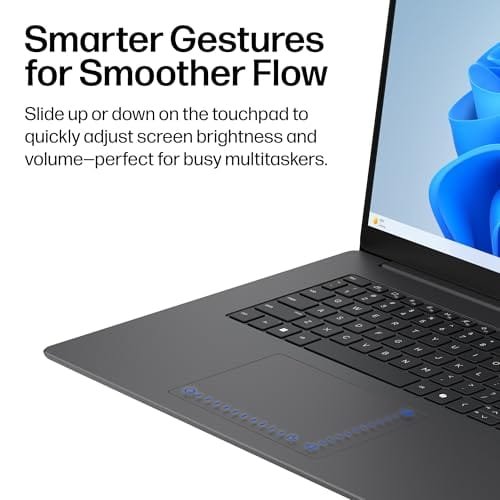
The HP OmniBook 3 stands out with its large 17.3-inch Full HD display. That size gives home users more room for web pages, email, recipes, spreadsheets, and streaming content. The AMD Ryzen 3 processor, 8 GB of RAM, and 512 GB SSD create a sensible mix for common daily tasks. Windows 11 Home also gives the laptop a familiar desktop layout with broad software support.
I see this model as a strong choice for people who want a roomy screen without connecting an external monitor. The SSD should help Windows start quickly and make file access feel more responsive than an older hard drive. AMD Radeon 610M graphics can handle basic video playback and light graphics work, but this is not a gaming laptop. Its Mica Silver finish also gives it a clean look for a kitchen table, desk, or home office.
Pros:
- Large 17.3-inch Full HD screen is easy to view
- 8 GB of RAM supports normal home multitasking
- 512 GB SSD offers useful local storage
- Windows 11 Home works well for general tasks
- Ryzen 3 processor suits email, browsing, and office work
- Large display helps users who dislike small text
- Silver finish looks neat in a home setting
Cons:
- Large size makes it less convenient to carry
- Integrated graphics are not made for demanding games
- Budget-class processor may feel limited with heavy editing
My Recommendation
I recommend the HP OmniBook 3 to families, older adults, remote workers, and anyone who prefers a large laptop screen. It is especially useful for home tasks that involve reading, comparing windows, viewing documents, or watching video from across a room. The 8 GB memory and 512 GB SSD are more comfortable for daily use than very small budget configurations. If portability matters most, a 15-inch or smaller model may suit you better.
For many households, this is a well-balanced candidate for the best laptop for home use. It gives you visual comfort first, then adds enough speed and storage for normal work. The main trade-off is its large body. Check the current Amazon price and seller details before ordering, since laptop availability and configurations can change.
HP Everyday Slim Laptop With Intel N150

This HP slim laptop targets simple home computing at a low entry price. It uses an Intel N150 processor with 4 GB of DDR5 RAM and a 128 GB SSD. The listed package also includes 1 TB of cloud storage, which can help users keep documents and photos online instead of filling the internal drive. Windows 11 gives it access to familiar apps, browser tools, and built-in security features.
I would consider this model for light tasks such as email, web searches, online forms, streaming, and basic document work. Its slim design should make it easier to move from a desk to a couch or dining table. Still, 4 GB of RAM calls for realistic expectations. It may work best when you keep browser tabs and background apps under control rather than trying to edit large photos or run many programs at once.
Pros:
- Usually appealing to shoppers on a tight budget
- Slim body is easy to move around the home
- Intel N150 processor fits basic daily tasks
- DDR5 memory uses a newer memory standard
- SSD storage should feel quicker than a hard drive
- 1 TB cloud storage can expand file space
- Windows 11 supports common home software
Cons:
- 4 GB of RAM limits heavy multitasking
- 128 GB of internal storage is fairly small
- Cloud storage may require an account or subscription terms
- Not a good fit for serious gaming or video editing
My Recommendation
This HP is best for a student, casual user, or family member who mainly needs a web machine. It can cover online banking, email, video calls, simple school work, and streaming when used within its limits. I would not choose it for someone who opens many tabs, stores large media files, or wants a laptop that will handle demanding apps for years. Before buying, review the cloud-storage terms and confirm the exact display, battery, and warranty details on the listing.
As a low-cost option, it can be the best laptop for home use when the budget is the main concern. The slim design and cloud space add practical value. However, the 4 GB memory makes this a focused tool, not a flexible all-purpose computer. If your budget allows, moving to 8 GB of RAM may provide a smoother long-term experience.
Lenovo 15.6-Inch Essential Everyday Laptop

The Lenovo Essential Everyday laptop takes a middle path with a 15.6-inch size and 8 GB of DDR5 RAM. Its 128 GB SSD provides faster storage behavior than a traditional mechanical drive, while the standard screen size keeps the laptop easier to place than a 17-inch model. This configuration aims at everyday home use rather than professional creative work. It should appeal to shoppers who want a simple Lenovo computer with enough memory for common tasks.
The 15.6-inch format is one of the safest choices for a shared household laptop. It gives enough screen room for documents and web pages but remains easier to carry from room to room. The 8 GB memory is also a useful step above entry-level 4 GB models. My main concern is the 128 GB capacity, so I would plan to use cloud storage, an external drive, or careful file management if you keep many photos and videos.
Pros:
- 8 GB DDR5 RAM supports smoother everyday multitasking
- 15.6-inch size balances viewing space and portability
- SSD helps with quick starts and responsive file access
- Simple design suits shared family use
- Good fit for browsing, email, and documents
- Lenovo keyboard layouts are familiar to many users
- More flexible than many 4 GB budget laptops
Cons:
- 128 GB storage can fill quickly
- Everyday hardware is not aimed at demanding creative apps
- Exact battery life depends on use and configuration
- Buyers should confirm the display resolution before ordering
My Recommendation
I would choose the Lenovo for a home that needs one practical laptop for several people. The 8 GB of RAM gives it a more comfortable starting point for browser tabs, office work, video calls, and light school tasks. It also has a useful size for adults who want readable text without the bulk of a 17-inch computer. Add external or cloud storage if your household keeps a growing photo library.
This Lenovo may be the best laptop for home use for shoppers who want a balanced 15.6-inch design. It does not chase premium performance, but it focuses on the tasks most people perform at home. Its biggest weakness is storage, not basic usability. Compare the current price with the HP OmniBook 3 before choosing, since a small price difference may make the larger HP a better value.
HP Slim Laptop With Intel N150
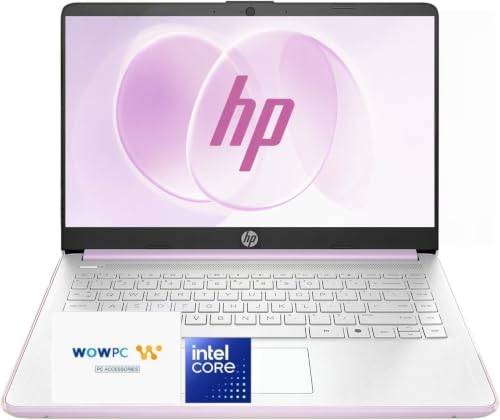
This second HP slim configuration uses the Intel N150 processor, 4 GB of DDR5 RAM, and a 128 GB SSD. It focuses on portability and simple home tasks. The listed package includes long battery life as a selling point, although real battery results always change with brightness, Wi-Fi use, video playback, and background apps. Windows 11 keeps the setup familiar for people who already use a Windows desktop.
This model makes sense as a personal laptop for light browsing or as a spare computer for travel around the house. Its slim shape can fit in a small bag or on a narrow side table. I would use it for email, online shopping, web research, streaming, and short documents. I would avoid treating it as a workhorse because 4 GB of RAM and 128 GB of storage leave less room for growth.
Pros:
- Portable slim design works well in small spaces
- Intel N150 handles basic home computing
- DDR5 RAM offers a current memory platform
- SSD storage improves everyday responsiveness
- Windows 11 provides broad app support
- Advertised long battery life suits mobile use
- Simple setup may suit first-time laptop buyers
Cons:
- Only 4 GB of RAM is restrictive
- 128 GB storage leaves limited room for large files
- Not ideal for advanced photo or video work
- Battery results may vary from the advertised claim
My Recommendation
I recommend this HP to light users who value a slim laptop and a lower price. It can work well for checking messages, browsing, joining short calls, and completing basic forms.It may also suit a college student or child who needs a simple school and web device, making it a best laptop for college on a budget. For a heavy home office workload, I would select an 8 GB model instead.
If you need the best laptop for home use in a small, portable form, this HP is worth considering. Its strengths are ease, size, and simple daily use. Its limits are clear, so buyers should not expect premium speed. Read the current listing carefully and compare battery, display, and warranty information before placing an order.
How I Choose the Best Laptop for Home Use
A home laptop does not need the fastest processor on the market. It needs to perform the tasks you do most often without creating extra work. I start by looking at the processor, RAM, storage, screen, keyboard, battery, operating system, ports, and warranty. I also consider whether the design fits real life, because a laptop that stays too heavy or cramped may spend more time closed than in use.
For most people, the best laptop for working from home should handle web browsing, email, streaming, video calls, documents, online shopping, and light school work. These tasks do not need a dedicated graphics card. They do need steady Wi-Fi, a responsive SSD, enough memory, and a screen that does not cause eye strain. Small details often matter more than a large processor name.
Processor: Match It to Your Work
The processor acts like the laptop’s main worker. A modern entry-level chip can handle simple work, but it may slow down when you open many apps or use complex tools. Intel N-series chips and basic AMD Ryzen chips can be useful for home tasks when the rest of the system is balanced. They are not designed to match high-end Core or Ryzen 7 systems for serious editing or complex data work.
I suggest listing your daily tasks before you shop. If you mostly browse, stream, and email, an entry-level processor may be enough. If you edit photos, work with large spreadsheets, or keep many apps open, choose a stronger processor and at least 8 GB of RAM. This simple check can prevent both overspending and disappointment.
RAM: Why 8 GB Is a Safer Choice
RAM helps a laptop keep active apps ready. With 4 GB, basic work may be possible, but you have less breathing room. Several browser tabs, a video call, and a document can push a small system toward slowdowns. That is why I prefer 8 GB for most shoppers seeking the best laptop for home use.
Eight gigabytes is not a guarantee of high performance. The processor, cooling system, storage, and software also matter. Still, it gives common Windows tasks a more comfortable workspace. If you plan to keep a laptop for several years, 8 GB is often the more sensible starting point.
Storage: SSD Speed and Capacity
An SSD can make a laptop feel quick during startup and normal file use. It has no spinning disk, so it generally responds faster than an old hard drive. The four models here use SSD storage. That is a strong feature for basic home computing.
Capacity is a separate issue. A 128 GB SSD may work for light users who store files online. It can feel tight after Windows updates, apps, photos, and downloads take their share. A 512 GB SSD, like the one listed for the HP OmniBook 3, gives much more room for local files. I always check both speed and size instead of looking at the word “SSD” alone.
Screen Size and Resolution
A 15.6-inch screen is a popular middle ground. It provides useful room for documents and websites while staying manageable on a desk. A 17.3-inch laptop can be easier to read and better for split-screen work, but it is less portable. A smaller screen may travel well but can make long sessions harder for some users.
Full HD, often listed as 1920 by 1080, gives clear room for text and video on common laptop sizes. Always verify the exact screen resolution on the product page. Product names can change, and marketplace listings may show more than one configuration. For older adults or anyone with vision concerns, screen size, scaling options, brightness, and viewing angle all deserve attention.
Keyboard, Touchpad, and Webcam
Home users often type more than they expect. They write emails, search for products, complete forms, and work on school files. A keyboard with clear spacing and firm feedback can reduce mistakes. A responsive touchpad also helps when you do not want to carry a mouse.
Video calls make the webcam important. A basic webcam may be enough for family chats and short meetings, but room lighting affects the result. I suggest placing the laptop near a window or using a small lamp in front of your face. No budget laptop can fully fix a dark room, poor Wi-Fi, or a low camera angle.
Battery and Portability
Battery life depends on brightness, wireless use, streaming, app load, and battery health. A brand may state a long result under a controlled test. Your real result may be lower. I treat battery claims as a guide, not a promise.
A slim laptop is easy to move, but a larger laptop may offer a more comfortable screen. Think about where you will use it. If you move between a home office, sofa, and kitchen, a lighter model may matter. If it stays on one desk, the large HP screen may provide more value than a thin body.
Windows 11 and Home Security
All four listed laptops use Windows 11 in their product names. Windows 11 supports common browsers, office tools, streaming services, printers, and video-call apps. It also includes built-in security features that help protect the system when you keep the software updated. Microsoft advises users to install updates and use strong account protection.
I recommend setting up a separate account for each regular user. Turn on automatic updates, use a password or PIN, and enable two-factor protection for important accounts. Avoid unknown downloads and suspicious email links. A secure habit can protect your files more effectively than a faster processor.
Ports and Wireless Use
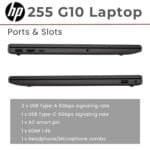
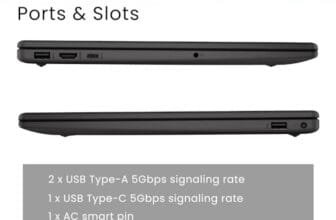
Ports matter when you connect a printer, flash drive, monitor, headset, or mouse. Before buying, check the listing photos and full specifications for USB ports, HDMI, audio, and charging details. A slim laptop may offer fewer ports than a larger one. If you use older accessories, you may need an adapter.
Wireless performance also shapes the home experience. A good laptop can still struggle in a room far from the router. Place your router in an open area, update its firmware, and consider a mesh system if your home has weak spots. Do not blame the laptop for every slow stream or dropped call.
Which Laptop Size Is Right for Your Home?
A 17.3-inch model works well for users who want a desktop-like view. It can help with large text, two windows side by side, and comfortable video viewing. The trade-off is weight and space. It may be awkward on a small lap table or difficult to carry upstairs.
A 15.6-inch laptop is easier to recommend to most homes. It gives a useful screen without feeling like a portable desktop. The Lenovo model fits this middle category. A slim HP model may be better if you move often or keep your laptop in a small space.
Screen size should also match the user. A person with reduced vision may prefer the HP OmniBook 3. A student may prefer the Lenovo because it balances room and travel. A casual user may favor one of the slim HP options. There is no single winner for every room, chair, and routine.
How Much Laptop Power Does a Home User Need?
For email and browsing, basic hardware can work. Streaming video also needs less power than many buyers assume. The larger concern is multitasking. If you keep a browser, music, a document, and a video call open, memory becomes more important.
For office work, I prefer 8 GB of RAM and an SSD. The Lenovo and HP OmniBook 3 meet that memory preference based on the listed specifications. For demanding photo work, 3D design, or the best laptop for programming and serious gaming, I would look beyond these entry-level systems. Those tasks need stronger processors, more RAM, better cooling, and often dedicated graphics.
For family use, storage can be the hidden cost. Photos and videos grow fast. A 128 GB laptop may require cloud storage or an external drive sooner than expected. The HP OmniBook 3 has a clear advantage here with its listed 512 GB SSD. It gives a larger cushion for local files and apps.
Tips for Getting Better Value on Amazon
I check the exact model number before comparing prices. A similar product title can hide a different processor, screen, RAM amount, or storage size. Read the bullet points and technical details, not just the first line. Product photos can also show ports and keyboard layouts that text leaves out.
Review the seller, return terms, warranty, and shipping date. Marketplace stock for any Amazon notebook computer can change, especially for new or seasonal models. Make sure the laptop includes the operating system you expect. Check whether cloud storage is included for a limited period or requires a paid plan later.
I also compare the cost of useful extras. A laptop may need a mouse, sleeve, printer cable, USB hub, or external drive. These items can change the true cost. A slightly more expensive laptop with 8 GB of RAM and 512 GB storage may be cheaper than upgrading a small system later.
Setup Advice for a New Home Laptop
Start by installing system and driver updates. Then remove trial apps you do not need. Keep your browser, security tools, and important software current. This small cleanup can make the first day less confusing.
Set the screen scaling to a comfortable level. Larger text can help with reading and does not mean the laptop is weak. Adjust brightness for the room, but avoid maximum brightness all day when you want longer battery life. Place the laptop on a hard, flat surface so air can move around it.
Create a backup plan before you store important photos or tax files. Cloud backup is convenient, while an external drive gives you a second copy. The best laptop for home use is still vulnerable to accidental deletion, spills, theft, and drive failure. A backup turns a major problem into a smaller one.
Best For Comparison
| Best for | Why |
|---|---|
| Large-screen home office use | The HP OmniBook 3 offers a 17.3-inch display, 8 GB RAM, and 512 GB SSD. |
| Balanced family computing | The Lenovo 15.6-inch model combines a useful size with 8 GB DDR5 memory. |
| Low-cost, light daily tasks | The HP slim models offer a portable design for browsing, email, and streaming. |
FAQs Of best laptop for home use
What is the best laptop for home use?
For many people, the HP OmniBook 3 is the strongest overall choice here. Its large Full HD display, 8 GB of RAM, and 512 GB SSD suit common home work. The Lenovo is a good alternative if you prefer a smaller and more balanced 15.6-inch design.
Is 4 GB of RAM enough for a home laptop?
It can work for email, light browsing, streaming, and simple documents. However, 4 GB gives you less room for many tabs and apps. I prefer 8 GB for a smoother and more flexible home experience.
Is a 128 GB SSD enough for Windows 11?
It can be enough for light users who save files online. It may feel tight after updates, apps, downloads, and photos fill the drive. Use cloud storage or an external drive if you choose a 128 GB model.
Is a 17.3-inch laptop too large for home use?
Not if you mainly use it at a desk or want a large, easy-to-read screen. A 17.3-inch laptop is less convenient to carry than a 15.6-inch model. Choose the larger size for comfort and the smaller size for mobility.
Can these laptops handle gaming or video editing?
They can handle simple games and basic media tasks, but they are not built for demanding gaming or professional video editing. Integrated graphics and entry-level processors have clear limits. Choose a more powerful laptop for high-resolution editing, 3D work, or modern games.
Final Verdict: Which Should You Buy?
The HP OmniBook 3 is my top pick because its large screen, 8 GB RAM, and 512 GB SSD offer the best balance for home use. Choose the Lenovo for a more portable 15.6-inch option, or an HP slim model for light work on a tighter budget.
The best laptop for home use should match your real habits, not just a product label. Check the current Amazon configuration, price, warranty, and storage terms before buying.