

The best laptop for college balances speed, battery life, comfort, storage, and price for daily student work.
College life can turn a laptop into a classroom, library, studio, and entertainment hub in one day. You may type notes in the morning, join a video call at noon, write a paper at night, and still need power for research. I looked at portability, screen size, storage, software, and day-to-day value to help you choose with less stress. The models below fit different student needs, from budget study work to a polished Apple setup.
HP OmniBook 3 17.3-inch Laptop
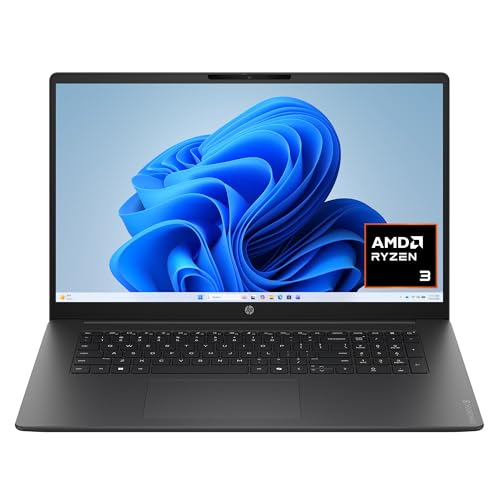
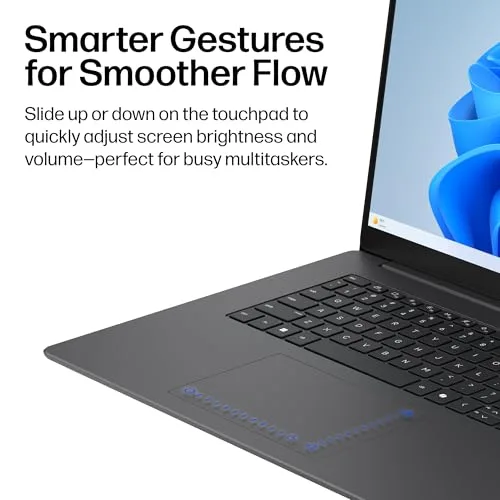
The HP OmniBook 3 gives students a large 17.3-inch Full HD screen, which can make long study sessions feel less cramped. Its listed configuration includes an AMD Ryzen 3 30 processor, 8GB of RAM, and a 512GB SSD. That mix suits common college tasks such as web research, essays, slides, streaming, email, and online classes. Windows 11 Home also keeps the software familiar for students who already use Microsoft tools.
The spacious display is the main reason to consider this HP. I find a large panel helpful when I place a lecture video beside a document or compare several research pages at once. The 512GB solid-state drive offers more breathing room than many entry-level laptops with very small storage. It is not a gaming powerhouse or a specialist workstation, but it can serve as a steady school desk when portability matters less than screen space.
Pros:
- Large 17.3-inch Full HD display gives notes and papers more room
- 512GB SSD provides useful space for files, apps, and media
- 8GB RAM handles normal school multitasking
- Windows 11 Home supports common college software
- AMD Radeon 610M graphics support basic visual work and media
- Full-size design can feel comfortable for desk-based study
Cons:
- The large body is less convenient for daily backpack travel
- Entry-level Ryzen performance may feel limited for advanced editing
- 8GB RAM leaves less room for heavy multitasking than 16GB
My Recommendation
I recommend this HP to students who want a roomy screen at a sensible cost. It can work well for business, education, writing, communications, and general liberal arts programs. Students who study mostly in a dorm, apartment, or home office may enjoy it more than someone who walks across campus all day. The large panel acts like a small desk, giving your work more space without needing an external monitor.
This is a strong choice when storage matters and your workload stays within normal college use. I would not pick it first for 3D design, serious video production, or demanding engineering software. Still, for papers, research, presentations, video calls, and streaming, it offers practical value. Among the options here, it may be the best laptop for college for students who value screen size above slim design.
Apple MacBook Neo 13-inch, Indigo

The 13-inch Apple MacBook Neo offers a compact setup for students who want a light and simple computer. The listed model uses an A18 Pro chip, 8GB of unified memory, and a 256GB SSD. It also includes a Liquid Retina display and a 1080p FaceTime HD camera. The Indigo finish adds a distinct look without changing the core school experience.
A small MacBook can feel like a quiet study partner because it takes little room on a crowded library table. The 13-inch size should be easy to carry between classes, though I always suggest checking the current weight and port details before buying. Apple’s software environment suits students already using an iPhone, iPad, or other Apple device. The listed support for Apple Intelligence and AI-focused features may also appeal to students who want newer productivity tools, but exact feature access can depend on software, region, and account settings.
Pros:
- Compact 13-inch design fits small desks and crowded bags
- A18 Pro chip gives the model a modern performance platform
- Liquid Retina display offers a sharp viewing experience
- 1080p camera is useful for remote classes and meetings
- 8GB unified memory supports normal school apps and browsing
- Apple ecosystem integration can simplify file and device access
- Indigo color gives students a stylish alternative to plain finishes
Cons:
- 256GB storage may fill quickly with large media or course files
- 8GB memory may not suit demanding professional applications
- Some college programs require Windows-only software
- The smaller display may feel tight for split-screen work
My Recommendation
This MacBook Neo is best for students who want a small, modern laptop for writing, browsing, video calls, presentations, and daily campus life. It is especially appealing to Apple users who already rely on iCloud, FaceTime, or other Apple services. The compact form makes it a good match for commuters and students who move from lecture hall to library to café. It also makes a thoughtful choice for anyone who values a clean interface and a polished build.
Before buying, I would confirm that your major supports macOS. Some business, engineering, science, and design courses may require Windows programs, special drivers, or campus testing tools. Storage also deserves attention, since 256GB is workable but not generous. If your files live in the cloud and your work is light to moderate, this could be the best laptop for college for a mobile Apple-focused student.
Apple MacBook Neo 13-inch, Blush

The Blush version of the MacBook Neo has the same listed core hardware as the Indigo model, but it offers a softer and more personal color choice. It features the A18 Pro chip, 8GB unified memory, 256GB SSD storage, a 13-inch Liquid Retina display, and a 1080p FaceTime HD camera. These parts create a focused package for study, communication, and everyday digital tasks. The difference is mainly visual, which matters when students want a laptop that feels personal.
I see this model as a good reminder that practical products can still have personality. A laptop often stays with a student for hours each day, so comfort, size, and enjoyment matter along with raw specifications. The small display helps keep the laptop portable, while the modern Apple chip platform supports common apps and browser work. As with the Indigo model, I would check course requirements before choosing macOS over Windows.
Pros:
- Portable 13-inch format works well for travel between classes
- A18 Pro chip is designed for modern everyday performance
- Sharp Liquid Retina display suits reading and media
- 1080p FaceTime HD camera supports online learning
- 8GB unified memory is suitable for routine school workflows
- 256GB SSD loads apps quickly and avoids a traditional hard drive
- Blush finish gives the laptop a warm, distinctive appearance
Cons:
- 256GB may be restrictive for large video and photo libraries
- 13-inch screen offers less room for side-by-side documents
- Some Windows-only academic tools may need another solution
- Memory and storage are not ideal for advanced creative workloads
My Recommendation
I would suggest the Blush MacBook Neo to students who want Apple portability with a more expressive finish. It suits note-taking, essays, online research, email, video meetings, and light creative work. It may also fit students who carry their laptop every day and want a small device that does not dominate a backpack. The 1080p camera is a useful detail for hybrid classes and professor meetings.
The main buying decision is not the color. It is whether 256GB storage, 8GB memory, and macOS match your course needs. Students in writing, education, social science, language, and many general programs may find the setup comfortable. If you want a stylish mobile computer and your school supports Apple software, this model deserves consideration as the best laptop for college in a compact class.
HP Essential Laptop with Windows 11
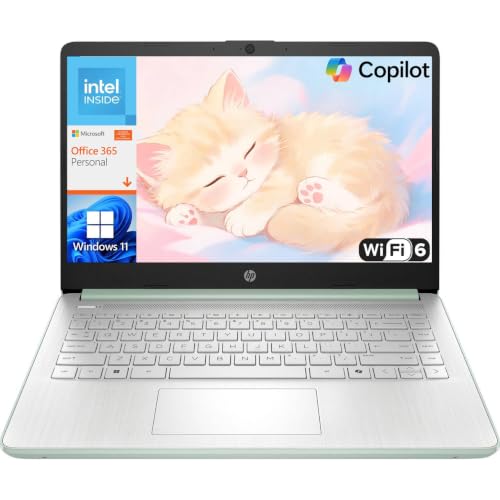
The HP Essential is aimed at students who want a basic Windows laptop for core school tasks. Its listed features include an Intel processor, 128GB of storage, Office 365, and Windows 11, making it a simple Amazon notebook computer for school. This kind of package can cover email, web browsing, simple documents, presentations, and online learning. It may also reduce the setup work for students who need familiar Office tools from the start.
The low storage capacity is the key point to understand. A 128GB drive can work when you save most files in cloud storage, but it leaves less room for large programs, downloads, photos, and videos. I would treat this model as a focused school tool rather than a long-term media machine. For a student with a tight budget and modest needs, simple can be a feature, not a flaw.
Pros:
- Windows 11 provides a familiar platform for many college programs
- Office 365 can help students begin work quickly
- Basic Intel processing suits documents, email, and web research
- Simple design may appeal to budget-focused buyers
- Useful entry point for students who do not need advanced hardware
- Cloud storage can extend its practical file capacity
Cons:
- 128GB storage is limited for large apps and local files
- Basic Intel performance may struggle with demanding workloads
- It may offer less multitasking headroom than higher-memory models
- Students should check the Office 365 subscription terms
My Recommendation
This HP Essential is best for students who need an affordable computer for basic college work. It can fit a first-year student, a remote learner, or anyone who mainly writes papers, reads web pages, checks email, and attends online classes. It also makes sense as a secondary laptop for a family that already owns a stronger desktop. The value comes from covering core tasks without paying for power you may never use.
I would not choose it for computer science projects that need large development tools, advanced design, gaming, or professional media work. I would also plan to use cloud storage and keep local downloads under control. If your college needs a low-cost Windows device for simple tasks, this can be the best laptop for college on a strict budget, though best gaming laptops under 1000 serve students who need more power. Check the current bundle details and available storage before ordering.
How I Evaluate the Best Laptop for College
A college laptop must do more than show a product page with impressive words. It must work during real student moments: a low battery before class, a crowded desk, or late-night deadlines — qualities that also define the best laptop for working from home. I look at the full balance of hardware, software, comfort, and cost. A fast chip cannot rescue a laptop that is too heavy to carry or too small for the student’s work.
I start with the processor because it affects app response and multitasking. Students should also look at RAM, since memory helps a laptop keep several browser tabs and apps open. Storage matters because modern programs and personal files grow over time. The listed products range from 128GB to 512GB, so the right choice depends on how much you keep on the laptop.
Screen size creates a clear trade-off. A 17.3-inch display gives more room for split-screen work, but it takes more space in a bag. A 13-inch laptop travels more easily, but a student may need more scrolling or an external monitor. I also consider the camera because video calls are now part of many college schedules. A clear camera can make office hours and group work feel less distant.
Operating system fit is just as important as hardware. Windows works with a broad range of school tools, but macOS can offer a smooth experience for students already using Apple devices. Before you buy, check your college’s technology page for required programs. Look for software used in your major, exam tools, virtual labs, and any remote access system.
Key Features to Look For Before Buying
Processor and daily speed
For basic college use, you do not need the most expensive processor. You need a chip that opens browsers, documents, and class apps without constant delay. Entry-level processors can handle light work, but they may slow down when you run many tabs, video calls, and large files together. A newer mid-range chip gives more comfort if your budget allows it.
Do not judge speed by the processor name alone. Generation, cooling, memory, and the laptop’s design all affect real use. A balanced system often feels better than a powerful chip paired with too little RAM or slow storage. I prefer to view the laptop as a team, not as one headline number.
RAM for multitasking
Eight gigabytes of RAM can suit writing, browsing, streaming, and video calls. It works best when you keep your tabs and apps under control. Sixteen gigabytes gives more room for large spreadsheets, coding tools, creative apps, and heavy research. Students in technical or creative majors should consider 16GB when available.
Memory upgrades are not always possible on modern thin laptops. Check the product details before buying if you think your needs may grow. A student can change cloud storage later, but fixed memory can be harder to solve. This is one reason I treat RAM as a long-term value feature.
Storage capacity
A solid-state drive, or SSD, helps a laptop start and load apps quickly. It has no spinning disk, so it usually feels more responsive than an older hard drive. Capacity still matters. The HP OmniBook’s listed 512GB drive gives more local space than the 128GB HP Essential or the 256GB MacBook Neo models.
Cloud storage can help, but it should not hide a very small drive. Large course downloads, photos, recorded lectures, and creative projects can use space fast. I suggest keeping at least a little free space so the system can update and work well. External drives can add capacity, but they are another item to carry and protect.
Battery and charging habits
Battery life changes with screen brightness, video calls, wireless use, and app load. Product listings may provide battery estimates, but real results vary. I recommend charging before a long class day and carrying the correct charger. A compact power bank may help some devices, but it must support the laptop’s charging needs.
Good battery habits are simple. Lower brightness when practical, close apps you do not need, and use sleep mode during breaks. Keep system updates current because manufacturers often improve power behavior through software. No laptop can replace a smart routine during a full day on campus.
Keyboard, camera, and comfort
Students type many pages each term, so keyboard comfort deserves real attention. A keyboard with clear key travel can reduce fatigue during long essays. A precise trackpad also helps when you move between tabs and edit documents. If you often work at night, a backlit keyboard may be worth seeking.
The camera matters for online classes, group projects, and support calls. The MacBook Neo listings specify a 1080p FaceTime HD camera, which is a useful feature for remote communication. The HP listings in this comparison do not provide a camera resolution in the supplied product names, so I would confirm that detail on the current listing before purchase.
Portability and screen size
A large laptop can make reading easier, but weight and size affect daily travel. If you walk across campus several times a day, a compact model may protect your shoulders and patience. If you work mostly at one desk, a larger screen may feel more rewarding. Think about your actual routine, not the ideal routine you imagine before the semester begins.
A laptop stand or external monitor can improve a small-screen setup at home. A compact MacBook paired with a monitor may give you both mobility and desk comfort. A large HP may remove the need for a separate monitor, but it will not disappear into a small bag. Each design solves a different problem.
Windows or macOS for College?
Windows is often the safer choice when you do not know which programs your major will require. It supports a wide range of school, business, engineering, and testing software. The HP models use Windows 11, which many students will find familiar. Windows laptops also come in more sizes and price levels.
macOS can be a great fit for students who use Apple devices and prefer a clean workflow. The MacBook Neo models may make it easy to move between Apple services and devices. They are compact and appealing for mobile study. Still, macOS is not automatically right for every major, so check your school’s software list first.
Some apps work on both systems, while others need a specific version. Web-based tools are usually flexible, but specialized programs may not be. A campus computer lab or remote desktop service can sometimes fill the gap. I would never buy a laptop for college without checking the requirements for the next two years of classes.
Best Laptop for College by Student Type
For students who want a large screen
The HP OmniBook 3 is the natural fit here. Its 17.3-inch Full HD display can help students read dense pages and arrange windows side by side. It is a better desk companion than a daily carry machine. Pair it with a protective sleeve if you plan to move it often.
For students who want maximum portability
The 13-inch MacBook Neo models are easier to consider for frequent travel. They can fit small work areas and reduce the bulk of a campus bag. Their listed 1080p camera also supports remote communication. Choose between Indigo and Blush based on personal style, not performance, since the listed core specifications match.
For students on a tight budget
The HP Essential targets basic needs. Its listed Office 365 bundle may help students start writing and making presentations quickly. The 128GB storage limit means you must manage files with care. This is a sensible choice for light workloads, but not for students who expect advanced software demands.
For students in demanding majors
None of these listed configurations should be treated as a dedicated workstation without checking the software requirements. Engineering, architecture, programming, film, music production, and advanced data work may require more RAM, storage, or the best laptop for programming tasks. Ask your department what it recommends. A slightly higher purchase cost can be cheaper than replacing an underpowered laptop later.
Tips for Getting More Value From Your College Laptop
Start with a clean file system. Create folders for each course and name files with the date or assignment name. This small habit saves time when finals arrive. Keep important work in two places, such as the laptop and a trusted cloud service.
Use a protective case or sleeve when you travel. Avoid placing drinks beside the keyboard, even during late-night study. Dust and heat can also affect comfort and performance, so keep vents clear. A hard surface is safer than a blanket or soft bed.
Install updates from the operating system and trusted software makers. Updates can fix security problems and improve stability. Use strong account passwords and turn on multi-factor authentication when available. College accounts often contain personal data, grades, payment details, or research files.
Think about accessories that solve real problems. A small mouse can help during long editing sessions. A USB hub may help if you need more connections, but check compatibility first. Headphones can improve focus in shared housing, while a laptop stand can make desk posture more comfortable.
What I Like and Dislike About These Picks
I like that this group covers several real student situations instead of forcing one answer on everyone. The HP OmniBook 3 gives storage and screen space. The MacBook Neo models focus on portability and Apple integration. The HP Essential keeps the entry price and task list simple.
I also see clear limits. The two MacBook Neo listings show 256GB storage and 8GB memory, which may feel small after several years. The HP Essential has an even tighter 128GB drive. The HP OmniBook 3 is more convenient on a desk than in a crowded backpack.
That balance is why I avoid calling one model perfect. The best laptop for college depends on your major, travel habits, software needs, and budget. A student who writes papers all day wants a different tool from a student who renders 3D models. Honest buying advice must respect that difference.
| Best for | Why |
|---|---|
| Large-screen study | HP OmniBook 3 offers a 17.3-inch Full HD display and 512GB SSD. |
| Portable Apple study | MacBook Neo models combine a compact 13-inch design with a modern Apple chip. |
| Basic budget work | HP Essential includes Windows 11 and listed Office 365 support for core tasks. |
FAQs Of best laptop for college
What is the best laptop for college students?
The best laptop for college depends on your major and budget. The HP OmniBook 3 suits students who want a large display and more storage. The MacBook Neo fits mobile Apple users, while the HP Essential suits light tasks and tight budgets.
Is 8GB RAM enough for college?
Eight gigabytes can handle documents, browsing, email, streaming, and video calls. Students who use coding tools, large spreadsheets, creative apps, or virtual machines should consider more memory when possible.
Is 256GB storage enough for a student?
It can be enough if you use cloud storage and keep large files elsewhere. It may feel limited if you store videos, photos, games, or large creative projects locally. Plan your storage before buying.
Should I buy a Windows laptop or a MacBook for college?
Choose Windows for broad software support and familiar school tools. Choose a MacBook if your major supports macOS and you already use Apple devices. Always check your college’s required software list first.
Is a 17-inch laptop too large for college?
It can be large for daily campus travel, but it gives useful room for reading and split-screen work. It is best for students who study mainly at a desk or want a built-in large display.
Final Verdict: Which Should You Buy?
For most students who want screen space and storage, I would choose the HP OmniBook 3. Apple users who value portability should choose the MacBook Neo, while the HP Essential fits basic work on a tight budget.
The best laptop for college is the one that matches your courses and daily routine. Check software needs, storage, memory, and current Amazon availability before you buy.




[…] may also suit a college student or child who needs a simple school and web device, making it a best laptop for college on a budget. For a heavy home office workload, I would select an 8 GB model […]