
A Lenovo mini PC can deliver strong daily performance, low power use, and a clean desk setup at a fair price.
A full-size desktop can make a small desk feel crowded fast. Many people need a simple computer for work, school, streaming, or home tasks, but do not need a large tower. A Lenovo mini PC solves that problem with a compact body, useful ports, and quiet performance. I reviewed five Lenovo ThinkCentre options for different needs, budgets, and age groups. Some are renewed models with older Intel chips, while one is a newer 1-liter desktop built for modern daily work. The right choice depends on speed, storage, display support, and how much you want to spend.
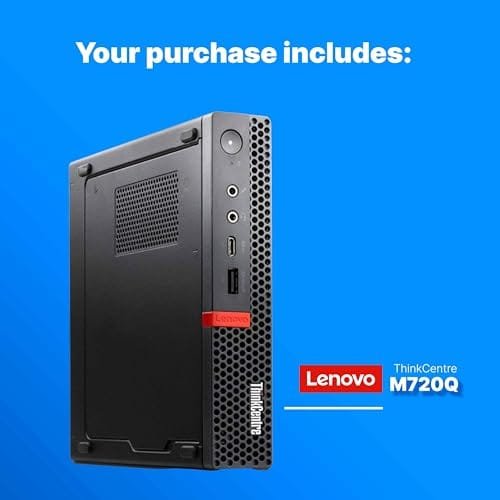
Lenovo M720Q Mini PC with i5 and 16GB RAM
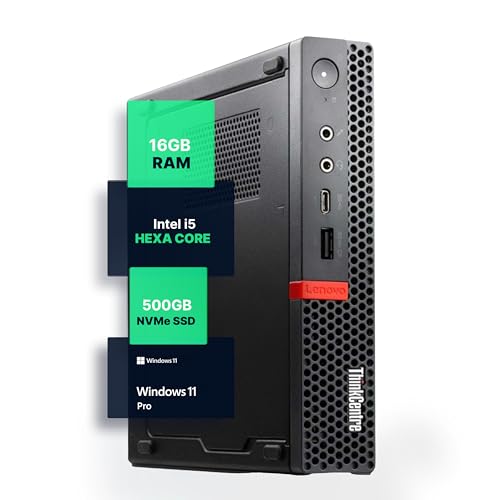
The Lenovo M720Q is a practical small desktop for work, study, and light home use. Its Intel Core i5-8400T processor has six cores, which helps it handle office apps, web tabs, video calls, and basic multitasking. The included 16GB of RAM gives this Lenovo mini PC a much smoother feel than many low-cost systems with only 8GB. The 500GB NVMe drive also helps Windows start quickly and gives you useful room for documents, photos, and apps.
I like the balance of parts in this renewed model. The small ThinkCentre case can sit beside a monitor, under a desk, or in a media cabinet with much less clutter than a tower. Windows 11 Pro adds useful business tools, though buyers should still check the seller’s exact setup and activation details before placing an order. Built-in Wi-Fi 5 and Bluetooth make it easy to connect to a wireless network, keyboard, mouse, headset, or printer.
Pros:
- Six-core Intel Core i5 processor for solid office work
- 16GB of RAM supports many browser tabs and apps
- 500GB NVMe storage offers quick startup and useful capacity
- Compact ThinkCentre design saves valuable desk space
- Wi-Fi and Bluetooth reduce cable clutter
- Windows 11 Pro suits home office and small business tasks
Cons:
- Renewed condition can vary by seller and unit
- Older processor is not ideal for demanding new software
- Integrated graphics are not made for modern AAA gaming
In daily use, this model makes the most sense for people who want a dependable computer without paying for high-end performance. It can manage Microsoft 365, Google Workspace, QuickBooks, email, research, and streaming with ease when paired with a good monitor. It may also work well as a family computer because 16GB of memory leaves more breathing room for several users. I would not choose it for serious video editing, 3D work, or advanced gaming.
Lenovo ThinkCentre neo 50q Gen 5 Mini Desktop

The ThinkCentre neo 50q Gen 5 is the most modern Lenovo mini PC in this group. It uses an Intel Core 5 210H processor with eight cores, giving it a clear advantage for newer office workloads and heavier multitasking. The 1-liter form makes it easy to place in a tight work area or mount behind a compatible display. For buyers who want a current platform rather than an older renewed business PC, this model deserves close attention.
A newer CPU can improve more than raw speed. It can help the computer feel responsive as programs grow larger and web pages become more demanding. This Lenovo mini PC is a strong fit for business users, remote workers, and students who expect to keep the system for several years. Exact memory, storage, operating system, ports, and display support can differ by listing, so I strongly suggest checking the Amazon configuration before buying.
Pros:
- Newer Intel Core 5 platform with eight cores
- Small 1-liter case fits behind a monitor or on a shelf
- Better long-term choice for modern office software
- Business-focused ThinkCentre design supports clean workspaces
- Good fit for remote work, school, and productivity tasks
- More current hardware than the older renewed options here
Cons:
- Configuration details may vary by seller or region
- Likely costs more than older renewed ThinkCentre models
- Integrated graphics limit serious gaming and workstation use
I see the neo 50q Gen 5 as the best choice for someone who values newer hardware over the lowest price. It should suit a home office where video calls, large spreadsheets, cloud tools, and many tabs are common. It is also a sensible pick for a small business that wants compact systems with a consistent look. Buyers should confirm the included RAM and SSD size, since those details affect the overall value more than the tiny case does.
Lenovo M920q Tiny PC with Core i5

The Lenovo ThinkCentre M920q is a compact business desktop built around an Intel Core i5-8500T processor. This six-core chip is well suited to common office work, school tasks, bookkeeping, and media playback. The listed 16GB of RAM helps keep the system comfortable during multitasking, while the 256GB NVMe SSD should provide quick boot and app load times. It also includes HDMI and DisplayPort, which gives users useful options for modern monitors.
This renewed Lenovo mini PC stands out because the package includes a wireless keyboard and mouse. That can save time and money for buyers who need a complete starter setup. The system also lists Wi-Fi and Bluetooth, so you can avoid running network and accessory cables across a small desk. Storage is more limited than the 500GB model, but cloud storage or an external SSD can solve that issue for many users.
Pros:
- Six-core Core i5-8500T handles daily work with ease
- 16GB RAM is suitable for multitasking
- NVMe SSD gives fast system response
- HDMI and DisplayPort support flexible monitor setups
- Wireless keyboard and mouse add immediate convenience
- Small case works well in an office or study area
Cons:
- 256GB storage may feel small for large media libraries
- Renewed condition may include cosmetic signs of prior use
- Older platform offers less future headroom than the neo 50q
I would recommend the M920q to a buyer who wants a ready-to-use package. It is especially helpful for a student, remote worker, or parent who does not already own spare input devices. The dual display outputs also make it useful for a desk with two screens, although buyers should confirm the exact output behavior and included cables. For basic productivity, this Lenovo mini PC offers a strong mix of speed, size, and convenience.
Lenovo M710q Tiny PC with 8GB RAM
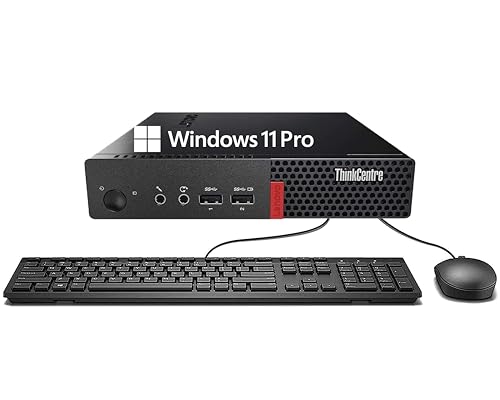
The ThinkCentre M710q is aimed at buyers who want a low-cost Lenovo mini PC for simple tasks. It uses a sixth-generation Intel Core processor, 8GB of DDR4 memory, and a 256GB SSD. That combination is enough for email, word processing, web browsing, online classes, and streaming. The SSD is a major benefit over an older hard drive because it makes startup and basic file access feel much faster.
This model includes a keyboard and mouse, along with Wi-Fi and Bluetooth. Those extras make it a useful first computer for a child, guest room, or basic office station. Its older processor means I would keep expectations realistic, especially when many large apps run at once. Still, a clean Windows 11 Pro setup and the compact case can make this renewed desktop a smart value if the price is right.
Pros:
- Affordable entry point into the ThinkCentre line
- 256GB SSD improves speed over a mechanical hard drive
- Keyboard and mouse help create a complete setup
- Wi-Fi and Bluetooth support simple wireless connections
- Compact design fits small desks and shared spaces
- 8GB RAM works for light daily computing
Cons:
- Older sixth-generation processor limits heavy multitasking
- 8GB RAM may feel tight with many browser tabs
- 256GB storage leaves less room for videos and games
The M710q is best for a light user who wants practical value instead of premium speed. I would consider it for writing, school portals, online banking, email, and streaming at home. It can also serve as a point-of-sale or back-office computer for simple business tasks. If you plan to edit photos, run virtual machines, or keep dozens of tabs open, spending more on a newer model would be wiser.
Lenovo M910Q Tiny PC with Core i7 and 32GB RAM

The M910Q is the performance-focused option among these older renewed ThinkCentre models. Its Intel Core i7-6700T processor can handle demanding daily multitasking better than the entry-level M710q. The listed 32GB of DDR4 RAM is the star feature because it gives you room for large spreadsheets, many tabs, remote desktop tools, and several apps at once. A 1TB SSD also provides far more space than the 256GB systems.
This Lenovo mini PC lists support for up to three 4K displays through DisplayPort and HDMI connections, making it attractive for productivity-heavy desks. The ability to spread work across multiple screens can save time for finance, research, coding, or customer support. It also includes Wi-Fi, Bluetooth, and a Windows 11 Pro installation. Because it is a renewed older computer, I would check the seller warranty, port condition, and exact display adapters before ordering.
Pros:
- 32GB RAM supports heavy multitasking
- 1TB SSD provides generous room for files and apps
- Core i7 processor offers strong performance for an older system
- Designed for multi-monitor productivity
- Up to three 4K display support is useful for office work
- Compact case keeps a powerful work setup tidy
Cons:
- Sixth-generation platform is not a new design
- Integrated graphics are not suitable for serious gaming
- Renewed units may show wear or use different accessories
I would choose the M910Q for a user who values memory, storage, and several screens. It can be a capable home office computer for data work, coding, remote support, or content planning. It is also a good option for buyers who dislike replacing drives or upgrading RAM soon after purchase. Its age matters, but the 32GB RAM and 1TB SSD make this particular Lenovo mini PC more practical than many basic refurbished desktops.
How I Compare a Lenovo Mini PC
Mini computers look similar at first glance, but their internal parts can differ a lot. I start with the processor because it shapes the system’s speed and useful life. Core count matters for multitasking, while processor generation affects efficiency, software support, and the feel of newer apps. An older Core i7 is not automatically faster than a newer Core 5, so I look at the whole platform rather than the badge alone.
Memory comes next. For simple browsing and writing, 8GB can still work, but 16GB gives a more comfortable experience. I prefer 32GB for large spreadsheets, development tools, virtual machines, or heavy browser use. A Lenovo mini PC with upgradeable RAM can offer extra value, but buyers should confirm the maximum supported amount and the type of memory used.
Storage also deserves close attention. An NVMe SSD usually makes Windows boot and programs open faster than a mechanical hard drive. A 256GB drive works for basic use, but it can fill quickly after updates, photos, and applications. I prefer 500GB or 1TB when the computer will store local files, games, videos, or work projects.
Ports can shape your setup just as much as speed. DisplayPort is common on business mini desktops, while HDMI is convenient for TVs and many consumer monitors. If you need two or three screens, check the output count and the supported resolution. Also confirm whether the listing includes Wi-Fi antennas, power adapters, display cables, a keyboard, or a mouse.
Performance for Work and School
Every model in this review can cover basic work tasks, but they do not offer the same level of comfort. Word processing, email, video meetings, and web research place a modest load on the CPU. The M710q can handle these jobs, but it may slow sooner when many tabs and apps stay open. The M720Q and M920q offer a better middle ground for daily use.
The M910Q gains an edge through its 32GB of RAM. RAM does not replace a strong processor, but it helps prevent slowdowns when you switch between several active programs. This makes it useful for people who keep spreadsheets, browser tabs, messaging apps, and file tools open all day. The neo 50q Gen 5 has the newest processor design here, which gives it the best chance of staying responsive as software changes.
For school, I would favor the M720Q or M920q because 16GB of memory offers more room for research and video calls. A young student with simple needs may do well with the M710q. For professional work, the M910Q or neo 50q Gen 5 makes more sense, depending on whether you value high memory capacity or a newer CPU platform.
Gaming and Graphics Limits
These ThinkCentre systems are not gaming desktops. Their integrated graphics can handle casual games, older titles, simple 2D games, and video playback. They are not designed for modern AAA games at high settings. A compact case also leaves little room for a large graphics card, so buyers should not treat a Lenovo mini PC as a replacement for a full gaming tower.
Casual players can still enjoy games that have modest graphics needs. Cloud gaming may work if your internet connection is stable and fast. Streaming services, movies, and standard online video should be fine on a properly configured system. For video editing, the newer neo 50q may offer a better base, but a desktop with a dedicated GPU remains the stronger tool for serious creative work.
Power Use, Noise, and Desk Space
Small business desktops have a simple charm. They use less space, often consume less power than large towers, and can disappear behind a monitor. This can make a small office feel calmer and easier to clean. The compact design also helps in dorm rooms, apartments, reception areas, and shared family spaces.
Noise depends on the workload, dust level, fan condition, and age of a renewed unit. An older computer may need cleaning before it reaches its best noise level. I suggest leaving open space around the vents and avoiding a closed cabinet with poor airflow. A mini PC is small, but it still needs room to breathe.
Power draw also depends on the processor and workload. T-series Intel chips in ThinkCentre Tiny systems are built with lower power targets than many full desktop processors. That does not mean they use no power, but they can be a sensible choice for a computer that runs many hours each day. The newer model may also bring efficiency gains, though exact results depend on settings and use.
Renewed Lenovo Mini PC Buying Advice
Four of the systems listed here are renewed models. Renewed does not always mean “like new,” so I read the product condition notes with care. Look for information about testing, cleaning, replacement parts, included accessories, and warranty coverage. A good return policy matters because the exact cosmetic condition and configuration can vary.
Check the photos, but do not rely on them alone. Renewed computers may ship with a different stand, power adapter, Wi-Fi antenna, or keyboard layout than expected. Confirm the operating system edition and make sure the listing clearly explains what comes in the box. If you need a specific port, do not assume that every M-series model has the same layout.
I also recommend checking the seller’s recent feedback and reading reviews that mention setup, activation, fan noise, ports, and storage health. A computer can arrive clean and fast, yet still have a weak battery in a wireless accessory or a missing antenna. These are small problems, but knowing about them helps you plan. Amazon’s return terms and the seller warranty should be reviewed before checkout.
Connectivity and Multi-Monitor Use
ThinkCentre Tiny systems often appeal to office users because they offer more useful business ports than many ultra-small consumer PCs. DisplayPort is valuable for modern monitors, while HDMI helps connect TVs and common screens. USB ports support drives, printers, webcams, and other accessories. The exact port list can change by model and configuration, so always verify the listing before buying.
The M910Q is the standout choice for a multi-monitor desk because its listing calls out support for up to three 4K displays. That feature can help people who compare documents, watch dashboards, or work with wide spreadsheets. The M920q also has HDMI and DisplayPort for a two-screen setup. If your work depends on three displays, confirm the needed adapters and the exact output limits first.
Security and Business Features
ThinkCentre computers come from Lenovo’s business desktop family. That does not make every renewed unit perfect, but it usually means the original design focused on office use, service access, and stable daily operation. Windows 11 Pro may include features that home users do not need but small companies may value. IT managers should still confirm firmware settings, security support, and the seller’s reset process.
Before using a renewed computer for sensitive work, I would reset the system and install current Windows updates. Remove unknown accounts and check that the administrator profile belongs to you. Run a trusted security scan and update drivers through reliable channels. These steps are good practice for any refurbished computer, no matter which brand is on the case.
My Recommendation
For most buyers, I recommend the Lenovo ThinkCentre M720Q because it offers a strong mix of six-core performance, 16GB RAM, and 500GB NVMe storage. It is a sensible pick for home offices, school work, streaming, and general productivity. Choose the neo 50q Gen 5 if you want the newest platform and plan to keep the computer for years. Choose the M910Q if you need 32GB RAM, 1TB storage, and a multi-monitor work area.
The M920q is a great ready-to-use option because its keyboard and mouse reduce setup cost. The M710q is best for simple tasks and a strict budget. In every case, confirm the renewed condition, warranty, included accessories, and exact specifications before buying. Availability and pricing can change, so compare the current Amazon listing with your needs rather than choosing only by the lowest price.
| Best for | Why |
|---|---|
| Best overall value | The M720Q combines 16GB RAM, a 500GB NVMe SSD, and a capable six-core CPU. |
| Best for newer hardware | The neo 50q Gen 5 uses a newer eight-core Intel Core 5 platform in a 1-liter case. |
| Best for heavy multitasking | The M910Q offers 32GB RAM, a 1TB SSD, and support for a multi-monitor desk. |
FAQs Of lenovo mini pc
Is a Lenovo mini PC good for everyday work?
Yes. A Lenovo mini PC can handle email, documents, web browsing, video calls, school work, and streaming. Models with 16GB RAM usually feel more comfortable for multitasking than 8GB systems.
Can a Lenovo mini PC run Windows 11?
These listings include Windows 11 versions, but buyers should confirm the exact edition and activation status. Microsoft’s hardware requirements and update policies can change, so check the installed system and product details after delivery.
Is a Lenovo mini PC good for gaming?
It is suitable for casual games and older titles. Integrated graphics in these ThinkCentre models are not designed for modern high-end games. A full desktop with a dedicated graphics card is better for serious gaming.
How much RAM should I get?
Choose 8GB for light use, 16GB for comfortable daily work, and 32GB for heavy multitasking. RAM needs depend on your apps, browser habits, and whether you use virtual machines or large files.
Are renewed Lenovo mini PCs safe to buy?
They can be good buys when the seller tests the units and offers a clear return policy. Check the seller rating, warranty, condition notes, included accessories, and buyer reviews before ordering.
Final Verdict: Which Should You Buy?
The Lenovo ThinkCentre M720Q is the best overall choice for most people. Pick the neo 50q Gen 5 for newer hardware, or the M910Q for 32GB RAM and multi-screen work.
A Lenovo mini PC can bring fast, tidy, low-clutter computing to a small desk. Compare the current Amazon specs, warranty, and price before you buy.