

The best router for small business balances strong Wi-Fi, secure controls, easy setup, and room to grow.
A busy office can lose time when video calls drop, checkout devices lag, or guests share the same network as staff. I tested the key needs of small teams: steady coverage, useful security tools, wired speed, VPN support, and simple control. The picks below cover different needs, from an affordable home-office router to a wired VPN gateway and a powerful Wi-Fi 6 business router. See the differences between my top picks at a glance.
| Router | Best For | Wireless Class | Business Strength | Buy |
|---|---|---|---|---|
| TP-Link Archer AX21 | Small offices on a budget | Wi-Fi 6, AX1800 | Easy mesh and gigabit ports | View on Amazon |
| TP-Link Archer AX73 | Busy offices and long range | Wi-Fi 6, AX5400 | High wireless capacity | View on Amazon |
| GL.iNet Flint 2 | VPN users and power users | Wi-Fi 6, up to 6 Gbps | OpenWrt and dual 2.5G ports | View on Amazon |
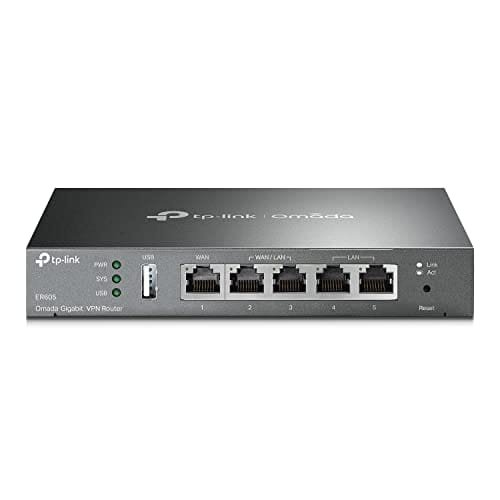
| TP-Link ER605 | Wired VPN and multi-WAN setups | Wired only | Load balance and Omada control | View on Amazon |
| GL.iNet Slate 7 | Traveling teams and remote work | Wi-Fi 7, BE3600 | Portable VPN and 2.5G | View on Amazon |
| ASUS ExpertWiFi EBR63 | Small companies needing business tools | Wi-Fi 6, AX3000 | Guest portal, VLAN, VPN, remote control | View on Amazon |
TP-Link Archer AX21: Best Budget Business Router

The TP-Link Archer AX21 is a practical Wi-Fi 6 router for a small office, home office, or shop with a modest number of users. It uses dual-band Wi-Fi 6 and offers gigabit wired ports for computers, printers, cameras, and other devices. The AX1800 class gives it enough speed for daily work, video calls, cloud apps, and normal streaming. It also works with TP-Link OneMesh-compatible products for wider coverage.
I like this model because it keeps setup simple without dropping useful modern features. Wi-Fi 6 can help when several devices share the network at once, while beamforming helps direct the signal toward connected clients. The router also supports WPA3 on compatible devices and includes basic parental and access controls. It is not a full enterprise gateway, but it gives many small offices a clean upgrade from an old ISP router.
Pros:
- Affordable entry point for Wi-Fi 6
- Gigabit Ethernet ports for wired office devices
- Simple setup through the TP-Link app
- OneMesh support can help extend coverage
- Good fit for home offices and small teams
- Works with Alexa for basic voice controls
Cons:
- Limited advanced business controls compared with a dedicated gateway
- No 2.5Gbps Ethernet port
- Performance can fall when the office has many active users
What Amazon Buyers Are Saying
Amazon buyers commonly like the Archer AX21 for its low price, quick setup, and clear improvement over older wireless routers. Many users report good coverage in apartments, homes, and small work areas. The app also receives praise from buyers who want to manage the network without complex menus. As with most wireless products, some reviews mention that walls, placement, and internet service quality affect the final range.
My Recommendation
I recommend the AX21 for a small business with a short list of connected devices and a tight budget. It is a strong basic router, but it may not suit a growing office that needs VLANs, multiple internet lines, or detailed traffic rules.
| Category | Rating |
|---|---|
| Coverage | 4/5 |
| Ease of Use | 4.5/5 |
| Business Features | 3.5/5 |
| Value | 4.5/5 |
| Overall Rating | 4.2/5 |
TP-Link Archer AX73: Best for Busy Small Offices

The TP-Link Archer AX73 steps up to the AX5400 class and offers more wireless capacity than the AX21. It is made for homes and small offices with more users, more devices, and heavier daily traffic. Its dual-band Wi-Fi 6 design suits video calls, cloud work, streaming, and large file transfers. Six external antennas help it send a strong signal across a wider area, though building layout still matters.
This router is a good choice when I want strong wireless performance without moving to a costly business access-point system. It includes gigabit Ethernet ports, TP-Link HomeShield tools, and support for OneMesh expansion. The USB port can support simple file or printer sharing, depending on the connected device and software setup. It remains a consumer-style router, so firms that need detailed VLAN or multi-WAN control should look at the ER605 or ExpertWiFi EBR63.
Pros:
- Higher wireless capacity than entry-level Wi-Fi 6 routers
- Good fit for busy homes and small offices
- Useful range for open offices and larger work areas
- Gigabit wired connections for office equipment
- OneMesh support for compatible coverage expansion
- Security and device controls are easy to manage
Cons:
- Advanced business networking tools are limited
- No multi-gigabit wired port
- Large antenna design may not suit every desk or shelf
What Amazon Buyers Are Saying
Amazon buyers often praise the Archer AX73 for its strong signal, simple installation, and ability to handle many connected devices. Reviews commonly describe it as a useful upgrade from older Wi-Fi 5 equipment. Some buyers like the app-based controls and stable performance during work and streaming. A smaller group reports setup issues, firmware concerns, or weaker results through thick walls, which shows why router placement remains important.
My Recommendation
The AX73 is one of my favorite choices for a small business that needs strong Wi-Fi but does not need a full wired security gateway. It offers a useful mix of range, speed, and ease of use. I would choose it over the AX21 for a growing office with more active users.
| Category | Rating |
|---|---|
| Wireless Capacity | 4.5/5 |
| Coverage | 4.5/5 |
| Business Features | 3.8/5 |
| Value | 4.3/5 |
| Overall Rating | 4.3/5 |
GL.iNet Flint 2: Best for VPN and Power Users

The GL.iNet Flint 2 is a powerful Wi-Fi 6 router for people who want more control over their network. It uses an eight-stream wireless design and advertises combined wireless speeds up to 6 Gbps. More important for a small business, it includes two 2.5Gbps ports and comes with OpenWrt installed. It also supports popular VPN options, including OpenVPN and WireGuard.
Flint 2 suits a technical owner who wants to set custom rules, run a VPN, and connect modern multi-gig devices. OpenWrt gives the router a broad set of options, but that flexibility also means a longer learning curve. I would not buy it only for a simple plug-and-play setup. I would buy it when network privacy, local control, fast wired links, or advanced settings matter more than a beginner-friendly interface.
Pros:
- Dual 2.5Gbps ports support faster local networks
- OpenWrt provides deep configuration options
- Built-in support for OpenVPN and WireGuard
- High Wi-Fi 6 capacity for demanding users
- Useful choice for NAS, server, and power-user setups
- Strong fit for owners who want local network control
Cons:
- Advanced settings may confuse first-time users
- Wireless performance depends on client devices and placement
- Some features require careful software configuration
What Amazon Buyers Are Saying
Amazon buyers commonly praise Flint 2 for its speed, VPN support, multi-gig ports, and flexible OpenWrt platform. Technical users often value the level of control and the ability to adjust the system beyond a normal consumer router. Reviews also show that setup can take more time for people who have not used OpenWrt before. Some buyers mention firmware settings, configuration steps, or the need to read the manual closely.
My Recommendation
Flint 2 is worth buying for a technical small-business owner who understands VPNs and network settings. It is one of the strongest performance picks here, but it is not my first choice for a team that wants the simplest possible management. I rate it highly for control and speed.
| Category | Rating |
|---|---|
| VPN and Security Control | 4.7/5 |
| Wired Performance | 4.7/5 |
| Ease of Use | 3.8/5 |
| Value | 4.4/5 |
| Overall Rating | 4.5/5 |
TP-Link ER605: Best Wired VPN Gateway

The TP-Link ER605 is different from the other picks because it is a wired VPN router, not a wireless access point. It can support up to three WAN Ethernet connections plus a USB WAN option, based on the setup and compatible devices. This design makes it useful for load balancing, failover planning, and wired network control. It also works with TP-Link Omada SDN for centralized management when paired with compatible Omada equipment.
I see the ER605 as the network gateway for a small business that already has Wi-Fi access points or plans to add them. It includes a stateful packet inspection firewall and VPN functions for remote connections. The box is compact and uses less space than many all-in-one routers. It does not provide Wi-Fi by itself, so buyers must budget for a separate access point if staff need wireless service.
Pros:
- Supports multiple WAN connections for flexibility
- Useful load-balancing and failover options
- Omada SDN integration can simplify central control
- Dedicated firewall and VPN gateway functions
- Compact design suits network cabinets and desks
- Good foundation for a wired small-office network
Cons:
- Does not provide built-in Wi-Fi
- Requires more networking knowledge than an all-in-one router
- Some advanced Omada features need compatible hardware
What Amazon Buyers Are Saying
Amazon buyers often like the ER605 because it offers business-style routing features at a modest price. Users commonly mention multi-WAN support, stable wired performance, and Omada integration as key benefits. Buyers who expected a standard wireless router sometimes report confusion because the unit has no Wi-Fi. Reviews also suggest that the best results come from careful setup and a clear understanding of WAN, VPN, and Omada terms.
My Recommendation
The ER605 is a strong choice for a small business that values wired control, VPN access, or a second internet connection. It is not the best standalone router for a small office. Pair it with a good access point, and it becomes a useful gateway for a more structured network.
| Category | Rating |
|---|---|
| WAN Flexibility | 4.7/5 |
| VPN Features | 4.3/5 |
| Ease of Setup | 3.8/5 |
| Value | 4.5/5 |
| Overall Rating | 4.3/5 |
GL.iNet Slate 7: Best Portable Business Router

The GL.iNet Slate 7 is a small Wi-Fi 7 travel router with a touchscreen and a 2.5Gbps port. It is aimed at people who work from hotels, cruise ships, RVs, offices, and other temporary locations. The touchscreen can provide quick access to VPN or AdGuard controls without opening a full browser menu. Its compact size makes it easy to carry in a laptop bag.
This is not a replacement for a full office router when a company needs wide coverage and many wired clients. It is better as a personal travel gateway or a backup router for a remote worker. A travel router can let one device handle the public network login while your own devices connect to a private network. VPN support also adds a useful privacy layer, but it cannot fix an unsafe public network or replace good account security.
Pros:
- Very portable for business travel
- Wi-Fi 7 support for compatible devices
- 2.5Gbps port supports fast wired connections
- Touchscreen makes key controls easy to reach
- Useful VPN and AdGuard functions
- Good option for hotels, cruises, and temporary workspaces
Cons:
- Not designed to cover a full office
- Small travel form limits port and antenna options
- Newer features may depend on compatible client devices
What Amazon Buyers Are Saying
Amazon buyers commonly focus on the Slate 7’s small size, travel value, touchscreen, and VPN controls. Users who work on the road often like the ability to carry one device for hotel or temporary network use. Some reviews note that travel networks can have login pages or limits that affect setup. Buyers also point out that the router is most useful for personal or small temporary networks rather than a permanent office deployment.
My Recommendation
I recommend Slate 7 as a travel companion, not as the main router for a fixed small business. It is a smart add-on for remote staff, consultants, and owners who work in many locations. Its size and controls make it more useful than a typical hotspot for some business trips.
| Category | Rating |
|---|---|
| Portability | 4.9/5 |
| Travel Features | 4.6/5 |
| Office Coverage | 3.2/5 |
| Value | 4.2/5 |
| Overall Rating | 4.2/5 |
ASUS ExpertWiFi EBR63: Best Business-Focused Wi-Fi Router

The ASUS ExpertWiFi EBR63 is built with small-business needs in mind. It combines AX3000 Wi-Fi 6 with tools such as a guest portal, VLAN support, VPN functions, and remote management. The guest portal can help a shop, studio, clinic, or office offer visitor access without giving guests the main staff password. ASUS also supports ExpertWiFi networking and AIMesh expansion for compatible devices.
This router stands out because it tries to bridge the gap between consumer simplicity and business control. A small firm can create separate networks for staff, guests, and selected devices when the setup supports those features. Remote management can help an owner check the network away from the office, but remote access should always use strong passwords and current firmware. I consider this a better long-term fit than a basic home router for companies that expect their needs to grow.
Pros:
- Business-focused guest portal options
- VLAN support for network separation
- VPN and remote management features
- Wi-Fi 6 performance for daily office work
- Can scale with compatible ExpertWiFi or AIMesh products
- Useful security tools for small teams
Cons:
- Some business features require careful setup
- Wi-Fi capacity is lower than the AX73 and Flint 2
- Remote management adds responsibility for account security
What Amazon Buyers Are Saying
Amazon buyers commonly appreciate the EBR63 for its clean design, straightforward setup, and business features that are not always found on basic home routers. Users often mention guest networking and app control as useful for small offices. Some buyers report that advanced features take time to understand. Reviews also show that the final experience depends on firmware, internet service, and whether the user needs simple Wi-Fi or a more complete network design.
My Recommendation
The EBR63 is my top choice for a small business that wants a business-ready feature set without building a large network system. It offers a useful mix of Wi-Fi, guest control, VLAN support, VPN tools, and future expansion. I would choose it when security and network separation matter as much as wireless speed.
| Category | Rating |
|---|---|
| Business Controls | 4.7/5 |
| Wireless Performance | 4.2/5 |
| Security Options | 4.6/5 |
| Ease of Use | 4.2/5 |
| Overall Rating | 4.5/5 |
How to Choose the Best Router for Small Business
Choosing the Best Router for Small Business depends on more than the advertised wireless speed. I first look at the office size, number of active users, internet plan, wired devices, and security needs. A home-based worker may need a simple Wi-Fi 6 model. A growing company may need VLANs, VPN access, guest control, multiple WAN lines, or a separate access-point system.
1. Match the Router to Your Office Traffic
Count the devices that will use the network at the same time. Include laptops, phones, printers, point-of-sale devices, cameras, smart displays, and guest phones. A small office with five active users may do well with the Archer AX21. A team with many cloud apps and video calls will gain more from the AX73, Flint 2, or EBR63.
Do not judge the router by its combined speed number alone. Those numbers describe ideal wireless links across two bands. Your real speed will also depend on walls, distance, device limits, interference, and the internet plan. A strong router cannot make a slow internet package faster.
2. Look for the Right Business Controls
Guest access is important when customers, visitors, or contractors need Wi-Fi. A guest network keeps visitors away from staff devices when configured correctly. VLAN support can create separate paths for staff, guests, cameras, and other device groups. The ASUS ExpertWiFi EBR63 is a good fit when these tools matter.
VPN support also deserves careful thought. A VPN can protect traffic between remote workers and the office, but setup and performance vary by protocol and device. The Flint 2 offers strong flexibility for technical owners. The ER605 is better when you want a dedicated wired gateway with multi-WAN and Omada options.
3. Check Ports, Expansion, and Total Value
Make a list of wired devices before you buy. Computers, network storage, printers, switches, and access points may need Ethernet. Gigabit ports work for many offices, while 2.5Gbps ports help modern servers, NAS devices, and faster local transfers. Flint 2 and Slate 7 include 2.5Gbps connectivity, while the ER605 focuses on wired routing rather than wireless access.
Also consider future growth. A basic router may cost less today, but replacing it after adding staff can cost more. Mesh or access-point support can help expand coverage. A multi-WAN gateway can add flexibility if downtime is costly. Keep firmware current, use long passwords, turn off features you do not need, and place the router in an open central spot.
Final Verdict: Which Should You Buy?
For most small companies, I recommend the ASUS ExpertWiFi EBR63 because it combines Wi-Fi 6, guest controls, VLAN support, VPN tools, and room to grow. Choose the AX73 for stronger simple Wi-Fi, Flint 2 for advanced VPN control, or ER605 for a wired multi-WAN setup.
The Best Router for Small Business should fit your users, devices, and security plan. Pick the model that solves today’s problems without making tomorrow’s network harder to manage.
FAQs Of Best Router for Small Business
What is the best router for a small business office?
The ASUS ExpertWiFi EBR63 is the best overall choice in this guide. It offers Wi-Fi 6, guest access, VLAN support, VPN tools, and remote management.
Is Wi-Fi 6 enough for a small business?
Yes. Wi-Fi 6 is enough for many small offices, especially when the internet plan and device count are moderate. Larger teams may benefit from a higher-capacity router or added access points.
Do small businesses need a VPN router?
A VPN router can help remote staff connect to business resources. It is most useful when the company has a clear remote-access plan and someone can manage the settings.
Is the TP-Link ER605 a wireless router?
No. The ER605 is a wired VPN gateway. You need a separate wireless access point or mesh system for Wi-Fi.
How many devices can a small-business router support?
The number varies by model, traffic, and wireless conditions. Check active users and busy devices, not only the total number of devices listed by the manufacturer.






