

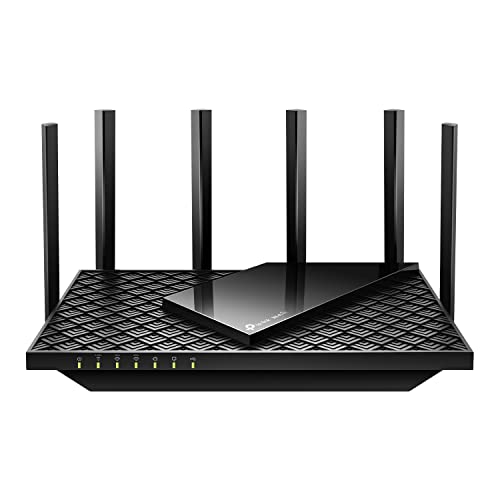
The best router for online gaming combines low latency, strong Wi-Fi, smart traffic control, and reliable wired ports.
A fast internet plan cannot fix every gaming problem. Weak Wi-Fi, busy home networks, poor router placement, and sudden traffic spikes can still cause lag, rubber-banding, or dropped matches. I tested the key features gamers need and compared seven current gaming routers for 2026. These picks cover high-end Wi-Fi 7, flexible Wi-Fi 6, multi-gig wired gaming, large homes, consoles, PCs, and lower budgets.
See the differences between my top picks at a glance.
| Router | Wi-Fi | Best For | Key Wired Feature | CTA |
|---|---|---|---|---|
| GL.iNet Flint 2 | Wi-Fi 6 | Open-source control | Dual 2.5G ports | View on Amazon |
| ASUS ROG GS-BE12000 | Wi-Fi 7 | Serious gaming setups | Eight 2.5G ports | View on Amazon |
| MSI Radix AXE6600 | Wi-Fi 6E | Gaming and streaming | Gigabit LAN ports | View on Amazon |
| ASUS GT-BE19000AI | Wi-Fi 7 | Large high-speed homes | Dual 10G ports | View on Amazon |
| ASUS TUF Gaming BE6500 | Wi-Fi 7 | Value-focused gamers | Four 2.5G ports | View on Amazon |
| ASUS RT-AX1800S | Wi-Fi 6 | Small budgets | Standard gigabit | View on Amazon |
| HYPEREV AX3000 | Wi-Fi 6 | Console players | Gaming-focused setup | View on Amazon |
GL.iNet Flint 2: Best Wi-Fi 6 Gaming Router

The GL.iNet GL-MT6000 Flint 2 is one of the most interesting choices for gamers who want control. It uses Wi-Fi 6 with an eight-stream design and a combined advertised wireless rate of up to 6 Gbps. Its dual 2.5G ports also suit fast fiber plans, wired gaming PCs, and network storage.
Flint 2 stands out because it comes with OpenWrt installed. That gives advanced users more control over routing, VPN rules, device limits, and traffic settings than many basic home routers. I would choose it for a gamer who enjoys tuning a network and wants OpenVPN and WireGuard support without a required security subscription.
Pros:
- Dual 2.5G multi-gig ports
- Strong Wi-Fi 6 capacity for busy homes
- Pre-installed OpenWrt offers deep control
- OpenVPN and WireGuard support
- Good fit for wired gaming PCs and consoles
- No need to depend on a paid gaming service
Cons:
- Advanced settings may feel complex for beginners
- Wi-Fi 7 routers offer newer wireless features
- Some users may prefer a simpler mobile app
What Amazon Buyers Are Saying
Amazon buyer feedback commonly centers on the router’s strong performance, flexible software, and useful multi-gig ports. Buyers who understand OpenWrt often value the control and VPN options. Common concerns tend to focus on setup time, firmware learning, and the extra care needed when changing advanced settings. Experiences can vary with home layout, client devices, and internet service.
My Recommendation
I recommend Flint 2 to technical gamers who want excellent value and strong network control. It is not the easiest choice for someone who wants a fully automatic setup, but it offers a lot for the money. I rate it 4.6 out of 5.
ASUS ROG Strix GS-BE12000 Wi-Fi 7 Router

The ASUS ROG Strix GS-BE12000 is built for modern gaming rooms with many fast devices. This tri-band Wi-Fi 7 router lists speeds up to 12 Gbps and coverage up to 3,300 square feet. It also provides eight 2.5G ports, which is unusually useful for a home filled with gaming PCs, consoles, access points, and wired media devices.
Wi-Fi 7 adds newer tools such as Multi-Link Operation on compatible clients. In simple terms, supported devices can use more than one wireless link to improve speed or connection handling. The ROG Game Boost feature targets game traffic, while mesh support can help extend coverage in a larger home.
Pros:
- Fast tri-band Wi-Fi 7 design
- Eight 2.5G ports for many wired devices
- Game Boost feature for traffic control
- Mesh support for larger homes
- Up to 3,300 square feet of listed coverage
- Strong match for new Wi-Fi 7 gaming devices
Cons:
- Costs more than basic Wi-Fi 6 routers
- Older devices cannot use every Wi-Fi 7 feature
- Large feature set may take time to learn
What Amazon Buyers Are Saying
Amazon shoppers commonly focus on the router’s speed, broad port selection, and gaming features. Buyers with several wired devices often see the eight 2.5G ports as a major benefit. Some buyers may question the value if most devices use older Wi-Fi standards or if their internet plan is modest. Actual range still depends on walls, placement, and wireless interference.
My Recommendation
This is my top high-end choice for a serious gaming household. It makes the most sense when you own newer Wi-Fi 7 clients, have multi-gig internet, or need many fast wired ports. I rate the ASUS ROG Strix GS-BE12000 at 4.8 out of 5.
MSI Radix AXE6600 Wi-Fi 6E Gaming Router

The MSI Radix AXE6600 uses tri-band Wi-Fi 6E to add access to the less crowded 6 GHz band. It has an advertised capacity of up to 6,600 Mbps, an 1.8 GHz quad-core processor, MU-MIMO, and an eight-stream design. These features make it a strong middle ground for gaming, streaming, and several active users.
The router also includes AI QoS and RGB lighting. The QoS feature can help organize traffic, though results depend on correct setup and the rest of the network. Wi-Fi 6E works best with newer phones, laptops, and adapters that support 6 GHz, while older devices can still use the 2.4 GHz and 5 GHz bands.
Pros:
- Tri-band Wi-Fi 6E adds the 6 GHz option
- Useful balance of speed and price
- AI QoS helps manage busy network traffic
- Quad-core processing suits many connected devices
- MU-MIMO supports multiple active clients
- Gaming design includes customizable RGB lighting
Cons:
- 6 GHz signals can lose strength through walls
- Not as future-ready as a Wi-Fi 7 model
- RGB lighting may not matter to every buyer
What Amazon Buyers Are Saying
Amazon feedback often praises the Radix AXE6600 for its fast connection, gaming look, and simple traffic controls. Buyers with newer 6 GHz devices may enjoy cleaner short-range performance. Some users may report that setup or firmware behavior needs attention, which is common with feature-rich routers. The best results usually come from placing it in an open area near the main gaming space.
My Recommendation
I recommend the MSI Radix AXE6600 for gamers who want tri-band service without moving to the newest Wi-Fi 7 class. It is a good fit for apartments, gaming rooms, and homes with compatible 6 GHz devices. My rating is 4.4 out of 5.
ASUS GT-BE19000AI Wi-Fi 7 Gaming Router

The ASUS GT-BE19000AI is aimed at users with very fast internet and large homes. It is a tri-band Wi-Fi 7 router with a listed wireless capacity of up to 19 Gbps and coverage up to 3,500 square feet. Two 10G ports and four 2.5G ports give it the wired speed needed for high-end PCs, NAS devices, and multi-gig fiber.
Its Game Boost system is designed to give game traffic priority, while VPN support adds flexibility for users who need secure remote access. The large hardware platform makes more sense in a busy household than in a small apartment. To use its full potential, you need compatible client devices and an internet plan that can feed its fastest ports.
Pros:
- Very high advertised Wi-Fi 7 capacity
- Two 10G ports support demanding wired networks
- Four 2.5G ports add excellent flexibility
- Listed coverage reaches up to 3,500 square feet
- Game Boost supports gaming and streaming traffic
- Strong choice for multi-gig fiber service
Cons:
- Premium hardware may exceed most home needs
- Requires compatible devices to show its full value
- Large size and advanced controls may not suit everyone
What Amazon Buyers Are Saying
Amazon buyers commonly highlight the router’s speed, strong wired connections, and wide feature set. Users with fast fiber often appreciate the 10G ports and the ability to connect several multi-gig devices. The most likely concern is cost, especially for buyers with slower service or few Wi-Fi 7 clients. Results also depend on proper placement and the limits of the connected device.
My Recommendation
This is the best router here for a large, demanding network with multi-gig internet. I would not buy it only for a basic 300 Mbps plan, but it is a powerful long-term choice for enthusiasts. I rate it 4.7 out of 5.
ASUS TUF Gaming BE6500 Wi-Fi 7 Router

The ASUS TUF Gaming BE6500 offers a simpler path into Wi-Fi 7. It uses a dual-band design with an advertised wireless rate of up to 6.5 Gbps. Four 2.5GbE ports make it useful for a gaming PC, console, TV, and another wired device without relying on older gigabit ports.
This router supports Game Accelerator, Multi-Link Operation, mesh expansion, VPN use, and subscription-free network security. Dual-band Wi-Fi may not separate traffic as widely as a tri-band model, but it keeps the setup more direct. I see it as a practical choice for gamers who want new wireless features without paying for the largest flagship router.
Pros:
- Wi-Fi 7 features at a more approachable level
- Four 2.5GbE ports are useful for wired gaming
- Game Accelerator helps prioritize game traffic
- Multi-Link Operation support for compatible clients
- Mesh and VPN compatible
- Subscription-free security reduces ongoing cost
Cons:
- Dual-band design has less separation than tri-band
- Full Wi-Fi 7 benefits need newer devices
- Coverage may require a mesh node in large homes
What Amazon Buyers Are Saying
Amazon shoppers often like the TUF model for its fast wired ports, gaming controls, and lower cost than premium Wi-Fi 7 models. Buyers who move from older routers may notice better device capacity and newer connection options. Potential complaints may involve setup choices, app features, or limited gains with older clients. Wireless speed also changes with distance, walls, and client hardware.
My Recommendation
The TUF Gaming BE6500 is my value pick among the Wi-Fi 7 routers. It gives gamers useful modern features and four 2.5G ports without pushing into flagship pricing. I rate it 4.5 out of 5.
ASUS RT-AX1800S Wi-Fi 6 Router

The ASUS RT-AX1800S is a sensible low-cost Wi-Fi 6 router for smaller homes and modest internet plans. It supports gaming, streaming, smart home devices, and AiMesh expansion. Its feature list also includes parental controls, built-in VPN support, and subscription-free network security.
This is not a multi-gig gaming powerhouse. Its value comes from dependable Wi-Fi 6 basics and the familiar ASUS software platform. A wired connection remains the best choice for a competitive gaming PC or console, but the router can serve casual and online multiplayer gamers well when placed close to the play area.
Pros:
- Affordable entry into Wi-Fi 6
- AiMesh support allows future expansion
- Parental controls help manage family devices
- Built-in VPN support adds flexibility
- Subscription-free network security
- Good fit for small homes and standard broadband
Cons:
- Fewer high-speed ports than premium picks
- Lower capacity for very busy households
- Not ideal for multi-gig fiber plans
What Amazon Buyers Are Saying
Amazon buyers often choose this model because it offers trusted basic features at a reasonable price. Common positive themes include easy setup, stable everyday Wi-Fi, and useful parental controls. Some users may want stronger range or more advanced gaming controls, especially in larger homes. Thick walls and crowded wireless channels can still limit performance.
My Recommendation
I recommend the RT-AX1800S for casual gamers, students, and smaller homes that do not need multi-gig speed. It is a better value than an old Wi-Fi 5 router, but power users should choose a higher class model. My rating is 4.2 out of 5.
HYPEREV AX3000 Gaming Router

The HYPEREV AX3000 is made for gamers who want a focused Wi-Fi booster for a PS5, PC, or console setup. It uses dual-band Wi-Fi 6 and advertises speeds up to 2,402 Mbps. Its game accelerator focuses on lowering lag and helping game traffic reach the internet with fewer delays.
The included 90-day GearUP VIP Core plan gives buyers a way to try the related gaming service. I would check the renewal terms before the trial ends. This router makes the most sense for a bedroom or gaming area where the main router struggles, but buyers should confirm how it works with their current network before purchase.
Pros:
- Designed around PS5, PC, and console gaming
- Wi-Fi 6 offers better device handling than older Wi-Fi
- Game accelerator targets lag and ping concerns
- Useful option for a separate gaming area
- Includes a 90-day GearUP VIP Core plan
- Simple fit for users seeking gaming-focused tools
Cons:
- Trial service may require a paid plan later
- Dual-band design is less flexible than tri-band
- Not a replacement for a poor internet connection
What Amazon Buyers Are Saying
Amazon shoppers often focus on how quickly the device can improve a weak gaming area and how easy it feels to use with consoles. Some buyers may like the included trial, while others may not want a recurring service after the trial ends. Real results can vary with the main router, distance, signal strength, and game server location. A wired connection may still provide the most stable result when available.
My Recommendation
I recommend HYPEREV for console players who want a targeted gaming solution rather than a full premium home router. Read the service terms and check compatibility first. I rate it 4.1 out of 5.
How to Choose the Best Router for Online Gaming
Choosing the Best Router for Online Gaming means looking beyond the biggest speed number on the box. Online games use little data compared with 4K video, but they need a steady path with low delay. The right router should also handle phones, TVs, downloads, and smart home devices at the same time.
1. Focus on latency control, not only speed
Ping measures the time that data takes to travel between your device and the game server. A router cannot remove distance or fix a slow game server, but good traffic management can help when another person starts a download. Look for QoS, Game Boost, game acceleration, or similar controls.
These features work best when you set them up with care. Give the gaming PC or console a high priority. Set realistic upload and download limits when the router supports them. Do not assume a large advertised Mbps number guarantees low ping.
2. Match Wi-Fi and ports to your devices
Wi-Fi 6 remains a strong choice for many gamers. Wi-Fi 6E adds a 6 GHz band, which can offer a cleaner short-range link with compatible devices. Wi-Fi 7 adds newer features such as Multi-Link Operation, but you need a Wi-Fi 7 phone, laptop, adapter, or console accessory to use those features.
Check the wired ports, too. A gigabit port is enough for many internet plans. A 2.5G port makes more sense for multi-gig service, local file transfers, or a high-speed home network. The ASUS GT-BE19000AI goes further with 10G ports, while the ASUS TUF BE6500 offers four 2.5G ports at a more practical level.
3. Consider coverage, software, and total value
Router range depends on walls, floors, interference, antenna position, and client hardware. A large coverage claim does not guarantee the same result in every home. Place the router in an open, central spot, not inside a cabinet or behind a television.
Think about software, too. OpenWrt on the Flint 2 suits advanced users who want fine control. ASUS models offer mesh support, parental controls, VPN tools, and gaming settings. If you want a simple upgrade for a small home, the RT-AX1800S may be enough. If you want long-term headroom, a Wi-Fi 7 router can offer more room for newer devices.
Final Verdict: Which Should You Buy?
For most serious gamers, I recommend the ASUS ROG Strix GS-BE12000 for its Wi-Fi 7 speed, eight 2.5G ports, and strong gaming focus. The GL.iNet Flint 2 is the better value for advanced users, while the ASUS TUF BE6500 is my balanced Wi-Fi 7 pick.
The Best Router for Online Gaming should match your internet plan, home size, devices, and budget. Use Ethernet when possible, place the router well, and choose smart traffic controls over marketing speed alone.
FAQs Of Best Router for Online Gaming
What is the best router for online gaming in 2026?
The ASUS ROG Strix GS-BE12000 is the strongest overall choice here for serious gamers. It combines Wi-Fi 7, Game Boost, mesh support, and eight 2.5G ports.
Does a gaming router lower ping?
A gaming router may reduce delay caused by home network traffic. It cannot fix a distant game server, weak internet service, or problems outside your home.
Is Wi-Fi 7 worth it for gaming?
Wi-Fi 7 is worth considering if you own compatible devices, use multi-gig internet, or want a newer long-term platform. Wi-Fi 6 remains enough for many homes.
Should I use Ethernet or Wi-Fi for online gaming?
Use Ethernet when possible. A wired connection usually gives a steadier link and avoids wireless interference, especially for competitive PC or console gaming.
How many 2.5G ports do I need on a gaming router?
One 2.5G port may be enough for one gaming PC or fast internet service. Four or more ports help homes with several wired gaming and network devices.




[…] businesses rely on efficient internet connectivity to drive daily operations. The right router enhances productivity, supports multiple devices, and safeguards your network. In this blog post, […]
[…] is particularly beneficial for busy households where multiple people are streaming videos or playing online games. The dual-band functionality offers speeds up to 1900 Mbps, ensuring that high-bandwidth […]