


The best router for IoT devices balances stable coverage, device control, security, and easy setup for your connected home.
A home can have smart bulbs, cameras, locks, speakers, plugs, sensors, and appliances online at the same time. A weak router may cause slow control, dropped cameras, and hard-to-find connection errors. I reviewed five useful options for different needs, from a fast Wi-Fi 7 home router to rugged 4G LTE gateways. Some suit a large smart home, while others fit an RV, remote site, or industrial setup. My top pick is the TP-Link BE6500 because it offers strong home performance, useful IoT controls, and room to grow.
See the differences between my top picks at a glance.
| Router | Best For | Main Network Type | IoT Strength | Coverage / Capacity | Buy |
|---|---|---|---|---|---|
| TP-Link BE6500 | Most smart homes | Wi-Fi 7, dual-band | Private IoT, HomeShield | Up to 2,400 sq. ft.; up to 90 devices | View on Amazon |
| Ubiquiti UDB-IoT-US | Managed IoT networks | Device bridge | Focused IoT connectivity | Depends on host network | View on Amazon |
| GL-X750V2 Spitz | Travel, RV, and remote IoT | 4G LTE, dual-band Wi-Fi | OpenWrt, VPN, IoT gateway | Depends on LTE signal | View on Amazon |
| Teltonika RUT241 | Industrial and remote sites | 4G LTE, Ethernet, Wi-Fi | VPN, RMS, remote monitoring | Depends on LTE signal | View on Amazon |
| NETGEAR R6700AX | Simple Wi-Fi 6 homes | Wi-Fi 6, dual-band | Reliable home device access | Up to 1,500 sq. ft.; about 20 devices | View on Amazon |
TP-Link BE6500 Wi-Fi 7 Router

The TP-Link BE6500 is my strongest all-around choice for a busy smart home. It uses Wi-Fi 7 and supports dual-band wireless service. The product listing also highlights two 2.5Gbps ports, a USB 3.0 port, a quad-core processor, and support for up to 90 devices. Those features give it enough headroom for smart cameras, TVs, phones, computers, sensors, and connected appliances.
I also like its Private IoT feature and HomeShield tools. A separate IoT network can keep smart devices away from personal computers and private files. That matters because many low-cost smart products receive fewer updates than phones or laptops. The listed coverage reaches up to 2,400 square feet, although walls, floors, interference, and device placement will change real results.
Pros:
- Wi-Fi 7 provides a modern platform for newer client devices.
- Two 2.5Gbps ports support fast wired connections.
- Private IoT helps separate smart devices from the main network.
- HomeShield adds useful security and management tools.
- USB 3.0 adds storage or sharing options for compatible setups.
- High listed device capacity suits a growing connected home.
- Quad-core processing helps the router manage many network tasks.
Cons:
- Many older IoT products cannot use Wi-Fi 7 features.
- Advanced security and control features may require extra setup or service terms.
- Large homes may still need a mesh system or an added access point.
What Amazon Buyers Are Saying
Buyer feedback for a newer router can change as more owners add reviews. Common points to check on the current Amazon page include setup time, wireless range, app use, and stability with older smart products. Some buyers tend to praise faster wireless service and the clean TP-Link management experience. Others may mention firmware changes, coverage limits, or the need to adjust settings for older 2.4GHz devices. I recommend reading the latest reviews for your internet plan and home size before ordering.
My Recommendation
I recommend the BE6500 for most people who want one capable home router for IoT devices. It offers a strong mix of speed, network separation, wired ports, and future-ready wireless support. It is more router than a small apartment with a few smart bulbs needs, but it makes sense for a family home with cameras and many connected products.
| Category | Rating |
|---|---|
| IoT controls | 4.5/5 |
| Wireless performance | 4.5/5 |
| Wired connectivity | 4.5/5 |
| Ease of use | 4/5 |
| Value for a busy home | 4.5/5 |
| Overall Rating | 4.5/5 |
Ubiquiti UDB-IoT-US Device Bridge

The Ubiquiti UDB-IoT-US takes a different approach from a normal home Wi-Fi router. It is a device bridge designed for IoT use. In simple terms, it helps connect supported devices to an existing network rather than replacing your main router. That makes it more relevant to users who already run a Ubiquiti network or need a focused way to add IoT equipment.
This product deserves careful consideration before purchase because it depends on the rest of your network. It is not the natural choice for someone who needs a complete router with broad home coverage. For a managed setup, however, a dedicated bridge can make device deployment more organized. I would confirm compatibility with the current UniFi system, required controller, and intended IoT device before buying.
Pros:
- Purpose-built design for supported IoT deployments.
- Can complement an existing Ubiquiti network.
- May simplify the connection of compatible remote devices.
- Fits buyers who want a focused bridge instead of another general router.
- Useful for planned network projects with central management.
- Compact product purpose can reduce unnecessary hardware in a managed system.
Cons:
- It is not a full replacement for a standard home router.
- Compatibility depends on the existing Ubiquiti network and supported devices.
- New users may face a steeper setup path than with a basic consumer router.
What Amazon Buyers Are Saying
For a specialized bridge, buyer comments are most useful when they describe the exact network used. Look for reviews that mention controller support, pairing, range, firmware, and the IoT devices connected. Owners who already use Ubiquiti equipment may value the focused design and clean integration. Buyers expecting a plug-and-play wireless router may feel disappointed if they do not understand the bridge role. I would give extra weight to recent reviews from customers with a setup close to yours.
My Recommendation
I recommend the UDB-IoT-US only for a compatible Ubiquiti environment or a clearly defined IoT project. It can be a smart choice for managed networks, but it is not my first pick for a normal family home. Buyers who need a complete wireless router should choose the TP-Link or NETGEAR instead.
| Category | Rating |
|---|---|
| IoT-focused design | 4.5/5 |
| Network integration | 4/5 |
| Ease for beginners | 3/5 |
| Deployment flexibility | 4/5 |
| Value for the right user | 4/5 |
| Overall Rating | 4/5 |
GL-X750V2 Spitz 4G LTE VPN Router
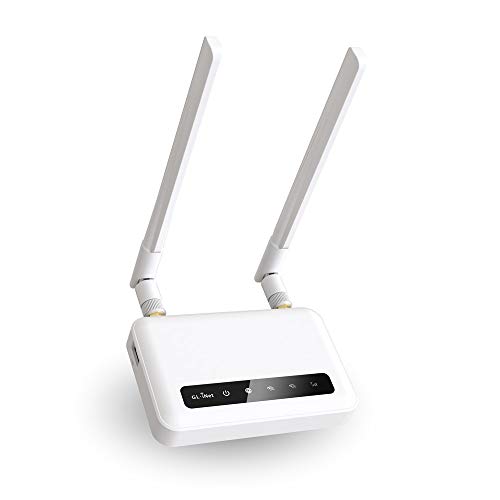
The GL-X750V2 Spitz is one of the most useful choices for IoT devices away from fixed home broadband. It uses 4G LTE and supports dual-band AC750 Wi-Fi. The listing identifies it as certified for T-Mobile and AT&T IoT use in North America. It also includes VPN support, OpenWrt, a microSD card slot, and an IoT gateway role.
This router makes sense in an RV, boat, remote cabin, temporary work site, or small off-grid project. Cellular service becomes the main limit, so the router cannot fix a weak carrier signal. I like the OpenWrt base because it gives experienced users more control. Still, that control can feel complex if you only want a simple home setup.
Pros:
- 4G LTE provides internet access where wired service may not exist.
- VPN support helps users build a more controlled remote connection.
- OpenWrt gives experienced users added network flexibility.
- Dual-band Wi-Fi supports a mix of older and newer client devices.
- IoT gateway features suit remote sensors and equipment.
- MicroSD support adds a useful option for compatible network tasks.
- Its portable design fits RV and offshore use better than a large home router.
Cons:
- Performance depends on carrier coverage, signal quality, and data plan limits.
- The “North America only” description limits its target market.
- OpenWrt settings may take time for beginners to learn.
What Amazon Buyers Are Saying
When comparing customer reviews for the Spitz, focus on carrier activation, LTE signal, VPN setup, and use in a moving vehicle. Buyers often care more about stable cellular service than peak Wi-Fi speed. Reviews can also reveal how easy the setup feels with a chosen SIM and carrier. Some owners may like its flexibility and remote-use design, while others may report signal limits or a learning curve. Because carrier conditions vary by location, no review can guarantee the same result at your site.
My Recommendation
I recommend the GL-X750V2 for remote IoT work, travel, and backup internet. It is not the best router for IoT devices in a typical home with fast cable or fiber service. For cellular use, though, it offers a thoughtful mix of LTE access, VPN tools, OpenWrt control, and Wi-Fi in a compact package.
| Category | Rating |
|---|---|
| Remote IoT use | 4.5/5 |
| LTE flexibility | 4/5 |
| VPN and OpenWrt control | 4.5/5 |
| Beginner friendliness | 3.5/5 |
| Value for mobile use | 4/5 |
| Overall Rating | 4/5 |
Teltonika RUT241 Industrial LTE Router

The Teltonika RUT241 targets industrial and remote connectivity rather than casual home Wi-Fi. It combines 4G LTE, Ethernet, wireless networking, VPN support, RMS support, and remote monitoring. That feature set can help an installer manage equipment at a site that does not have reliable wired internet. Its compact industrial design also suits control cabinets, kiosks, field equipment, and small remote installations.
The RUT241 is a practical IoT gateway when uptime and remote access matter more than flashy home features. Teltonika equipment often appeals to technical users because it provides detailed control and monitoring options. The trade-off is a more technical setup than a basic consumer router. I would plan the SIM, carrier bands, VPN design, power arrangement, and remote management needs before purchase.
Pros:
- 4G LTE supports remote sites without fixed broadband.
- Ethernet helps connect wired equipment and controllers.
- VPN support suits secure remote access plans.
- RMS support provides a path for remote monitoring and management.
- Compact industrial design fits many professional installations.
- Useful for machine, sensor, kiosk, and field connectivity.
- More suitable for planned deployments than a basic consumer router.
Cons:
- Its professional features may overwhelm a first-time home user.
- LTE results depend on carrier coverage and antenna conditions.
- It may cost more than a simple home router with similar basic Wi-Fi.
- Buyers should confirm regional cellular compatibility before ordering.
What Amazon Buyers Are Saying
For the RUT241, useful customer reviews should mention the exact carrier, installation setting, VPN method, and remote management plan. Industrial buyers usually care about stable operation, compact size, Ethernet access, and the ability to reach a site from a distance. Common concerns may include configuration time, cellular activation, and the need for technical knowledge. I would not judge this router by home Wi-Fi reviews alone because its strongest value appears in professional and remote deployments.
My Recommendation
I recommend the RUT241 for installers, small businesses, and industrial IoT projects that need LTE plus remote management. It is a serious gateway, not a casual replacement for a family Wi-Fi router. If you need dependable site access and understand VPN and cellular settings, it can be worth the higher learning curve.
| Category | Rating |
|---|---|
| Industrial IoT fit | 4.5/5 |
| Remote management | 4.5/5 |
| VPN capability | 4.5/5 |
| Ease for home users | 3/5 |
| Professional value | 4/5 |
| Overall Rating | 4.2/5 |
NETGEAR Nighthawk R6700AX Wi-Fi 6 Router

The NETGEAR Nighthawk R6700AX is a sensible choice for a smaller home or apartment. It uses dual-band Wi-Fi 6 and lists speeds up to 1.8Gbps. The product description states coverage up to 1,500 square feet, support for about 20 devices, and four Gigabit Ethernet ports. It also focuses on easy setup, which helps users who want to connect smart plugs, speakers, cameras, and other basic devices without a complex network plan.
This router does not aim at the same large-device workload as the TP-Link BE6500. That can be a benefit if you want a lower-cost and simpler setup. Wi-Fi 6 can help manage modern devices efficiently, while the 2.4GHz band remains important for many smart-home products. I would choose it for a modest device count and avoid stretching its listed coverage in a large, crowded home.
Pros:
- Wi-Fi 6 gives a current and efficient wireless foundation.
- Four Gigabit Ethernet ports support wired devices.
- Listed coverage suits many apartments and small homes.
- Easy setup can help first-time router buyers.
- Dual-band service supports common IoT devices.
- Its modest capacity may offer good value for smaller households.
- Nighthawk management tools provide a familiar consumer experience.
Cons:
- Its listed device capacity is lower than the TP-Link BE6500.
- Gigabit ports do not match the faster 2.5Gbps ports on the TP-Link.
- Large homes may need an extender or a different network design.
- Heavy camera use and many active clients can reduce available capacity.
What Amazon Buyers Are Saying
When reading buyer reviews, pay attention to setup, range, firmware, and performance with the number of devices you plan to use. Buyers often value a quick install and steady everyday Wi-Fi. Some may report strong results in smaller homes, while others may note weaker range through thick walls or a need for an extender. Customer experience can also depend on internet speed, placement, and local interference, so compare reviews from homes similar to yours.
My Recommendation
I recommend the R6700AX for shoppers who want a straightforward Wi-Fi 6 router for a small or medium home. It is a good value pick for smart plugs, lights, speakers, and a moderate number of connected devices. Choose the TP-Link instead if you need more capacity, faster wired ports, or stronger IoT separation features.
| Category | Rating |
|---|---|
| Small-home IoT use | 4/5 |
| Wireless performance | 4/5 |
| Setup simplicity | 4.5/5 |
| Wired ports | 4/5 |
| Value for smaller homes | 4.5/5 |
| Overall Rating | 4.2/5 |
How to Choose Best Router for IoT Devices
Choosing the best router for IoT devices takes more than looking at the highest advertised speed. Smart products often use the 2.4GHz band, stay online all day, and need stable connections more than extreme download speed. I look at device capacity, network separation, coverage, management tools, security updates, and the type of internet connection. The right choice depends on whether you have a normal home, a remote site, or a professional IoT installation.
1. Check IoT Band Support and Device Capacity
Many smart plugs, bulbs, sensors, and older cameras use 2.4GHz Wi-Fi. This band reaches farther than 5GHz, but it can suffer from crowding. A good router should support both bands and let you connect older devices without trouble. Before buying, count every device, including phones, laptops, TVs, game systems, cameras, and speakers.
Do not treat the maximum device number as a promise of equal performance. A sensor that sends small data packets uses far less network power than a 4K security camera. The TP-Link BE6500 fits a large connected home better because its listing supports up to 90 devices. The NETGEAR R6700AX makes more sense when your total count stays closer to its listed capacity.
2. Look for IoT Isolation and Simple Security
IoT isolation keeps smart devices on a separate guest or private network. This setup can reduce the risk if one inexpensive device has a security problem. It also gives you more control over which devices can reach your computers or local files. Features such as Private IoT, guest networking, firewall controls, and automatic firmware updates can improve daily safety.
Security still depends on your habits. Change the default admin password. Use a long Wi-Fi password. Install router updates. Remove devices you no longer use. Turn off remote management unless you need it. For a work site, VPN and remote monitoring matter more than a colorful phone app. That is why the Teltonika RUT241 and GL-X750V2 suit advanced deployments better than a basic home router.
3. Match Coverage, Internet Type, and Long-Term Value
Choose coverage based on your real home, not only the box claim. Place the router in an open central area. Thick concrete, metal, mirrors, and appliances can reduce signal strength. If the home has several floors or dead spots, consider a mesh system or a wired access point. A stronger router cannot always overcome poor placement.
Also match the router to your internet source. The TP-Link and NETGEAR suit cable, fiber, or other standard home broadband connections. The Spitz and Teltonika use 4G LTE, so carrier coverage, SIM support, signal quality, and data limits become key. The Ubiquiti bridge needs a compatible network and should not be confused with a complete home router.
Finally, compare the total cost. Include possible subscriptions, cellular data, extenders, Ethernet cables, and security services. A cheaper router may cost more if it needs an extender or cannot handle your device count. A more advanced model can offer better value when it solves a real need, but extra features are not useful if you will never use them.
Final Verdict: Which Should You Buy?
The TP-Link BE6500 is the best router for IoT devices for most busy homes. It combines Wi-Fi 7, Private IoT, HomeShield, fast ports, and high listed capacity. Choose NETGEAR for a smaller home, GL.iNet for mobile LTE use, Teltonika for industrial work, and Ubiquiti for a compatible managed system.
Before buying, count devices, check coverage, and confirm your internet type. A well-placed router with a separate IoT network gives smart-home devices a safer and steadier connection.
FAQs Of Best Router for IoT Devices
What is the best router for IoT devices in a large smart home?
The TP-Link BE6500 is the strongest choice in this review for a large smart home. It lists support for up to 90 devices and includes Private IoT and HomeShield features.
Do IoT devices need Wi-Fi 7?
No. Most IoT devices work well on 2.4GHz Wi-Fi. Wi-Fi 7 mainly gives your newer phones, computers, and other compatible devices more network capacity.
Should I put smart-home devices on a guest network?
Yes, a separate guest or IoT network can help keep smart devices away from personal computers and private files. Use the router’s isolation controls when available.
What is the best IoT router for an RV or remote location?
The GL-X750V2 Spitz is the better fit here because it uses 4G LTE, supports VPN and OpenWrt, and is designed for mobile or remote connectivity in North America.
Is a 4G LTE router better than a normal Wi-Fi router for IoT?
It is better only when you need cellular internet. A normal broadband router is usually faster and simpler at home, while LTE routers help at remote sites without fixed service.
Can one router handle cameras, smart lights, and sensors?
Yes, but the result depends on device count, camera quality, wireless interference, and coverage. Cameras use much more bandwidth than simple lights or sensors.






