


The TP-Link Archer AX73 is my top long-range router pick for most homes, with strong coverage, speed, and value.
Dead zones are frustrating. A phone drops Wi-Fi in the bedroom, a smart TV buffers in the den, and a security camera loses its link near the garage. The right router can fix much of this trouble. I tested the main features, coverage design, ports, wireless standards, and best-use cases of these popular long-range networking products. My goal is simple: help you choose a stable router or outdoor access point that fits your home, budget, internet plan, and coverage needs.
See the differences between my top picks at a glance.
TP-Link Archer AX73: Best Overall

The TP-Link Archer AX73 is the strongest all-around choice in this group. It uses Wi-Fi 6 and a dual-band design to serve phones, laptops, TVs, consoles, and smart home devices at the same time. Its AX5400 class gives it more room than basic routers for busy homes. Six external antennas and beamforming help direct the signal toward connected devices.
I like the AX73 because it balances range, speed, and ease of use. It includes gigabit Ethernet ports for wired devices and supports TP-Link OneMesh when you need to add compatible coverage. Wi-Fi 6 features such as OFDMA and MU-MIMO can help reduce delays when many devices share the network. It is a smart starting point for anyone seeking the Best Router for Long Range without paying for an advanced business system.
Pros:
- Strong Wi-Fi 6 performance for most medium and large homes
- Six external antennas support broad signal coverage
- Good capacity for streaming, gaming, and smart home devices
- OneMesh support allows future expansion
- Gigabit wired ports suit common home internet plans
- TP-Link setup tools are friendly for new users
Cons:
- No 2.5 Gbps Ethernet port
- Large homes may still need a mesh node
- Advanced users may want deeper network controls
What Amazon Buyers Are Saying
Amazon buyers commonly praise the AX73 for its easy setup, strong signal, and good improvement over older routers. Many users like its handling of several streaming devices and smart home products. Some buyers report that real range depends on wall material, router placement, and home size. A smaller group mentions firmware settings or app features that take time to learn. Customer experiences can change with updates and local interference, so I treat review patterns as useful guidance rather than a promise.
My Recommendation
I recommend the Archer AX73 for most households. It offers the best blend of practical range, modern wireless features, and fair cost. It is worth buying when you want one capable router instead of a full mesh kit.
TP-Link Archer AX80: Best for Busy Homes
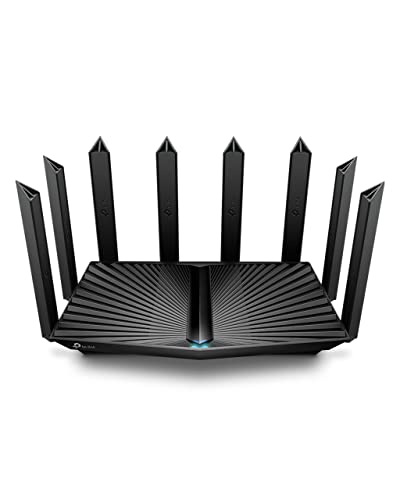
The Archer AX80 is a step up for homes with many devices and faster internet service. It uses Wi-Fi 6 and has an AX6000 class rating, which gives it more wireless capacity than the AX73 on paper. Its 2.5 Gbps WAN/LAN port is a major benefit for newer fiber plans, network storage, or a fast wired desktop. Eight streams also make it a better fit for a busy family network.
This router supports OneMesh and access point mode, so it can adapt as your network grows. WPA3 support adds a newer security option for compatible clients, while beamforming helps focus the signal. The AX80 is not automatically better in every room, since walls and placement still matter. Yet it is one of the best long-range router choices when speed, device count, and wired performance all matter.
Pros:
- High AX6000 wireless class for demanding homes
- 2.5 Gbps port supports faster wired networking
- Good choice for many phones, TVs, cameras, and computers
- OneMesh and access point modes add flexibility
- Wi-Fi 6 improves efficiency with compatible devices
- WPA3 provides a modern security option
Cons:
- Costs more than the AX73
- Older Wi-Fi devices will not use all its features
- Its larger body needs an open placement area
What Amazon Buyers Are Saying
Buyers often like the AX80 for its strong throughput, simple installation, and ability to handle many connected devices. Reviews also point to the 2.5 Gbps port as a useful feature for newer internet service. Some customers say the app makes setup easy, while others want more advanced controls. A few buyers report that coverage varies in homes with thick walls or several floors. Those comments match normal router behavior: a high class rating cannot defeat every building material or source of interference.
My Recommendation
I recommend the AX80 for users with fast internet, many devices, or a need for a 2.5 Gbps connection. It is more router than a small apartment needs, but it makes strong sense in a busy home or home office.
TP-Link Archer A6: Best Budget Router

The Archer A6 remains a useful low-cost router for basic homes. It uses Wi-Fi 5 AC1200, dual-band wireless, and four external antennas. It also offers gigabit Ethernet ports, which is helpful for wired streaming boxes, game systems, or desktop computers. MU-MIMO can help compatible devices share the network more smoothly.
I would not choose the A6 for a very fast fiber plan or a large home full of new Wi-Fi 6 devices. Still, it can provide solid value for a small house, apartment, guest space, or simple internet setup. OneMesh and access point mode give it more flexibility than many entry-level models. If price matters most, this router remains a sensible way to reduce basic dead zones.
Pros:
- Usually offers a low entry cost
- Dual-band Wi-Fi suits everyday browsing and streaming
- Four antennas support useful home coverage
- Gigabit ports help wired devices reach full speed
- MU-MIMO supports compatible client devices
- OneMesh and access point modes improve flexibility
Cons:
- Uses older Wi-Fi 5 technology
- Lower capacity than the Wi-Fi 6 models here
- Not the best choice for very fast internet plans
What Amazon Buyers Are Saying
Amazon buyers often appreciate the A6 for its low price, easy setup, and dependable basic connection. Many use it for apartments, small homes, or as an access point. Common concerns include weaker performance when many devices connect at once and limited benefits for newer Wi-Fi 6 hardware. Some users also find that placement makes a clear difference. Based on the product class and review themes, I see the A6 as a value router, not a high-capacity solution.
My Recommendation
The Archer A6 is worth buying when you need affordable dual-band Wi-Fi for a modest space. It is not my first choice for the Best Router for Long Range, but it delivers good value for light to medium use.
Tenda RX2 Pro: Best Value Wi-Fi 6 Router

The Tenda RX2 Pro targets shoppers who want Wi-Fi 6 features at a lower cost. It uses an AX1500 dual-band design and includes four gigabit ports. Its five high-gain antennas are a notable part of the coverage design. The router also supports WPA3, IPv6, and parental control features.
This model fits a small or medium home with normal streaming, work, and smart home needs. It will not match the wireless capacity of the TP-Link AX73 or AX80. However, the high-gain antenna design and Wi-Fi 6 efficiency make it more current than a basic AC router. I see it as a practical pick for shoppers who want long-range Wi-Fi on a controlled budget.
Pros:
- Wi-Fi 6 support at a value-focused price
- Five high-gain antennas support broad signal reach
- Four gigabit ports support wired home devices
- WPA3 adds a current security option
- Parental controls help manage family access
- IPv6 support improves long-term network compatibility
Cons:
- AX1500 capacity may feel limited in a busy home
- Brand support tools may be less familiar to some buyers
- Large homes may need an added access point
What Amazon Buyers Are Saying
Common buyer feedback focuses on simple setup, useful coverage, and good value. Users who replace older entry-level routers often notice a better connection in nearby rooms. Some reviewers say the router works well for normal browsing and streaming but does not suit heavy traffic from many devices. A few buyers mention that control options feel less polished than those of larger networking brands. I would review current customer comments and firmware notes before purchase.
My Recommendation
The RX2 Pro is a good value choice for a small or medium home. Buy it when you want Wi-Fi 6, high-gain antennas, and basic family controls without paying for premium capacity.
WAVLINK AX1800: Best Outdoor Wi-Fi Extender

The WAVLINK AX1800 is built for outdoor coverage rather than normal indoor routing. Its IP67 weatherproof design makes it suitable for places such as yards, farms, garages, RV areas, and outdoor work spaces. It uses Wi-Fi 6, four 8 dBi antennas, and Power over Ethernet support. The product listing also describes support for access point and repeater use.
This type of device can extend a network far beyond an indoor router. Placement and a suitable Ethernet or PoE run matter a great deal. A repeater still depends on a usable signal from the main router, while access point mode can provide a stronger wired connection. I like this model for outdoor cameras, garden work, and yard coverage, but it is not a replacement for the best indoor Wi-Fi router.
Pros:
- IP67 design suits demanding outdoor conditions
- Four 8 dBi antennas support outdoor signal reach
- Wi-Fi 6 improves efficiency with newer devices
- PoE helps simplify power and network installation
- Useful for yards, farms, garages, RVs, and cameras
- Can work with an existing router or Starlink setup
Cons:
- Needs careful outdoor mounting and cable planning
- Repeater mode depends on the signal from the main router
- It may require more setup than an indoor router
What Amazon Buyers Are Saying
Buyers commonly value the weather-resistant housing, outdoor reach, and PoE setup. Users with large yards or detached spaces often see it as a practical way to move Wi-Fi outside. Some reviews note that setup takes more planning than a plug-in extender. Other concerns center on cable runs, placement, and the need for a strong source signal. Those points are important because outdoor coverage depends on the whole network path, not only the antenna count.
My Recommendation
I recommend the AX1800 for outdoor coverage, not as a stand-alone indoor router. It is worth buying when you need weather protection, PoE, and Wi-Fi in a yard, garage, farm, or RV area.
Ubiquiti UniFi U7 Long-Range Access Point

The Ubiquiti UniFi U7 Long-Range is an access point for users who want a more managed network. It belongs to the UniFi ecosystem and targets homes, offices, and advanced installations. The product name identifies it as a Wi-Fi 7 long-range access point. Unlike a normal consumer router, it may need a separate router or gateway for routing, DHCP, and internet control.
UniFi equipment shines when you want central management, multiple access points, device visibility, and network planning. It can be a strong answer for a large home or small business with wired network runs. However, it is not the simplest plug-and-play option in this list. I would choose it for users who understand access points and want to build a larger, cleaner system.
Pros:
- Designed for long-range access point coverage
- Wi-Fi 7 platform supports newer client devices
- UniFi management suits multi-access-point networks
- Good fit for advanced homes and small offices
- Useful for network monitoring and structured expansion
- More scalable than a basic single-router setup
Cons:
- May require a separate router or gateway
- Setup is more complex than consumer router apps
- Best results usually need wired network planning
What Amazon Buyers Are Saying
Buyer feedback for UniFi products often highlights clean hardware, strong wireless performance, and powerful management tools. Many advanced users like the control they gain over several access points and connected clients. Less experienced buyers may find adoption, controller setup, and network planning more involved. Some users also expect a complete router and later learn that an access point does not replace every gateway function. I advise checking the required UniFi equipment before ordering.
My Recommendation
The U7 Long-Range is a strong choice for an advanced user who wants a managed Wi-Fi 7 access point. It is not my first pick for a simple home router, but it may be the best long-range option for a planned UniFi network.
WAVLINK AX3000: Best Outdoor High-Capacity Pick
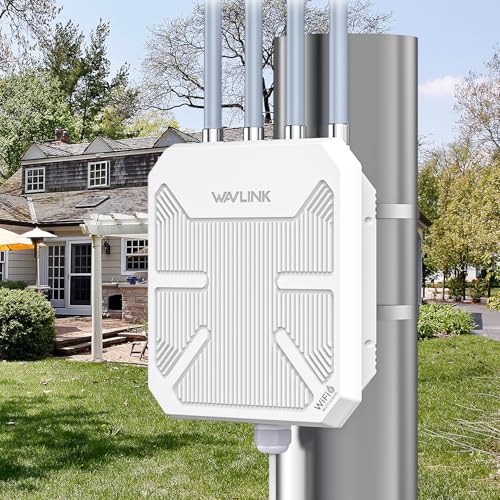
The WAVLINK AX3000 is a higher-capacity outdoor Wi-Fi 6 extender and repeater. It uses dual-band wireless, four 8 dBi antennas, active PoE, and an IP67-rated outdoor design. The listing describes support for up to 256 devices and use with farms, yards, RVs, cameras, routers, and Starlink systems. Those features make it suitable for larger outdoor networks.
The AX3000 makes the most sense when outdoor traffic is heavier or when you need dual-band performance outside. It can extend a wireless network or act as an outdoor access point, depending on the installation. I would favor wired access point mode when possible because it avoids the limits of a weak wireless backhaul. As with any outdoor unit, cable quality, mounting height, line of sight, and the source network all affect results.
Pros:
- AX3000 class offers more capacity than the AX1800 model
- IP67 housing supports outdoor installation
- Four 8 dBi antennas are built for long outdoor links
- Dual-band Wi-Fi supports a wider range of devices
- Active PoE simplifies power delivery
- Useful for farms, yards, RVs, and security cameras
Cons:
- Requires more installation work than an indoor router
- Outdoor performance depends on the backhaul connection
- May be excessive for a small yard or light use
What Amazon Buyers Are Saying
Amazon buyers often focus on the AX3000’s outdoor range, weather protection, and ability to support cameras or large open spaces. Users with a wired connection to the unit tend to value access point mode. Common concerns involve setup, PoE wiring, and the need to choose the right operating mode. Some buyers also expect the advertised device capacity to equal full-speed service for every client. In practice, shared bandwidth, distance, and interference still shape the result.
My Recommendation
I recommend the AX3000 for demanding outdoor coverage. It is a worthwhile upgrade over a basic extender when you need more capacity, weather protection, and PoE. For a small outdoor area, the AX1800 may offer better value.
How to Choose the Best Router for Long Range
Choosing the Best Router for Long Range takes more than reading the highest speed number. A router must match your home layout, internet plan, device count, and wall materials. It must also offer the right setup type. A normal router may solve indoor dead zones, while an outdoor access point may suit a detached garage or large yard.
1. Match the Router to Your Coverage Area
Start by measuring the problem area. For one floor, a strong indoor Wi-Fi 6 router may solve the issue. For several floors, thick walls, or a distant room, consider OneMesh, a wired access point, or a mesh system. Place the main router in an open, central area. Keep it away from metal cabinets, large appliances, and enclosed shelves.
Outdoor coverage needs a different plan. Look for IP-rated protection, PoE support, and an antenna design made for outdoor links. The WAVLINK models fit this role better than indoor routers. Do not place an indoor router outside. Heat, rain, dust, and moisture can damage it and create a safety risk.
2. Check Wi-Fi Class, Ports, and Device Load
Wi-Fi 6 can manage busy networks more efficiently than older Wi-Fi 5 gear. It does not make every device faster, but it can help when many clients share airtime. AX1500 models fit lighter use. AX5400 and AX6000 routers offer more capacity for large families, 4K streaming, gaming, work calls, and smart home devices.
Check the wired ports too. Gigabit ports suit many plans up to about 1 Gbps. A 2.5 Gbps port gives more room for faster service and local network transfers. Also check whether the router supports access point mode, WPA3, parental controls, IPv6, and firmware updates. These features can matter more than a large box speed number.
3. Consider Setup, Security, and Long-Term Value
Think about how much control you want. A TP-Link router usually suits shoppers who want a simple app and quick setup. Ubiquiti suits users who want deeper management and several access points. Outdoor WAVLINK products need cable planning and a safe mounting spot.
Use a strong administrator password and update firmware when the maker releases security fixes. Place the router where the signal can spread. If one router cannot cover the full home, do not keep increasing the budget without a plan. A wired access point or mesh node may give better results than one powerful router placed in a corner.
Final Verdict: Which Should You Buy?
For most homes, I choose the TP-Link Archer AX73 as the Best Router for Long Range. Pick the AX80 for faster plans and heavier traffic. Choose WAVLINK for outdoor coverage and Ubiquiti for advanced network control.
Compare home size, walls, device count, and ports before buying. The best long-range Wi-Fi setup is the one that fits your space and gives stable coverage where you use it most.
FAQs Of Best Router for Long Range
What is the best router for long range in a typical home?
The TP-Link Archer AX73 is my top choice for most homes. It offers Wi-Fi 6, strong antenna coverage, good capacity, and OneMesh expansion.
Does a more expensive router always have longer range?
No. Walls, placement, interference, antenna design, and local rules affect range. A wired access point or mesh node may work better than one costly router.
Is Wi-Fi 6 better for long-range coverage?
Wi-Fi 6 mainly improves efficiency and capacity. It can help a busy network, but it does not remove the limits caused by distance, walls, or interference.
What is the best option for Wi-Fi in a large yard?
Choose an outdoor access point or extender with weather protection and PoE. The WAVLINK AX1800 and AX3000 are designed for yards, farms, garages, RVs, and outdoor cameras.
Should I buy a router or an access point?
Buy a router for a complete home network. Choose an access point when you already have a router and want to add coverage through a wired network connection.









