


The ASUS RT-AX3000 is the best router for fast downloads, with strong Wi-Fi 6 speed and useful traffic control.
Slow downloads are frustrating, especially when a large game, work file, or 4K movie takes hours to finish. The problem may not always come from your internet plan. An old router, weak Wi-Fi signal, busy network, or poor modem can also reduce speed. I reviewed these six options for different needs, including home broadband, cable internet, travel, and mobile data. My goal is simple: help you find a fast, stable, and practical router that matches your connection and budget.
See the differences between my top picks at a glance.
ASUS RT-AX3000 Wi-Fi 6 Router

The ASUS RT-AX3000 is my top choice for most homes that already have a modem. It uses Wi-Fi 6 and supports a combined wireless class of AX3000. That gives compatible phones, laptops, and streaming devices more room to share the network. Its gigabit WAN and LAN ports also make it a strong match for fast cable, fiber, and similar broadband plans.
I like this router because it offers more control than many low-cost models. Adaptive QoS can help give priority to downloads, games, calls, or streaming. AiMesh support lets you add compatible ASUS units later for wider coverage. It also includes a USB 3.0 port and built-in security tools, though advanced features may take time to learn.
Pros:
- Wi-Fi 6 helps newer devices handle busy networks.
- Gigabit ports suit fast broadband plans.
- Adaptive QoS helps manage traffic during large downloads.
- AiMesh support allows future network expansion.
- AiProtection adds useful security features.
- USB 3.0 supports storage or printer sharing.
Cons:
- It does not include a cable modem.
- Some advanced settings may feel complex for beginners.
- Older devices will not gain every Wi-Fi 6 benefit.
What Amazon Buyers Are Saying
Amazon buyer feedback commonly highlights easy setup, solid range, and better performance than older Wi-Fi 5 routers. Many users like the ASUS app and the ability to adjust traffic settings. Some buyers report that firmware updates or advanced controls require patience. Results also vary with home layout, wall materials, device age, and internet service quality.
My Recommendation
I recommend the ASUS RT-AX3000 for households that want fast downloads, steady streaming, and room to grow. It gives the best balance of speed, control, and long-term value in this group. Buy it when you already own a modem or receive one from your internet provider.
ARRIS G36 Wi-Fi 6 Cable Modem Router

The ARRIS G36 is a practical choice for cable internet users who want one box instead of a separate modem and router. It combines a DOCSIS 3.1 cable modem with Wi-Fi 6 AX3000 wireless networking. The listed maximum speed reaches 1.2 Gbps, but your cable provider, plan, and network conditions still set the real limit. You should confirm compatibility before buying.
This model can reduce clutter and may remove the monthly modem rental fee from a compatible provider. Wi-Fi 6 helps it serve several modern devices at once. The built-in router gives you a useful mix of wireless speed and wired connections. Because this is a renewed product, I would check the seller warranty, return policy, and included accessories before placing an order.
Pros:
- Combines a cable modem and router in one unit.
- DOCSIS 3.1 supports modern high-speed cable service.
- Wi-Fi 6 improves efficiency with newer devices.
- Supports cable plans listed up to 1.2 Gbps.
- Reduces equipment clutter near your modem outlet.
- Can offer savings compared with long-term rental fees.
Cons:
- It requires cable provider approval.
- It is a renewed unit, so condition can vary.
- It is not suitable for fiber or DSL service.
What Amazon Buyers Are Saying
Buyer comments for renewed modem-router products often focus on whether the unit activates quickly and arrives in good condition. Users who match the device with a supported cable plan tend to value the single-box design and strong wireless speed. Common concerns include activation steps, provider compatibility, and cosmetic wear on renewed stock. I suggest checking your provider’s approved-device list first.
My Recommendation
The ARRIS G36 is worth considering for a cable subscriber with a plan near gigabit speed. It is one of the better choices here if you want a modem and router together. I would not buy it for fiber service, and I would only choose the renewed version after checking warranty details.
ARRIS SBG8300 Cable Modem Router

The ARRIS SBG8300 combines a DOCSIS 3.1 cable modem with an AC2350 Wi-Fi 5 router. It supports listed internet speeds up to 1 Gbps on compatible cable services. This makes it a sensible option for users who want to replace two devices with one. Its four gigabit Ethernet ports also help wired computers, game systems, and smart hubs reach full local speed.
Wi-Fi 5 is older than Wi-Fi 6, but it can still deliver good results on many home networks. The main value comes from the built-in modem and router, especially when the purchase price is lower than a new Wi-Fi 6 combo. This renewed model needs extra care during selection. Confirm activation support and inspect the return terms before you depend on it for work or school.
Pros:
- Includes both cable modem and wireless router functions.
- DOCSIS 3.1 suits many current cable plans.
- Four gigabit Ethernet ports support wired devices.
- Listed support reaches up to 1 Gbps.
- Single-unit design keeps the setup neat.
- Can reduce recurring modem rental costs.
Cons:
- Wi-Fi 5 is less efficient than Wi-Fi 6.
- It does not work with fiber or DSL service.
- Renewed condition and accessories may vary.
What Amazon Buyers Are Saying
Customer feedback commonly centers on easy activation, stable wired performance, and the convenience of replacing separate equipment. Buyers who already checked cable compatibility often see the greatest benefit. Other comments raise concerns about renewed packaging, setup help, or older wireless performance in busy homes. These patterns show why plan compatibility matters as much as the advertised speed.
My Recommendation
I recommend the SBG8300 for a budget-minded cable customer who does not need the newest Wi-Fi standard. It can be a good value for a small or medium home with moderate device traffic. If you own many new Wi-Fi 6 devices, the ARRIS G36 or ASUS RT-AX3000 is a stronger long-term choice.
Cudy WR1200 AC1200 Router
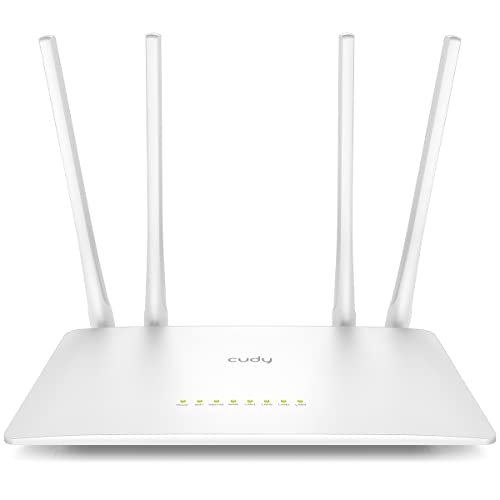
The Cudy WR1200 is a low-cost dual-band router for basic home use. It uses AC1200 wireless, with a listed 867 Mbps on the 5 GHz band and 300 Mbps on the 2.4 GHz band. It also includes five 100 Mbps Ethernet ports, four antennas, beamforming, and MU-MIMO support. Those features can help with simple browsing, video calls, and light downloads.
The key point is its 100 Mbps wired port limit. That limit makes it a poor match for gigabit internet or very large downloads over Ethernet. It makes more sense for a small apartment, a basic broadband plan, or a secondary access point. VPN client support and several operating modes add flexibility, but users should not expect the speed or processing power of a premium Wi-Fi 6 router.
Pros:
- Low purchase cost suits basic networks.
- Dual-band Wi-Fi supports older and newer devices.
- MU-MIMO can help several devices share the network.
- Beamforming may improve signal focus.
- VPN client support adds useful flexibility.
- Five Ethernet ports help connect wired equipment.
Cons:
- 100 Mbps ports limit fast broadband performance.
- AC1200 is slower and less efficient than newer Wi-Fi 6 models.
- Advanced VPN settings may be difficult for new users.
What Amazon Buyers Are Saying
Buyer feedback often praises the price, compact design, and simple performance for small homes. Some users like the extra operating modes and the number of Ethernet ports. The most important complaint is the 100 Mbps port limit, especially from buyers who expected gigabit results. Setup experiences can also differ based on firmware and the user’s networking knowledge.
My Recommendation
The Cudy WR1200 is worth buying only when your plan and needs fit within its limits. It is not my pick for the best router for fast downloads on a modern gigabit connection. Still, it can serve well as a low-cost router for basic internet, a guest network, or a small space.
4G Wi-Fi 6 Portable SIM Router

This unlocked 4G portable router targets travelers, remote workers, and people who need internet away from fixed broadband. It accepts a SIM card and lists download speeds up to 300 Mbps. The built-in 3,000 mAh battery can power the unit while you work in a cafe, hotel, car, or temporary office. It can connect up to 28 devices according to the listed product information.
Its real-world download speed depends on the mobile network, signal strength, carrier bands, congestion, and data plan. The Wi-Fi 6 label improves the local wireless link, but it cannot make a weak 4G tower faster. I like the unlocked design because it gives you more carrier choice. Before travel, confirm SIM size, supported bands, roaming rules, and hotspot limits with your carrier.
Pros:
- Portable design works where fixed broadband is unavailable.
- Unlocked SIM slot gives users carrier flexibility.
- Listed battery capacity supports mobile use.
- Can connect many devices for travel or work.
- Wi-Fi 6 helps compatible local devices share the link.
- Useful backup internet for outages.
Cons:
- Speed depends heavily on mobile coverage.
- Carrier bands and SIM rules may limit compatibility.
- Mobile data plans can cost more than home broadband.
What Amazon Buyers Are Saying
Feedback for portable SIM routers commonly focuses on battery life, carrier setup, and signal quality. Users value the freedom to work without hotel Wi-Fi or public hotspots. Some buyers report slower results in weak coverage areas or with carriers that do not support the needed bands. That is normal for cellular equipment, so I would test the carrier and plan before relying on it for critical work.
My Recommendation
This is a strong choice for travel, temporary housing, and backup internet. It is not a replacement for a fast wired home connection in every location. I recommend it when portability matters more than predictable speed and when your carrier offers strong 4G service where you plan to use it.
NETGEAR AC797 4G LTE Mobile Hotspot

The NETGEAR AC797 is a renewed 4G LTE mobile hotspot for users who need a small wireless network on the move. Its listed download speed reaches 400 Mbps, and it can connect up to 15 devices. The unit is GSM unlocked, which may give users more choice when selecting a compatible SIM plan. It creates a private WLAN for laptops, tablets, phones, and other Wi-Fi devices.
This hotspot is best viewed as a simple travel tool, not a home broadband replacement. Actual speed depends on LTE coverage, network traffic, supported bands, and the carrier plan. The AC Wi-Fi standard is also older than Wi-Fi 6, but it remains suitable for normal mobile work and browsing. Since this is renewed, inspect the battery condition and seller support before purchase.
Pros:
- Compact form works well for travel.
- Listed LTE download speed reaches 400 Mbps.
- Connects up to 15 devices.
- GSM unlocked design offers carrier choice.
- Creates a private network instead of using open Wi-Fi.
- Simple setup suits users who want fewer controls.
Cons:
- It uses 4G LTE rather than newer 5G service.
- Renewed battery condition may vary.
- Carrier band support must be checked before buying.
What Amazon Buyers Are Saying
Amazon feedback commonly praises the small size, quick hotspot access, and usefulness during trips or service outages. Buyers also discuss carrier activation and signal strength. Complaints often relate to battery wear on renewed units or slower speeds in crowded locations. These points are typical of mobile hotspots, where the local cell network affects performance more than the Wi-Fi name on the box.
My Recommendation
The NETGEAR AC797 is a good value for travelers who need basic 4G hotspot service and can accept a renewed product. I would choose the newer Wi-Fi 6 pocket router for more connected devices. Still, this model remains practical for a few users, light work, and emergency internet access.
How to Choose the Best Router for Fast Downloads
Choosing the Best Router for Fast Downloads starts with your internet type. A router for fiber or cable service is different from a router with a SIM card. You also need to match the router ports, wireless standard, coverage, and traffic tools to your home. A high number on the box does not guarantee a high download speed in every room.
1. Match the Router to Your Internet Service
First, identify whether you use fiber, cable, DSL, or mobile data. A standard wireless router needs a separate modem or an Ethernet connection from your provider. A cable modem router must work with your cable company. Providers often publish approved modem lists, so check that list before buying.
Fiber users usually need an optical network terminal from the provider. In many cases, you can connect a normal router to that device. Mobile routers need a compatible SIM, supported carrier bands, and a data plan that allows hotspot use. This step prevents a common mistake: buying a fast router that cannot connect to your service.
2. Check Ports, Wi-Fi Class, and Network Load
Look at the Ethernet ports as closely as the wireless label. A router with 100 Mbps ports cannot pass a gigabit internet plan at full wired speed. Gigabit ports make more sense for fast cable and fiber plans. If you use a multi-gigabit plan, check for ports that support more than 1 Gbps.
For wireless use, Wi-Fi 6 often gives better efficiency than Wi-Fi 5 when many devices share the network. It can improve response and capacity, but your phone or laptop must also support Wi-Fi 6 to gain its full benefit. Count your regular devices. Streaming boxes, cameras, phones, tablets, consoles, and smart home products all share airtime.
Also check traffic tools. Adaptive QoS can help when one large download uses much of the available bandwidth. MU-MIMO and beamforming may help compatible devices communicate more smoothly. These features do not increase the speed supplied by your internet provider. They help the router manage that speed better.
3. Judge Coverage, Security, and Total Value
Router placement has a major effect on download speed. Put the unit in an open, central spot. Keep it away from thick walls, metal cabinets, large appliances, and the floor. A powerful router cannot fully solve a poor location. For a large home, look for mesh support or plan for an Ethernet-connected access point.
Security also matters. Choose a router that receives firmware updates and supports modern Wi-Fi protection. Change the default administrator password. Use a strong Wi-Fi password. Turn off remote access unless you need it. These simple steps help protect your devices while you download files and use online services.
Finally, compare the full cost. A modem-router combo may save a rental fee, but it can be harder to replace one part later. A separate router offers more upgrade freedom. Renewed equipment may cost less, but check the warranty, return policy, and battery condition when applicable. The best router for fast downloads is the one that matches your plan, devices, home size, and budget.
Final Verdict: Which Should You Buy?
For most homes, I recommend the ASUS RT-AX3000 as the best router for fast downloads. Cable users who need a modem combo should choose the ARRIS G36 after confirming provider approval.
Choose the portable 4G models for travel or backup service. Match every purchase to your internet plan, device count, and coverage needs for reliable download speed.
FAQs Of Best Router for Fast Downloads
What is the best router for fast downloads?
The ASUS RT-AX3000 is the best overall pick for most homes with a separate modem. It offers Wi-Fi 6, gigabit ports, traffic control, and AiMesh support.
Does a faster router increase my internet plan speed?
No. A router cannot exceed the speed supplied by your internet provider. It can reduce wireless limits, improve network sharing, and help devices reach the plan’s available speed.
Is Wi-Fi 6 better for large downloads?
Wi-Fi 6 can help when several modern devices share the network. It improves efficiency and capacity, but both the router and client device need compatible Wi-Fi 6 hardware.
Do I need a modem with a wireless router?
Yes, if your provider delivers cable or DSL service through a modem. A modem-router combo includes both functions, while a standard router needs a separate modem or provider gateway.
Can a 4G router replace home broadband?
It can in areas with strong cellular coverage and a suitable data plan. However, speed, data limits, signal strength, and network congestion can change the result.









