


The TP-Link Archer AX21 is my top router for elderly users because setup is simple, coverage is strong, and controls feel clear.
Many older adults want reliable Wi-Fi for video calls, health visits, streaming, smart devices, and staying in touch with family. Yet small labels, confusing apps, weak signals, and hard-to-find settings can make router setup stressful. I looked for models that offer steady coverage, simple setup, useful security tools, and enough speed without needless complexity. The picks below suit different homes and needs, from a small apartment to a busy house with many connected devices.
See the differences between my top picks at a glance.
TP-Link Archer AX21: Best Overall

The TP-Link Archer AX21 V5 is the easiest all-around choice in this group. It uses Wi-Fi 6, also called 802.11ax, to handle newer phones, tablets, TVs, and computers with less strain. Its dual-band design lets older 2.4 GHz devices connect while newer devices use the faster 5 GHz band. Gigabit Ethernet ports also help when a wired connection makes more sense.
I like this model for older adults because it balances speed with a fairly simple setup path. TP-Link lists Alexa support, and the router supports EasyMesh for compatible expansion units. It is a strong fit for a home where someone wants clear video calls and smooth streaming without paying for extreme performance. As with any router, actual range depends on walls, floor plans, internet service, and device location.
Pros:
- Strong value for everyday home internet
- Wi-Fi 6 support for newer devices
- Dual-band connection for mixed device types
- Gigabit ports for wired computers and TVs
- EasyMesh support can help extend coverage
- Alexa compatibility may simplify voice control
Cons:
- Advanced settings may still feel complex to some users
- Large homes may need an added mesh unit
- It does not offer the newest Wi-Fi 7 features
What Amazon Buyers Are Saying
Amazon buyer feedback commonly highlights easy installation, good wireless speed, and better coverage than older routers. Many buyers also like the value and the ability to connect several devices at once. Some users report smooth streaming and dependable daily use after setup.
The main complaints in customer feedback tend to involve app steps, firmware updates, or coverage in homes with thick walls. A few buyers may need help with modem compatibility or internet service settings. Those points are normal for home networking gear, but they show why a family member may want to assist during the first setup.
My Recommendation
I recommend the Archer AX21 to most older adults who want a dependable home router without a high price. It gives enough speed for video calls, streaming, browsing, and smart home use. I rate it 4.6 out of 5.
| Category | Rating |
|---|---|
| Ease of Setup | 4.6/5 |
| Coverage | 4.5/5 |
| Daily Performance | 4.6/5 |
| Security and Control | 4.4/5 |
| Value | 4.8/5 |
| Overall Rating | 4.6/5 |
NETGEAR R6700AX: Easy Daily Wi-Fi

The NETGEAR Nighthawk R6700AX is a practical Wi-Fi 6 router for smaller homes and apartments. NETGEAR lists coverage of up to 1,500 square feet and support for up to 20 devices. Its dual-band setup suits common tasks such as email, browsing, streaming, and video calls. Four Gigabit Ethernet ports give useful space for wired devices.
This router makes sense for an older adult who wants modern Wi-Fi but does not need a large-home system. The Nighthawk app can guide setup and help manage the network. Its advertised wireless speed reaches 1.8 Gbps under ideal conditions, though real speeds depend on the internet plan, distance, interference, and client device. I would pair it with a modem that matches the user’s service.
Pros:
- Good fit for apartments and smaller homes
- Wi-Fi 6 helps with newer phones and tablets
- Supports up to 20 connected devices as listed
- Four Gigabit LAN ports offer flexible wired use
- App-based setup can reduce installation stress
- Useful balance of features and size
Cons:
- Listed coverage is lower than larger routers here
- It may not suit a large multi-floor home
- App and account steps may still require help
What Amazon Buyers Are Saying
Customer reviews often praise the R6700AX for its quick setup, stable connection, and solid performance in modest-size homes. Buyers commonly mention that the router works well for streaming, work, and regular household browsing. The four wired ports also receive positive attention from people who connect TVs, desktops, or other fixed devices.
Some Amazon feedback points to setup questions, firmware concerns, or signal limits in larger homes. A few customers may expect the advertised speed to appear on every device, but Wi-Fi results vary by environment. Buyers who understand those limits tend to find this router more satisfying.
My Recommendation
I recommend the R6700AX for an older adult living in an apartment or smaller home. It avoids paying for capacity that may never be used. I rate it 4.4 out of 5.
| Category | Rating |
|---|---|
| Ease of Setup | 4.5/5 |
| Coverage | 4.2/5 |
| Daily Performance | 4.5/5 |
| Wired Connections | 4.6/5 |
| Value | 4.4/5 |
| Overall Rating | 4.4/5 |
TP-Link Archer BE230: Best Wi-Fi 7 Value

The TP-Link Archer BE230 brings Wi-Fi 7 features to a compact dual-band router. It includes two 2.5G ports, three 1G ports, and a USB 3.0 port. Its four-stream design and quad-core processor give it room to handle newer devices and faster wired internet plans. The router also supports EasyMesh and HomeShield features.
This model suits an older adult whose family wants a router that can last for several years of device upgrades. Wi-Fi 7 can improve efficiency with compatible devices, but older phones and tablets will not gain every new benefit. The many ports are useful, yet they may feel excessive for a user who only connects wirelessly. I see it as a strong choice when future readiness matters more than the simplest feature list.
Pros:
- Modern Wi-Fi 7 support
- Two 2.5G ports for fast wired networking
- Three additional Gigabit ports
- USB 3.0 port adds storage or sharing options
- EasyMesh support helps with future coverage growth
- HomeShield tools add useful network controls
Cons:
- Some older devices cannot use its newest features
- Advanced options may confuse less technical users
- Dual-band design may not suit every demanding setup
What Amazon Buyers Are Saying
Amazon reviews commonly focus on the Archer BE230’s speed, port selection, and modern Wi-Fi 7 support. Buyers who own newer computers and phones often appreciate the extra performance potential. Several types of users also value the USB port and mesh support.
Common concerns include app setup, firmware updates, and the learning curve created by its larger feature set. Some buyers may not notice a major speed change with older client devices. That is not a fault unique to this router; Wi-Fi 7 benefits depend on the devices connected to it.
My Recommendation
I recommend the BE230 when a technically confident family member will help with setup, or when the home already has newer devices. It is more router than many older adults need today, but it offers useful long-term value. I rate it 4.5 out of 5.
| Category | Rating |
|---|---|
| Setup Simplicity | 4.1/5 |
| Speed Potential | 4.8/5 |
| Port Selection | 4.9/5 |
| Future Readiness | 4.8/5 |
| Value | 4.4/5 |
| Overall Rating | 4.5/5 |
TP-Link BE400: Best for Large Homes

The TP-Link BE400 is built for a larger and busier home. TP-Link lists coverage up to 2,400 square feet and support for up to 90 devices. It has dual 2.5 Gbps ports, a USB 3.0 port, Wi-Fi 7 support, and a quad-core CPU. HomeShield and Private IoT features add tools for managing connected devices.
This router can help when an older adult lives with family, uses several smart devices, or needs stable coverage across a broad floor plan. Its capacity also suits households with cameras, streaming boxes, phones, tablets, and computers. Still, the large feature set can take time to learn. I would ask a trusted relative or installer to set up the network and write down the Wi-Fi details in a safe place.
Pros:
- Listed coverage up to 2,400 square feet
- Supports up to 90 devices as specified
- Two 2.5 Gbps ports support fast wired links
- Wi-Fi 7 offers long-term upgrade potential
- Private IoT tools help separate smart devices
- HomeShield provides useful security and control options
Cons:
- May cost more than a small home needs
- Many settings can feel overwhelming at first
- Actual range varies with walls and router placement
What Amazon Buyers Are Saying
Customer reviews often praise the BE400 for its strong performance, broad coverage, and ability to support many connected devices. Buyers with large homes or demanding households tend to value its 2.5G ports and Wi-Fi 7 capability. HomeShield and private network tools also appeal to people who want more control.
Some buyers mention a learning curve during setup. Others note that advertised coverage and speed do not guarantee the same result in every home. Thick walls, metal, nearby networks, and the internet plan can all change performance. These comments support careful placement and help from another person when needed.
My Recommendation
I recommend the BE400 for a large, connected household where basic routers struggle. It is not my first pick for a small apartment, but it is an excellent high-capacity option. I rate it 4.5 out of 5.
| Category | Rating |
|---|---|
| Coverage Potential | 4.7/5 |
| Device Capacity | 4.8/5 |
| Security Tools | 4.5/5 |
| Ease of Management | 4.1/5 |
| Long-Term Value | 4.5/5 |
| Overall Rating | 4.5/5 |
GL.iNet Opal: Best Compact Router
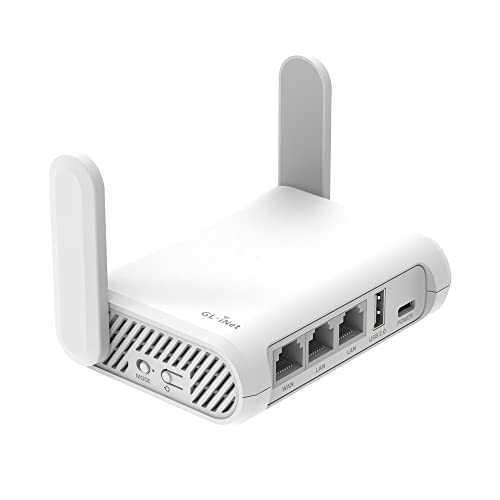
The GL.iNet GL-SFT1200 Opal is a small AC1200 travel router with three Gigabit ports. Its compact 145-gram design makes it easy to carry for trips, temporary homes, or small spaces. It runs OpenWrt and supports OpenVPN and WireGuard. GL.iNet also lists support for more than 30 VPN services.
The Opal is different from the other picks because it focuses on portability and privacy tools. It can suit an older adult who travels often or needs a simple personal network in a hotel or guest space. However, it is not the best choice for a large permanent home. VPN and OpenWrt settings can also feel advanced, so I suggest help during setup.
Pros:
- Light and compact for travel
- Dual-band AC1200 wireless support
- Three Gigabit Ethernet ports
- OpenVPN and WireGuard support
- OpenWrt offers flexible network control
- Useful for hotels, trips, and temporary spaces
Cons:
- Not designed to replace a strong whole-home router
- VPN settings may be hard for beginners
- Older AC technology lacks Wi-Fi 6 and Wi-Fi 7 features
What Amazon Buyers Are Saying
Amazon buyers often like the Opal’s small size, travel-friendly design, and VPN support. Reviews commonly mention that it works well for creating a personal connection in hotels or other temporary locations. The three wired ports also add flexibility for a compact device.
Common complaints focus on the setup curve and the limits of travel-router hardware. Some buyers expect it to perform like a full-size home router. Others need help with VPN configuration or hotel login pages. These points matter because the Opal rewards users who want control, but it may not be the simplest first router.
My Recommendation
I recommend the Opal for travel, not as the main router in a large home. It is a clever compact tool for privacy-minded users who can get setup help. I rate it 4.1 out of 5.
| Category | Rating |
|---|---|
| Portability | 4.9/5 |
| Travel Features | 4.6/5 |
| Ease of Setup | 3.9/5 |
| Privacy Flexibility | 4.6/5 |
| Home Coverage | 3.7/5 |
| Overall Rating | 4.1/5 |
How to Choose the Best Router for Elderly
Choosing the best router for elderly users means looking past raw speed. A good model should make daily internet use simple, keep a steady signal, and offer sensible safety tools. It should also match the home size and internet plan. The fastest router is not always the best router for elderly buyers.
1. Prioritize Simple Setup and Clear Control
Look for a router with a clear mobile app, plain setup steps, and easy Wi-Fi name and password changes. A family member can complete the first setup, then write the network name and password on a card. Keep that card in a safe place. Voice support, such as Alexa compatibility, may help some users, but it should not replace a clear app.
Do not buy a complex router only because it has many settings. Features such as VPN controls, private IoT networks, and advanced firewall tools can help, but they may need guidance. The TP-Link Archer AX21 offers the best balance here. The GL.iNet Opal gives more control, but it asks more from the user.
2. Match Coverage to the Home
Measure the home and think about where the router will sit. Place it in an open, central area, away from thick walls, large appliances, and enclosed cabinets. A small apartment may work well with the NETGEAR R6700AX. A larger home may benefit from the Archer AX21 with a compatible mesh unit or from the TP-Link BE400.
Remember that brand coverage numbers are estimates. Wi-Fi signals weaken through walls and floors. The internet plan also limits the top speed. A router cannot create a faster connection than the service entering the home.
3. Choose the Right Features and Value
Wi-Fi 6 remains a sensible choice for many homes. Wi-Fi 7 makes more sense when the household has newer devices, faster internet, or a desire to keep the router for many years. Extra Ethernet ports help with a desktop, television, or medical device that stays in one place.
Security also matters. Use a strong, unique Wi-Fi password. Turn on automatic updates when available. Create a guest network for visitors and smart devices if the router supports it. The BE400 offers useful HomeShield and Private IoT tools, while the Archer BE230 adds strong wired connectivity. Buy only the features someone will use, because unused options add cost and confusion.
Final Verdict: Which Should You Buy?
For most older adults, I recommend the TP-Link Archer AX21. It offers the best mix of simple setup, steady Wi-Fi 6 performance, useful ports, and value. Choose the NETGEAR R6700AX for a smaller home, or the BE400 for a large, busy household.
The best router for elderly users is the one that stays reliable and easy to manage. Set it up well, place it in the open, and keep the Wi-Fi details safe for future help.
FAQs Of Best Router for Elderly
What is the best router for elderly users?
The TP-Link Archer AX21 is my top choice for most older adults. It offers easy daily performance, Wi-Fi 6, useful wired ports, and good value.
Is Wi-Fi 6 better for an older adult?
Wi-Fi 6 can improve performance with newer phones, tablets, and computers. It also gives a router more room to handle several devices at once.
What router is best for a small apartment?
The NETGEAR R6700AX is a good fit for many smaller homes. Its listed coverage reaches up to 1,500 square feet, though walls and placement affect results.
Should I buy a Wi-Fi 7 router for an elderly parent?
Buy Wi-Fi 7 when the home has newer devices or needs long-term upgrade potential. For simple browsing and streaming, a quality Wi-Fi 6 router may offer better value.
Can a family member set up the router remotely?
A family member can often guide setup by phone or use the router app, but the first installation may need someone at the home. Write down the Wi-Fi name and password after setup.









