


The best router for 5G connectivity combines strong cellular reception, flexible SIM support, fast Wi-Fi, and reliable network control.
A weak home connection can make work calls drop, games lag, and streaming stop at the worst time. A 5G cellular router can solve that problem without a cable line. I reviewed six useful options for homes, travel, business, backup internet, and remote sites. Some focus on rugged uptime, while others offer better Wi-Fi, battery life, or simple carrier use. Before you buy, check local 5G bands, carrier rules, data limits, and signal strength at your location. A fast router cannot fix a poor cellular signal.
See the differences between my top picks at a glance.
Teltonika RUTM50 5G Industrial Router

The Teltonika RUTM50 is built for users who need steady 5G service and more control than a basic home gateway provides. It supports dual SIM use, so you can set up a second mobile plan for backup. That design can help keep a remote office, camera system, or small business online when one carrier has a problem. It also provides Gigabit Ethernet for wired devices.
This router runs Wi-Fi 5, which is not the newest wireless standard, but it remains useful for many work and small business networks. VPN support adds value for secure remote access. Teltonika also targets professional users with remote management features through its networking tools. I see this as a strong choice for uptime, control, and planned deployment rather than casual plug-and-play use.
Pros:
- Dual SIM support helps create cellular failover.
- 5G and 4G LTE support can improve network flexibility.
- Gigabit Ethernet suits wired workstations and devices.
- VPN support helps protect remote connections.
- Remote management is useful for distributed locations.
- Industrial design fits demanding network roles.
Cons:
- Wi-Fi 5 is older than Wi-Fi 6 and Wi-Fi 7.
- Professional features may feel complex to new users.
- It can cost more than a simple consumer gateway.
What Amazon Buyers Are Saying
Buyer feedback for this type of Teltonika router tends to focus on build quality, network control, and cellular flexibility. Users who understand SIM settings and router management usually value the dual-SIM design and business features. The main concern is setup depth, since this is not designed like a basic home Wi-Fi box.
My Recommendation
I recommend the RUTM50 for small businesses, remote offices, and industrial users who need failover and detailed control. It is more router than many homes need, but it earns its place when downtime costs money. Confirm carrier compatibility and antenna needs before ordering.
| Category | Rating |
|---|---|
| 5G and SIM flexibility | 4.7/5 |
| Network management | 4.8/5 |
| Wi-Fi performance | 4.1/5 |
| Business value | 4.4/5 |
| Overall Rating | 4.5/5 |
GL.iNet MUDI 7 5G Travel Router

The GL.iNet MUDI 7 takes a different approach from a fixed industrial router. It targets travelers, remote workers, and people who need a portable 5G hotspot with strong wireless features. The listed design includes eSIM, dual nano-SIM support, a 2.5G Ethernet port, and a 2.8-inch touchscreen. That gives you several ways to connect and manage the device.
Its tri-band Wi-Fi 7 support is a major draw for newer phones and laptops. The built-in battery is rated for up to 13.5 hours, although real use will change with signal strength, traffic, and screen time. A stated VPN speed of up to 700 Mbps is also notable, but actual results depend on encryption, server distance, and the cellular link. I like this model for mobile work where size and flexibility matter.
Pros:
- eSIM and dual nano-SIM support offer flexible travel use.
- Tri-band Wi-Fi 7 supports newer client devices.
- 2.5G Ethernet gives wired devices a fast local link.
- Built-in battery supports work away from wall power.
- Touchscreen controls can simplify on-device setup.
- Portable design suits hotels, vehicles, and temporary offices.
Cons:
- Battery life will vary with 5G signal and workload.
- Small travel hardware may not cover a large home well.
- Advanced VPN and SIM settings may take time to learn.
What Amazon Buyers Are Saying
Portable 5G router buyers usually praise the freedom to work without hotel Wi-Fi and the value of multiple SIM options. The MUDI 7’s screen, battery, and newer Wi-Fi standard are its most visible strengths. As with most mobile routers, buyers may differ on battery results because use patterns and cellular coverage vary widely.
My Recommendation
This is my favorite pick for frequent travel and mobile work. It offers more connection choices than a simple hotspot and adds modern Wi-Fi 7 support. It is worth buying if you need portability, but home users should consider a larger fixed router for whole-house coverage.
| Category | Rating |
|---|---|
| Travel flexibility | 4.8/5 |
| Wireless features | 4.7/5 |
| Battery usefulness | 4.4/5 |
| Ease of use | 4.3/5 |
| Overall Rating | 4.6/5 |
MOFINETWORK MOFI6500 5G Router

The MOFINETWORK MOFI6500 is aimed at users who want a serious cellular router for home broadband or business backup. It supports 4G LTE and 5G, plus dual SIM operation. The product listing also highlights amplified Wi-Fi 6, auto failover, VPN support, and compatibility with major US carriers such as Verizon, AT&T, and T-Mobile. Carrier approval and plan support still need checking before purchase.
Auto failover is the feature that makes this router stand out for work settings. You can use cellular service as a backup when a primary connection fails, subject to your plan and configuration. Wi-Fi 6 can help manage several modern devices more efficiently than older Wi-Fi standards. This model makes the most sense for users who want a central network device instead of a small travel hotspot.
Pros:
- Dual SIM design supports connection redundancy.
- 5G and 4G LTE provide useful cellular options.
- Wi-Fi 6 suits busy homes and small offices.
- Auto failover helps reduce internet downtime.
- VPN features support secure remote access.
- Listed compatibility includes several major US carriers.
Cons:
- Carrier and band support still require careful checking.
- Business features may be more than casual users need.
- Cellular performance depends on local tower coverage.
What Amazon Buyers Are Saying
Feedback around MOFI cellular routers often centers on flexibility, carrier choice, and the benefit of using cellular service as a backup. Buyers who need a stronger home or office setup tend to value the full-size router design. The most common caution with products in this class is that setup and performance depend on the SIM plan, signal, and local network conditions.
My Recommendation
I recommend the MOFI6500 for a home office, small business, or rural user who wants 5G backup with Wi-Fi 6. It offers a useful mix of speed, failover, and security tools. It may be excessive for simple travel use, and I would confirm firmware and carrier details before paying.
| Category | Rating |
|---|---|
| Cellular flexibility | 4.6/5 |
| Failover features | 4.7/5 |
| Wi-Fi performance | 4.5/5 |
| Setup and value | 4.2/5 |
| Overall Rating | 4.5/5 |
Max 5G Dream Router
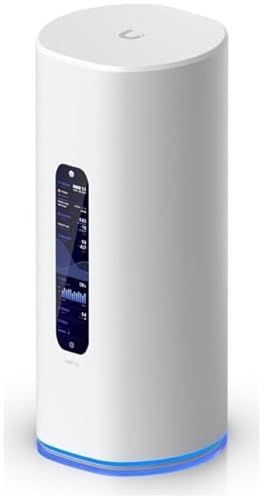
The Max 5G Dream Router is a simple option for shoppers who want a dedicated 5G router without choosing an industrial or travel-focused model. Its product name clearly positions it as a 5G home or general connectivity device. That can appeal to users who want a cleaner setup than phone tethering. However, the available listing information gives fewer detailed specifications than the other routers in this guide.
Because of that, I would inspect the current Amazon listing closely before buying. Check supported bands, SIM format, Wi-Fi generation, Ethernet speed, antenna options, and carrier approval. Those details matter more than the word “5G” on the box. This router may suit a buyer who values a straightforward design, but it does not offer the same clearly stated feature set as the MUDI 7, MOFI6500, or Teltonika models.
Pros:
- 5G-focused design can simplify a cellular internet setup.
- Dedicated hardware avoids phone tethering limits.
- May suit users seeking a basic home gateway.
- Simple positioning can help less technical buyers.
- Useful alternative when wired broadband is unavailable.
Cons:
- Public product details appear less complete than rivals.
- Confirm Wi-Fi, port, band, and SIM specifications first.
- Advanced failover and remote tools are not clearly listed.
What Amazon Buyers Are Saying
Buyer expectations for a product like this usually center on easy setup and usable 5G service. The most important review points are carrier activation, signal strength, and actual download speed at the buyer’s location. Since performance can vary sharply by tower and plan, I would read the newest reviews for your carrier before ordering.
My Recommendation
I would consider the Max 5G Dream Router only after confirming its full specification sheet and carrier compatibility. It may work for a simple 5G home setup, but it is not my first choice for business failover or travel. Buyers who want clearly documented features should choose one of the more detailed models here.
| Category | Rating |
|---|---|
| Basic 5G concept | 4.0/5 |
| Specification clarity | 3.5/5 |
| Ease-of-use potential | 4.0/5 |
| Buying confidence | 3.6/5 |
| Overall Rating | 3.8/5 |
Teltonika RUTM50 North America

This North America version of the Teltonika RUTM50 is made for users who need a controlled cellular network in the United States and nearby markets. The listing highlights dual SIM operation, 5G and 4G LTE, GNSS, Wi-Fi 5, and five Gigabit Ethernet ports. It also supports both SA and NSA 5G modes, which are two ways modern 5G networks can operate. Carrier and band checks remain essential.
Five wired network ports make this model more useful at sites with cameras, access points, computers, or other Ethernet devices. GNSS can help with location-aware deployments, while remote management and VPN tools support professional operation. Like the other Teltonika model, it is not the best fit for someone who only wants a quick home setup. It shines when reliability and remote control matter most.
Pros:
- North America version fits regional deployment needs.
- Dual SIM support adds a useful backup path.
- SA and NSA 5G support broaden network flexibility.
- Five Gigabit Ethernet ports support many wired devices.
- GNSS helps with location-based installations.
- Remote management and VPN tools suit professional networks.
Cons:
- Wi-Fi 5 is less current than Wi-Fi 6 or Wi-Fi 7.
- Business-grade setup may challenge first-time users.
- Hardware cost may not suit a basic household.
What Amazon Buyers Are Saying
Reviews of professional Teltonika hardware commonly highlight its solid control options and suitability for remote sites. Buyers who deploy it with several wired devices tend to appreciate the port count. The repeated caution is complexity: cellular profiles, antennas, VPN rules, and failover settings need careful setup for the best result.
My Recommendation
This is one of the strongest choices for a remote North American site, especially when Ethernet ports and location tools matter. I prefer it over a basic 5G gateway for controlled deployments. I would not pay for it solely to connect a few phones and a smart TV.
| Category | Rating |
|---|---|
| Regional connectivity | 4.7/5 |
| Ports and expansion | 4.8/5 |
| Remote management | 4.8/5 |
| Ease and value | 4.2/5 |
| Overall Rating | 4.6/5 |
T-Mobile 5G Gateway and Wi-Fi 7 Router

The T-Mobile 5G Gateway and Wi-Fi Router is aimed at home users who want wireless broadband through the T-Mobile network. The listing highlights dual-band Wi-Fi 7 and a no-contract approach. That can make it attractive for renters, homes without cable service, or users who want to avoid a long wired internet agreement. Service availability and eligibility still depend on T-Mobile coverage and plan terms.
Wi-Fi 7 can benefit newer phones, laptops, and other compatible devices, but older devices will not gain every feature. The main buying question is not just router speed. You also need to confirm that T-Mobile 5G reaches your home well and that the gateway works with the intended service arrangement. For a T-Mobile household, this is one of the simplest options in this group.
Pros:
- Designed for T-Mobile 5G home internet use.
- Dual-band Wi-Fi 7 supports current client devices.
- No-contract positioning may appeal to flexible households.
- Dedicated gateway avoids phone hotspot limits.
- Simple home broadband concept suits many new users.
- Useful where cable or fiber service is unavailable.
Cons:
- It is mainly suited to T-Mobile service.
- Coverage and indoor signal can vary by address.
- Advanced dual-carrier failover is not the focus.
What Amazon Buyers Are Saying
Buyers of T-Mobile gateways usually care about activation, signal placement, speed, and whether the device fits their service plan. Positive experiences often come from homes with a strong nearby signal. Complaints in this category often involve weak indoor reception or speed changes during busy periods, which are cellular network issues rather than Wi-Fi issues alone.
My Recommendation
I recommend this gateway for a T-Mobile customer who wants simple 5G home internet and modern Wi-Fi. It is less suitable for multi-carrier failover, industrial use, or travel. Place it near a window, test service during busy hours, and confirm the current T-Mobile terms before buying.
| Category | Rating |
|---|---|
| Home setup | 4.6/5 |
| Wi-Fi features | 4.5/5 |
| Carrier convenience | 4.4/5 |
| Network flexibility | 3.7/5 |
| Overall Rating | 4.3/5 |
How to Choose Best Router for 5G Connectivity
Choosing the Best Router for 5G Connectivity starts with your carrier, location, and daily use. Do not choose by peak speed alone. A router needs the right cellular bands, a suitable SIM plan, enough Wi-Fi capacity, and the ports or controls your network requires. The best model for a travel worker may be the wrong model for a warehouse or family home.
1. Match the Router to Your Carrier and 5G Signal
First, check whether the router supports your carrier’s bands and network type. A North American model may suit US deployment better than an imported version. Also check whether the device accepts a physical SIM, eSIM, or both. Dual SIM support helps only when you have a second active plan.
Signal strength matters just as much as the router modem. Place a fixed gateway near a window or exterior wall when possible. Test it at different times because cellular speeds can change with tower traffic. If your home sits in a weak signal area, check whether the router supports external antennas before you buy.
2. Choose Wi-Fi and Ports for Your Real Devices
Wi-Fi 7 is useful for newer devices, but it does not make old phones faster by itself. Wi-Fi 6 remains a strong choice for busy homes and offices. Wi-Fi 5 can still work well when the main goal is cellular access and wired networking.
Count your Ethernet needs. A small home may need one or two ports. A remote office may need several for cameras, switches, access points, and workstations. A 2.5G port can help with fast local connections, while multiple Gigabit ports offer practical value for business equipment.
3. Compare Failover, VPN, Battery, and Total Value
For business use, look for dual SIM, automatic failover, VPN tools, and remote management. These features can reduce trips to a remote site. They also take more time to configure, so advanced control only adds value when you will use it.
Travel buyers should focus on battery life, eSIM support, size, and a clear screen. Home buyers may prefer a fixed gateway with simple setup. Finally, include the cost of the router, SIM plan, data, antennas, and possible carrier fees. A lower purchase price may not be the better long-term value.
Final Verdict: Which Should You Buy?
For most travelers, the GL.iNet MUDI 7 is the best Router for 5G Connectivity because it combines 5G, eSIM, dual SIM, Wi-Fi 7, Ethernet, and battery power. For business uptime, choose the Teltonika RUTM50 or MOFI6500.
Your best choice depends on carrier coverage and your work needs. Check bands, data terms, and signal strength before ordering for reliable 5G internet in 2026.
FAQs Of Best Router for 5G Connectivity
Can I use any SIM card in a 5G router?
No. The SIM plan must support the router, its bands, and its data use. Check carrier rules before activation.
Is Wi-Fi 7 required for a 5G router?
No. Wi-Fi 7 helps newer devices, but Wi-Fi 6 or Wi-Fi 5 can still provide useful home and office service.
Which 5G router is best for travel?
The GL.iNet MUDI 7 is the strongest travel choice here because it combines a battery, eSIM, dual nano-SIM support, Wi-Fi 7, and a touchscreen.
Does a 5G router need a strong cellular signal?
Yes. The router can improve your local Wi-Fi, but it cannot fully overcome weak tower coverage or heavy network congestion.
Are dual-SIM 5G routers better for business?
They can be. Dual SIM allows a second carrier plan for backup, but automatic failover needs proper setup and suitable service plans.
Can a 5G router replace cable internet?
It can in some areas. Compare signal quality, data limits, speed changes, latency, and monthly cost with your wired options.









