


The TP-Link Archer AX73 is my top pick for smooth HD streaming, long range, and busy homes.
Does your movie pause just as the best scene starts? Maybe the Wi-Fi drops when someone joins a video call, plays online games, or connects a smart TV. A good router can fix many of these problems by improving wireless coverage, handling more devices, and reducing home network traffic. I reviewed seven popular routers and mesh products for HD video, live TV, gaming, and daily home use. My picks cover small apartments, large homes, smart households, and buyers who want simple controls without a monthly security fee.
See the differences between my top picks at a glance.
| Router | Wi-Fi Type | Best For | Key Strength | Ethernet Ports | Buy |
|---|---|---|---|---|---|
| AmpliFi HD System | Wi-Fi 5 mesh | Large homes | Whole-home coverage | 4 on router | View on Amazon |
| TP-Link Archer AX73 | Wi-Fi 6 | Most homes | Speed and range | 4 LAN | View on Amazon |
| AmpliFi HD Router | Wi-Fi 5 | Expandable setups | Easy control screen | 4 | View on Amazon |
| ASUS RT-AX1800S | Wi-Fi 6 | Small homes | Security and controls | 4 LAN | View on Amazon |
| Linksys E8400 | Wi-Fi 5 | Wired devices | 4×4 wireless radio | 4 | View on Amazon |
| Linksys EA8300 | Wi-Fi 5 tri-band | Many devices | Extra wireless band | 4 | View on Amazon |
| AmpliFi HD Router | Wi-Fi 5 | Mesh expansion | Touchscreen setup | 4 | View on Amazon |
AmpliFi HD WiFi System

The AmpliFi HD WiFi System uses one main router and two mesh points. This design suits homes where one router cannot reach every room. The mesh points help carry the signal into bedrooms, offices, and other weak spots. That makes it a strong choice for HD streaming across a larger floor plan.
The system also includes four Gigabit Ethernet ports on the main router. I like that option for a smart TV, game console, desktop computer, or streaming box. The system uses an older Wi-Fi 5 platform, so it does not offer the newer Wi-Fi 6 efficiency of the Archer AX73. Still, its coverage-focused design can matter more than peak speed in a large home.
Pros:
- Two mesh points help reduce dead zones.
- Good fit for large or multi-room homes.
- Four Gigabit Ethernet ports support wired streaming devices.
- Simple mesh design replaces many basic extenders.
- Useful for HD video, music, calls, and smart home devices.
Cons:
- Uses Wi-Fi 5 rather than Wi-Fi 6.
- The mesh points need good placement for best results.
- A three-unit system may cost more than a single router.
What Amazon Buyers Are Saying
Amazon review patterns for this system commonly focus on broad coverage and simple setup. Buyers often like the clean design and the ability to manage the network from an app. Some reviews also describe better service in rooms that had weak signals before installation. Complaints tend to involve setup issues, placement, or expectations about speed through thick walls. Wireless results vary with home layout, internet plan, and nearby networks, so I would not treat every speed claim as universal.
My Recommendation
I recommend this system for a large home that needs coverage more than the newest wireless standard. It remains a practical HD streaming solution when the main problem is a weak signal at the far end of the house. It is worth buying if you want a ready-made mesh kit and do not need Wi-Fi 6 features.
TP-Link Archer AX73 Wi-Fi 6 Router

The TP-Link Archer AX73 is my leading all-around pick for HD streaming. It uses Wi-Fi 6, which can manage newer phones, TVs, laptops, and smart home devices with better network efficiency. Its dual-band design gives you a fast 5 GHz band for nearby streaming devices and a 2.4 GHz band for range. The six-antenna design also supports strong coverage in many typical homes.
This router makes sense for households with several active users. One person can watch HD video while another joins a meeting or plays a game. Four Gigabit LAN ports also make it easy to connect key devices by cable. It cannot solve a slow internet plan or a poor modem, but it gives a strong base for cable, fiber, and similar home services.
Pros:
- Wi-Fi 6 supports newer devices and busy networks.
- Strong fit for HD streaming and everyday multitasking.
- Four Gigabit LAN ports support wired connections.
- Dual-band design works with older Wi-Fi devices.
- Good balance of speed, range, and price for many homes.
Cons:
- It is a single router, not a full mesh kit.
- Large homes may still need an extender or compatible mesh unit.
- Performance depends on the modem, plan, walls, and local interference.
What Amazon Buyers Are Saying
Common Amazon review themes praise the Archer AX73 for its range, speed, and easy app-based management. Buyers often mention smoother service after replacing an older internet provider router. Some users report that setup takes a little care, especially when changing modem and network settings. Other complaints relate to firmware behavior, app preferences, or coverage in difficult buildings. These comments show why buyers should check current firmware support and place the router in an open, central spot.
My Recommendation
I recommend the Archer AX73 for most people who want one of the best routers for HD streaming without buying a complete mesh system. It offers a modern Wi-Fi 6 base and enough wired ports for common entertainment gear. For a medium-size home with a suitable internet plan, it is the strongest value in this group.
AmpliFi HD Router with Touchscreen
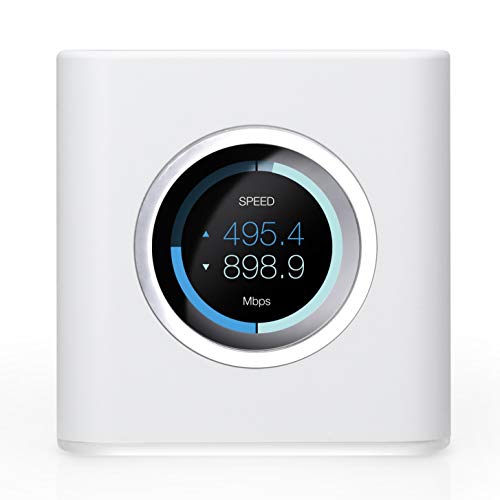
This AmpliFi HD router gives you the main unit without the two included mesh points found in the larger system kit. It has a clear touchscreen that can show basic network details at a glance. That makes it more friendly than routers that hide every setting inside a web page. The router also supports expansion with compatible AmpliFi mesh points.
The unit has four Gigabit Ethernet ports and one WAN port. That layout works well for a streaming box, TV, console, and wired computer. Since it uses Wi-Fi 5, it suits buyers who want a stable and attractive home router rather than the latest wireless speed. Add mesh points later if your home needs more reach.
Pros:
- Touchscreen gives quick access to basic network information.
- Four Gigabit ports support several wired devices.
- Expandable design can grow with the home.
- Clean hardware design fits visible living spaces.
- Good option for HD streaming in a moderate-size home.
Cons:
- Wi-Fi 5 is older than Wi-Fi 6.
- A single unit may not cover a large or tall home.
- Extra mesh points add to the total cost.
What Amazon Buyers Are Saying
Amazon buyers often highlight the touchscreen, compact setup, and attractive design. Many appreciate seeing network information without opening a browser. Reviews also commonly discuss reliable coverage in apartments and average-size homes. Some buyers say the router needs extra points in larger layouts, while others note that advanced users may want more detailed controls. These differences make sense because home size and wall materials strongly affect Wi-Fi range.
My Recommendation
I recommend this router for buyers who value simple controls and a polished design. It is a good standalone choice for a smaller home and a useful starting point for an AmpliFi mesh network. Buy it when the touchscreen matters to you; choose the AX73 if newer Wi-Fi efficiency matters more.
ASUS RT-AX1800S Wi-Fi 6 Router

The ASUS RT-AX1800S is a compact Wi-Fi 6 router for apartments, small homes, and basic smart home networks. It supports modern wireless devices while keeping the setup fairly simple. ASUS also lists parental controls, AiMesh support, a built-in VPN feature, and security tools without requiring a security subscription. These controls give it more flexibility than a basic provider router.
The router includes four LAN ports for wired devices. Its speed class fits HD streaming, browsing, calls, and casual gaming on a moderate network. It may not be the best match for a very large home or a huge group of users. Still, its Wi-Fi 6 support gives it a useful advantage over many older budget routers.
Pros:
- Wi-Fi 6 helps newer devices share the network.
- Compact size suits apartments and small rooms.
- AiMesh support allows compatible ASUS expansion.
- Parental controls help manage family screen time.
- Security and VPN features add useful control.
Cons:
- Coverage may be limited in large homes.
- Less headroom than higher-class Wi-Fi 6 routers.
- Advanced settings may feel complex to first-time users.
What Amazon Buyers Are Saying
Amazon review patterns often praise the low profile, quick setup, and useful controls. Buyers commonly choose it as an upgrade from an older router or a basic provider unit. Some reviews mention good service in apartments and smaller homes. Other buyers report limits when they place it far from the main living area or connect many devices at once. That feedback supports using it as a focused small-home router rather than expecting full large-house coverage.
My Recommendation
I recommend the RT-AX1800S for a small home, apartment, or buyer who wants Wi-Fi 6 at a sensible level. It is especially useful when parental controls and subscription-free network tools matter. For a large household with many simultaneous streams, step up to the Archer AX73 or a mesh system.
Linksys E8400 AC2400 Router

The Linksys E8400 is an AC2400 dual-band router with a 4×4 wireless design. It targets buyers who want solid wireless service for video, gaming, and home networking without moving to Wi-Fi 6. Four Gigabit Ethernet ports make it useful for several wired entertainment devices. The router has a traditional shape and setup style that will feel familiar to many users.
This model can work well when your devices still use Wi-Fi 5 or older standards. It may also offer good value when sold at a lower price than newer models. However, it lacks the efficiency improvements found in Wi-Fi 6. I would consider it mainly for a modest network, a replacement router, or a wired-heavy home.
Pros:
- 4×4 design suits compatible Wi-Fi 5 devices.
- Four Gigabit ports support wired entertainment gear.
- Dual-band operation works with many older devices.
- Useful for HD video and everyday home use.
- Can offer good value when discounted.
Cons:
- Older Wi-Fi 5 platform has less future headroom.
- No built-in mesh kit is included.
- Large homes may need extra access points.
What Amazon Buyers Are Saying
Amazon buyers often mention the router’s wired ports and steady service with common home devices. Some users like it as a replacement for an aging router and report good results with streaming and gaming. Complaints tend to focus on age, setup details, or coverage in larger homes. Since wireless standards and firmware support can change over time, buyers should check current compatibility before choosing this older model for a new network.
My Recommendation
I recommend the E8400 only when its price is clearly lower than newer Wi-Fi 6 options or when your devices work best with its older feature set. It can handle HD streaming, but it is not my first pick for a future-ready home. The AX73 gives most buyers a stronger long-term choice.
Linksys EA8300 Max-Stream Router

The Linksys EA8300 uses a tri-band Wi-Fi 5 design. A third band can give compatible devices more wireless space, which may help when many devices use the network at the same time. The router also supports MU-MIMO, a feature that helps it communicate with more than one compatible device. This makes it a reasonable option for busy homes that do not require Wi-Fi 6.
The EA8300 includes four Gigabit Ethernet ports and supports common streaming, gaming, and smart home tasks. Its tri-band layout is its main reason to choose it over a basic dual-band model. Still, the benefits depend on compatible devices and good placement. As an older router, it may have less long-term value than a newer Wi-Fi 6 alternative.
Pros:
- Tri-band design gives the network an extra wireless band.
- MU-MIMO can help compatible devices share service.
- Four Gigabit ports support wired streaming gear.
- Good fit for homes with many Wi-Fi devices.
- Useful for gaming and HD video at a sale price.
Cons:
- Uses Wi-Fi 5 instead of Wi-Fi 6.
- Tri-band benefits vary by device support.
- Not a complete mesh system by itself.
What Amazon Buyers Are Saying
Amazon review patterns often praise the EA8300 for handling several devices and for its extra wireless band. Buyers may also like its wired ports and familiar Linksys setup. Some reviews mention firmware, app, or range concerns, especially in homes with thick walls. Others expect the tri-band label to solve every congestion problem. In practice, the internet plan, device mix, and router location still control the final result.
My Recommendation
I recommend the EA8300 for a busy home that can benefit from tri-band Wi-Fi and finds this model at a strong price. It remains capable for HD streaming, but I would choose a Wi-Fi 6 router when both models cost about the same. Its best value comes from discounted pricing and compatible devices.
AmpliFi HD WiFi Router

This AmpliFi HD router is another standalone option with a touchscreen and mesh expansion support. It gives users a simple way to view basic network information. The unit has four Gigabit Ethernet ports and one WAN port for a standard wired setup. It can serve as the center of a home network now and grow later with compatible mesh points.
The router suits buyers who want a neat design and easy day-to-day control. Its Wi-Fi 5 platform can support HD video on a suitable internet connection, but it lacks newer Wi-Fi 6 benefits. I would use it in an apartment, small home, or moderate space where one unit can reach the main rooms. For a large home, the full AmpliFi system makes more sense.
Pros:
- Touchscreen makes basic status checks simple.
- Expandable mesh design supports future coverage needs.
- Four Gigabit ports help connect streaming devices.
- Simple look works well in visible living areas.
- Good choice for users who dislike complex router menus.
Cons:
- Older Wi-Fi 5 technology limits future value.
- One router may not cover a large home.
- Mesh expansion requires extra hardware.
What Amazon Buyers Are Saying
Amazon buyers commonly like the simple display and clean hardware. Reviews often describe easy basic setup and useful coverage in smaller spaces. Some customers report that large homes need additional mesh points, while others want more advanced network tools. These comments suggest a clear buying rule: choose this model for simple control and expandability, not for the highest current wireless performance.
My Recommendation
I recommend this router for a small home or for someone who wants the AmpliFi interface and plans to expand later. It can support regular HD streaming when placed well. I would not choose it over the AX73 for a new, busy network unless the touchscreen and AmpliFi ecosystem are your main priorities.
How to Choose Best Router for HD Streaming
The best router for HD streaming should match your internet plan, home size, device count, and wall layout. A high speed label alone does not guarantee smooth video. I look at the points below before I recommend any router.
1. Match the Router to Your Internet Plan
First, check the speed from your internet provider. A router cannot create speed that your modem or plan does not deliver. HD video often needs far less bandwidth than 4K video, but several streams need more total capacity. Leave room for calls, game updates, phones, and smart devices.
Also check the modem connection. Gigabit Ethernet ports help wired devices use fast plans, but the modem, service line, and router must all support the needed speed. If your provider rents a gateway, ask whether bridge mode or router mode works best before you replace it.
2. Choose Coverage for Your Home Layout
One strong router may cover an apartment or small house. A larger home may need mesh points. Thick brick, concrete, metal, and several floors can weaken Wi-Fi. Place the main router in an open, central spot. Do not hide it inside a cabinet or place it beside large electronics.
Mesh systems can help when the problem is distance. However, each mesh point still needs a usable signal from the main unit. A point placed too far away may repeat a weak connection. The AmpliFi HD system is a better fit than a single unit when you need ready-made whole-home coverage.
3. Compare Wi-Fi Generation, Ports, and Controls
Wi-Fi 6 is a smart choice for a new network. It can manage newer devices more efficiently and may reduce congestion in a busy home. Wi-Fi 5 routers can still stream HD video well, especially with a small device count. Their lower price may make sense for basic needs.
Count your wired devices before you buy. A smart TV, game console, desktop, and network storage box can quickly use four ports. Then review parental controls, security tools, app quality, and mesh support. I also check the router’s update history and warranty because long-term support matters as much as launch speed.
Final Verdict: Which Should You Buy?
The TP-Link Archer AX73 is my best router for HD streaming. It offers Wi-Fi 6, strong range, four LAN ports, and a useful balance for most homes. Choose the AmpliFi HD System instead when whole-home coverage is your main concern.
For a small home, the ASUS RT-AX1800S offers strong value and useful controls. Pick the router that fits your home layout, plan, and device count, then place it in an open central location.
FAQs Of Best Router for HD Streaming
What is the best router for HD streaming in 2026?
The TP-Link Archer AX73 is my top all-around choice. It combines Wi-Fi 6, good coverage, four Gigabit LAN ports, and strong support for busy homes.
Do I need Wi-Fi 6 for HD video streaming?
No. Wi-Fi 5 can handle HD video on a suitable internet plan. Wi-Fi 6 is better for newer devices, busy homes, and longer future use.
Is a mesh router better for streaming in a large house?
A mesh system can help when distance and dead zones cause drops. It works best when each mesh point sits where it still receives a strong signal.
How many internet devices can stream HD video at once?
There is no single number for every home. Your internet speed, Wi-Fi signal, video quality, and other traffic all affect the result. A stronger Wi-Fi 6 router gives a busy network more room.
Should I connect my smart TV to Wi-Fi or Ethernet?
Use Ethernet when the TV is near the router. A wired link usually gives a steady connection. Use Wi-Fi when cable placement is not practical.






