For most Mac users, the TP-Link Archer AX21 offers the best mix of speed, range, value, and easy setup.
A slow Wi-Fi link can ruin a MacBook workday, pause a FaceTime call, or make cloud files take too long to open. The right router can improve speed, reduce dead zones, and keep several Apple devices online at once. I reviewed five strong options for homes, apartments, and small offices. I looked at Wi-Fi standards, wired ports, setup, range, device support, and long-term value. This guide will help you find the Best Router for Mac without paying for features you may not use.
See the differences between my top picks at a glance.
TP-Link Archer AX21 V5 Wi-Fi 6 Router

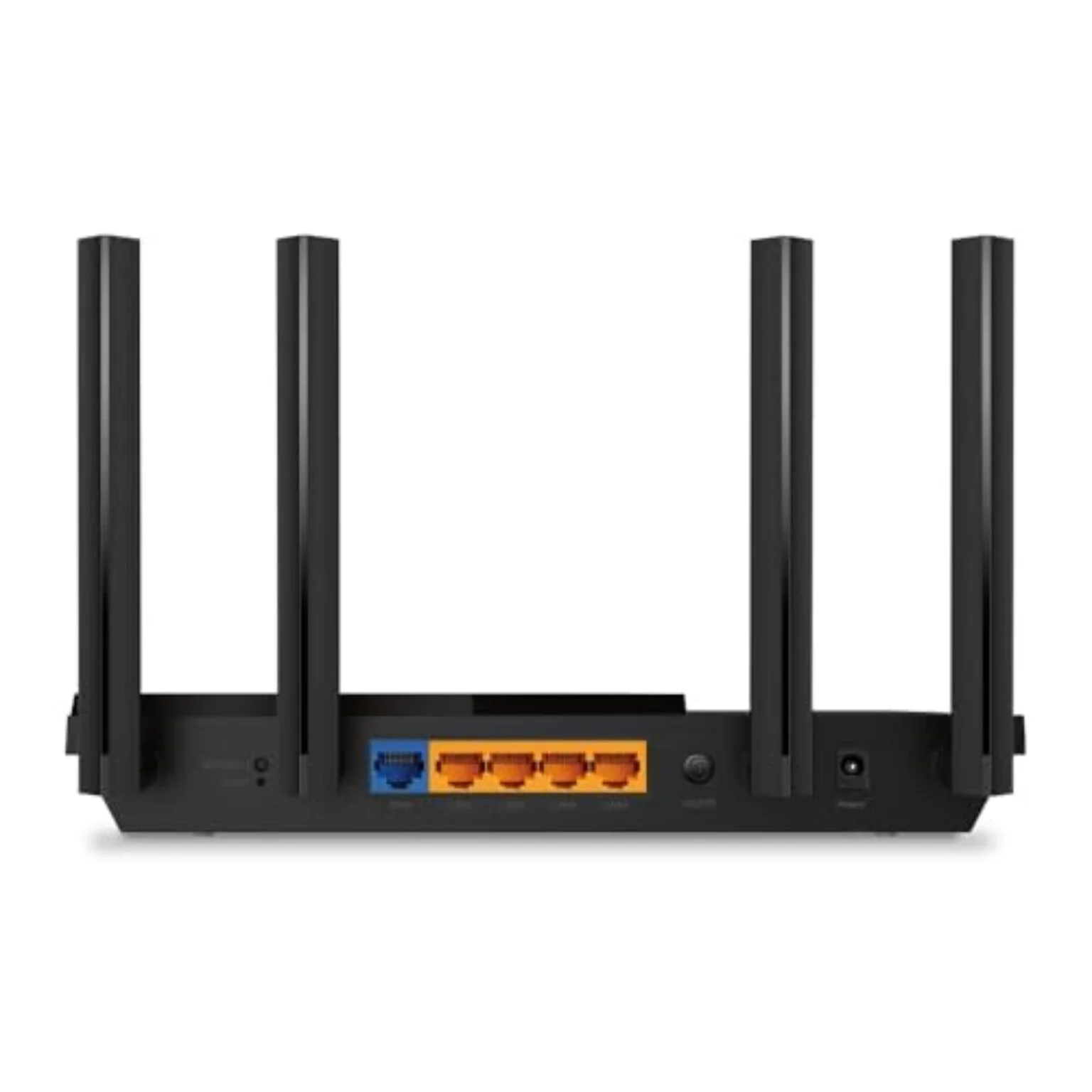
The TP-Link Archer AX21 V5 is a practical Wi-Fi 6 router for MacBook, iMac, Mac mini, and iPhone users. Its AX1800 class gives you a solid dual-band connection for web work, video calls, streaming, and normal file transfers. The router also includes gigabit Ethernet ports for a Mac desktop, smart TV, game console, or network storage device. I like its simple shape and clear setup path.
Wi-Fi 6 helps the router manage several devices with less strain than older Wi-Fi 5 hardware. That matters when a MacBook shares the network with phones, tablets, cameras, and smart home products. The Archer AX21 also supports EasyMesh, so you can build a compatible mesh system later. It works with Alexa and carries the “Certified for Humans” positioning, which suits buyers who want a less complex setup.
Pros:
- Strong value for everyday Mac use
- Wi-Fi 6 support for newer Apple devices
- Gigabit Ethernet ports for wired connections
- EasyMesh support for future expansion
- Simple setup for first-time router buyers
- Good fit for apartments and average homes
Cons:
- It does not provide multi-gig Ethernet
- Dual-band Wi-Fi may feel limited in very busy homes
- Large homes may need a mesh extender
What Amazon Buyers Are Saying
Amazon review patterns for the Archer AX21 often focus on easy setup, steady daily performance, and good value. Buyers commonly choose it for home offices, streaming, and several connected devices. Some users report strong coverage in smaller homes, while others note that walls and router placement affect results. As with any wireless product, real speed varies by internet plan, device, distance, and local interference.
My Recommendation
I recommend the Archer AX21 V5 for most people who want a dependable and affordable Best Router for Mac. It has the right mix of Wi-Fi 6 support, useful wired ports, and simple controls. It is not the best choice for a multi-gig fiber plan or a very large home, but it is an excellent everyday router. I rate it 4.5 out of 5.
| Category | Rating |
|---|---|
| Mac compatibility | 4.5/5 |
| Wireless performance | 4.5/5 |
| Setup and control | 4.5/5 |
| Value | 4.5/5 |
| Overall Rating | 4.5/5 |
NETGEAR Nighthawk CAX30 Wi-Fi 6 Modem Router

The NETGEAR Nighthawk CAX30 combines a cable modem and Wi-Fi 6 router in one unit. This design can save space and remove one box from your desk or shelf. It lists support for Xfinity, Spectrum, and Cox, but compatibility can change, so I suggest checking your provider before buying. For Mac users with cable service, this model can simplify the home network.
The CAX30 offers up to 2.7 Gbps combined wireless capacity and four gigabit ports according to its listed product details. Those ports help when you want to connect a Mac mini, desktop dock, NAS, or other wired device. The built-in modem can also reduce rental equipment, though the total value depends on your provider and service plan. Guided setup and free expert help may appeal to buyers who want more support.
Pros:
- Combines a cable modem and router
- Wi-Fi 6 supports newer Mac devices
- Four gigabit Ethernet ports
- Useful for cable internet households
- Can reduce equipment clutter
- Guided setup may help less technical users
Cons:
- It is not a fit for fiber or DSL service
- Provider compatibility must be checked first
- A separate modem and router may offer more upgrade freedom
What Amazon Buyers Are Saying
Customer discussions around modem-router combos often praise the cleaner setup and the fewer devices needed. Buyers also tend to value stable connections and the convenience of using one unit. Common concerns include activation steps, provider approval, and firmware or compatibility questions. These points make it important to confirm your cable company supports the exact model before placing an order.
My Recommendation
The CAX30 is worth considering when you have compatible cable internet and want one device for both modem and Wi-Fi. It is less flexible than a separate modem and router, but the all-in-one design can be very convenient. I would choose it over the other models in this guide only for a cable setup. My rating is 4.2 out of 5.
| Category | Rating |
|---|---|
| Mac compatibility | 4.4/5 |
| Wireless performance | 4.4/5 |
| Cable service fit | 4.6/5 |
| Setup flexibility | 4.0/5 |
| Overall Rating | 4.2/5 |
NETGEAR Nighthawk R6700AX Wi-Fi 6 Router

The NETGEAR Nighthawk R6700AX is a straightforward Wi-Fi 6 router for homes that need reliable daily coverage. Its listed range reaches up to 1,500 square feet, and its AX1800 class suits common broadband plans. The router supports up to 20 devices according to the product listing. That makes it a reasonable choice for a MacBook, phones, streaming devices, and a few smart home products.
The R6700AX has four gigabit Ethernet ports, which gives you useful options for wired devices. A wired connection can help a Mac desktop or dock maintain a steady link without relying on wireless signal strength. The dual-band design keeps the setup easy to understand. I see this model as a good fit for an apartment, condo, or modest single-level home rather than a large property with many users.
Pros:
- Wi-Fi 6 for current Mac computers and phones
- Listed coverage of up to 1,500 square feet
- Four gigabit Ethernet ports
- Simple dual-band design
- Easy setup for basic home networks
- Good match for smaller homes and apartments
Cons:
- Coverage may not suit large or multi-story homes
- No multi-gig Ethernet listed
- The device limit may feel low for a smart home
What Amazon Buyers Are Saying
Review themes for entry-level Nighthawk routers often include praise for the setup process, daily streaming, and stable connections. Buyers may also like the four wired ports and the familiar NETGEAR app experience. Some complaints in this product class involve signal loss through thick walls or the need to restart a router after a network issue. Placement and home construction can strongly affect wireless results.
My Recommendation
I recommend the R6700AX if you want a simple Wi-Fi 6 router for a smaller home. It gives Mac users the core features they need without adding a modem or advanced multi-gig hardware. Buyers with a larger home, gigabit-plus service, or many connected devices should look at a stronger option. I rate it 4.2 out of 5.
| Category | Rating |
|---|---|
| Mac compatibility | 4.4/5 |
| Coverage fit | 4.1/5 |
| Ease of use | 4.4/5 |
| Wired connectivity | 4.2/5 |
| Overall Rating | 4.2/5 |
TP-Link Archer BE230 Wi-Fi 7 Router

The TP-Link Archer BE230 brings Wi-Fi 7 features to a compact dual-band router. Its BE3600 class and four-stream design aim at newer devices and busy home networks. Mac users with newer wireless hardware can benefit from a current standard, while older Apple devices can still connect through backward compatibility. The real advantage becomes clearer when you also use fast wired devices.
This router stands out because it lists two 2.5G ports, three gigabit ports, and a USB 3.0 port. That layout works well for a Mac mini, desktop workstation, NAS, or fast internet plan. It also includes EasyMesh, HomeShield, VPN features, and a private IoT network in its listed features. Wi-Fi 7 does not make an older Mac faster than its own hardware allows, but it can give your network more room for future upgrades.
Pros:
- Modern Wi-Fi 7 support
- Two 2.5G ports for fast wired links
- Three additional gigabit ports
- USB 3.0 for compatible network sharing tasks
- EasyMesh support
- Private IoT network feature for smart devices
Cons:
- Some older Macs cannot use every Wi-Fi 7 feature
- Dual-band design may not suit every crowded network
- Advanced settings may take time to learn
What Amazon Buyers Are Saying
Buyers who choose newer Wi-Fi 7 routers often mention future-ready hardware, fast wired ports, and strong control over connected devices. They may also value the compact design and the number of Ethernet ports. Common concerns include setup questions, firmware updates, and confusion about which devices support Wi-Fi 7 features. These are normal points to consider when moving from a basic Wi-Fi 5 or Wi-Fi 6 router.
My Recommendation
The Archer BE230 is a smart pick for a Mac user who owns or plans to buy multi-gig wired equipment. It offers more headroom than the basic Wi-Fi 6 models here, yet it remains easier to justify than a very high-end router. I would not buy it only for an older Mac and a modest internet plan. For future-focused users, it earns 4.5 out of 5.
| Category | Rating |
|---|---|
| Mac compatibility | 4.5/5 |
| Wi-Fi technology | 4.6/5 |
| Wired ports | 4.8/5 |
| Future value | 4.4/5 |
| Overall Rating | 4.5/5 |
TP-Link Archer BE400 Wi-Fi 7 Router

The TP-Link Archer BE400 is the strongest high-capacity option in this group. It uses dual-band Wi-Fi 7 and lists BE6500-class performance, dual 2.5Gbps ports, and coverage up to 2,400 square feet. TP-Link also lists support for up to 90 devices. Those features make it a better fit for a large home, a busy family network, or a small office with several Macs and smart devices.
The quad-core CPU and USB 3.0 port support a feature-rich home network. HomeShield adds network tools, while the private IoT option can help separate smart home products from personal computers. Coverage claims always depend on walls, layout, interference, and placement, so I would not treat the listed square footage as a guarantee. Still, this model gives you more capacity and faster wired links than the entry-level choices.
Pros:
- Wi-Fi 7 for newer Apple and wireless devices
- Dual 2.5Gbps Ethernet ports
- Listed coverage up to 2,400 square feet
- Supports up to 90 devices according to the listing
- USB 3.0 port and quad-core processor
- Private IoT network support
Cons:
- It may cost more than a typical Mac user needs
- Older devices cannot use every Wi-Fi 7 benefit
- Large homes may still need a mesh system
What Amazon Buyers Are Saying
Reviews for higher-end TP-Link Wi-Fi 7 routers commonly focus on capacity, fast wired connections, and broad feature sets. Buyers may like the app controls and the ability to connect many devices. Some users can find advanced network tools less simple than a basic router menu. Coverage reports also vary because every home has different walls, floors, and sources of interference.
My Recommendation
I recommend the Archer BE400 for Mac users who need more room for devices and faster wired networking. It is a strong choice for a larger home or a growing home office. If your internet plan is modest and you use only a few devices, the Archer AX21 offers better value. The BE400 earns 4.6 out of 5 for power and flexibility.
| Category | Rating |
|---|---|
| Mac compatibility | 4.6/5 |
| Capacity | 4.8/5 |
| Wired performance | 4.8/5 |
| Ease and value | 4.3/5 |
| Overall Rating | 4.6/5 |
How to Choose the Best Router for Mac
Choosing the Best Router for Mac does not mean buying the router with the highest number on the box. A Mac works with modern Wi-Fi standards, but your internet plan, home layout, device age, and wired equipment matter just as much. I suggest matching the router to your real use. Start with the points below before you compare prices.
1. Match Wi-Fi to Your Mac and Internet Plan
Wi-Fi 6 remains a strong choice for most MacBook and iMac owners. It can manage several devices well and often costs less than Wi-Fi 7. Wi-Fi 7 makes more sense when you own newer devices, use a fast fiber plan, or plan to upgrade soon. It can also help a busy network, but it cannot push an older Mac beyond its built-in wireless limits.
Check your internet plan before you spend more. A basic plan may not show a large difference between a good Wi-Fi 6 router and a Wi-Fi 7 model. A gigabit or multi-gig plan can benefit more from fast Ethernet ports. Also check whether your provider needs a separate modem. The CAX30 includes a cable modem, while the other routers in this guide need a modem or an optical network terminal from your provider.
2. Check Ports, Range, and Home Layout
Ports matter if you use a Mac mini, desktop, dock, NAS, smart TV, or game console. Gigabit ports work for many homes. A 2.5G port becomes more useful with multi-gig internet or fast local file transfers. The Archer BE230 and BE400 stand out here because they list 2.5G ports.
Do not trust a coverage number without thinking about your home. Thick walls, metal, floors, and appliances can weaken Wi-Fi. Place the router in an open and central spot. Keep it off the floor and away from large metal objects. For a long home, a compatible mesh system may work better than one powerful router. EasyMesh support on the TP-Link models gives you a path to expand later.
3. Balance Security, Setup, and Long-Term Value
A good router should offer simple setup and regular software support. Look for a clear app, guest Wi-Fi, device controls, and a way to update firmware. A private IoT network can help keep smart devices apart from your Mac and personal files. HomeShield and similar tools may add more controls, though some advanced features can depend on a paid plan.
Think about the total cost. A modem-router combo may save space, but it can limit future changes. A separate router gives you more freedom to replace the modem or change internet providers. For most buyers, a reliable Wi-Fi 6 router offers the best value. Pay more for Wi-Fi 7 when the faster ports, higher capacity, or future upgrades solve a clear need.
Final Verdict: Which Should You Buy?
For most people, the TP-Link Archer AX21 V5 is the Best Router for Mac. It offers Wi-Fi 6, gigabit ports, easy setup, and strong value. Choose the Archer BE400 for a larger home or many devices, and the CAX30 for compatible cable service.
Match the router to your Mac, internet plan, home size, and wired gear. That simple check will help you get faster, steadier Wi-Fi without overspending.
FAQs Of Best Router for Mac
Does a Mac need a special router?
No. Macs work with standard Wi-Fi routers that follow common wireless standards. Choose a router based on speed, range, ports, security, and your internet plan.
Is Wi-Fi 6 good for MacBook users?
Yes. Wi-Fi 6 is a strong choice for many MacBook users. It can improve network efficiency when several devices share the connection.
Should I buy Wi-Fi 7 for my Mac?
Buy Wi-Fi 7 if you have newer compatible devices, a fast internet plan, or a need for multi-gig wired ports. Otherwise, a good Wi-Fi 6 router may offer better value.
Can I use the NETGEAR CAX30 with fiber internet?
The CAX30 is a cable modem-router combo. Check your provider before buying. It is not the right type of equipment for most fiber connections.
What router is best for a Mac and a large home?
The TP-Link Archer BE400 is the strongest fit in this guide for a large, busy home. Actual coverage depends on walls, layout, interference, and router placement.