


The ASUS RT-AX1800S is the best router for Smart TV streaming, gaming, and busy modern homes.
A Smart TV can lose its magic when apps buffer, 4K video drops quality, or the connection keeps cutting out. I know how frustrating that feels, especially during a live event or a favorite movie. The right router can give your TV a stronger link, better coverage, and smoother streaming. I reviewed the listed networking products with Smart TV use in mind. Some are true routers, while others solve nearby problems, such as weak Wi-Fi, limited internet access, or a wired TV connection.
See the differences between my top picks at a glance.
ASUS RT-AX1800S Wi-Fi 6 Router

The ASUS RT-AX1800S is the strongest all-around choice in this group. It uses Wi-Fi 6, also called 802.11ax, which helps manage many connected devices at once. That matters in a home with a Smart TV, phones, tablets, cameras, and game consoles. Its AX1800 class also gives it more room for modern streaming than older basic routers.
I like its focus on home control and safety. ASUS lists parental controls, built-in VPN support, subscription-free network security, and AiMesh compatibility. AiMesh lets compatible ASUS routers work together to improve coverage in larger homes. The router also suits gaming and streaming, so it can serve more than just the living-room TV.
Pros:
- Wi-Fi 6 support for newer devices
- Good fit for 4K streaming and busy homes
- Parental controls help manage screen time
- Subscription-free security features
- Built-in VPN support
- AiMesh support for future coverage upgrades
Cons:
- It may cost more than a basic AC router
- Large homes may need an additional mesh node
- Older Smart TVs may not use all Wi-Fi 6 features
What Amazon Buyers Are Saying
Amazon buyers commonly value the simple setup, strong wireless performance, and useful control tools. Many users choose it for streaming, gaming, and several connected devices in one home. As with most routers, some buyers report that performance changes with wall thickness, router placement, and internet service quality. A few users also find the ASUS settings menu more detailed than they expected.
My Recommendation
I recommend the RT-AX1800S for most people who want a dependable Best Router for Smart TV choice with room to grow. It offers the best balance of speed, control, security, and modern features here. Buy it if your home has several devices or if you plan to keep the router for years.
Tenda AC6 AC1200 Smart Wi-Fi Router

The Tenda AC6 is a low-cost dual-band router for a small home or apartment. Its AC1200 class supports both 2.4 GHz and 5 GHz Wi-Fi bands. The 5 GHz band can help a nearby Smart TV stream with less congestion than the older 2.4 GHz band. Tenda also lists guest Wi-Fi, access point mode, IPv6, parental controls, and app support.
This router has four fast Ethernet ports rated at 100 Mbps. That detail matters because the ports can limit wired speeds on faster internet plans. Still, the limit may not trouble a user with a modest plan or a TV that connects over Wi-Fi. I see the AC6 as a practical budget pick, not a long-term high-speed network hub.
Pros:
- Affordable dual-band design
- 5 GHz Wi-Fi can help nearby TV streaming
- Four Ethernet ports for wired devices
- Guest Wi-Fi keeps visitors separate
- Access point mode adds setup flexibility
- Parental controls suit family homes
Cons:
- Ethernet ports support only up to 100 Mbps
- Older AC technology lacks Wi-Fi 6 features
- Very large homes may need wider coverage
What Amazon Buyers Are Saying
Buyers often like the low price, quick setup, and useful dual-band connection. Many use it for basic home internet, streaming, and smaller spaces. Common concerns center on range, speed through walls, and the 100 Mbps wired ports. Results can also depend on the internet plan and the location of the router.
My Recommendation
The Tenda AC6 is worth buying when you need an inexpensive router for one Smart TV and a few everyday devices. It makes the most sense with a modest internet plan. I would choose the ASUS instead for a busy home, faster service, or several years of future use.
4G Mobile Wi-Fi Hotspot Router

This unlocked 4G mobile hotspot serves a different need from a home broadband router. The listing states support for speeds up to 300 Mbps, up to 12 devices, WPA2-PSK encryption, and a 2100 mAh battery. It can share cellular internet with a Smart TV, phone, tablet, or laptop. That makes it useful for travel, temporary housing, RV use, or home internet backup.
The key word is “unlocked.” You still need a compatible SIM card and a carrier plan. Real speed depends on the carrier, network band, signal strength, and local congestion. I would not buy this as the first choice for a family home with wired broadband, but it can help when fixed internet is not available.
Pros:
- Portable design for travel and temporary use
- Useful cellular backup for a home network
- Supports up to 12 listed devices
- WPA2-PSK security for the wireless link
- Listed speed of up to 300 Mbps
- Battery power helps in places without easy outlets
Cons:
- Requires a compatible SIM and data plan
- Cellular speed can change from place to place
- Battery life may not suit all-day home use
- 4G may have more delay than fixed broadband
What Amazon Buyers Are Saying
Buyers of mobile hotspots usually focus on portability, setup, and signal performance. Users who have a strong compatible cellular signal tend to find this type of device useful for travel and backup access. The most common concerns involve carrier compatibility, SIM setup, battery life, and speed in weak-signal areas. I suggest checking network bands and return terms before purchase.
My Recommendation
This hotspot is a smart backup or travel choice, but it is not my main Best Router for Smart TV recommendation. It earns its place for RV trips, temporary internet, and emergency use. Consider it if your TV needs internet where cable or fiber service is not practical.
BrosTrend AC1200 Wi-Fi to Ethernet Bridge
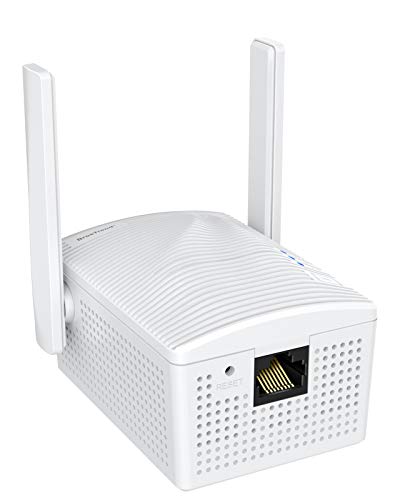
The BrosTrend AC1200 is not a router. It is a wireless bridge that helps a wired device join an existing Wi-Fi network. This makes it useful for an older Smart TV, Blu-ray player, game console, printer, or PC that has Ethernet but weak or missing built-in Wi-Fi. The adapter connects to your main router wirelessly, then connects to the TV with an Ethernet cable.
This approach can work well when the TV sits near a strong wireless signal but has poor wireless hardware. It may also avoid the trouble of entering a long Wi-Fi password on an older TV remote. The bridge does not create internet service by itself. You need a working router and a suitable Ethernet cable for the final connection.
Pros:
- Helps connect an Ethernet-only Smart TV
- Dual-band AC1200 wireless support
- Useful for game consoles and Blu-ray players
- WPS can make setup easier
- Can reduce dependence on weak TV Wi-Fi hardware
- Works with many types of wired network devices
Cons:
- It is not a standalone router
- Needs an existing Wi-Fi network
- Wireless walls and distance still affect results
- Requires a separate Ethernet cable for the TV
What Amazon Buyers Are Saying
Buyers often like this type of bridge because it solves a clear problem with little work. Common positive themes include easy WPS setup and better access for devices that lack reliable Wi-Fi. Some users report trouble when the bridge sits too far from the main router or when device settings do not match. Placement remains important, just as it does with any wireless product.
My Recommendation
I recommend the BrosTrend bridge when your TV has Ethernet but poor Wi-Fi. It can be a better fix than replacing a working router. However, do not mistake it for the Best Router for Smart TV. It is a useful accessory that extends the value of the router you already own.
Amazon Ember 32-Inch Fire TV

The Amazon Ember 32-inch 2-Series is a Smart TV, not a router. I include it because many shoppers search for a router when the real need involves a slow or aging television. This model includes Fire TV, an Alexa remote, HD resolution, Dolby Audio, and access to streaming apps. It still needs a separate home network for online content.
A new TV can improve app speed and ease of use, but it cannot repair weak Wi-Fi. If the picture buffers on several devices, focus on the router or internet service first. If only an old TV feels slow, replacing the TV may offer a cleaner fix. I also suggest checking the screen size and room distance before choosing a 32-inch model.
Pros:
- Built-in Fire TV platform
- Alexa remote helps find shows by voice
- HD screen suits bedrooms and smaller rooms
- Dolby Audio support
- Access to free and live TV options
- Simple choice for users who need a new TV
Cons:
- It does not replace a Wi-Fi router
- HD resolution is below 4K
- Streaming still depends on a separate network
- 32 inches may feel small in a large room
What Amazon Buyers Are Saying
Buyers of this kind of Fire TV tend to focus on its simple interface, voice remote, size, and value. Some shoppers prefer it for bedrooms, offices, and smaller spaces. Typical concerns with compact HD TVs include screen size, sound expectations, and the need for a stable internet connection. Customer experience can also vary with app use and home network quality.
My Recommendation
Buy the Amazon Ember if you need a new, compact Smart TV. Do not buy it to solve a router problem. It works best as a companion product for a good home network, not as an alternative to the Best Router for Smart TV.
Indoor TV Antenna for Local Channels

This indoor antenna is another useful TV accessory, but it is not a router. It receives free over-the-air local broadcasts through VHF and UHF signals. The listing includes a signal booster, a smart IC chip, a 16.5-foot coax cable, USB power, and support for use with TVs in places such as homes, offices, and RVs. It does not connect a TV to Netflix, YouTube, or other internet apps.
An antenna can reduce the need for paid live-TV service when local channels meet your needs. Reception depends on distance from broadcast towers, walls, trees, buildings, and antenna placement. I suggest checking local channel availability before buying. Place the antenna near a window when possible, then scan for channels through the TV menu.
Pros:
- Receives local over-the-air channels
- Does not need monthly streaming service for broadcasts
- Long 16.5-foot coax cable adds placement options
- USB-powered booster is included in the listing
- Supports VHF and UHF signal types
- Useful for homes, offices, and some RV setups
Cons:
- It does not provide internet access
- Reception varies by location and building design
- It cannot improve Wi-Fi streaming
- Amplification cannot fix every weak signal
What Amazon Buyers Are Saying
Antenna buyers usually care most about channel count, setup, cable length, and signal stability. Users in strong broadcast areas often find indoor models easy to install. Complaints tend to involve missing channels or dropouts in areas with distance, hills, thick walls, or nearby interference. This is normal for over-the-air reception and does not reflect home Wi-Fi performance.
My Recommendation
I recommend this antenna for free local broadcasts, not internet streaming. It can pair well with a Smart TV but cannot act as the Best Router for Smart TV. Check your local broadcast map and place the antenna carefully for the best chance of stable reception.
How to Choose Best Router for Smart TV
Choosing the right router depends on your TV, home size, internet plan, and number of connected devices. A TV does not need the highest advertised speed to stream well. It needs a stable connection with enough capacity left for the rest of the home.
1. Match the Router to Your Internet Plan
Start with the speed from your internet provider. A basic router may work well with a modest plan and one TV. A Wi-Fi 6 router makes more sense when your plan is fast or when many devices share the network. Do not judge a router only by a large number on the box. Wi-Fi speed changes with distance, walls, interference, and device limits.
Also check the Ethernet ports. The Tenda AC6 lists four 100 Mbps ports. That may be fine for a small plan, but it can limit wired devices on faster service. If you plan to use Ethernet from the router to a TV, console, or streaming device, choose ports that match your needs.
2. Choose the Right Band and Coverage
Dual-band routers offer 2.4 GHz and 5 GHz connections. The 2.4 GHz band travels farther and passes through walls better. The 5 GHz band often gives better speed at short to medium range. Place the router in an open spot near the center of the home, not inside a cabinet or behind the TV.
For a large home, look for mesh support or a way to add an access point. The ASUS RT-AX1800S supports AiMesh, which gives you a path to expand compatible ASUS coverage. For a small apartment, a standard dual-band router may be enough. If the TV sits far away, a wireless bridge such as the BrosTrend can help a wired TV connect to the network.
3. Check Security, Controls, and Long-Term Value
Modern homes need more than raw speed. Look for current security tools, guest Wi-Fi, firmware updates, and parental controls. Guest Wi-Fi lets visitors connect without sharing your main password. Parental controls can help manage when children access online devices.
Wi-Fi 6 also offers better support for busy networks. It does not make an old TV magically faster, but it can help the router serve many devices with less strain. I also value app control because it makes setup, password changes, and basic checks easier. Finally, check the return policy and confirm that the router works with your internet service.
Final Verdict: Which Should You Buy?
The ASUS RT-AX1800S is my top pick and the best router for Smart TV use in this group. Choose the Tenda AC6 for a low-cost, small-home setup. Pick the BrosTrend bridge only when your TV needs a wireless-to-Ethernet connection.
A stable router can make streaming smoother, but placement and internet speed matter too. Match the router to your home, devices, and plan for better long-term value.
FAQs Of Best Router for Smart TV
Does a Smart TV need a special router?
No. A Smart TV needs a stable Wi-Fi or Ethernet connection. A dual-band router with good coverage is usually enough for streaming.
Is Wi-Fi 6 worth it for a Smart TV?
Wi-Fi 6 is useful when your home has many connected devices or a fast internet plan. An older TV can still connect, even if it does not support every Wi-Fi 6 feature.
Should I use 2.4 GHz or 5 GHz for my TV?
Use 5 GHz when the TV is fairly close to the router. Use 2.4 GHz when the TV is farther away or separated by several walls.
Can a Wi-Fi bridge replace a router?
No. A Wi-Fi bridge connects a wired device to an existing wireless network. It does not create internet service or replace your main router.
Why does my Smart TV buffer even with a fast router?
Buffering can come from weak signal, poor router placement, network congestion, slow internet service, or the streaming app itself. Test the TV near the router and check other devices before replacing equipment.









[…] key features is crucial, as they impact internet speed and coverage. Beginners should focus on routers offering easy setup, reliable performance, and good customer […]