


For most homes, TP-Link Deco XE75 offers the best mix of speed, coverage, control, and long-term value.
Dead zones are frustrating. A video call drops when you move rooms, a game lags upstairs, or a smart camera loses its link outside. A mesh system solves this by placing several wireless units around your home. The units share one network name and help your devices move to the best signal. I compared six popular options for speed, coverage, setup, wired backhaul, device support, and value. This guide will help you find the best router for mesh networking based on your home size, internet plan, and budget.
See the differences between my top picks at a glance.
TP-Link Deco XE75 Wi-Fi 6E Mesh System

The TP-Link Deco XE75 is my leading pick for most families. It uses tri-band Wi-Fi 6E, so compatible devices can use the newer 6 GHz band. That band can reduce congestion because many older devices stay on 2.4 GHz or 5 GHz. The three-pack also gives this system strong reach for larger homes.
In daily use, the XE75 makes sense for busy homes with phones, TVs, laptops, cameras, and smart devices. It supports a wired Ethernet backhaul, which lets the satellite units use cable instead of wireless links between nodes. That can improve stability when walls are thick or the home has several floors. TP-Link also lists WPA3 security and app-based setup, which makes the system easier to manage.
Pros:
- Tri-band design with a useful 6 GHz band
- Large listed coverage of up to 7,200 square feet
- Supports wired Ethernet backhaul
- Good fit for many connected devices
- Simple setup through the Deco app
- WPA3 support for newer security needs
Cons:
- Older devices cannot use the 6 GHz band
- Three units may be more than a small home needs
- Advanced security features may depend on a paid plan
What Amazon Buyers Are Saying
Amazon buyers commonly focus on the simple setup, wide coverage, and strong performance across rooms. Many owners like that the app shows connected devices and helps guide placement. Buyers also value the option to add Ethernet backhaul when wireless links do not perform well.
Common concerns include app settings that may feel less detailed than those on a traditional enthusiast router. Some buyers also note that real coverage depends on walls, floor layout, and node placement. Those comments are fair. A coverage number is a guide, not a promise for every building.
My Recommendation
I recommend the Deco XE75 for households that want a fast, flexible mesh router with room to grow. It is especially appealing if you own newer Wi-Fi 6E devices or plan to keep the system for several years. I rate it 4.6 out of 5.
TP-Link Deco BE25 Wi-Fi 7 Mesh System

The Deco BE25 brings Wi-Fi 7 to this comparison at a more approachable size and price than many large premium systems. Its BE5000 class design supports newer Wi-Fi features, including Multi-Link Operation on compatible devices. It also includes two 2.5 Gb ports per unit, which is useful for fast wired internet service, local storage, or a wired backhaul.
This system suits buyers who want a current platform rather than an older Wi-Fi generation. Wi-Fi 7 devices can benefit the most, while older phones and laptops still connect normally. The two-pack can cover a medium or large home, but placement remains important. I would place one unit near the modem and the second where it still receives a clean signal from the first.
Pros:
- Modern Wi-Fi 7 platform
- Two 2.5 Gb Ethernet ports per unit
- Supports wired backhaul for better node links
- Useful choice for newer phones and laptops
- Listed coverage of up to 6,600 square feet
- Includes features such as MLO and AI roaming
Cons:
- Older devices may not show a large speed gain
- Wi-Fi 7 benefits depend on compatible client devices
- Two units may not suit homes with many thick walls
What Amazon Buyers Are Saying
Customer feedback commonly highlights the quick setup, modern feature list, and useful 2.5 Gb ports. Buyers who own newer devices often look for the extra capacity and newer wireless functions. Some users also appreciate the ability to run a wired connection between the nodes.
The main concern buyers raise with any new Wi-Fi generation is value. A home filled with older Wi-Fi 5 or Wi-Fi 6 devices may not see the full benefit at once. Some reviews also point out that advertised coverage can vary in homes with concrete, brick, or metal barriers.
My Recommendation
The Deco BE25 is a smart pick for buyers who want Wi-Fi 7 and fast wired ports without jumping to a much larger system. It is less compelling if your devices and internet plan are modest. I rate it 4.5 out of 5.
TP-Link Deco X55 AX3000 3-Pack

The Deco X55 3-pack is one of the strongest value choices in this guide. It uses Wi-Fi 6, which offers better efficiency than older Wi-Fi 5 systems when many devices share the network. Each unit has three Gigabit Ethernet ports, so you have useful room for a smart TV, desktop, game console, or wired backhaul.
TP-Link lists coverage up to 6,500 square feet for this three-pack. That makes it a practical choice for a larger home, especially when the main router cannot reach distant rooms. The system replaces a standard router and extender setup with one mesh network. It does not have a 6 GHz band, but most current household devices can still work well on Wi-Fi 6.
Pros:
- Strong value for a three-unit mesh system
- Wi-Fi 6 handles busy networks well
- Three Gigabit ports on each unit
- Supports Ethernet backhaul
- Large listed coverage area
- Good match for streaming and home office use
Cons:
- No 6 GHz band
- Gigabit ports limit wired speed above 1 Gbps
- Three units can create excess overlap in smaller homes
What Amazon Buyers Are Saying
Amazon buyers often praise the setup process, broad signal reach, and stable service in homes where a single router leaves dead zones. Many users also like the three Ethernet ports on every node. The app receives attention because it makes basic network control easier for less technical households.
Some buyers report that placement takes a little trial and error. That is normal with mesh networking. A satellite placed too far from the main unit may show a weak connection, even if the room itself needs coverage. A few buyers also prefer more advanced settings than the app presents by default.
My Recommendation
I recommend the three-pack X55 for larger homes that need reliable Wi-Fi 6 coverage at a sensible cost. It is my value pick for families with many connected devices but no immediate need for Wi-Fi 7. I rate it 4.5 out of 5.
Amazon eero 6 Mesh Wi-Fi Router
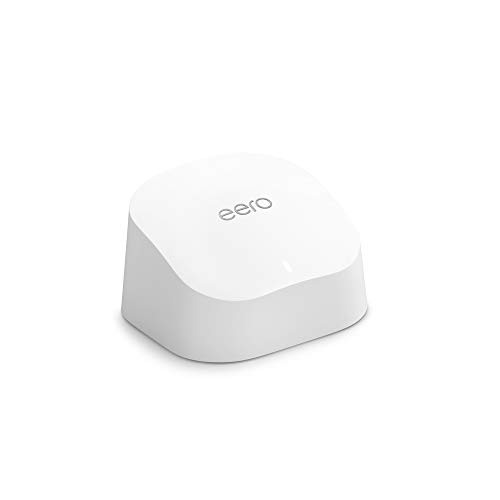
The Amazon eero 6 is a compact choice for a small apartment, condo, or modest single-story home. This one-pack supports internet plans up to 900 Mbps according to its listing and covers up to 1,500 square feet. It also supports a large number of connected devices, which helps homes filled with lights, speakers, cameras, and sensors.
The main appeal is ease of use. The eero app guides setup and provides a clean view of the network. It can also work with other compatible eero units if you later need more coverage. This is not the best fit for buyers who need several wired ports or deep manual controls, but it is a friendly starting point for simple mesh Wi-Fi.
Pros:
- Very simple app-guided setup
- Compact design for small homes
- Supports up to 75 connected devices as listed
- Can expand with compatible eero units
- Wi-Fi 6 support for newer devices
- Good fit for users who want fewer settings
Cons:
- One unit covers less space than the multi-packs
- Limited Ethernet connectivity compared with Deco options
- Some security and control tools may require a subscription
What Amazon Buyers Are Saying
Buyers often like how quickly the eero 6 gets a home online. The app and simple design appeal to people who do not want to manage complex router menus. Customers also commonly mention stable coverage in apartments and smaller homes.
The most common limitation is the small coverage area of the one-pack. Buyers with larger homes may need extra eero units. Some users also want more advanced controls without a subscription, so I suggest checking the current feature list before buying.
My Recommendation
The eero 6 is worth buying when ease of use matters more than maximum coverage or advanced networking tools. It is a good small-home router, but not my overall winner for a large mesh network. I rate it 4.2 out of 5.
TP-Link Deco X55 AX3000 2-Pack

The two-pack Deco X55 offers the same basic Wi-Fi 6 platform as the three-pack, but it targets smaller spaces. TP-Link lists coverage up to 4,500 square feet. Each unit has three Gigabit ports, which gives you more flexibility than many compact mesh systems.
This kit works well for a medium home, townhouse, or apartment with a distant office. One unit connects to the modem, while the other extends coverage into a weak area. You can also connect the units with Ethernet if your home has network cable. The two-pack costs less than a three-pack and avoids placing an extra node where you do not need one.
Pros:
- Good coverage for medium homes
- Wi-Fi 6 performance for busy networks
- Three Gigabit ports per unit
- Supports wired Ethernet backhaul
- Less expensive than buying a larger pack
- Easy to expand if needs change
Cons:
- No 6 GHz support
- Coverage may not reach every large or tall home
- Gigabit ports are not designed for multi-gig wired service
What Amazon Buyers Are Saying
Customer reviews often praise this version for removing dead zones without a difficult installation. Buyers like the balance between two-unit coverage and the useful wired ports. The system also earns attention from people replacing a router and extender combination with one shared network.
Some buyers find that the second unit works best when placed closer to the main unit than expected. That is a key mesh lesson: the satellite needs a good connection before it can spread that connection farther. Buyers with very large homes often choose the three-pack instead.
My Recommendation
I recommend the two-pack X55 for medium homes and apartments that need more reach than a single router can provide. It gives most shoppers strong value without paying for an unused third node. I rate it 4.5 out of 5.
TP-Link Deco S4 AC1900 Mesh System

The Deco S4 is the budget option in this group. It uses Wi-Fi 5 rather than Wi-Fi 6, Wi-Fi 6E, or Wi-Fi 7. Still, it can cover a wide area with its three-unit design, and TP-Link lists coverage up to 5,500 square feet. It also includes Gigabit ports and works with Alexa.
This system makes sense for basic browsing, streaming, smart-home devices, and moderate internet plans. It can replace an older router and extender setup with one network name. However, homes with many active devices may benefit from the better efficiency of a newer Wi-Fi standard. I would choose the S4 only when its lower price matters more than future performance.
Pros:
- Low-cost way to create a mesh network
- Three units provide broad listed coverage
- Gigabit Ethernet ports
- Works with Alexa
- Simple app-based management
- Suitable for basic home internet use
Cons:
- Uses older Wi-Fi 5 technology
- Less efficient than Wi-Fi 6 systems in busy homes
- May offer less long-term value for fast internet plans
What Amazon Buyers Are Saying
Amazon buyers often like the low price, simple installation, and improvement over a single weak router. Many customers choose it for large homes that need basic coverage rather than maximum wireless speed. The three-pack format also gives users flexibility when placing nodes around the home.
The main complaints center on the older Wi-Fi 5 standard and limits during heavy use. Some buyers expect the coverage number to work through many walls, but building materials can reduce signal strength. Buyers with newer devices or gigabit internet may prefer the X55 or XE75.
My Recommendation
The Deco S4 remains a reasonable budget system for basic use, but I would buy it only at a strong sale price. A Wi-Fi 6 model gives better long-term value for many families. I rate it 4.0 out of 5.
How to Choose the Best Router for Mesh Networking
Choosing the best router for mesh networking starts with your home, not the biggest number on the box. Think about the size of your space, your internet plan, the number of devices you use, and whether you can run Ethernet cable. A smaller system may work better than an oversized kit if you place it well.
1. Match the System to Your Home Layout
Coverage claims come from controlled tests. Real homes have walls, floors, appliances, and furniture that weaken signals. A two-pack often suits an apartment or medium home. A three-pack helps in a long ranch house, a large home, or a multi-floor layout.
Do not place a satellite in the dead zone. Put it halfway between the main unit and the weak room. The satellite needs a strong link to the main unit. If your home has thick brick or concrete walls, consider Ethernet backhaul. A wired link often gives more stable results than relying on a distant wireless connection.
2. Choose the Right Wi-Fi Generation
Wi-Fi 5 can handle simple use, but Wi-Fi 6 is a better starting point for most new purchases. Wi-Fi 6 improves how a router shares airtime with many devices. That helps when several people stream video, join calls, play games, and use smart-home products at the same time.
Wi-Fi 6E adds a 6 GHz band for compatible devices. Wi-Fi 7 adds newer features such as Multi-Link Operation for supported clients. These features can help, but they do not make old phones faster by magic. If most of your devices are older, a well-priced Wi-Fi 6 system may offer better value.
3. Check Ports, Backhaul, and Long-Term Value
Count your wired devices before you buy. A desktop, TV, game console, security hub, and network storage device can use several ports. Three Gigabit ports per unit, as found on the Deco X55, offer useful flexibility. The Deco BE25 goes further with 2.5 Gb ports for compatible multi-gig equipment.
Also check whether the system supports Ethernet backhaul. This feature lets nodes communicate through a network cable. It can reduce wireless congestion and improve performance. Finally, review the app, security tools, parental controls, update policy, and subscription requirements. The cheapest system is not always the best router for mesh networking if it costs more to maintain or cannot support your future needs.
Final Verdict: Which Should You Buy?
The TP-Link Deco XE75 is the best overall choice for most homes. Choose the Deco BE25 for Wi-Fi 7 and 2.5 Gb ports, the X55 three-pack for value and large coverage, or eero 6 for simple small-home setup.
The best router for mesh networking should fit your space, devices, and internet plan. Good placement matters as much as speed, so plan your node locations before installation.
FAQs Of Best Router for Mesh Networking
What is the best router for mesh networking in 2026?
The TP-Link Deco XE75 is the best overall pick in this comparison. It combines Wi-Fi 6E, broad coverage, easy setup, and wired backhaul support.
Is Wi-Fi 6E better than Wi-Fi 6 for a mesh network?
Wi-Fi 6E can be better when you own compatible 6 GHz devices and face congestion. Wi-Fi 6 may offer better value when most devices use older bands.
How many mesh router units do I need?
One unit may suit a small apartment. Two units often fit a medium home, while three units can help larger or multi-floor homes.
Can I use Ethernet backhaul with these mesh systems?
Yes. The TP-Link Deco XE75, BE25, and X55 systems support wired backhaul. Check your home wiring and the current product instructions before setup.
Is a Wi-Fi 7 mesh system worth buying now?
It can be worth buying if you have newer Wi-Fi 7 devices, multi-gig internet, or want a longer upgrade cycle. Wi-Fi 6 may be the better value for basic devices.










[…] internet offers high-speed connectivity, but without a suitable router, you might not enjoy its full potential. Choosing the right router is crucial for maximizing fiber […]
[…] TP-Link and NETGEAR, designed to meet streaming needs. Wi-Fi 6 technology in these routers ensures fast internet speed and wide […]
[…] decide. A good router enhances connectivity and supports multiple devices seamlessly. Features like long-range WiFi and dual-band capabilities are […]