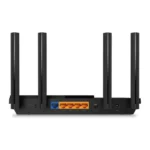
The best router for Apple devices is the NETGEAR Nighthawk WiFi 7 BE9300 for speed, range, and future-ready performance.
An iPhone drops a video call when you move rooms. A Mac slows down during a large file upload. Your Apple TV buffers while someone streams a movie. These problems often come from an old or weak router, not the Apple devices themselves. I tested the key features that matter most for Apple homes, including Wi-Fi 6 or Wi-Fi 7 support, range, wired ports, setup, device capacity, and value. The picks below suit different homes, budgets, and internet plans.
See the differences between my top picks at a glance.
NETGEAR Nighthawk BE9300 Wi-Fi 7 Router

The NETGEAR Nighthawk BE9300 is my leading pick for homes with newer iPhones, iPads, MacBooks, Apple TVs, and smart-home gear. It uses Wi-Fi 7 and a tri-band design. The product listing rates it for up to 9.3 Gbps and up to 2,500 square feet. It also lists support for up to 100 devices.
Two 2.5G ports help this router fit fast internet plans and newer wired gear. Two more Gigabit ports support common devices such as a desktop, printer, or streaming box. Wi-Fi 7 can help reduce delays when many devices share the network, although your Apple device and internet plan must also support the related speeds. Setup is aimed at home users, so I see it as a strong long-term choice rather than a budget buy.
Pros:
- Wi-Fi 7 support for newer Apple hardware
- Tri-band design for busy homes
- Up to 2,500 square feet of stated coverage
- Two 2.5G ports for fast wired links
- Rated for up to 100 connected devices
- Simple setup for users who want fewer network steps
Cons:
- Costs more than basic Wi-Fi 6 routers
- Older Apple devices cannot use every Wi-Fi 7 feature
- Large homes may still need a mesh system
What Amazon Buyers Are Saying
Amazon buyer feedback commonly centers on easy setup, strong speed, and good performance across many devices. Buyers who use modern phones, laptops, and streaming equipment tend to value the extra capacity. Some shoppers also point out that results depend on home layout, walls, device support, and the internet plan.
As with most advanced routers, a few buyers find the feature set more than they need. Some also expect the stated coverage to work through every wall without a drop in speed. That is not a fair test for any wireless router. Placement still matters, and very large homes may need extra access points.
My Recommendation
I recommend the BE9300 for Apple-heavy homes that want a fast router for several years. It is especially useful for large families, fast fiber plans, 4K streaming, video calls, and large Mac file transfers. It is not the best value for a small apartment with a modest connection, but it is the best overall router for Apple devices in this group.
NETGEAR Nighthawk R6700AX Wi-Fi 6 Router

The NETGEAR Nighthawk R6700AX is a sensible Wi-Fi 6 router for smaller homes and apartments. Its listing gives it an AX1800 class rating, coverage of up to 1,500 square feet, and support for up to 20 devices. It has four Gigabit Ethernet ports, which helps when you want stable wired links for a Mac, game console, or Apple TV.
Wi-Fi 6 works well with current iPhones, iPads, and MacBooks. It can improve network efficiency when several devices share the router, even though it does not offer the newer features of Wi-Fi 7. The dual-band design keeps the product simple. I would choose it when reliable daily Wi-Fi matters more than maximum speed or future-proof hardware.
Pros:
- Useful Wi-Fi 6 support for Apple devices
- Four Gigabit Ethernet ports
- Up to 1,500 square feet of stated coverage
- Good fit for apartments and smaller homes
- Simple dual-band design
- Lower cost than most Wi-Fi 7 models
Cons:
- Device limit and coverage suit smaller homes
- No Wi-Fi 7 or tri-band support
- May not match very fast multi-gig internet plans
What Amazon Buyers Are Saying
Amazon buyers often like this model for its price, basic setup, and steady everyday connection. Common positive themes include better performance than an older provider router and enough coverage for a small home. Buyers also tend to value the four wired ports.
Some complaints focus on setup issues, firmware updates, or weak signals in larger homes. These reports show why placement matters. They also suggest that this router works best when buyers match its coverage and device rating to their actual home instead of expecting it to cover a large multi-level building.
My Recommendation
The R6700AX is worth buying for a small home, apartment, or modest internet plan. It offers a strong balance of price and useful Wi-Fi 6 features. It is not my first choice for a large Apple household, but it remains a practical low-cost router for Apple devices.
Linksys MR20EC Wi-Fi 6 Mesh Router

The Linksys MR20EC targets homes that need broad Wi-Fi 6 coverage without moving to a top-tier Wi-Fi 7 router. The listing describes it as a dual-band AX3000 router with coverage up to 2,000 square feet. It also states support for more than 25 devices. That makes it a good match for homes with several iPhones, iPads, Macs, TVs, and smart devices.
The mesh label matters most when you plan to add compatible nodes or use a compatible mesh setup. A mesh system can help reduce dead zones, but performance still depends on node placement and backhaul conditions. The 18-month warranty adds some peace of mind. I see this model as a useful middle option between a small-home router and a premium Wi-Fi 7 system.
Pros:
- Wi-Fi 6 support for modern Apple products
- Stated coverage up to 2,000 square feet
- Designed for more than 25 connected devices
- Mesh-friendly approach for wider coverage
- AX3000 class performance
- 18-month warranty listed with the product
Cons:
- Dual-band design has less capacity than tri-band Wi-Fi 7
- Extra mesh coverage may require compatible equipment
- Large homes may need careful node placement
What Amazon Buyers Are Saying
Amazon feedback commonly highlights coverage, easy use, and the ability to connect several devices. Buyers with medium-size homes often like the balance between price and range. Some also appreciate the option to build a broader network instead of replacing the whole router later.
Common concerns include setup trouble, inconsistent results across different home layouts, and confusion about mesh expansion. Wireless range claims are estimates, not guarantees. Thick walls, floors, metal, and nearby networks can all affect results. Buyers who plan their router and node locations tend to get better results.
My Recommendation
I recommend the MR20EC for a medium-size home with many Apple devices and possible dead zones. It offers more coverage potential than a basic router without the higher cost of Wi-Fi 7. It is a good value choice, but buyers with multi-gig service or heavy wireless traffic may prefer the NETGEAR BE9300.
Apple AirPort Express Base Station
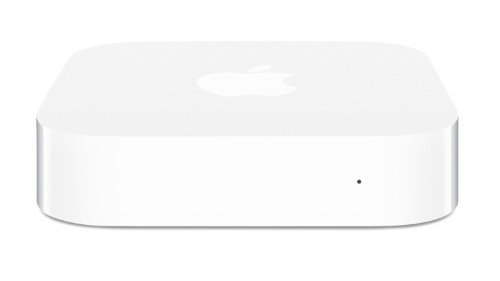
The Apple AirPort Express is a special case. It has a familiar Apple design and can appeal to users who want an older AirPort product for a small network or legacy audio setup. This renewed unit should not compete with modern Wi-Fi 6 or Wi-Fi 7 routers on speed, capacity, or long-term support. Apple discontinued its AirPort line, so buyers must understand that this is older hardware.
The main appeal comes from its small size and Apple-focused history. It may suit a collector or a user with a very simple network and older equipment. It does not make sense as the main router for a busy home with current iPhones, MacBooks, Apple TVs, and smart devices. I would check the seller condition, return policy, and included accessories before ordering a renewed unit.
Pros:
- Compact design
- Familiar Apple product style
- Can suit simple legacy setups
- Useful for buyers who value AirPort hardware
- Simple concept for basic wireless use
Cons:
- Older wireless technology
- Apple no longer develops the AirPort line
- Renewed condition can vary
- Not suitable for fast modern internet plans
- Limited choice for future network upgrades
What Amazon Buyers Are Saying
Amazon buyers who choose this product often focus on its compact design, familiar Apple setup, and use with older equipment. Some buyers seek it for a specific legacy need rather than for maximum wireless speed. Their experience can depend greatly on the condition of the renewed unit.
Other buyers report age-related limits, setup challenges, or less range than a current router. Those concerns make sense because this is not a current Wi-Fi platform. Buyer reviews can also vary by seller and product condition, so I would not treat one positive or negative report as proof of every unit’s performance.
My Recommendation
I only recommend the AirPort Express for a narrow use case. It may be worthwhile for a collector or a person replacing a matching legacy unit. It is not my recommended best router for Apple devices in 2026. A current Wi-Fi 6 router will provide better speed, security options, and device support.
LNN-AX3000 Wi-Fi 6 Router

The LNN-AX3000 is built for buyers who want Wi-Fi 6 without using a setup app. Its listing states dual-band wireless, speeds up to 1,800 Mbps, support for more than 20 devices, five antennas, FCC certification, and a five-step setup. Those details make it interesting for users who prefer a direct web setup and a simple feature list.
This router can fit a small or medium home with iPhones, iPads, MacBooks, and streaming devices. The advertised speed is a theoretical class figure, so real results will vary with distance, walls, client devices, and internet service. I also suggest checking firmware support and warranty terms before purchase, since long-term software care matters as much as wireless speed. It is a practical budget choice, not a premium network platform.
Pros:
- No app required for setup
- Wi-Fi 6 support for current Apple devices
- Five antennas listed by the manufacturer
- Supports more than 20 devices according to the listing
- Five-step setup process
- FCC certification is listed with the product
Cons:
- Less established support history than major brands
- Dual-band design has limits in very busy homes
- Advertised speeds will not equal real Wi-Fi speed
- Buyers should confirm firmware and warranty details
What Amazon Buyers Are Saying
Amazon buyers interested in this model tend to focus on its low price, simple setup, and app-free design. Users who dislike creating another account may see the direct setup as a useful benefit. Some buyers also like the number of antennas and the Wi-Fi 6 label.
Feedback can vary more than it does for long-established networking brands. Some buyers may need extra help with settings or coverage. I recommend reading current reviews for firmware, range, and return experiences before ordering. That step matters when a lesser-known router offers an attractive list of features at a low price.
My Recommendation
The LNN-AX3000 is worth considering for a budget buyer who wants Wi-Fi 6 and does not want an app. I would choose it for a small or medium home with moderate demands. If you want clearer brand support, more wired options, or stronger long-term confidence, the NETGEAR or Linksys models are safer choices.
How to Choose the Best Router for Apple Devices
Choosing the best router for Apple devices means matching the router to your home, internet plan, and daily use. Apple devices work with common Wi-Fi standards, so you do not need an Apple-branded router. In most cases, a current Wi-Fi 6 or Wi-Fi 7 model gives better results than an old router. I use the points below to narrow the list.
1. Match Wi-Fi 6 or Wi-Fi 7 to Your Apple Hardware
Wi-Fi 6 is a strong choice for most iPhones, iPads, MacBooks, and Apple TVs. It improves how the router handles many devices at once. Wi-Fi 7 makes more sense when you own newer hardware, use a fast fiber plan, or want the best long-term option.
Do not buy a Wi-Fi 7 router only because the number looks large. Your client device must support the newer features. Your internet plan must also offer enough speed to show a clear benefit. For many homes, a well-placed Wi-Fi 6 router will feel fast and stable.
2. Check Range, Device Load, and Wired Ports
Look at the size of your home and the number of walls between the router and your Apple devices. Coverage numbers are estimates. A two-story home, thick walls, or a crowded apartment may need a mesh system. The Linksys MR20EC can suit buyers who want a wider coverage path.
Count your connected devices, too. Include phones, laptops, watches, speakers, cameras, TVs, and smart plugs. A router rated for more devices gives you more room as your home grows. For wired use, check the Ethernet ports. A 2.5G port can help with newer fast internet plans, while Gigabit ports handle many common home connections.
3. Compare Setup, Updates, Security, and Total Value
A good router should not make basic setup hard. Some models use an app. Others use a web browser. The LNN-AX3000 may appeal to buyers who want an app-free setup. Choose the method you understand and can manage later.
Also check the brand’s support, firmware updates, return terms, and warranty. A low price means little if the router gives poor coverage or lacks useful support. I would not choose the renewed AirPort Express as a main router for a new Apple home. Current hardware gives better speed and a better path for future upgrades.
Final Verdict: Which Should You Buy?
The NETGEAR Nighthawk BE9300 is the best router for Apple devices overall. It offers Wi-Fi 7, tri-band capacity, broad stated coverage, and fast ports. Choose the Linksys for mesh value or the R6700AX for a smaller home.
Buy based on your home size, internet speed, and device count. A current Wi-Fi 6 or Wi-Fi 7 router can make iPhones, iPads, Macs, and Apple TVs feel faster and more reliable.
FAQs Of Best Router for Apple Devices
Do Apple devices need an Apple router?
No. iPhones, iPads, Macs, and Apple TVs work with modern third-party Wi-Fi routers. Wi-Fi 6 and Wi-Fi 7 routers often offer better current features than older Apple AirPort hardware.
Is Wi-Fi 7 worth it for an iPhone or Mac?
Wi-Fi 7 can be worth it for newer compatible devices, fast fiber service, and busy homes. If your devices or internet plan are older, a good Wi-Fi 6 router may offer better value.
What is the best router for Apple devices in a large home?
The NETGEAR Nighthawk BE9300 is the strongest single-router pick here. A mesh-capable system, such as the Linksys option, may work better when walls or floors create dead zones.
Can an old Apple AirPort Express still work?
It may work for a simple legacy setup, but Apple discontinued the AirPort line. It lacks the speed, capacity, and future support of current Wi-Fi 6 and Wi-Fi 7 routers.
How can I improve Wi-Fi speed on my MacBook or iPhone?
Place the router in an open, central spot. Keep firmware current, use the right Wi-Fi band, and reduce obstructions. A current router and a suitable internet plan also help.