The best router for RVs delivers steady Wi-Fi, simple setup, strong range, and travel-friendly control.
RV life often means weak campground Wi-Fi, crowded networks, and several devices fighting for one slow connection. A good router can make that daily problem much easier. It can share one internet connection with phones, laptops, TVs, cameras, and smart devices. After reviewing the features, ports, travel design, wireless standards, and likely use cases, I found five strong options for RV owners. The right choice depends on whether you need a home-style router, a pocket travel router, or advanced VPN control.
See the differences between my top picks at a glance.
TP-Link Archer AX21 Wi-Fi 6 Router

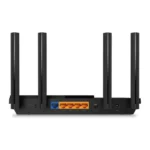
The TP-Link Archer AX21 is the best all-around pick for many RV owners. It uses Wi-Fi 6 and carries an AX1800 class rating. That gives it a useful mix of speed, range, and device handling for a family RV. Its design looks more like a home router than a pocket travel unit, but that can help when you want steady Wi-Fi inside a larger motorhome or fifth wheel.
Gigabit ports make it easy to connect a smart TV, desktop computer, or wired streaming device. EasyMesh support also gives you a path to expand coverage with compatible TP-Link equipment. The router works well when you already have internet from a campground Ethernet jack, a modem, or another wired source. It does not replace a cellular modem or satellite antenna, so you still need a separate internet source.
Pros:
- Wi-Fi 6 helps manage several connected devices
- Gigabit ports suit wired TVs and computers
- EasyMesh support allows future coverage expansion
- Good fit for full-time or seasonal RV use
- Simple setup through TP-Link tools
- Works with Alexa for supported voice controls
Cons:
- Less compact than a pocket travel router
- Needs a separate modem or wired internet source
- Not designed as a direct cellular hotspot
What Amazon Buyers Are Saying
Amazon buyers commonly focus on easy setup, stable connections, and strong performance for normal home networks. Many users like the clear app-based setup and the ability to connect several devices without much effort. Some buyers report that coverage depends heavily on wall placement and the size of the space.
Common complaints tend to involve setup issues, firmware behavior, or confusion about the difference between a router and an internet modem. That point matters for RV use. The Archer AX21 can distribute an existing connection, but it cannot create internet by itself. Read the current listing and setup guide before buying if your plan depends on cellular service.
My Recommendation
I recommend the Archer AX21 for RV owners who want a dependable main router and already have a wired modem, hotspot, or campground Ethernet connection. It offers a strong balance without adding travel-only features you may not need. It is worth buying for a larger RV, but it is not the best choice if you need a tiny unit powered by USB-C.
TP-Link Roam 6 AX1500 Travel Router

The TP-Link Roam 6 is built for people who move often. Its AX1500 Wi-Fi 6 design fits travel use, small RVs, hotel rooms, and public Wi-Fi sharing. USB-C power makes it easier to fit into a mobile setup than a full-size router with a larger power adapter. It also supports several modes, which gives it more value than a basic range extender.
This router can help create one private network from a public connection. That can reduce the need to reconnect every device each time you move campsites. The listing also highlights phone tethering, OpenVPN, and WireGuard support. Those features are useful for travelers who want more control, but VPN setup may take more time than a basic plug-and-play connection.
Pros:
- Compact form suits RV travel
- USB-C power fits many mobile power setups
- Wi-Fi 6 supports newer phones and laptops
- Can share selected public Wi-Fi connections
- Supports phone tethering for flexible internet access
- OpenVPN and WireGuard support add privacy options
Cons:
- Small travel design may have less range than full-size routers
- Public Wi-Fi sign-in pages can still require manual steps
- Advanced VPN modes may feel complex to new users
What Amazon Buyers Are Saying
Buyer feedback for travel routers often centers on size, power, and the ability to share one connection with many devices. Users who understand travel-router modes tend to value the flexible setup. Buyers also like the idea of using one private network across hotels, RV stops, and other temporary locations.
The most common concern with this type of product is setup learning. A travel router has more modes than a basic home router, so the first connection may take patience. Some buyers may also expect it to include cellular service, but a router like this still needs Wi-Fi, tethered phone data, or another upstream connection.
My Recommendation
The Roam 6 is my top portable choice. I would choose it for a camper who changes locations often and wants USB-C power, public Wi-Fi sharing, and VPN support in one small unit. It is worth buying when portability matters more than maximum indoor range.
GL.iNet GL-SFT1200 Opal Travel Router
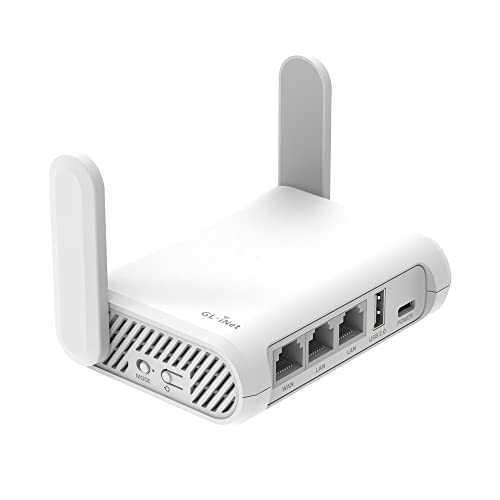
The GL.iNet GL-SFT1200 Opal is a compact router for RV owners who value control. It uses dual-band AC1200 Wi-Fi and offers three gigabit ports. Its small size makes storage simple, while the OpenWrt base gives advanced users many settings. This is a practical unit for travelers who want a private network without carrying a full-size home router.
OpenVPN and WireGuard support are major reasons to consider the Opal. The router also lists support for more than 30 VPN services, though the exact setup depends on the service you choose. Its wired ports can help connect a laptop, smart TV, or other device at a campsite. It uses Wi-Fi 5 rather than Wi-Fi 6, so it may not be the best fit for buyers who want the newest wireless standard.
Pros:
- Very compact for RV storage and travel
- Three gigabit ports offer useful wired flexibility
- OpenWrt supports deeper network control
- OpenVPN and WireGuard support suit privacy-focused users
- Dual-band Wi-Fi works with older and newer devices
- Good choice for creating a private travel network
Cons:
- Uses Wi-Fi 5 instead of Wi-Fi 6 or Wi-Fi 7
- Advanced settings may overwhelm beginners
- Small size does not guarantee whole-RV coverage
What Amazon Buyers Are Saying
Amazon buyers commonly praise the Opal for its small footprint, travel value, and advanced network features. Users who already understand VPNs and router modes often find it more capable than a basic travel router. The wired ports also receive attention from people who want to connect more than one device by cable.
Some buyers describe a learning curve with the interface and VPN setup. That is a fair concern because OpenWrt gives users many choices. A buyer who only wants a simple wireless network may prefer the Roam 6 or a standard home router. Before purchase, check that the current firmware and VPN features meet your needs.
My Recommendation
I recommend the Opal for technically confident RV travelers. It is a strong value if VPN support, wired ports, and compact storage matter more than the latest Wi-Fi version. It is not my first pick for a beginner who wants the simplest possible setup.
NETGEAR Nighthawk R6700AX Wi-Fi 6 Router

The NETGEAR Nighthawk R6700AX is a full-size AX1800 router aimed at reliable home-style networking. The listed coverage reaches up to 1,500 square feet, though real coverage varies with RV construction, wall material, placement, and interference. It supports up to 20 devices according to the product listing. That makes it a sensible option for an RV with phones, tablets, TVs, cameras, and smart gear.
Four gigabit ports give this router a practical edge for wired equipment. Wi-Fi 6 can improve network efficiency when many compatible devices share the connection. The Nighthawk design takes more space than a travel router, but it may suit a large RV better. Like the other standard routers in this review, it needs an existing internet source.
Pros:
- Wi-Fi 6 supports busy device networks
- Four gigabit ports provide strong wired flexibility
- Listed coverage suits larger RV interiors
- Supports up to 20 devices on the product listing
- Useful for streaming, work, and smart-home devices
- Familiar full-size router design
Cons:
- Less portable than dedicated travel routers
- Needs a separate modem, hotspot, or wired source
- Actual range can drop inside metal-sided RVs
What Amazon Buyers Are Saying
Amazon buyers often mention easy installation, steady Wi-Fi, and good results with common home devices. Users like having four wired ports and a current Wi-Fi 6 standard. Some buyers choose it because they want a traditional router that feels familiar rather than a small travel device with many special modes.
Reported concerns can include app setup, firmware updates, and differences between advertised coverage and real-world coverage. Those concerns apply even more in an RV because metal, cabinets, appliances, and tight walls can block radio signals. Place the router in an open, central spot for the best result.
My Recommendation
The R6700AX is a good choice for a larger RV or a semi-permanent campsite setup. I would choose it over a travel router when you want four wired ports and broad indoor Wi-Fi. It is less attractive for backpack-style travel or USB-powered mobile use.
TP-Link Archer BE230 Wi-Fi 7 Router

The TP-Link Archer BE230 is the most future-ready option in this group. It uses Wi-Fi 7 and offers a BE3600 class rating. The router includes two 2.5G ports, three gigabit ports, and a USB 3.0 port. Those connections give it more room for fast wired networks, storage sharing, and newer broadband equipment.
A 2.0 GHz quad-core processor, four antennas, EasyMesh, VPN tools, HomeShield, MLO, and private IoT support add useful features. Still, Wi-Fi 7 only shows its full value when your devices and internet source also support newer standards. In many RVs, the upstream campground or cellular link will remain the main speed limit. This router makes the most sense for a well-equipped RV that will use the same network for years.
Pros:
- Wi-Fi 7 helps prepare for newer devices
- Two 2.5G ports support fast wired equipment
- Three gigabit ports add connection flexibility
- USB 3.0 expands local network options
- EasyMesh supports compatible coverage expansion
- Private IoT tools help separate smart devices
Cons:
- Large feature set may be more than a casual traveler needs
- Newer Wi-Fi features require compatible client devices
- Full-size design is not ideal for compact RV storage
- Fast ports cannot improve a slow campground connection
What Amazon Buyers Are Saying
Amazon buyers commonly look at the BE230 for its newer Wi-Fi 7 standard, fast ports, and broad feature list. Users with newer laptops, phones, or multi-gig equipment may value the extra headroom. Buyers also tend to like the mix of EasyMesh, VPN, and smart-device controls.
The main concern with a feature-rich router is value. Some buyers may not notice a large speed change if their internet plan or client devices use older standards. Setup can also take longer when users explore advanced options. Check your current devices and internet source before paying extra for Wi-Fi 7.
My Recommendation
I recommend the Archer BE230 for RV owners who want one powerful router for long-term use. It is the best future-proof option here, but not the best value for every camper. Buy it when fast wired ports, Wi-Fi 7, and network expansion matter more than compact size.
How to Choose the Best Router for RVs
Choosing the Best Router for RVs starts with your internet source. A router shares and manages an existing connection. It does not automatically provide cellular, campground, or satellite service. Before you compare speed numbers, decide how the router will connect to the internet and how much space it must cover.
1. Match the Router to Your Internet Source
First, identify your normal connection. You may use campground Ethernet, a phone hotspot, a dedicated cellular hotspot, fixed wireless, or satellite internet. A standard router works well with a modem or Ethernet source. A travel router works better when you need public Wi-Fi sharing or phone tethering.
Check the output of your hotspot before you buy. Some hotspots provide Ethernet. Others only provide Wi-Fi or USB tethering. If the hotspot uses Wi-Fi, the router must support a wireless repeater, client, or similar travel mode. If you want cellular service built into the router, these five products are not direct replacements for a cellular modem. Read the product page for current compatibility details.
2. Choose the Right Size and Wireless Range
RV construction changes Wi-Fi performance. Metal walls, slide-outs, mirrors, appliances, and cabinets can block or weaken a signal. A full-size router may offer better antenna placement and more wired ports. A small travel router takes less space and works well near a desk, bed, or temporary campsite setup.
Think about where you will use the signal. A small travel trailer may not need a large router. A long fifth wheel may benefit from a central full-size model or a compatible mesh system. Do not judge coverage by the advertised square-foot number alone. Place the router in an open location, away from thick metal and enclosed cabinets.
3. Compare Wi-Fi Standard, Ports, and Device Load
Wi-Fi 6 is a strong middle ground for most RV networks. It can manage newer devices and busy networks well. Wi-Fi 7 adds newer features and faster wired options, but your phone, laptop, and internet source must support them. Wi-Fi 5 can still work well for basic browsing, streaming, and work tasks.
Count your wired devices before buying. A smart TV, printer, desktop, camera system, or streaming box may use Ethernet. Gigabit ports cover most RV needs. The Archer BE230 stands apart with two 2.5G ports and three gigabit ports. USB-C power can matter more than top wireless speed when you run the router from a portable battery.
Also consider setup. Simple routers suit buyers who want to connect and go. Travel routers offer more modes, but they may need extra steps. VPN support can protect traffic between your devices and a chosen VPN service, but it does not fix a weak signal or make slow internet fast. Keep your expectations realistic.
Final Verdict: Which Should You Buy?
For most RV owners, I recommend the TP-Link Archer AX21 because it balances Wi-Fi 6 performance, easy setup, gigabit ports, and value. Choose the Roam 6 for maximum portability, or the Archer BE230 for a future-ready network.
The Best Router for RVs depends on your internet source, RV size, and travel style. Pick the model that fits your real setup, not just the highest speed label.
FAQs Of Best Router for RVs
What is the best router for RVs with campground Wi-Fi?
The TP-Link Roam 6 is the strongest fit for campground Wi-Fi because it supports travel modes and public Wi-Fi sharing. It still depends on the campground connection and may require a sign-in step.
Can an RV router provide internet without cellular service?
No. A router shares an existing source. You still need campground Ethernet, Wi-Fi, a phone hotspot, a cellular modem, satellite service, or another internet connection.
Is Wi-Fi 6 worth it for an RV?
Yes, Wi-Fi 6 is useful when several newer devices share the network. It may not create a large speed gain if your internet source is slow or your devices use older Wi-Fi standards.
Should I choose a travel router or a full-size router for an RV?
Choose a travel router for small size, USB-C power, and public Wi-Fi features. Choose a full-size router for more indoor range, more ports, and a semi-permanent RV setup.
Can I use a VPN with an RV router?
Yes, models such as the Roam 6 and GL.iNet Opal support VPN tools. VPN setup varies by service, so check the current router instructions before purchase.