

The best laptop for programming balances fast code builds, ample memory, a sharp screen, and all-day comfort.
You open your laptop to fix one small bug, then start a long build, run a local server, and test a database at the same time. A weak laptop can turn that simple task into a slow wait filled with fan noise and frozen tabs. I reviewed the key needs of programmers—processor speed, RAM, storage, keyboard quality, screen space, ports, battery life, and upgrade value—to help you choose with confidence. The models below cover school, web work, software projects, business code, and light creative tasks.
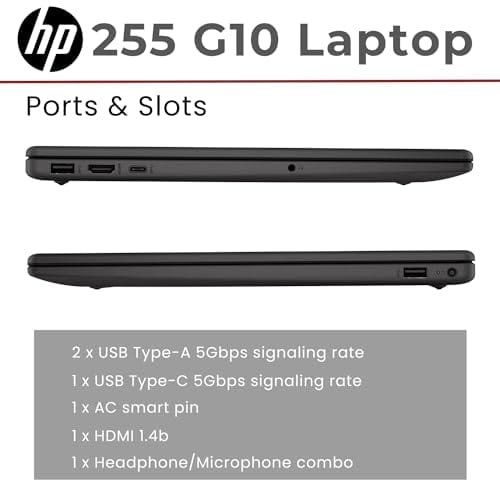
HP 255 G10: Best Overall Coding Value

The HP 255 G10 is the strongest all-round choice in this group for many programmers. Its AMD Ryzen 7 7730U processor gives it enough muscle for code editors, browsers, terminals, office apps, and local tools running together. The 32GB of RAM is especially useful when I keep Docker containers, a virtual machine, and several browser tabs open. Its 1TB PCIe SSD also gives projects plenty of room and helps the system start quickly.
The 15.6-inch Full HD screen offers a practical work area for code and documentation. I also like the built-in numeric keypad, HDMI output, Wi-Fi 6, and Windows 11 Pro because they suit home offices and business use. This is not a gaming laptop or a mobile workstation, but that is not its goal. It is a sensible coding machine that focuses on speed, memory, storage, and daily comfort.
Pros:
- Ryzen 7 performance handles large coding workloads well
- 32GB of RAM supports virtual machines and containers
- 1TB SSD provides useful room for projects and media
- Full HD display gives text a clear, usable view
- Wi-Fi 6 supports fast and stable wireless work
- HDMI makes it easy to connect an external monitor
- Windows 11 Pro suits many business and development tools
- Numeric keypad helps with data entry and spreadsheets
Cons:
- The display is practical rather than ideal for color work
- It is larger and less travel-friendly than a compact laptop
- Integrated graphics are not made for serious 3D work
My Recommendation
I recommend the HP 255 G10 to students, web developers, software testers, and home users who want strong value without paying for features they may not need. The 32GB memory stands out because programming tools can consume RAM quickly. It gives this model a comfortable lead over basic laptops with only 8GB. If you need the best laptop for programming for a mixed work and study setup, this HP is the safest starting point in this list.
It is also a good fit for someone who wants to use an external monitor, wired accessories, and business software. The large screen and number pad make it feel more like a small desk computer than a thin travel notebook. Availability and pricing can change, so check the current Amazon listing before ordering.
HP Everyday Slim: Best Budget Coding Laptop

The HP Everyday Slim is made for simple daily work, school, and entry-level coding. Its thin body should appeal to learners who carry a laptop between class, home, and a coffee shop. The 128GB SSD is faster than old-style hard drive storage, so Windows and common apps should feel more responsive. Microsoft 365 support also makes it useful for notes, reports, and project plans.
This model makes the most sense for lighter programming tasks. It can handle HTML, CSS, JavaScript basics, Python lessons, SQL practice, and cloud-based coding tools. However, a 128GB drive can fill fast after installing development environments, SDKs, downloaded files, and updates. I would treat it as an affordable learning laptop, not as a heavy workstation for multiple virtual machines or large software builds.
Pros:
- Thin design is easy to carry for school or travel
- SSD storage gives faster response than a hard drive
- Windows 11 supports many beginner coding programs
- Microsoft 365 helps with school and office tasks
- Fast-charge support can reduce time near an outlet
- Long battery focus suits note taking and light work
- Simple setup works well for new computer users
Cons:
- 128GB storage leaves limited room for large projects
- It may struggle with heavy IDEs and virtual machines
- Basic hardware offers less room for demanding multitasking
- Not the best choice for Android emulators or local AI tools
My Recommendation
I recommend the HP Everyday Slim for students who are starting to learn programming and need a low-cost computer for basic code, web work, and school tasks. It is also useful for people who mainly use browser-based development platforms. Keep your project files in cloud storage or on an external drive to protect the small internal SSD. For beginners seeking an affordable best laptop for programming, this model keeps the first step simple.
I would not select it for professional developers who run several large tools at once. Still, its slim shape, SSD, Windows environment, and everyday features offer good value at the entry level. Check the exact memory and processor details on the live listing, since configurations can vary by seller or release.
HP OmniBook 3 17: Best Large Screen Option

The HP OmniBook 3 17 gives programmers something many compact laptops cannot: a broad 17.3-inch Full HD workspace. A large screen can make long code files easier to scan and leaves room for a terminal beside an editor. The 512GB SSD is also more practical than a small entry-level drive. With 8GB of RAM and an AMD Ryzen 3 processor, this model targets light work rather than complex development.
I see the OmniBook 3 as a comfortable home laptop for students and casual coders. The large panel may reduce the need for an external monitor, which can save money and desk space. It should suit basic Python, web pages, beginner Java, text editing, and online courses. For demanding builds, mobile development, or container-heavy work, the 8GB memory will be the main limit.
Pros:
- 17.3-inch Full HD screen gives generous coding space
- 512GB SSD offers room for apps and project files
- Large display can reduce the need for a second monitor
- Radeon graphics handle normal desktop display tasks
- Windows 11 Home supports common programming software
- Good fit for home study and online coding lessons
- Wide screen helps users who prefer larger text
Cons:
- 8GB RAM limits heavy multitasking
- Ryzen 3 is aimed at basic rather than advanced development
- 17-inch size is less convenient for frequent travel
- Integrated graphics are not suited to demanding 3D projects
My Recommendation
I recommend the HP OmniBook 3 17 to home users, online students, and programmers who value screen size above raw speed. It is a nice choice when your coding space feels cramped on a small display. The 512GB SSD gives it a helpful balance for lessons, documents, and modest projects. If you need the best laptop for programming with a large built-in screen at an accessible price, this HP deserves consideration.
Choose another model if your work depends on Docker, Android Studio, several IDEs, or virtual machines. The 8GB RAM can work for light tasks, but it leaves little breathing room. For relaxed coding at a desk, however, the big screen is this laptop’s strongest feature.
Lenovo ThinkPad E16: Best for Business Coding

The Lenovo ThinkPad E16 brings a work-focused design to this comparison. Its 16-inch touchscreen gives code, dashboards, and documents more space than a typical 13-inch or 14-inch notebook. The AMD Ryzen 7 250 processor and 32GB of DDR5 memory suggest a strong setup for multitasking. A 1TB SSD adds fast storage for source files, tools, test data, and backups.
ThinkPad laptops are known for practical keyboards, and that matters when I write code for hours. A comfortable layout can reduce fatigue more effectively than a small speed gain. The touchscreen may help with navigation, diagrams, and general Windows use, though most programmers will still prefer the keyboard and trackpad. This model is well suited to office developers, analysts, consultants, and users who need a serious daily work machine.
Pros:
- 32GB DDR5 memory supports demanding multitasking
- 1TB SSD provides fast and spacious project storage
- 16-inch screen gives a useful balance of size and mobility
- Touch input adds flexible control for Windows tasks
- ThinkPad-style keyboard suits long typing sessions
- Ryzen 7 platform is suitable for many professional tools
- Business-focused design fits office and remote work
Cons:
- Touchscreen laptops can use more battery during active use
- It may cost more than basic student models
- Integrated graphics are not intended for serious gaming or 3D rendering
- The 16-inch body is less compact than an ultraportable
My Recommendation
I recommend the Lenovo ThinkPad E16 for programmers who type often and need strong multitasking. It is a particularly good match for business software, data work, web development, and remote office use. The 32GB RAM and 1TB SSD provide the headroom that serious users want from the best laptop for programming. The larger screen and work-friendly keyboard also make long sessions feel less cramped.
This is the model I would consider first for a developer who wants a practical office computer rather than a flashy gaming system. It offers useful speed without forcing you to carry a separate monitor for ordinary work. Review the exact processor and display configuration before purchase, because retailer listings can include several versions under similar names.
NIMO 15.6: Best for Creative Coding Projects

The NIMO 15.6 AI-Creator laptop takes a balanced approach for users who code and create. Its six-core AMD Ryzen 5 6600H processor is designed for stronger performance than low-power entry chips. The 16GB of RAM is a sensible starting point for programming, creative apps, browsers, and light data work. Its 1TB SSD gives plenty of space for source code, design files, local tools, and media.
The 15.6-inch screen is a familiar size for a mixed home and work setup. I like this configuration for people who may edit images, build websites, test small apps, and learn data tools on the same device. It should not be confused with a full professional workstation, especially if your software needs a powerful dedicated GPU. Still, the combination of a performance-minded processor, 16GB memory, and large SSD makes it a versatile option.
Pros:
- Ryzen 5 6600H offers useful performance for mixed workloads
- 16GB RAM handles normal development multitasking well
- 1TB SSD gives generous space for code and creative files
- 15.6-inch format works well for home and office use
- Good fit for web design and light creator tasks
- More balanced for demanding work than basic slim laptops
- Useful choice for learners exploring several software fields
Cons:
- Integrated graphics may limit advanced video and 3D work
- Battery life can vary with the higher-performance processor
- Brand support may not match larger business laptop makers
- It may be more power than a beginner needs
My Recommendation
I recommend the NIMO 15.6 to students and independent creators who want one laptop for programming, design, and general productivity. The 16GB RAM and 1TB SSD form a strong middle ground. This is a good choice for web developers who also edit graphics, run local databases, or manage large project folders. It may be the best laptop for programming for users who want extra room to grow without moving to a costly workstation.
Buy it after checking the seller, warranty terms, return window, and exact display details. Those points matter more with lesser-known brands than with established business lines. If you value broad storage and balanced performance, the NIMO is appealing; if you need enterprise support, the ThinkPad or HP business model may be safer.
How I Choose the Best Laptop for Programming
Programming does not require one magic specification. A beginner writing short Python scripts has different needs from a developer running containers, emulators, databases, and test servers. I look for a balanced system that stays responsive during real work. A fast processor helps, but enough RAM and a good SSD often make the larger difference in daily use.
I also consider the keyboard, screen, ports, heat, battery, operating system, and upgrade path. Developers stare at text for hours, so a poor keyboard or cramped display can become a daily nuisance. A laptop may have a fast chip but still feel wrong if it has weak storage or only a few useful ports. Good buying advice must look beyond a single benchmark number.
Processor: The Engine Behind Builds
The CPU affects compile time, code analysis, file indexing, and many development tools. Modern AMD Ryzen 5 and Ryzen 7 chips can handle common programming work with ease. A newer or stronger chip is helpful for large projects, but processor names alone do not tell the full story. Core count, power limits, cooling, and the laptop’s design also affect real speed.
For HTML, CSS, light JavaScript, and beginner Python, an entry-level processor can be enough. For Android Studio, Docker, local databases, and software builds, I prefer a Ryzen 5, Ryzen 7, or similar modern Intel Core processor. The HP 255 G10 and ThinkPad E16 stand out here. The HP Everyday Slim and OmniBook 3 are better for lighter code.
RAM: The Space for Your Open Tools
RAM acts like a desk. When the desk is wide, you can keep more tools open without stacking everything on the floor. A laptop with 8GB can run a code editor and browser, but it may slow down when you add an emulator, database, or many tabs. For current programming work, 16GB is a more comfortable target.
Users who run virtual machines, containers, mobile emulators, or data tools should consider 32GB. That is why the HP 255 G10 and Lenovo ThinkPad E16 are so attractive. Their memory gives room for growth and reduces the need to close tools during a project. Always check whether the RAM is upgradeable, soldered, or fixed before buying.
Storage: Choose an SSD
An SSD helps Windows start quickly and makes apps, project folders, and file searches feel more responsive. I strongly prefer PCIe solid-state storage over an older mechanical hard drive for programming. Source code itself is often small, but development tools, SDKs, package caches, virtual machines, and test files can use space quickly.
A 128GB SSD may work for a beginner, but it needs careful file management. A 512GB SSD is a better basic target, while 1TB is ideal for users with many tools or creative files. The HP Everyday Slim has the smallest drive here. The HP OmniBook 3 offers 512GB, while the HP 255 G10, ThinkPad E16, and NIMO provide 1TB.
Screen Size and Text Clarity
Programmers read text for long periods. A clear Full HD screen is usually the minimum I would seek for comfortable work. Higher resolution can show more lines and sharper text, but it may also use more battery and cost more. Screen quality includes brightness, viewing angles, scaling, and glare control—not just pixel count.
A 13-inch laptop is easy to carry but can feel tight. A 15.6-inch model is a popular middle choice. The 16-inch ThinkPad E16 offers a little more room, and the 17.3-inch OmniBook 3 gives the widest built-in workspace. If you often work at home, a laptop with HDMI or USB-C display support can pair well with a second monitor.
Keyboard, Trackpad, and Comfort
A good keyboard is not a luxury for programmers. It is the tool you touch most. Keys should have clear travel, a useful layout, and firm feedback. The ThinkPad line has a strong reputation for business-oriented keyboards, while the HP models provide familiar layouts for everyday typing.
Backlighting is useful in dim rooms, but it is not the only comfort factor. Wrist position, screen height, fan noise, and heat also affect long sessions. I suggest placing any laptop on a firm surface and using a stand or external keyboard when possible. Small comfort gains can prevent a long coding session from feeling like a chore.
Operating System and Development Tools
Windows 11 works with many popular editors, compilers, terminals, browsers, and database tools. It can also support Linux workflows through tools such as Windows Subsystem for Linux, depending on your setup and edition. Windows is a practical choice for students and users who need broad app support.
Linux users should check hardware support before installing their preferred distribution. Wi-Fi, graphics, suspend, fingerprint readers, and function keys may work differently across laptops. Windows 11 Pro on the HP 255 G10 can be helpful in business environments, while Windows 11 Home is enough for many personal projects. The right OS depends on your tool chain, not on trends.
Ports and Connectivity
Programming often involves more than writing code. You may connect a monitor, external drive, phone, test device, network cable, or USB hub. HDMI is useful for a second display, and fast USB ports help with storage and accessories. Wi-Fi 6 is a welcome feature for large downloads, remote repositories, and cloud work.
Port selection can change by configuration, so read the current listing carefully. If a laptop lacks a port you need, a quality dock can help, but it adds cost and another item to carry. The HP 255 G10 is appealing for users who want a practical mix of ports and business features without relying on many adapters.
Battery Life and Heat
Battery life depends on screen brightness, processor power, wireless use, background apps, and workload. A laptop may last many hours while reading but less time during builds or video calls. I avoid promising one exact battery number unless a controlled test supports it. Real use varies from person to person.
Thin laptops are easy to carry, but their small cooling systems may reduce sustained performance. Larger laptops can offer more room for cooling and a bigger battery, though they weigh more. Keep vents clear, update the system, and avoid soft beds or couches during heavy work. These simple habits help a laptop stay cooler and more stable.
Best for Comparison
| Best for | Why |
|---|---|
| Professional multitasking | HP 255 G10 and Lenovo ThinkPad E16 pair strong processors with 32GB RAM and 1TB SSD storage. |
| Beginner coding and school | HP Everyday Slim offers a simple, portable setup for light code, browser tools, and class work. |
| Large screen or creative work | HP OmniBook 3 17 favors screen space, while NIMO adds a stronger mixed-use balance with 16GB RAM. |
Who Should Buy Each Laptop?
The HP 255 G10 is the most balanced model for buyers who want strong specifications at a sensible price. Its 32GB RAM removes a common bottleneck, and its 1TB SSD helps it serve as a main computer for years. I would choose it for web work, school, business coding, and general development.
The HP Everyday Slim is for the light user. It suits online lessons, basic scripts, browser-based tools, and office tasks. It is not the right tool for a developer who already knows they need containers, emulators, or large local environments. Think of it as a clean notebook for the first chapter, not a full workshop.
The HP OmniBook 3 17 makes sense when screen size matters most. It can show more code without an external display, which helps users who work from a fixed desk. The processor and 8GB RAM keep it in the light-use class. For reading, learning, and basic coding, its large panel is a real comfort feature.
The ThinkPad E16 is the business-minded option. It combines 32GB DDR5 memory and 1TB storage with a large touchscreen and a typing-focused design. I would point office developers, consultants, analysts, and remote workers toward this model. It has the kind of practical setup that supports a busy workday.
The NIMO 15.6 is for a user with mixed interests. Its Ryzen 5 6600H, 16GB RAM, and 1TB SSD create a useful platform for code, design, and media. It is a strong value choice if you do not require a dedicated graphics card or a large enterprise support network. Check warranty details before purchase, as you should with any smaller brand.
Programming Tasks These Laptops Can Handle
All five laptops can support some form of programming, but their comfort levels differ. The two 32GB models are best for layered workloads. The NIMO is a good middle option, and the two basic HP models are better for lighter tasks. Match the laptop to the tools you actually use rather than buying based on the word “programming” alone.
Web Development
Web development often includes a code editor, browser, local server, image tools, and a terminal. The HP Everyday Slim can handle beginner work, while the HP OmniBook 3 adds more storage and screen space. For larger frameworks and many browser tabs, I prefer the HP 255 G10, ThinkPad E16, or NIMO. Their extra memory gives the workflow more breathing room.
Python and Data Learning
Python lessons and small scripts do not need extreme hardware. Basic notebooks can run a code editor and interpreter with ease. Data notebooks, large libraries, and local databases can change the picture. For those tasks, 16GB is a better starting point, and 32GB is even more comfortable.
Mobile App Development
Android Studio and emulators can be demanding. They use memory and processor power, especially when a browser, emulator, and build process run together. I would favor the HP 255 G10, ThinkPad E16, or NIMO for this work. The 8GB models may run basic tools, but they offer less room for smooth multitasking.
Game and 3D Development
These laptops can support learning game code and simple 2D projects. They are not dedicated gaming or 3D workstations. Integrated graphics share system resources and may struggle with advanced scenes, high-resolution assets, and modern game engines. If game development is your main goal, search for a laptop with a dedicated GPU, stronger cooling, and at least 16GB RAM.
Cloud and Remote Development
Cloud IDEs and remote servers reduce the load on the laptop. In that case, a clear screen, good keyboard, strong Wi-Fi, and reliable battery may matter more than raw CPU speed. The HP Everyday Slim can be enough for this use. Still, local tools are useful when internet access is poor, so I would not choose too little storage without a clear reason.
Tips for Setting Up a Programming Laptop
Start with system updates before installing a large development stack. Updates can improve security, drivers, stability, and battery behavior. Remove trial apps you do not need, but keep the tools that manage drivers and firmware. Create a restore point or backup before major changes.
Install one main code editor first, then add only the extensions you use. Too many extensions can slow startup and clutter the interface. Use a package manager where it makes sense, and keep project environments separate. This practice prevents one project from breaking another.
Back up your code in more than one place. Git repositories, cloud storage, and an external drive can work together. A laptop is a tool, not a vault. A spilled drink, failed drive, or lost bag should not erase months of work.
Use a password manager and turn on device encryption when available. Keep Windows Defender or another trusted security tool active. Avoid unknown downloads and copied commands that you do not understand. Good security habits are part of good programming practice.
Common Buying Mistakes to Avoid
The first mistake is buying a laptop based only on processor branding. A fast processor with 8GB RAM and a tiny drive may feel less useful than a balanced system. Look at the complete configuration, including memory, storage, display, ports, and warranty. The best laptop for programming is a complete package, not a single impressive number.
The second mistake is choosing too little RAM. Eight gigabytes can work, but modern browsers and development tools add up quickly. If the laptop allows an upgrade, that can reduce the concern. If the memory is fixed, choose 16GB or more when your budget permits.
The third mistake is ignoring the keyboard. A laptop can look attractive in a product photo but feel tiring after hours of typing. Read the layout details and consider whether you need a number pad, backlight, or dedicated navigation keys. If possible, test the keyboard during the return period.
The fourth mistake is overlooking storage. Development tools can be large, and system updates need free space. A nearly full SSD may reduce convenience and make file management stressful. I prefer 512GB as a practical floor for many users and 1TB for a main work computer.
The fifth mistake is trusting a seller without checking the listing. Confirm the exact RAM, SSD, operating system, processor, display, and warranty. Marketplace listings may use similar names for different configurations. Take a screenshot of the advertised specifications when you order.
If you want to know more click here
FAQs Of best laptop for programming
How much RAM do I need for programming?
Eight gigabytes works for basic lessons and simple scripts. I recommend 16GB for most students and web developers. Choose 32GB if you use virtual machines, Docker, Android emulators, or large data tools.
Is an expensive gaming laptop necessary for coding?
No. A gaming laptop is useful for game development, 3D work, and GPU-heavy tasks. For web, Python, Java, business apps, and many software projects, a balanced business laptop can be a better buy.
Is 128GB storage enough for programming?
It can be enough for beginner code and browser tools, but it fills quickly. Development kits, virtual machines, media, and updates need space. A 512GB SSD is a safer target, while 1TB suits heavier users.
Which is better for programming, a large or small screen?
A small screen improves travel comfort, while a large screen reduces cramped code. A 15.6-inch or 16-inch model offers a useful middle ground. The 17.3-inch HP OmniBook 3 is best if you work mostly at home and want maximum screen space.
Can I program on a laptop with integrated graphics?
Yes. Integrated graphics handle most web, Python, office, and business development work. Choose a dedicated GPU only if you plan to build games, edit video, render 3D scenes, or run graphics-heavy software.
Final Verdict: Which Should You Buy?
The HP 255 G10 is my top pick because its Ryzen 7 chip, 32GB RAM, and 1TB SSD offer the best balance. The ThinkPad E16 is a close choice for business users who value its keyboard and touchscreen.
For lighter study, the HP Everyday Slim saves money. The OmniBook 3 favors screen size, while the NIMO suits mixed creative work. Choose the best laptop for programming based on your tools, RAM needs, storage, and daily comfort.



[…] monitor can be more comfortable. For remote work and travel, a laptop is usually more convenient. A programming laptop also need for remot […]