
The best mini gaming PC combines strong graphics, fast storage, quiet cooling, and easy upgrades in a tiny case.
A large gaming tower can feel like a noisy suitcase under your desk. A mini gaming PC solves that problem by using less space while still handling games, school, work, and streaming. I tested the key features that matter most in 2026, including processor power, graphics, memory, storage, ports, cooling, and upgrade room. These five models cover different needs, from serious 1080p play to light gaming and home use, so you can spend less time guessing and more time playing.
MINISFORUM G1 Pro: Best Overall Mini Gaming PC
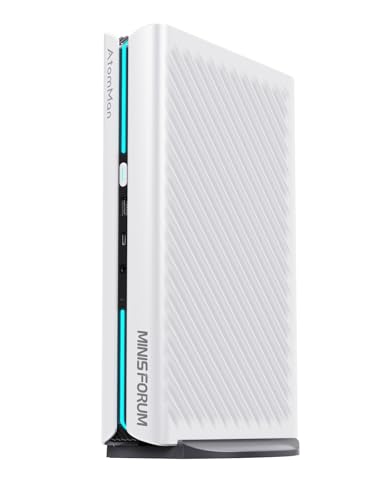
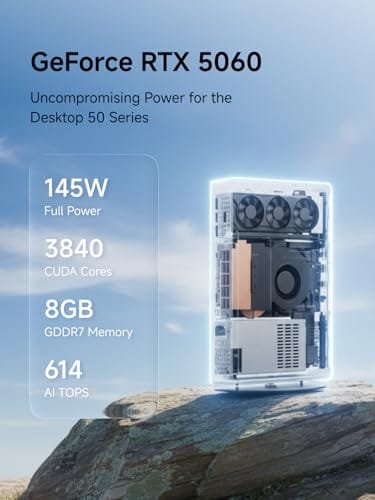
The MINISFORUM G1 Pro is the most powerful choice in this group. It pairs the AMD Ryzen 9 8945HX with 32GB of DDR5 memory, a 1TB PCIe 4.0 SSD, and dedicated RTX 5060 graphics. The processor has 16 cores and 32 threads, with a listed boost speed of up to 5.4GHz. That combination gives this compact PC the kind of headroom I look for in a serious gaming machine.
The dedicated graphics card is the main reason this system stands above most small PCs. Integrated graphics share system memory, but a dedicated RTX card has its own graphics memory and is better suited to modern 3D games. The G1 Pro also offers several display outputs, fast networking, Wi-Fi 7, and Bluetooth 5.4. In simple terms, it is a small box with the heart of a full gaming desktop.
Pros:
- Dedicated RTX 5060 graphics for much stronger gaming performance
- Ryzen 9 processor with 16 cores and 32 threads
- 32GB DDR5 RAM supports games, streaming, and heavy multitasking
- Fast 1TB PCIe 4.0 SSD provides useful space and quick load times
- Multiple HDMI and DisplayPort connections support several screens
- 5G LAN, Wi-Fi 7, and Bluetooth 5.4 offer modern connection options
- Compact design saves desk space compared with a full tower
Cons:
- Powerful parts may create more heat and fan noise during long gaming sessions
- Dedicated graphics raise the price compared with integrated-graphics mini PCs
- Small internal space can limit future hardware upgrades
My Recommendation
I recommend the MINISFORUM G1 Pro for players who want the best mini gaming PC for modern games, high frame rates, and longer ownership. It also suits creators who edit video, stream games, or run demanding apps because the CPU and memory provide plenty of room. The dedicated RTX 5060 is a major advantage over the other systems in this guide. It turns this model from a basic compact computer into a real gaming PC.
This is the model I would choose for a small desk, dorm room, studio, or living room where a normal tower feels too large. It should appeal most to buyers who care about game performance first and size second. Check the current price and configuration before buying, since compact gaming PC stock can change quickly. When available at a fair price, the G1 Pro offers the strongest overall value for serious players.
GMKtec M5 Ultra: Best Value Mini Gaming PC
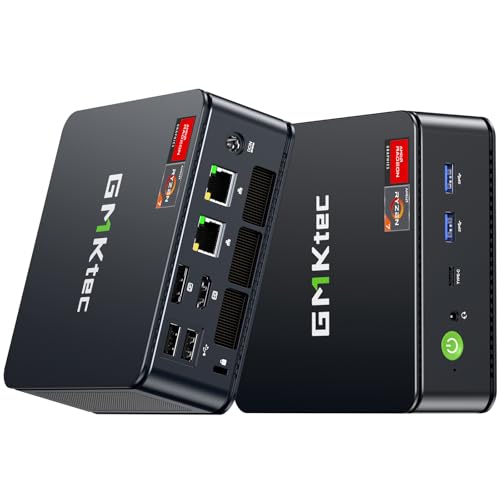
The GMKtec M5 Ultra takes a simpler path. It uses an AMD Ryzen 7 7730U processor with 32GB of RAM and a 512GB SSD. This setup targets buyers who want a small Windows desktop that can also play lighter games. It does not list a dedicated graphics card, so I would view it as a practical entry-level gaming option rather than a replacement for a high-end tower.
Its 32GB memory stands out at this price level. That amount helps when I keep a game, browser tabs, chat, music, and other apps open at the same time. The 512GB SSD should make Windows and everyday programs feel responsive, though a large game library may require an external drive or later storage upgrade. For casual players, esports fans, and home users, this balance makes good sense.
Pros:
- 32GB RAM gives smooth space for multitasking
- Ryzen 7 processor handles daily work and light gaming well
- 512GB SSD offers faster startup than a traditional hard drive
- Small size fits behind a monitor or on a crowded desk
- Good choice for esports, indie games, and older PC titles
- Uses less desk space and power than a large gaming desktop
Cons:
- Integrated graphics are not ideal for demanding new AAA games
- 512GB storage may feel small after installing several large games
- Gaming performance depends heavily on memory settings and cooling
My Recommendation
The GMKtec M5 Ultra is best for a buyer who wants the best mini gaming PC at a sensible cost. I would choose it for games such as Roblox, Minecraft, League of Legends, Valorant, and other titles that do not need a powerful dedicated GPU. It also works well as a family computer, school PC, media box, or quiet office machine. The 32GB RAM gives it more comfort than many low-cost compact systems.
This model makes the most sense when your gaming list is modest and your budget matters. It is not the right pick for demanding ray-traced games or high-resolution play. Still, it gives casual gamers a fast and tidy computer without the size and cost of a full tower. Its value is strongest when you want one small PC for both work and play.
ACEMAGIC X3: Best Integrated Graphics Mini Gaming PC
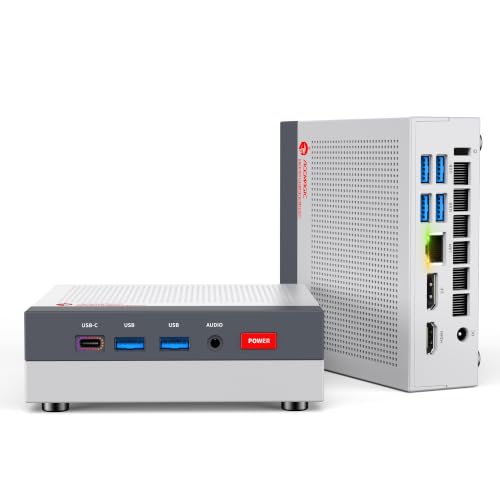
The ACEMAGIC X3 uses an AMD Ryzen 7 H 255 processor with Radeon 780M graphics. It comes with 16GB of RAM, a 1TB SSD, and Windows 11 Pro. Radeon 780M integrated graphics are more capable than the basic graphics found in many office mini PCs, making this an appealing middle ground. It offers a useful mix of storage, gaming ability, and business features.
The 1TB SSD is a welcome touch because modern games can consume a great deal of space. I also like the Windows 11 Pro operating system for users who need extra system controls, remote access features, or a PC that serves both work and home roles. As with any integrated-graphics system, game settings matter. Lower or medium settings at 1080p are the sensible target for many current games, while lighter titles should feel more comfortable.
Pros:
- Radeon 780M graphics are well suited to casual and esports gaming
- Ryzen 7 H 255 processor offers a strong balance of speed and efficiency
- Large 1TB SSD leaves room for games, photos, and work files
- Windows 11 Pro adds useful features for work and home users
- Compact body fits small desks, entertainment centers, and offices
- Good option for buyers who do not want a separate graphics card
Cons:
- Integrated Radeon graphics cannot match a dedicated RTX gaming GPU
- 16GB RAM gives less multitasking room than the 32GB models
- Performance can drop if the system runs hot for long periods
My Recommendation
I suggest the ACEMAGIC X3 for someone seeking the best mini gaming PC with strong integrated graphics and generous storage. It suits a student who plays after class, a remote worker who enjoys games at night, or a family that needs one small computer for many jobs. The Radeon 780M is the key feature because it gives this compact PC more gaming flexibility than a typical office model. The 1TB SSD also removes one common frustration: running out of space.
This is a smart choice for buyers who want fewer cables and no separate graphics card. I would not buy it for ultra settings in the newest demanding releases, but I would consider it for competitive games, older favorites, simulation games, and light creative work. It offers a clean middle ground between an office mini PC and a dedicated gaming system. Availability and pricing should guide the final decision.
KAMRUI E3B: Best Affordable Ryzen 7 Mini PC

The KAMRUI E3B is a compact system built around the AMD Ryzen 7 7730U. This version includes 16GB of RAM and a 1TB SSD, which is a useful pairing for daily work and casual gaming. It gives buyers more storage than many entry-level mini computers without moving into the price range of dedicated gaming models. Its small footprint makes it easy to place almost anywhere.
I see the E3B as a flexible home computer first and a light gaming machine second. Its processor can handle browsing, streaming, office work, school tasks, and common creative apps. The integrated graphics are better suited to older games, indie titles, and esports than to demanding new releases. Still, the 1TB drive makes it easy to keep a healthy mix of games and personal files on the PC.
Pros:
- Ryzen 7 processor handles everyday tasks with ease
- 1TB SSD provides useful space for games and files
- Compact design works well in bedrooms, offices, and living rooms
- 16GB RAM is enough for normal gaming and daily multitasking
- Lower power use can help keep running costs modest
- Good fit for buyers who need a simple Windows desktop
Cons:
- Integrated graphics limit performance in newer demanding games
- 16GB memory gives less headroom for heavy creative workloads
- Not the best choice for high-refresh competitive gaming at demanding settings
My Recommendation
The KAMRUI E3B is best for budget shoppers who want the best mini gaming PC for basic gaming and everyday use. I would point it toward families, students, and casual players who value storage and a clean setup more than maximum frame rates. It can handle common office work during the day and lighter games at night. That dual role gives it strong practical value.
Choose this model if you want a small PC that stays out of the way and does many jobs. It is not a high-end gaming rig, but that is not its purpose. The E3B delivers a useful Ryzen 7 platform, 16GB of RAM, and a roomy SSD in a compact package. It becomes especially attractive when sold at a discount or bundled with a useful accessory.
KAMRUI Pinova P2: Best Basic Home Mini PC

The KAMRUI Pinova P2 is the most basic option in this roundup. It uses an AMD Ryzen 7330U with four cores and eight threads, along with 16GB of RAM and a 256GB SSD. Its Zen 3 architecture and listed boost speed of up to 4.3GHz make it a capable system for browsing, streaming, schoolwork, and office tasks. It also supports triple 4K display output, which is unusual for a small budget computer.
The 256GB SSD is the main limit to note. It can hold Windows, programs, and a few smaller games, but a large library will fill it quickly. The graphics hardware is intended for basic visual work and light gaming rather than modern blockbuster games. I would treat this as a home or business mini PC that can play simple titles when needed.
Pros:
- Compact design suits small workspaces and shared rooms
- 16GB RAM supports normal browsing and office multitasking
- Triple 4K display support helps users with multi-screen setups
- Four-core Ryzen processor is suitable for everyday computing
- 256GB SSD starts Windows and apps faster than a hard drive
- Often a lower-cost way to add a Windows desktop to the home
Cons:
- 256GB storage is limited for modern games and large media files
- Four cores and integrated graphics are not built for heavy gaming
- May need an external drive for a larger game or file library
My Recommendation
The KAMRUI Pinova P2 is best for a buyer who wants the best mini gaming PC for light games, home use, and office work at a low entry price. It makes sense for a child’s first computer, a basic media station, or a small business desk. The triple-display feature may also help traders, clerks, and users who need more screen space. Its strengths are size, simplicity, and low storage demands.
I would not choose it for current AAA games or demanding 3D work. I would choose it when the PC will mainly run web apps, documents, video, and light games. The low storage capacity deserves careful thought, but an external SSD can solve that issue. If your needs are simple, the Pinova P2 can offer solid everyday value without taking over the desk.
How I Choose the Best Mini Gaming PC
A small computer can look powerful on a product page, yet the details decide how it feels after a few weeks. I start with the processor, but I never stop there. Gaming depends on graphics power, memory, cooling, storage speed, and the way the parts work together. A fast CPU cannot rescue a system with weak graphics when you want to play demanding 3D games.
I also check the installed RAM and SSD size. Sixteen gigabytes of RAM remains a sensible starting point for many gamers, while 32GB gives more room for streaming, browser tabs, and creative work. A 1TB SSD is much more comfortable than a 256GB drive because modern game installs can be very large. I also look at ports, display support, wireless features, and upgrade options before calling any model the best mini gaming PC.
Dedicated Graphics vs. Integrated Graphics
This is the most important difference in this list. The MINISFORUM G1 Pro includes dedicated RTX 5060 graphics. The other listed systems use integrated graphics tied to the processor. Dedicated graphics generally provide much more power for modern 3D games, while integrated graphics use shared system memory and focus on efficiency and low cost.
Integrated graphics are not useless. They can work well for esports, older games, indie games, cloud gaming, and many titles played at sensible settings. They also keep the computer smaller and often quieter. If your game list is light, an integrated-graphics mini PC may be the smarter buy because you do not pay for power you will not use.
For new open-world games, demanding shooters, virtual reality, or high-resolution play, dedicated graphics are the safer choice. The G1 Pro is the clear pick for that use. For casual play, the ACEMAGIC X3 offers the strongest integrated-graphics angle in this group based on its listed Radeon 780M graphics.
Why RAM and Storage Matter
RAM is the short-term work space of a computer. More RAM helps when you switch between a game, voice chat, a browser, and other apps. The 32GB systems here, such as the MINISFORUM G1 Pro and GMKtec M5 Ultra, give the most breathing room. Sixteen gigabytes still works for many users, but heavy multitasking can make that limit easier to notice.
The SSD stores Windows, games, and files. A PCIe 4.0 SSD, like the one listed in the G1 Pro, can offer fast data transfer and quick load times. Capacity matters just as much as speed. The 1TB models provide a better start for gamers, while the 256GB Pinova P2 may need extra storage sooner.
I advise checking whether the memory and storage are replaceable before purchase. Mini PCs vary a lot in this area. Some allow a simple SSD swap, while others use parts that are harder to replace. An external USB SSD is an easy answer for game storage, but internal expansion usually keeps the setup cleaner.
Cooling and Noise in a Small Gaming PC
Small cases have less room to move heat. That does not mean every mini PC runs hot, but it does mean cooling deserves attention. During a long game, the processor and graphics system work hard. If heat builds up, the computer may lower its speed to protect itself.
Keep the mini PC on a hard, open surface. Avoid thick carpet, soft bedding, and tight shelves that block air vents. A small stand can improve airflow and make the device easier to clean. I also keep dust away from the vents because dust acts like a warm blanket around the parts.
Powerful models may use more active cooling than basic office systems. That can mean fan noise under load. A quiet desktop at the start of a game may sound different after an hour of heavy play. This is normal, but buyers who need silence should favor lighter games or use headphones.
Ports, Displays, and Network Features
Port selection affects how easy the PC is to use. I look for enough USB ports for a keyboard, mouse, headset, controller, and external drive. HDMI and DisplayPort outputs matter if you plan to connect one or more monitors. The G1 Pro stands out with multiple HDMI and DisplayPort outputs, which gives it more flexibility for a multi-screen desk.
Fast network features help with large downloads and online play, but internet speed still depends on your router and service plan. Wired Ethernet remains a strong choice for stable online gaming. Wi-Fi 7 on the G1 Pro is a modern feature, while Bluetooth helps connect controllers, speakers, keyboards, and other devices with fewer cables.
Before buying, check the exact port layout in the listing photos. A port on the front is easier to reach than one on the rear. Also confirm whether the included power adapter fits your space. These small details can make a big difference in daily use.
Best Features by User Need
| Best for | Why |
|---|---|
| Serious modern gaming | MINISFORUM G1 Pro includes dedicated RTX 5060 graphics, a Ryzen 9 CPU, 32GB RAM, and a 1TB SSD. |
| Casual gaming and multitasking | GMKtec M5 Ultra combines a Ryzen 7 processor with 32GB RAM in a small, practical system. |
| Light gaming with large storage | ACEMAGIC X3 offers Radeon 780M graphics, Windows 11 Pro, and a roomy 1TB SSD. |
Tips Before Buying a Mini Gaming PC
First, make a list of the games you actually play. Do not buy based only on the word “gaming” in a product name. A basic mini PC may be excellent for Minecraft and poor for a new visual showcase. The best mini gaming PC for one player may be the wrong choice for another.
Next, check the screen you plan to use. A 1080p monitor places less strain on graphics than a 1440p or 4K screen. Integrated graphics usually make more sense with a 1080p display and moderate settings. A dedicated GPU gives you more freedom to raise resolution and visual quality.
Look at the full package, not only the CPU name. Two PCs can use a similar processor yet feel different because one has more RAM, better cooling, or a faster SSD. I also check the operating system, warranty terms, seller details, and return policy. Those items matter when buying compact computers from a lesser-known brand.
Finally, plan your accessories. A mini PC usually needs a monitor, keyboard, mouse, and sometimes a controller. A good headset can hide fan noise during demanding games. A USB hub or external SSD may also help if the computer has limited ports or storage.
Mini Gaming PC Setup Advice
Start by installing system updates and graphics drivers. Updates can improve stability, security, and support for newer games. I then remove apps I do not need and set the power mode to match my use. A balanced mode works well for daily tasks, while a higher performance mode may help during plugged-in gaming.
Place the PC where air can flow around it. Leave space near the vents and do not cover the power adapter. Connect the monitor with the best supported cable available, then select the correct refresh rate in Windows. Many users own a fast display but leave it set to a lower refresh rate by mistake.
Inside each game, begin with the recommended settings. Use 1080p when possible and adjust shadows, reflections, and texture quality first. These options often affect frame rate more than small changes to character detail. I prefer a stable game that looks good over a sharp image that stutters.
Who Should Buy a Mini Gaming PC?
A mini PC is ideal for someone with limited desk space. It works well in a dorm, apartment, shared office, or living room. It can also suit a buyer who wants a clean setup with fewer cables and less visual clutter.
It is also a good fit for mixed use. Many people need one computer for work, streaming, school, and games. A compact system can handle those roles without the size of a gaming tower. Models with 16GB or 32GB RAM are especially helpful when you switch between several apps.
A mini gaming PC may not suit every enthusiast. Desktop towers usually provide more room for graphics cards, large coolers, storage drives, and future upgrades. If you plan to replace parts often or chase the highest frame rates, a traditional desktop may be easier to maintain. Small size always involves some trade-offs.
FAQs Of best mini gaming pc
Can a mini gaming PC run modern games?
Yes, but performance depends on the graphics hardware. The MINISFORUM G1 Pro has dedicated RTX 5060 graphics and is the strongest choice here for modern 3D games. Integrated-graphics models are better for lighter games, older titles, and moderate settings.
Is 16GB RAM enough for gaming?
Sixteen gigabytes is enough for many games and normal daily use. Choose 32GB if you stream, edit video, use many browser tabs, or want more long-term comfort. The GMKtec M5 Ultra and MINISFORUM G1 Pro offer 32GB.
Do mini PCs come with a monitor and keyboard?
Most mini PCs are sold as the computer only. You normally need to buy a monitor, keyboard, mouse, and other accessories separately. Check the package contents on the product page before ordering.
Can I upgrade a mini gaming PC?
Some models allow RAM or SSD upgrades, but the options vary. Check the manufacturer details before buying. External USB storage is often the easiest way to add more space for games and media.
Are mini gaming PCs quiet?
They can be quiet during light work, but the fans may become louder during gaming. Powerful parts create more heat, and small systems have less room for cooling. Good airflow and regular dust removal help control noise.
Final Verdict: Which Should You Buy?
The MINISFORUM G1 Pro is the best mini gaming PC in this roundup. Its Ryzen 9 processor, 32GB RAM, 1TB SSD, and dedicated RTX 5060 graphics make it the strongest choice for serious gaming.
For lighter play, the ACEMAGIC X3 and GMKtec M5 Ultra offer better value. Choose by game needs, storage, and budget to find the right compact gaming PC in 2026.